The renewal desk is now a Windows application: eight rooms, one book, and a case that writes back
We rebuilt the renewal desk as an application you work inside, not a report you read. Here is what changes for a procurement buyer and where the limits still sit.
Most renewal tools hand you a list and wish you luck. You export it, you sort it, you copy the interesting rows into a spreadsheet, and by the time you have a view you can act on, two of the deals have already auto renewed. We think the problem is not the data. The problem is that the renewal desk has never behaved like a place you work. So we rebuilt it as one. Renewals now opens as an application: a caption, menus, a command bar, eight rooms on the rail, and a status bar. You can read the whole thing in the renewals workspace, but the point of this post is what it changes at your desk.
The problem: a list is not a desk
Call it the renewal drift problem. A procurement team of three or four is nominally responsible for a few hundred agreements. The tooling shows all of them at once, undifferentiated, sorted by whatever column you clicked last. Nothing tells you which one needs a move this week and which one is fine until Q3. So the team works by anxiety instead of by consequence, and the deals that get attention are the loud ones, not the expensive ones. We wrote about the scale of this in the renewal calendar problem. The fix is not a better spreadsheet. It is an application that always knows the one move the selected agreement needs next.
The shape: eight rooms, one book, one command bar
The rail holds eight rooms, reachable by the number keys: Today, Calendar, Workload, Approaching, Pipeline, Plan, Managed and Record. Each room answers a different question. Today is what needs you now. Calendar and Approaching are timing. Workload is how much is landing on whom. Pipeline is where every live deal sits by stage. Plan, Managed and Record are the longer arcs. The command bar sits above all of them, and its primary action is never generic. It is always the single move the selected agreement needs next, whether that is start a benchmark, request approval, or send a notice.

The book: a ledger grouped by consequence
The centre of the application is the book, and the book is not sorted alphabetically or by vendor. It is a ledger grouped by consequence. Agreements that can hurt you sit at the top: the ones auto renewing soon, the ones with the largest uplift exposure, the ones with no benchmark yet. A row does not link out to another page. It opens its case beside it, in the same window, so you never lose your place. That is the difference between reading about a renewal and working one.
The case: setup, dates, money, market, moves, thread
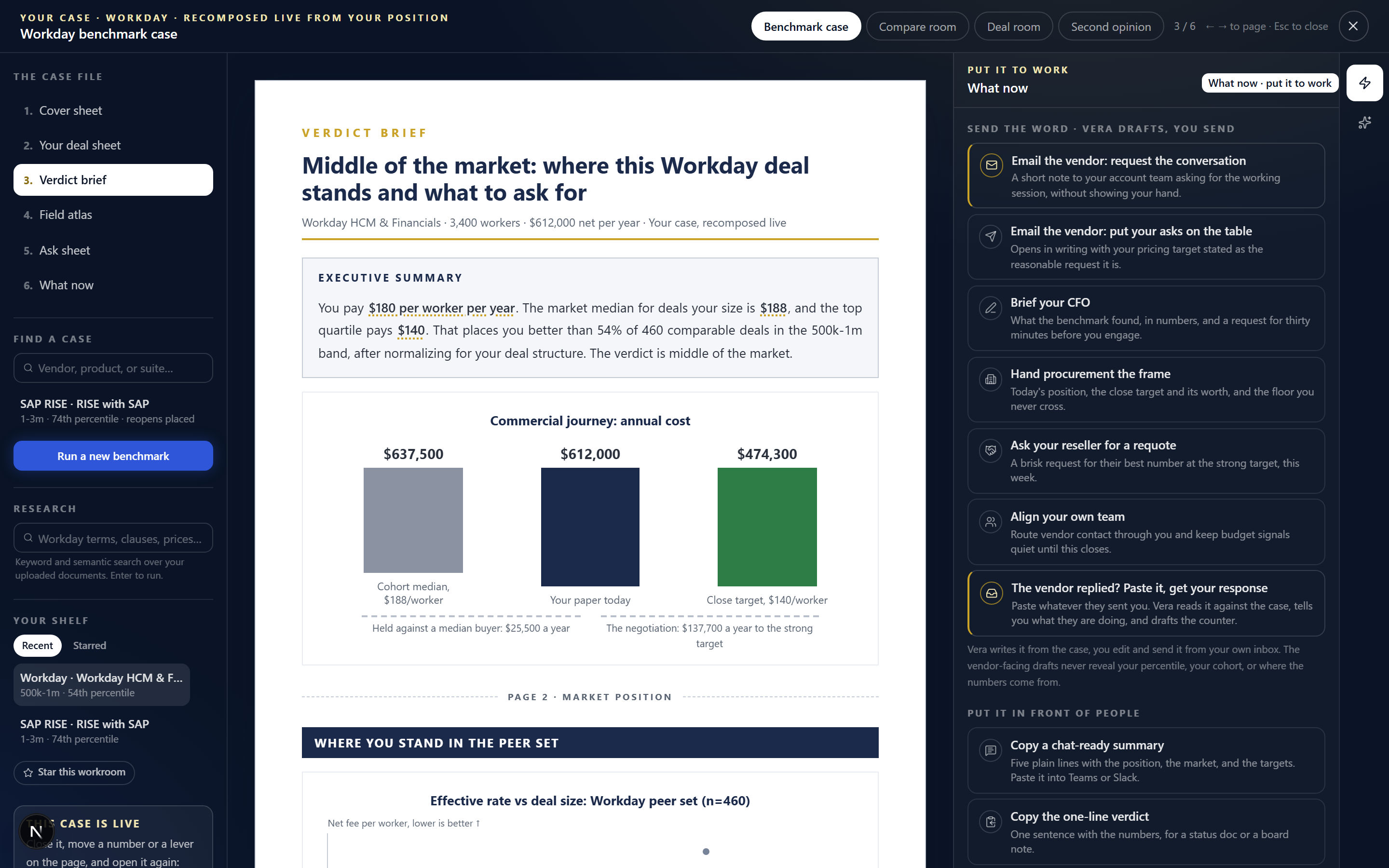
Open a case and you get six panels in a fixed order. The setup, so you know what you are looking at. The dates on a term timeline, so the notice window is visual, not buried in a clause. The money with the uplift lever and three outcomes, so you can drag the uplift and watch what you concede or save. The market card, which answers the three questions a buyer actually asks when a benchmark exists: where does this sit against peers, how far is it from fair, and what is the credible ask. The moves as a checklist. And the thread, the running record of who did what. This is the same discipline we brought to the program desk and to Vera: one window, one selected thing, one clear next action.
The case writes back
This is the part that matters most, and it is the part most tools skip. The case is not read only. A value typed into it is written to the agreement. A stage move on the pipeline is written and can be undone, so you can advance a deal and reverse it without a support ticket. A notice letter opens in your own mail client, sent from your address, and is logged against the case. Nothing leaves through a black box. You keep authorship and the audit trail keeps the receipt. If you want the benchmarks behind the market card to reflect the whole book rather than one deal, that is the argument in benchmark the portfolio, not one deal at a time.
Honest limits
Three things this does not do, so you can plan around them. First, the market card only appears when a benchmark exists for that category. For long tail or highly bespoke agreements, you will see the term timeline and the money but no percentile, and you should treat the uplift lever as a modelling tool, not a verdict. Second, writing back depends on your integration. Where we have a live connection to your contract or pipeline system the write is immediate and reversible. Where we do not, the case still models the move, but you post it manually. Third, the notice letter opens in your mail client rather than sending on your behalf. That is deliberate. We would rather you keep authorship of a legally consequential message than automate it. If you want the renewal handled end to end with fees tied to realised savings, that is a different service, managed renewals, not this desk.
The rebuild does not add work to your week. It removes the assembly step that used to sit between knowing a renewal is coming and being able to act on it. The book already knows what needs a move. The case already knows the number. Your job is the decision, which is the only part that was ever yours to make.
Fredrik has spent more than twenty years in enterprise software, with time at Oracle, IBM, SAP, and Salesforce before moving to the buy side. He structured and priced the kind of large agreements most buyers only see once or twice in a career, which taught him where the leverage sits and how far a vendor will actually move. He started VendorBenchmark to hand that knowledge to every sourcing team.


