Vera AI opens as a command desk
Vera no longer behaves like a chat page you scroll. It opens as a working desk with four stations, one document in the middle, and your position one click away for the whole session.
Most AI tooling in procurement fails at the same place, and it is not the model. It is the container. You ask a good question, you get a good answer, and then the answer scrolls away. Twenty minutes later you are asking the same question with slightly different wording because you cannot find the version you liked. The report you kicked off died when you switched tabs. The contract you were working from is in another window. The work has no place to sit. That is the problem this release fixes. The Vera page is now an application rather than a scrolling page, and the difference shows up in how much of your own thinking survives a session.
The named problem: the page that loses your place
Watch a procurement lead use a chat interface for real renewal work and you see the same three losses, over and over. The first is context loss. The contract sits in a PDF viewer, the benchmark sits in a browser tab, the chat sits in a third place, and the buyer becomes the integration layer, copying figures between windows and introducing transcription errors on the way. The second is state loss. A long report starts generating, the buyer switches to something else, and the work either stops or becomes unfindable. The third is position loss. Halfway through a session the buyer knows a great deal more than they did at the start, but nothing has accumulated into a stated position they could take into a call.
None of those are model problems. A better model answers the question faster and then scrolls it away faster. They are architecture problems, and the fix is to stop treating the analyst as a conversation and start treating the analyst as a desk. That is the argument we have made before in From chat to deliverable, and this release is that argument applied to the interface itself.
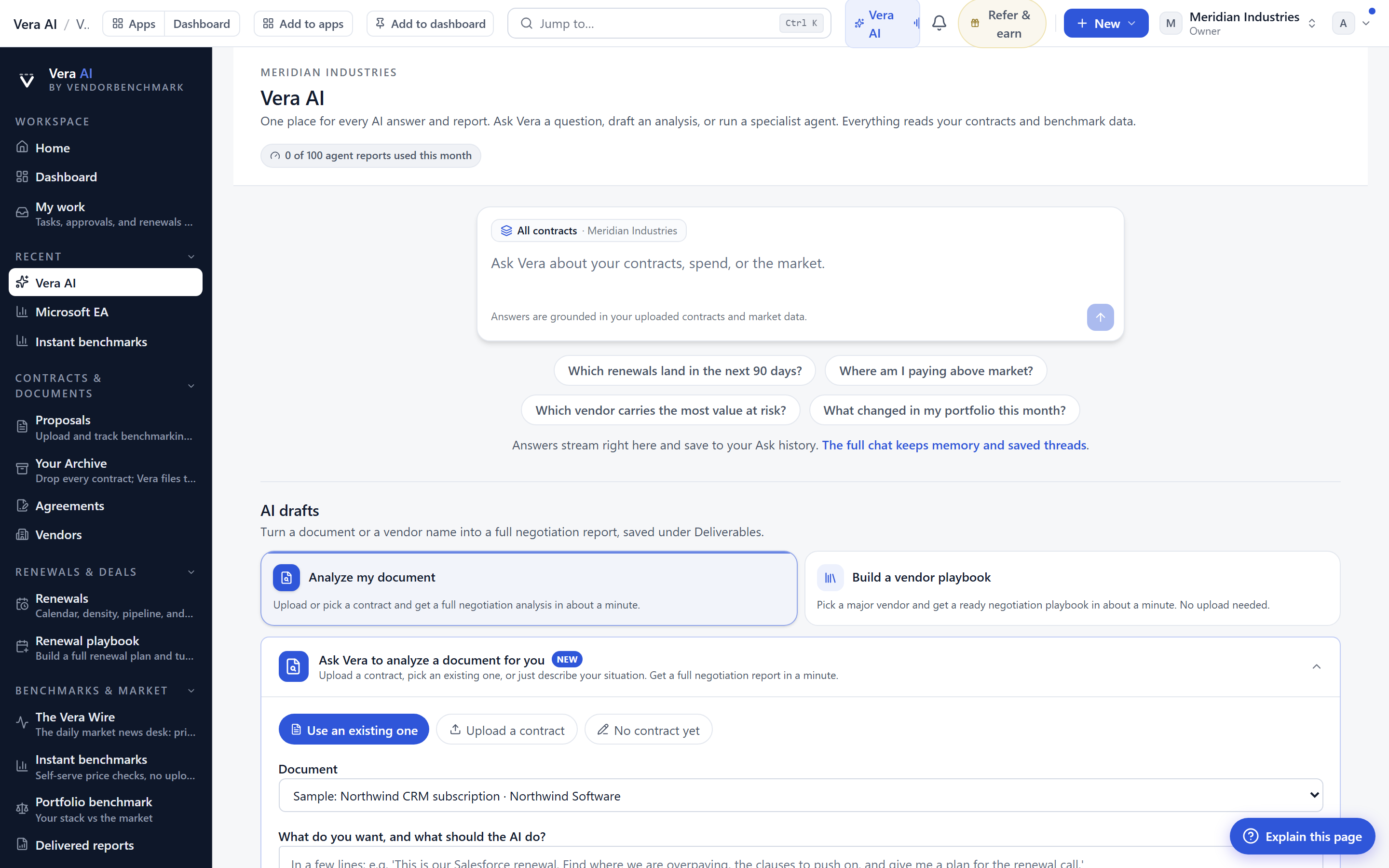
Four desks in a dark rail
The left rail holds four stations, and they map to the four things buyers actually do with an analyst. The conversation is the open ended question, the sanity check, the what should I be worried about here. Read a document is the paper in front of you, the MSA, the order form, the SOW, the renewal quote that arrived this morning. Vendor playbook is the standing strategy for a named supplier, the leverage, the concession ladder and the walk away. Specialist agents is where the six specialist agents sit, each with a narrow brief and a report format, described in more detail in Six agents and a ghost writer.
The important design decision is what happens on arrival. The desk does not open on an empty prompt box asking you to be creative. It opens on your own choices: work a contract that is already on file, drop a PDF straight onto the tile, or pick a recent conversation back up where you left it. A blank box asks the buyer to supply the structure. A desk supplies the structure and asks the buyer to supply the judgement. That is the right division of labour, and it is the same instinct behind starting the renewal with an interview rather than a blank dashboard.
One paper at a time in the middle
The centre of the desk carries exactly one paper. A contract, a clause comparison, a benchmark read, a finished report. Not a feed, not a stack of cards competing for attention, one document that you are working on right now. The composer is docked at the foot of that paper, so the question you type is unambiguously a question about the thing you are looking at. This sounds like a small detail and it is not. It removes the most common failure in AI assisted contract review, which is asking a question about document A while the assistant is still holding document B.
One paper at a time also changes what a good answer looks like. When the analyst can see what you can see, the answer stops being a general statement about software pricing and becomes a statement about clause 8.3 of the paper in front of you. That is the difference between commentary and work product, and it is why the output of a desk session is usually a deliverable rather than a transcript.
The dock: What now, and Where you stand
The right edge carries two panels that stay with you for the whole session. What now holds the recommended moves, and the important word is recommended, not generic. The moves are read from your own workspace, so if the contract on the desk has a notice window closing in five weeks, the recommended move is about that window, not about best practice in the abstract. If the vendor sits well above market on a per seat basis, the move is to run the comparison. If you have no priced alternative on file, the move is to build one, which is the argument in The credible alternative.
Where you stand is the standing position, one click away at any point in the session. Not a summary of the chat, a position: what you pay, what comparable buyers pay, where the paper is weak, what you should be asking for. Before this release, a buyer had to reconstruct that from scrolling. Now it is a panel. The practical effect is that you can be pulled into a vendor call with four minutes of notice and open the position rather than the history.
Nothing scrolls away, and nothing stops
Your recent conversations, your finished reports and your agent report allowance now live in the rail rather than disappearing upward. The allowance in particular was a common source of confusion, because buyers could not see what they had spent until they hit the limit. It is now visible where the work is commissioned. Switching desks does not lose work either. A report that is generating keeps generating while you talk on another desk, which matters because the platform runs up to 99 background jobs and the longer report types are not instant. You commission, you carry on, you collect.
The honest limits. First, What now is only as good as your workspace. On a thin tenant with two contracts loaded and no invoices, the recommended moves will be thin and obvious, and you will get more out of the desk after a proper contract load than on day one. Second, Where you stand depends on benchmark coverage. We hold 1,471 vendors benchmarked on modelled deal cohorts, which is deep in the categories most enterprises spend real money on and shallower on niche or regional suppliers. Where the comparable set is small, the panel says so rather than manufacturing a percentile. Third, one paper at a time is a deliberate constraint and it has a cost. If your task genuinely requires two documents side by side, the desk will feel narrow, and you should use the comparison views instead. Fourth, background generation is server side, so a closed tab does not kill the job, but you do have to come back to the rail to collect the output. It will not chase you. Fifth, the agent report allowance is finite by plan. The desk makes the allowance visible, which is not the same as making it larger. Sixth, and most importantly, the desk does not negotiate. It does not send, sign or commit anything. It produces a position and a paper, and a human takes both into the room.
If you have not used the analyst in anger yet, the fastest honest test is to take the ugliest renewal on your calendar, drop the incumbent paper onto the read a document tile and ask the question you are actually worried about. You can start that at /ask. If the answer is worth keeping, take the recommended move from the dock and let the report generate while you carry on, then read it against your own numbers. Where the desk earns its place is on the second and third session, when everything you did the first time is still exactly where you left it.
Morten brings two decades of enterprise and software procurement, with stints across Oracle, IBM, SAP, and Salesforce shaping how he reads a deal. He has led sourcing through hundreds of renewals, from mid market order forms to nine figure global agreements, and learned that the buyers who win are the ones who walk in knowing the market. He built VendorBenchmark to make that pattern recognition repeatable.


