Start the renewal with an interview, not a blank dashboard.
The Microsoft EA playbook now opens with a guided kickoff: answer a short discovery interview, in a form or in conversation with Vera, watch the AI generate your renewal plan from the answers, then confirm the facts and dates. Three steps, and the playbook opens already tailored to your deal.
Dropping a first time user onto a mission control dashboard is a hazing ritual, not an onboarding. A renewal playbook has forty screens of leverage, and on day one you do not need forty screens: you need the playbook to learn your deal and tell you where to start. The Microsoft EA playbook now begins exactly there, with a guided kickoff in three steps.
Step one is an interview. Answer the discovery questions the way you prefer: a structured form if you like forms, or a conversation with Vera if you would rather talk it through, switching between the two at will. The questions are the ones a veteran advisor would ask first: the renewal date, the estate, what Microsoft is pushing, what your organization can actually change.
The plan is generated, then confirmed, then yours
Step two happens without you: the AI reads your interview and generates the renewal plan, the phases, the moves, and the talking points, tailored to what you said rather than templated. Step three is the confirm screen, where you check the facts the plan depends on, and if a date moves, the playbook offers to regenerate the plan around it rather than letting the plan quietly rot.
Existing users are not interrupted: the kickoff shows once, skips in one click, and never intercepts a deep link or a shared team project. It is a front door, not a gate.
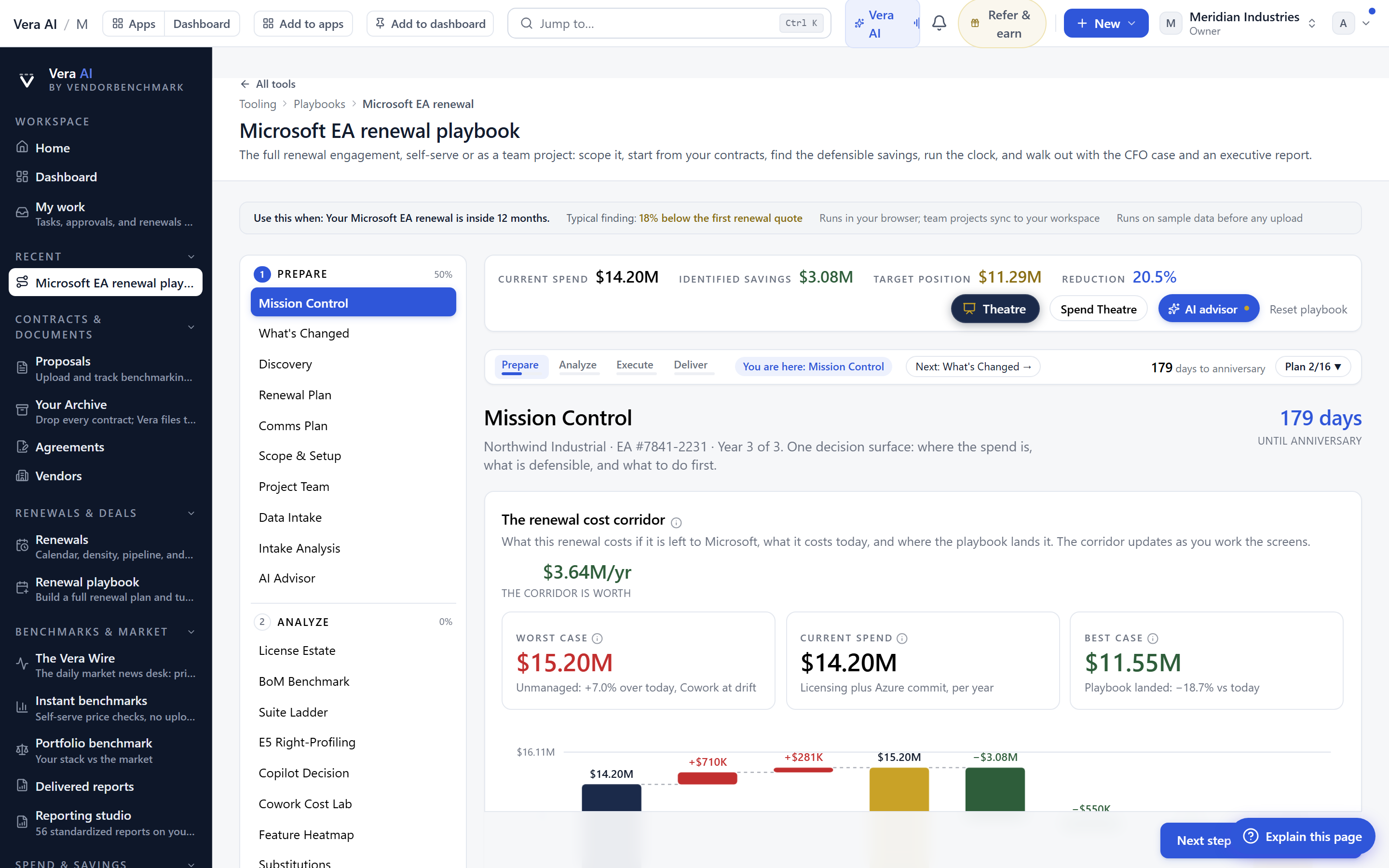
A rail on the left, bigger explanations, zoom on everything
The same wave rebuilt how the playbook reads. Navigation moved from top pills to a proper left rail, every phase and screen visible and sticky, the way a forty screen tool should navigate. The little explanation tips grew into readable panels, because a tooltip you have to squint at is documentation that failed.
And everything zooms. Every chart and every card in the playbook enlarges on click into a lightbox, charts as charts and text panels as enlarged reading views, which matters more than it sounds the moment you project a screen to a room or lean in on a laptop with someone beside you. Present the whole playbook on the theatre stage, light or dark, when the meeting is the point.
How the kickoff runs
The interview shapes the plan, the market shapes the numbers
The kickoff tailors the playbook to your answers, and answers can be wrong: an estate you underestimate produces a plan that underestimates with you. The confirm step exists precisely to catch that, and the playbook's benchmark data keeps the numbers anchored to the market regardless of how optimistic the interview was.
The guided kickoff is live on the Microsoft EA playbook first, with the other flagship playbooks following the same pattern. The rail, the bigger tips, and the zoom are already platform wide, because those were never Microsoft specific to begin with.
Morten brings two decades of enterprise and software procurement, with stints across Oracle, IBM, SAP, and Salesforce shaping how he reads a deal. He has led sourcing through hundreds of renewals, from mid market order forms to nine figure global agreements, and learned that the buyers who win are the ones who walk in knowing the market. He built VendorBenchmark to make that pattern recognition repeatable.
The week in enterprise software buying, in one email.
What shipped on the platform, and the pricing and licensing moves worth knowing before your next renewal. One email a week, to your work address. Unsubscribe any time.