The intake specifies the future and forgets to cancel the past
A specification that ignores what it displaces produces duplicate tooling and parallel contracts long after go live. Here is why it persists, and the platform motion that captures the savings the new deal was supposed to deliver.
Read last month's intake again. The request runs three pages on the future. It names the modules, the seat count, the integrations, the SSO requirement, the SLA the team wants, the reporting the analysts asked for. It is a careful, well written description of the world after go live. Now search the same document for a single sentence that says what this purchase turns off. There is none. Nobody wrote down the ticketing tool it supersedes, the two point products it absorbs, or the licence tier it makes redundant. The spec described the destination and left the old world running behind it, quietly renewing.
This is the failure mode that produces duplicate tooling. The new contract goes live, the team migrates, and the incumbent keeps billing because nobody attached a cancellation to the buying decision. Six months later a spend review turns up two platforms doing the same job, and the savings the business case promised were never captured because the retirement was never scheduled. The problem is not the new purchase. The problem is a specification that treats itself as an addition rather than a replacement.
Why intake describes the future and forgets the past
Intake forms are built by the people who want the new thing. Their attention is on the outcome they are trying to reach, not on the estate they are standing in. The requester genuinely does not think about the incumbent, because from where they sit the incumbent is already dead. They have mentally moved on. The trouble is that mental death and contractual death are different events, and only one of them stops the invoice.
There is also a knowledge problem. The person specifying the replacement often does not know the full set of contracts they are displacing. A modern platform absorbs functions that used to live in three or four separate tools, bought by three or four separate teams over five years. The requester knows about the one they use. They do not know that finance still pays for a legacy scheduling add on, or that a different department renewed an overlapping licence last quarter. The spec cannot retire what the requester cannot see. This is the same blindness we described in the renewal that re-bought a spec nobody could explain, arriving from the opposite direction.
The cost lives in the gap between go live and cancellation
Consider how the money actually leaks. A new platform is signed to replace an incumbent that costs, for example, roughly 90,000 dollars a year. The business case assumes that spend disappears the day the new tool goes live. But the incumbent contract runs on an annual auto renewal with a 60 day notice window, and nobody diarised the notice date. The renewal fires. Now you carry both platforms for a full extra year, and the net saving the deal was approved on has evaporated. The new purchase did not fail. The cancellation failed to happen, because it was never anyone's task.
This connects directly to the outcome question. When intake never prices the incumbent it is displacing, it also never states the true value of the new deal, which is the difference between the two, not the cost of the new one alone. We wrote about the mirror image of this in the request that never states the cost of doing nothing. A spec that ignores what it replaces cannot compute its own return.
Spend visibility turns a request into a replacement map
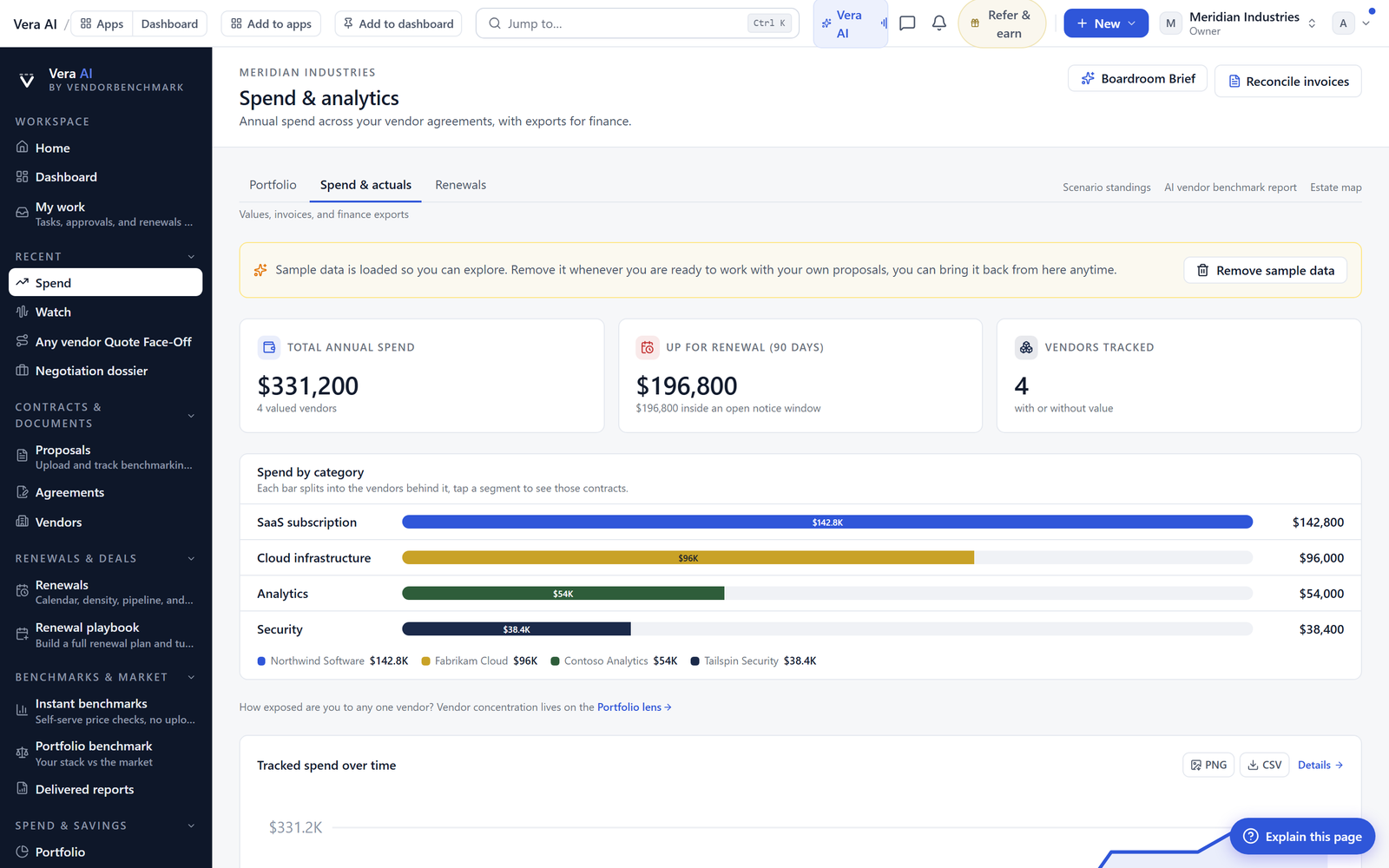
The platform motion starts by refusing to read a request in isolation. When a new intake lands, spend visibility maps the incumbent contracts that sit in the same functional area, so the request stops being a standalone purchase and becomes a replacement decision with a named list of what it displaces. The buyer no longer has to trust the requester's memory of the estate. The estate is on the screen next to the request.
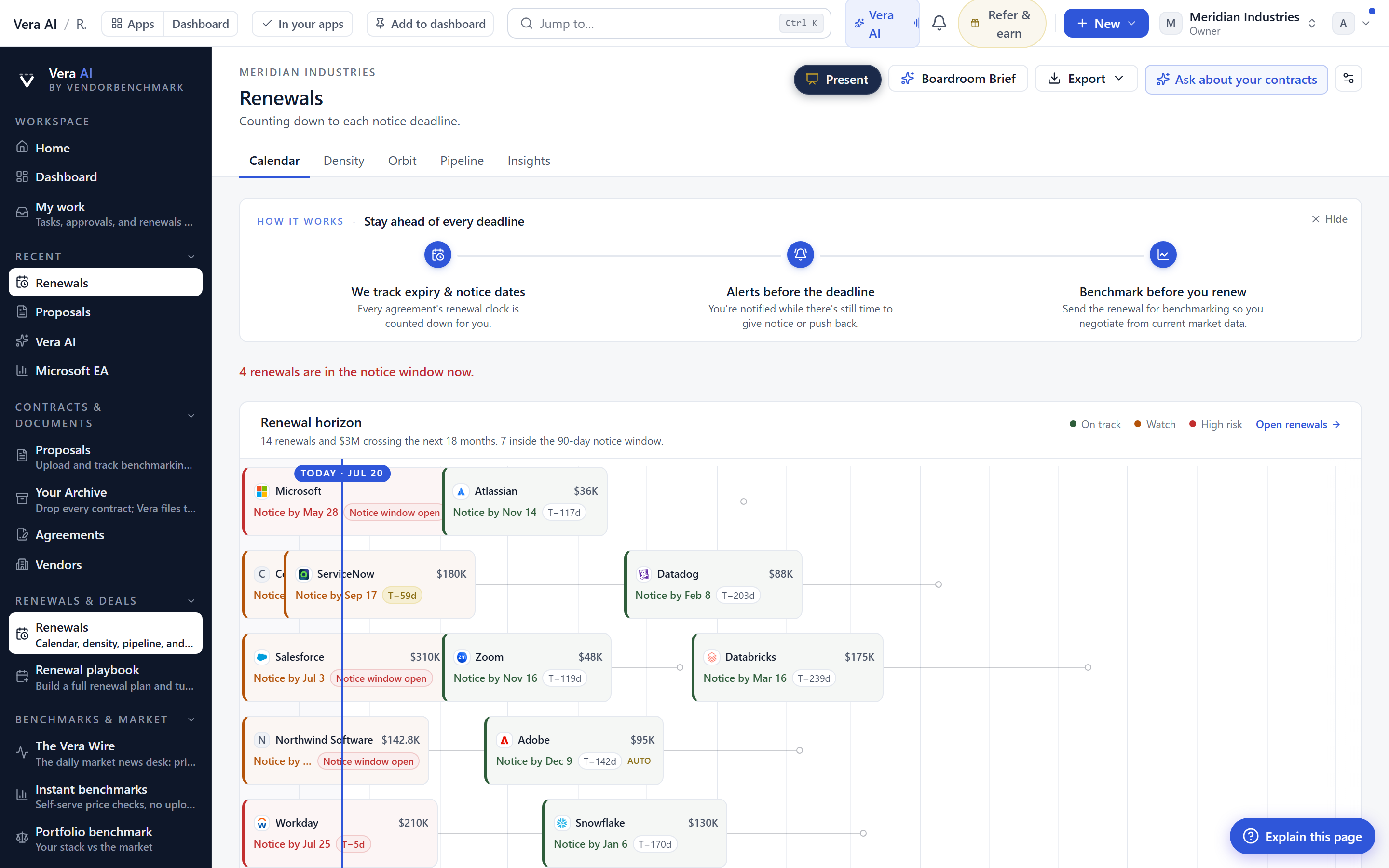
Then the renewal calendar does the timing work. Each incumbent the request would replace has a renewal date and a notice window, and the calendar flags the agreements that are due to retire so the buyer can set the cancellation in the same breath as approving the new deal. This is where the saving is actually captured. The new contract's value is only real if the old contract's invoice stops, and the invoice only stops if someone gives notice inside the window. The calendar makes that window visible while the buyer is still deciding, not after the auto renewal has already fired the way it does in the intake flag that hands the deal to the vendor calendar.
From a single replacement to a ranked estate cleanup
Once the platform is mapping displacement on every request, the pattern compounds. The overlaps stop being one off surprises and become a portfolio you can rank. You can see, across the whole estate, where two or three contracts do overlapping work, which of them a pending request would retire, and which renewals are close enough to act on this quarter. That is the difference between fixing one leak and closing the whole set, which is the exercise we lay out in from spend list to savings plan, twenty moves ranked.
What this does not solve
Be honest about the limits. The platform can map the incumbent contracts a request would replace and flag their renewal windows, but it cannot force a cancellation through your own process. If your organisation has no owner willing to sign the termination notice, the calendar will flag a date that nobody acts on. The visibility removes the excuse, not the decision.
It also cannot see contracts that are not in the system. If a departmental tool was bought on a card and never recorded, spend visibility has nothing to map, and the overlap stays hidden until an invoice reconciliation catches it. The mapping is only as complete as the estate you have loaded. And it cannot judge whether the incumbent genuinely does the same job as the replacement, or whether the two overlap in name but differ in a capability someone still relies on. That judgement is yours. The platform brings the two contracts side by side and shows you the timing. Deciding that the old one is truly redundant, and being willing to turn it off, is still buyer's work, and it should be.
Fredrik has spent more than twenty years in enterprise software, with time at Oracle, IBM, SAP, and Salesforce before moving to the buy side. He structured and priced the kind of large agreements most buyers only see once or twice in a career, which taught him where the leverage sits and how far a vendor will actually move. He started VendorBenchmark to hand that knowledge to every sourcing team.


