How to integrate Vera AI with DocuSign
Three connections, each a few minutes: the signed copy files itself, your Agreements app sends for signature, and Vera reads every envelope before a signature goes on it.
Most companies sign in DocuSign and file somewhere else, weeks later, by hand. The executed copy sits in an inbox, the renewal date is typed into a spreadsheet from memory, and the one person who read the order form before it went out has moved on. Vera AI by VendorBenchmark connects to DocuSign at three points so none of that is left to a person: the signed document files itself the moment the envelope completes, the Agreements app sends a record out for signature without leaving the platform, and Vera reads every envelope your workspace sends before anyone signs it. This post walks through all three, what each one needs from your DocuSign admin, and where the limits sit.
What the DocuSign connection does
The connection has three parts, and you can switch on any one of them without the others. The first is intake: a DocuSign Connect configuration pointed at your workspace's webhook address, with Include Documents enabled, so every completed envelope delivers its executed document straight into Contracts. The file arrives as a contract with its vendor, its value and its renewal and notice dates read off the contract, exactly as an uploaded one would, and the same read that opens every contract runs on it. The second is sending: the Agreements app builds an envelope from a record's newest version and a person presses send; completion comes back through the same webhook. The third is Vera in the Loop: a window where every envelope the workspace sends is read before a signature goes on it, with a two page signing brief, a benchmark of the price on the contract, and an approval by named people.
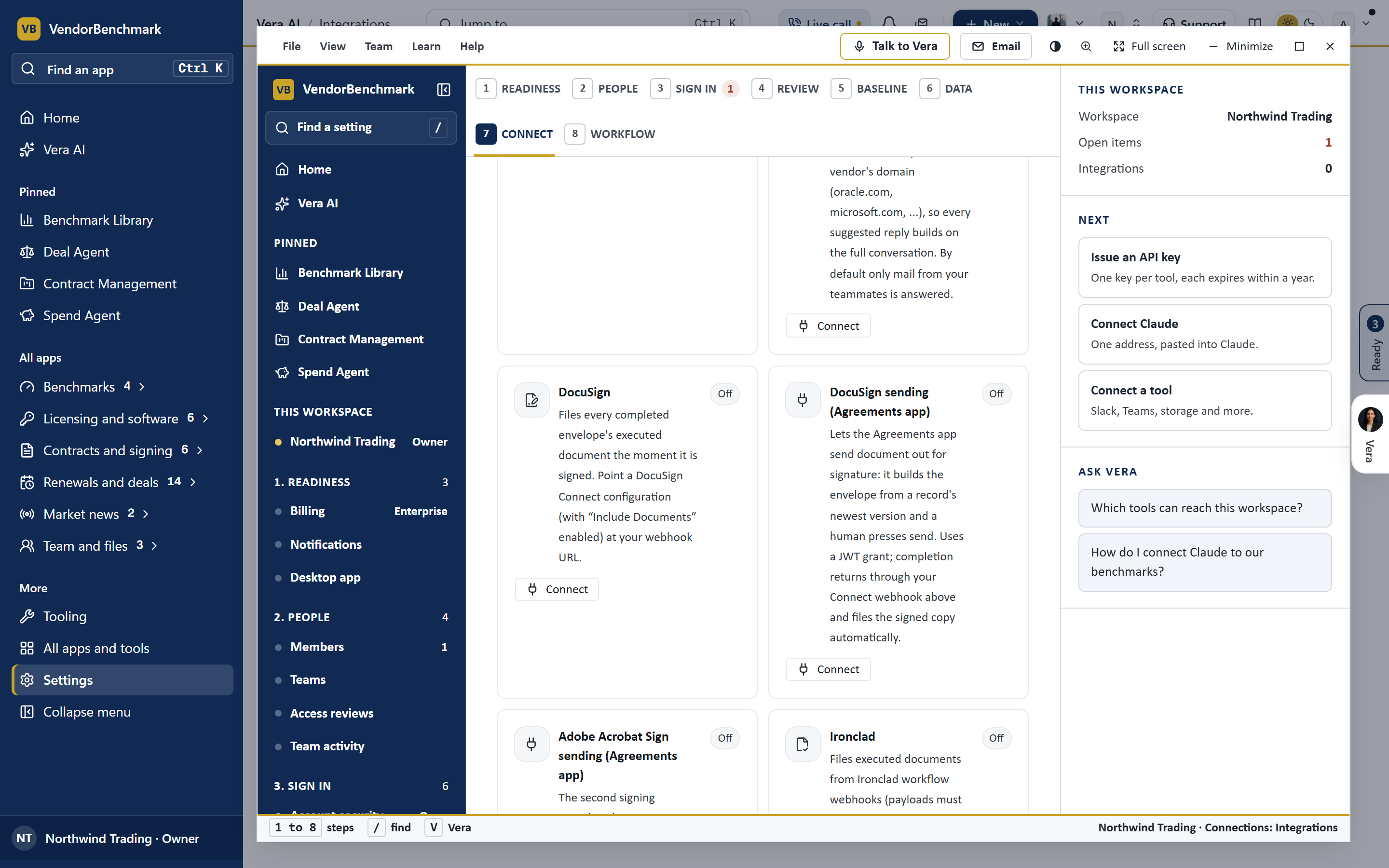
Step by step: the intake webhook
Open Settings, Integrations and find the DocuSign card under the Contract intake lane. Press Connect and the card shows the webhook address for your workspace. In DocuSign, as an account administrator, open Settings, Integrations, Connect, add a configuration, paste that address, select the envelope completed event, and enable Include Documents so the executed file travels with the notice. Save it. From that moment every completed envelope lands in Contracts as a new record; a duplicate of a file already on hand is recognized by its content and not filed twice. The card shows the last delivery and any error in words, and the same page keeps a history of every delivery.
Sending for signature from Agreements
The second part runs the other way. In the Agreements app, a record's newest version can go out for signature from the platform: the envelope is built from that version, the signers are the people on the record, and a person presses send. It uses a DocuSign JWT grant, so your administrator creates an integration key, grants consent once, and pastes the key, the user id and the account id into the DocuSign sending card. Nothing is sent without a human press, and completion comes back through the same webhook as intake, so the signed copy files itself against the record it came from. The Agreements app shows the envelope's state on the record: sent, viewed, signed, declined, voided.
Vera in the Loop: the read before the signature
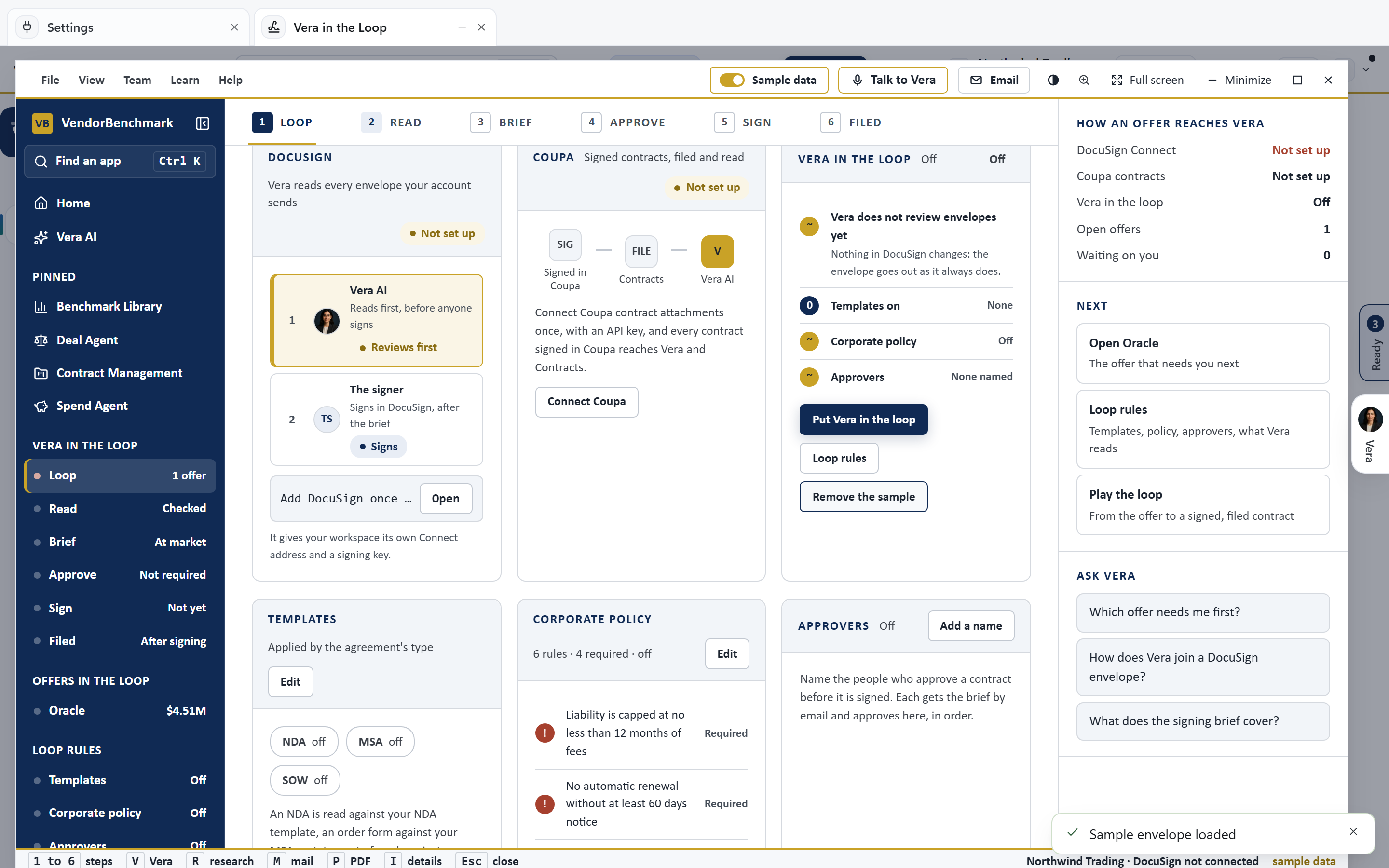
The third part is the one buyers notice. Open Vera in the Loop and press Put Vera in the loop: from then on every envelope your workspace sends in DocuSign is read before anyone signs. Six steps down the side: the loop (how an offer reaches Vera, the envelopes in it, the rules), the read, the two page signing brief, the approval by named people, the signature, and the filing of the signed copy. The read names the vendor, the term, the uplift and the price, benchmarks that price against what comparable customers pay, and says in one line whether to sign, to ask for a change first, or to stop. The brief is what you forward to the approver; the approval is by the people you name, in the app or by email; and the signature opens in DocuSign itself, so nothing about who signs changes.
What it costs you to try, and the honest limits
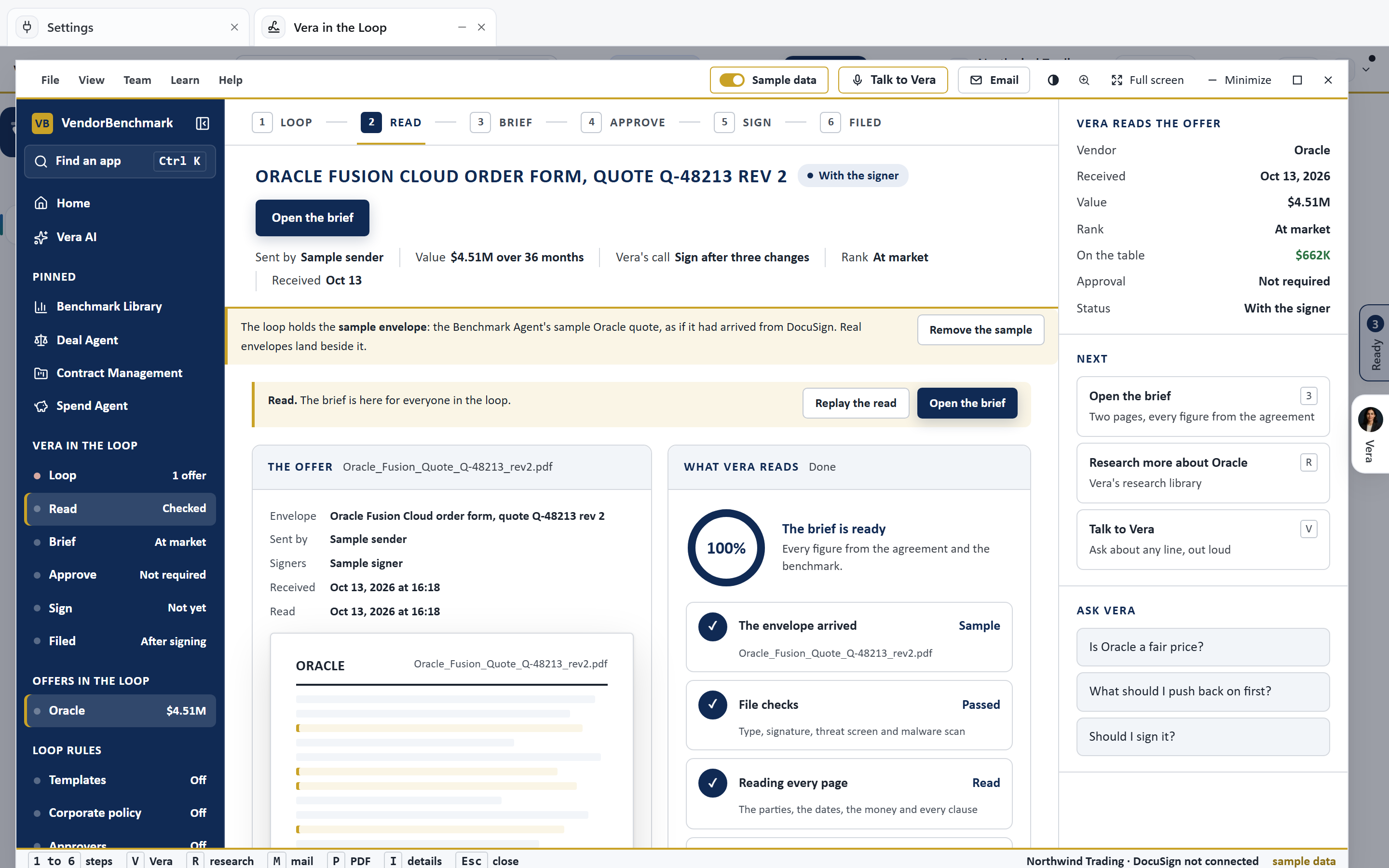
There is a sample envelope in the window, an Oracle Fusion order form with its benchmark and its brief, so you can see the loop end to end before connecting anything. The limits are worth stating plainly. Vera reads and benchmarks; she never signs, never voids an envelope and never changes a signer. The read is only as good as the document: a scanned image with no text layer is read through its cleaned pages, and a price that is not on the contract cannot be benchmarked, so the brief says so rather than guessing. The approval step is a workflow inside Vera, not a DocuSign routing rule; your DocuSign approval order stays exactly as it was. And the intake webhook needs Include Documents, or the record arrives with no file.
If your contracts also live in a procurement system, the same pattern applies there: see how to integrate Vera AI with Coupa and with SAP Ariba. And for what Vera does with a contract once it is in the loop, read how AI agents negotiate for you in Vera AI.
Want to be updated when major licensing and pricing changes land? One analyst brief a week: the price rises, metric changes and audit campaigns that move software costs. Work email only.
Morten brings two decades of enterprise and software procurement, with stints across Oracle, IBM, SAP, and Salesforce shaping how he reads a deal. He has led sourcing through hundreds of renewals, from mid market order forms to nine figure global agreements, and learned that the buyers who win are the ones who walk in knowing the market. He built VendorBenchmark to make that pattern recognition repeatable.


