Document Agent 2.0: one box finds the clause in every contract, as a crop of the page it sits on
The Document Agent is now one room with one job: find what your papers say and take it away. No menus, no phrasing, no model between you and the page.
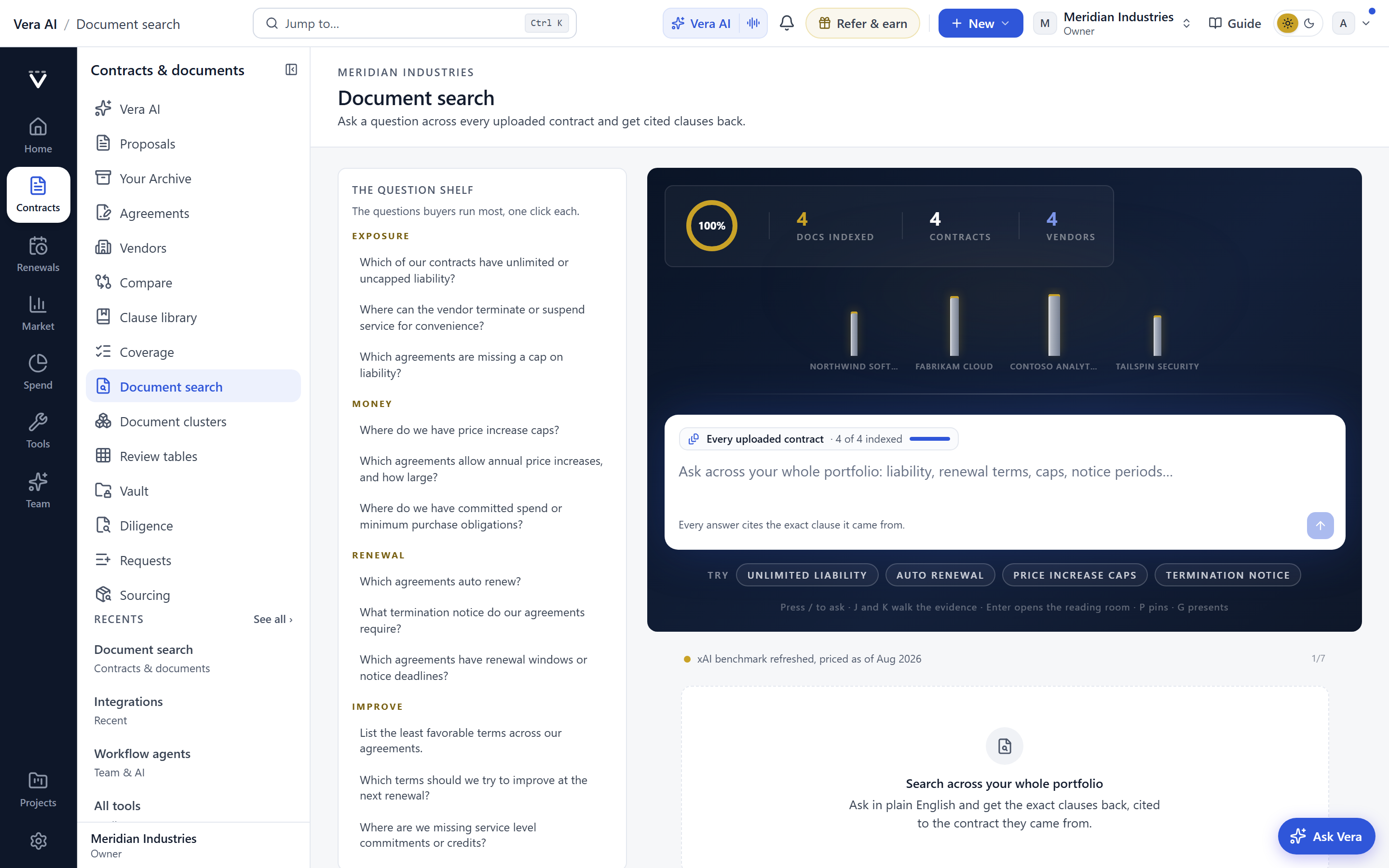
Every procurement team has a folder problem it has learned to live with. You know a limitation of liability cap sits somewhere across forty vendor MSAs, you know at least three of them carry an auto renewal window you meant to diarise, and you know the only way to confirm any of it is to open the files one by one. The knowledge exists. Retrieving it costs an afternoon. Document Agent 2.0 attacks that specific cost. It is now one box: type a word, a phrase in quotes, or a vendor name, and every clause that says it comes back grouped by paper, drawn as a crop of the stored page with the words marked and the page number beside it. What is on screen is exactly what the papers say, because there is no model between you and the document.
The named problem: you can find the file, not the clause
The friction was never storage. You have the contracts. The friction is that a contract repository answers the question you did not ask. It tells you which files exist. It does not tell you which of them say indemnity uncapped, or which twelve carry a most favoured customer clause you now want to invoke. To get from the file to the clause you open, scroll, skim, and copy, and you do that once per document. On a portfolio of any size that is not a task, it is a project, and it is why clause level questions get postponed until a renewal forces them.
We built earlier versions of this as separate rooms, an Ask room, a Library, a Brief, and so on, and each room asked you to phrase the question its own way. That was our friction, not yours. Document Agent 2.0 collapses all of it into one search surface. The Ask, Library, Brief, Collaboration and Report rooms have retired, and the release notes say exactly where each piece of work now lives, so nothing you relied on has quietly vanished.
What the search actually returns
Type a bare word and you get every clause containing it. Wrap a phrase in quotes and the match tightens to that exact string, which is how you separate limitation of liability from a stray liability in a definitions list. Type a vendor and you scope the search to that vendor's papers. Results arrive grouped by document, and each hit is a crop of the stored page, not a reconstruction, with your terms marked in place and the page number sitting beside it. If a clause spans a page break you see the crop as it is stored, which matters when you are quoting a clause back to a vendor and cannot afford a paraphrase.
This is the same principle we applied when we made the decode mark up the document itself and when research papers began reading as styled pages rather than embedded files. The page is the source of truth, and the tool points at it rather than summarising over it. There is no interpretation layer to second guess.
Filters that report their own counts
Down the left you filter by vendor, document type, date, and status, and each filter shows the count the database itself reports, not an estimate. If the auto renewal filter reads eleven, eleven papers carry that hit, and ticking it narrows the results to exactly those. This is the difference between a search that suggests and a search that enumerates. For a buyer building a negotiation position it means you can state the size of the exposure before you open a single file, and you can trust the number because it is a count, not a guess. It pairs naturally with the command table and search language the Document Agent already carries.
Ticking to export, in five shapes
Every result carries a tick. Select what you want and take it away in the shape the next step needs. Excel rows when you are building a comparison grid. A Word brief when you are handing analysis to legal or the CFO. The clipboard when you are pasting a clause into a redline. A print when the meeting is offline. A link when a colleague needs to see the same result set you are looking at. The export is the deliverable, so there is no re keying between finding the clause and using it. If your clause work involves positions rather than raw text, the clause library that argues your playbook is where those positions now live.
Where it fits, and where it does not
Document Agent 2.0 is a retrieval and export tool, and it is deliberately narrow. It finds what your papers literally say and hands it over. That is its whole job, and it does that job well because it does nothing else. It is honest about three limits. First, it matches text, so it will not surface a clause that means an uncapped liability if the words uncapped and liability never appear near each other. Semantic reasoning about intent belongs to the specialist agents. If you want a contract read for meaning rather than searched for strings, that is the work of the SOW, Contract and MSA Agents, and there are six specialist agents in total for that class of analysis.
Second, it can only find what has been uploaded and read. A contract sitting in an inbox that never reached the library will not appear in a result set, which is why the ten inbox agents matter as the on ramp. Third, a page crop is only as clean as the scan behind it. A faxed and re scanned amendment from 2014 may match on the words it can read and miss the ones it cannot. In those cases the page crop is still your best evidence, because it shows you exactly what the source looks like rather than pretending to a certainty it does not have.
For a procurement buyer the change is concrete. The clause level questions you used to postpone until a renewal forced them are now a twenty minute exercise you can run on a Tuesday. You can walk into a vendor conversation knowing how many of your contracts carry the term in dispute, with the exact language marked on the exact page, exported into the brief before the call starts. Open it at /doc-search and search a phrase you already know sits somewhere in your papers.
Want to be updated when major licensing and pricing changes land? One analyst brief a week: the price rises, metric changes and audit campaigns that move software costs. Work email only.
Morten brings two decades of enterprise and software procurement, with stints across Oracle, IBM, SAP, and Salesforce shaping how he reads a deal. He has led sourcing through hundreds of renewals, from mid market order forms to nine figure global agreements, and learned that the buyers who win are the ones who walk in knowing the market. He built VendorBenchmark to make that pattern recognition repeatable.


