Work a whole contract without leaving the archive
Double-click any paper and the reading window becomes a workbench. Dates, notes, and runs live on one record, so renewal prep stops scattering across tabs.
Here is the failure mode every procurement buyer knows. The contract lives in one place, the renewal dates live in a spreadsheet someone maintained until they left, the quote sits in an inbox thread, and the benchmark you need is a separate exercise you keep postponing. By the time you assemble all four, the notice window has already closed. This update collapses that scatter. Double-click any paper in the archive and the reading window is now a contract workbench, with the dates, the prep, and the analysis on the same record. It builds directly on the Document Desk, and it exists because the gap between reading a contract and acting on it is where leverage leaks out.
The problem is the tab count, not the contract
A renewal is not hard because the paper is complex. It is hard because the working state is spread across four or five surfaces that never agree with each other. The date in the CLM says one thing, the calendar reminder says another, and the actual clause says a third. Most missed notice windows we see are not comprehension failures. They are coordination failures. Someone knew the date. It just was not on the record anyone was looking at. We wrote about the mechanics of that in recovering from a missed notice window, and the pattern is always the same: the information existed, but not where the decision was made.
So the fix is not another reminder system. It is putting the dates, the journal, and the analysis on the contract itself, so the record you read is the record you act on.
The Renewal tab holds the dates that matter
The Renewal tab is the spine. It carries the term, the auto-renew flag, the notice window, and the uplift cap, all editable so you can correct what the extraction got approximately right. The notice deadline is counted down in plain sight, and a single press exports the runway to your calendar. That last part matters more than it sounds. A date you have to transcribe is a date you can mistype. A date you export straight from the record is a date that arrives correct.
Auto-renew is the clause that punishes passivity, and the Renewal tab treats it that way. If the paper renews itself unless you act, the countdown is the thing standing between you and a silent, uncapped rollover. If you want the underlying mechanics of why that window is the leverage point, the auto-renewal trap lays out the trap, the window, and the fix.
The Notes tab is where prep accumulates
Negotiation prep is cumulative, and it usually lives nowhere. The Notes tab is a timestamped team journal attached to the contract. Paste anything, an internal thread, a stakeholder complaint, a decision the CFO made in a hallway. Attach the renewal quote or the vendor email exported to PDF onto the same record. When the renewal comes around again next year, the person handling it inherits the full history rather than starting cold. This is the same instinct behind treating each contract as a live project, which we described in indexing your backlog with Vera. A contract is not a static file. It is a case with a history, and the journal is where that history lives.
The Runs tab puts analysis on the same page
From the Runs tab you can start a Contract decode, an instant benchmark, or a second opinion on the paper. The run reads in the background, one of 99 background jobs the platform can hold at once, and the result pops as its own window over the archive with Ask Vera one press away. You do not leave the contract to get the analysis, and you do not lose the analysis when you close it, because it is attached to the record. If you have not seen what a decode surfaces first, decode any contract in a minute walks through what to look for. The instant benchmark is where the buyer-side value sits: the price in front of you, measured against comparable deals, not a vendor list price dressed up as a discount.
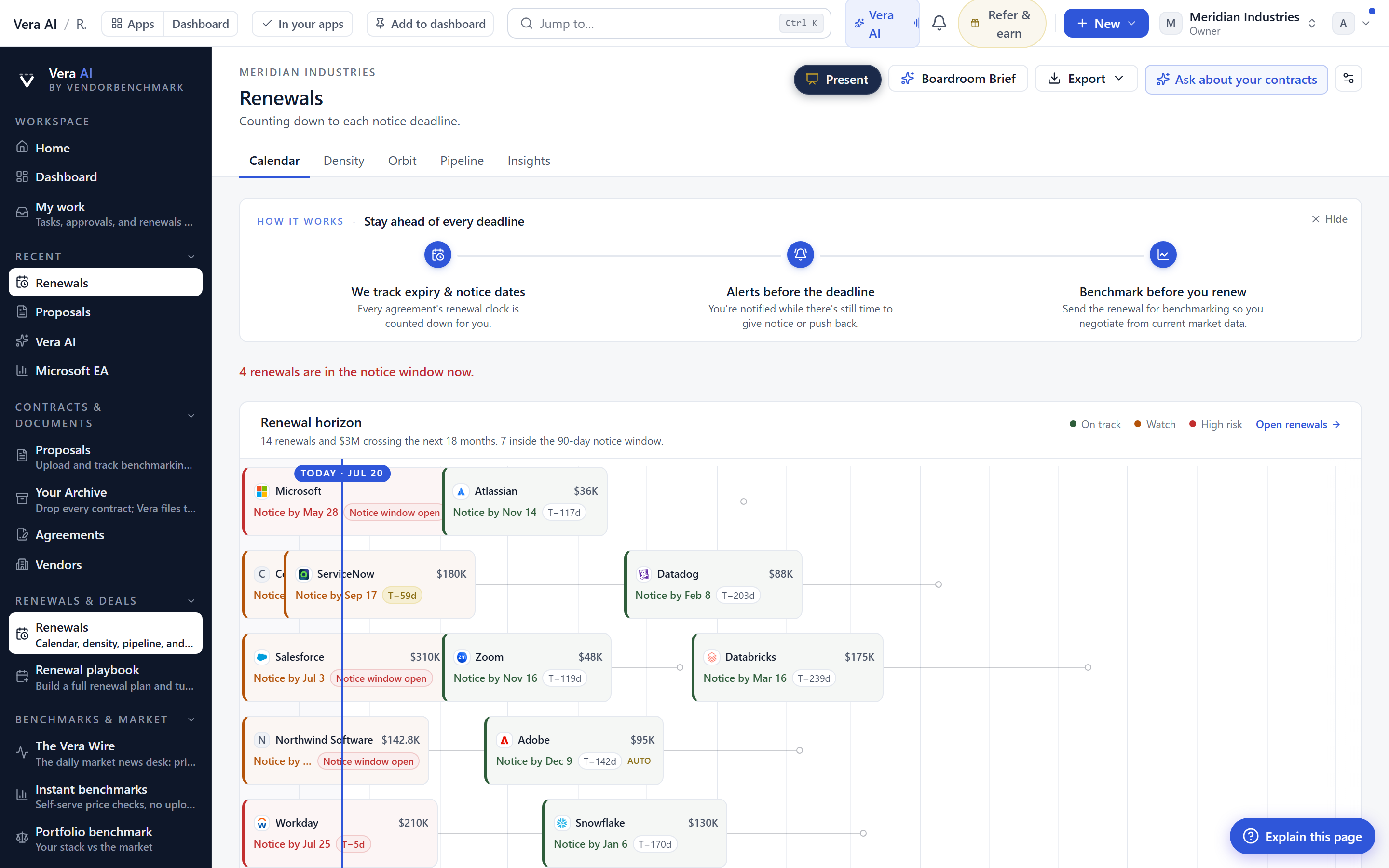
Zoom out from the single contract and the same discipline scales. The Renewals sheet leads with notice deadlines rather than start dates, because the deadline is what you act on. It badges auto-renewals so the silent rollovers cannot hide, groups the whole portfolio by quarter, and exports the runway to your calendar. If you run a portfolio at any real scale, this is the difference between reacting and planning. We laid out why deadline-first ordering matters in the renewal calendar problem, and the sheet is that argument shipped. It also feeds cleanly into a QBR, so you can present the next four quarters straight from the calendar instead of rebuilding the deck each time.
The honest limits
This is a workbench, not an autopilot, and it is worth being precise about what it does not do. First, the extracted dates are a strong starting point, not gospel. The Renewal tab is editable on purpose, and you should confirm the notice window against the executed clause before you trust the countdown, because a contract with a co-term amendment or a side letter can carry a date the base paper does not show. If your dates are entangled across agreements, read the co-term trap before you rely on a single record.
Second, the calendar export puts the date in front of you. It does not send the notice for you. A buyer still has to act inside the window, and the countdown is a prompt, not a guarantee. Third, the instant benchmark tells you where a price sits against the market. It does not tell you what your specific leverage is, what the vendor's fiscal pressure looks like this quarter, or whether a true-down beats a renegotiation. For a named example of that judgment, the Salesforce true-down shows why the number is the start of the conversation, not the end of it.
Finally, the journal is only as good as the discipline behind it. It gives your team a single place to record prep, but it will not populate itself. The payoff is real, and it compounds: every contract you work through the archive leaves a record that makes the next renewal faster and the next handoff cleaner. That is the whole point. Not fewer tabs for their own sake, but a working surface where reading the contract and acting on it are finally the same job.
Fredrik has spent more than twenty years in enterprise software, with time at Oracle, IBM, SAP, and Salesforce before moving to the buy side. He structured and priced the kind of large agreements most buyers only see once or twice in a career, which taught him where the leverage sits and how far a vendor will actually move. He started VendorBenchmark to hand that knowledge to every sourcing team.


