The main agent
One goal for every contract, in one sentence.
You set the goal. Mothership splits it into assignments for the agents, hundreds at once, reads every report they send back and revises its plan. Only the decisions that touch a vendor or money wait for you.
- One goal for the whole estate
- Hundreds of assignments at once
- People approve every send and signature
- Stop all with one press
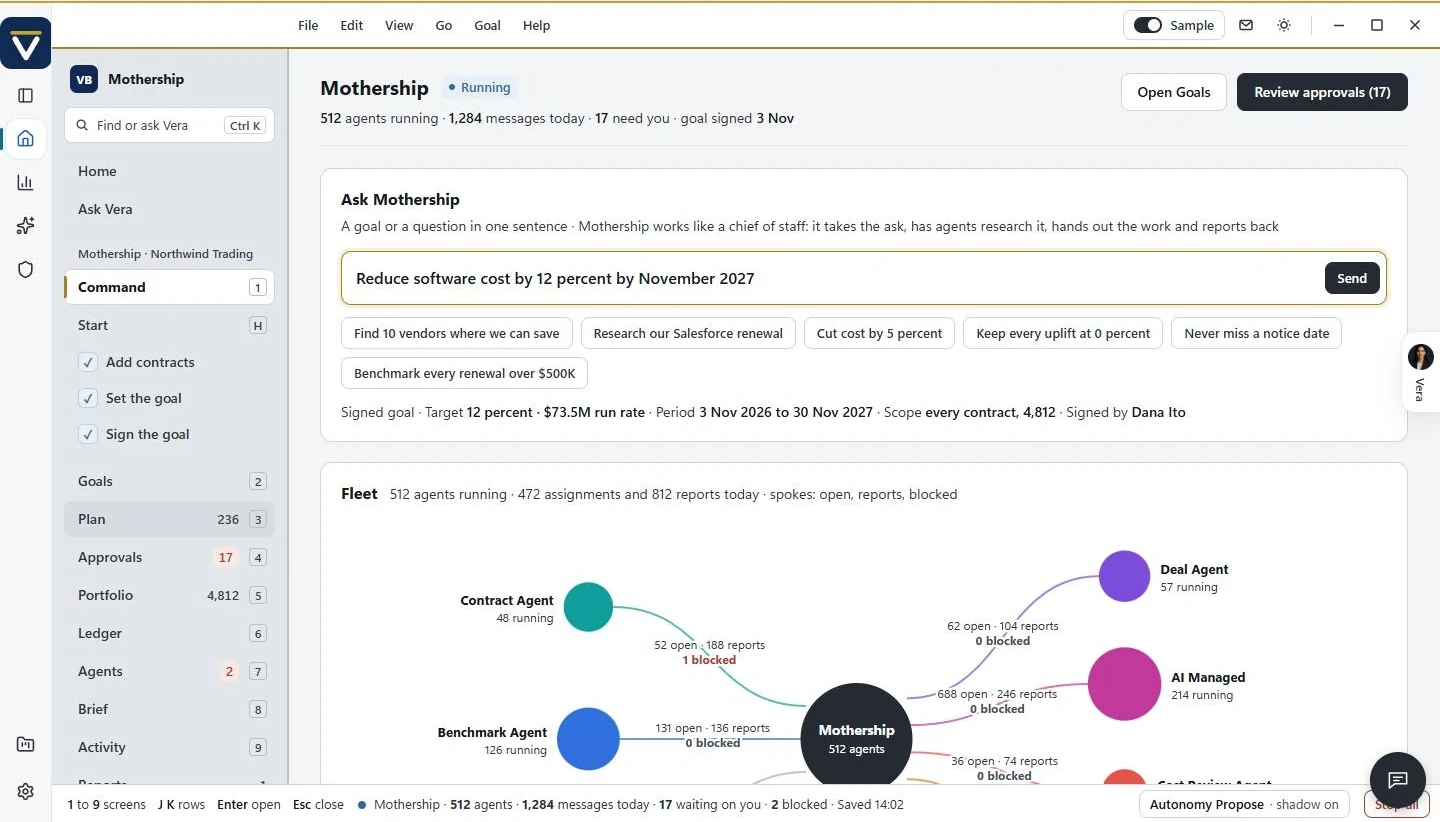
Mothership, on sample data.
What Mothership is
The agent you talk to, so you do not have to direct the rest.
Instead of setting up an agent for each contract, you give Mothership one target for the whole estate. It directs every other agent and answers like a chief of staff.
You set the goal
One sentence, such as cutting cost by 12 percent or keeping every uplift at 0 percent. The scope is every live contract.
The agents do the work
Mothership splits the goal into assignments, reads each report and revises its plan as the reports come in.
The decisions come to you
Each vendor send, notice letter, offer and signature waits for a person. Mothership never signs.
The run
Watch the agents work together.
Press Send and the fleet becomes the run. Assignments travel out to the agents, reports come back, and every hand off passes through Mothership.
- Every message in one conversation. Assignments and reports, filtered by kind.
- What needs you goes to You. Nothing that touches a vendor moves without a person.
- Pause, skip to the end or replay. The run plays only when you press.
- Stop all. One press in the status bar stops every agent.
Ask like a chief of staff
Ask a question. Get a deep dive report.
Ask for the ten vendors where you can save. The agents research it, and the answer comes back as a report you can act on.
- The short version, then the ten vendors and where each ranks
- The saving a year, the lever and the date for each one
- A SWOT and a plan
- Download as Word, or as the analyst's workbook in Excel
I will handle it
The report stays with you. Work it yourself, with the figures and the plan in hand.
Mothership, do it
One assignment per vendor goes to the agents. The reports come back, and the decisions come to you.
Getting started
Three steps, then the agents start.
Notice protection, the uplift cap and benchmark coverage are always on. You do not set them.
- Step 1Add contractsUpload the estate or connect a source. The Contract Agent reads each file.
- Step 2Set the goalOne sentence for the whole estate. Mothership sizes it on your contracts.
- Step 3Sign the goalThe owner signs, then finance countersigns the baseline. Mothership never signs.
Inside Mothership
Twelve screens, one goal.
You stay in control
The agents do the work. People make the calls.
People approve
Only vendor sends, notice letters, offers and signatures come to Approvals, each with its evidence.
Mothership never signs
The owner signs the goal and finance countersigns the baseline.
Stop all
One press in the status bar stops every agent at once.
On the record
Activity lists every assignment, report and decision as it happened.
The fleet
The agents Mothership directs.
Each one is an agent you can also use on its own.
Spend Agent
Benchmarks the whole estate at once and ranks where you can save.
Benchmark Agent
Prices a quote against what comparable customers pay.
Contract Agent
Reads each contract and marks the changes worth asking for.
Deal Agent
Runs each renewal and negotiation, from the notice date to the signature.
AI Managed renewals
Negotiates renewals by email, inside the limits you set.
Vendor Radar
Watches vendor price and terms changes and prices them on your contracts.
Questions
Mothership, answered.
Do I set a goal for each contract?
No. You set one goal for the whole estate. Mothership works out how each contract contributes.
What can a goal be?
A target for the estate in one sentence, such as cutting cost by a percentage or keeping every uplift at 0 percent.
Can Mothership send or sign on its own?
No. Each vendor send, notice letter, offer and signature comes to a person. Mothership never signs.
Can I see it before I load my contracts?
Yes. In a trial, the Sample switch shows a sample estate, Northwind Trading.

Give Mothership a goal.
One sentence for the whole estate. The agents do the work, and the decisions come to you.
Free trial. Every app opens populated on a sample company. No card required. Or speak to sales