The report is a workspace now, and the paper opens beside every answer
We shipped a report that behaves like an application. The stake sits at the top in four figures, the answers sit on the paper, and your colleagues sit in the window with you.
Here is a problem most procurement teams stopped noticing because it never went away. You ask an agent to read a contract, you get a good answer, and then the real work starts. You paste the answer into a spreadsheet, you flag three terms for the CFO, you email the SAM manager a screenshot of the renewal clause, and you keep a browser tab open on the raw PDF so you can find the line the answer came from. The reading took a minute. The handling took the rest of the week. We have written before about why reports beat answers and how the answers should sit on the paper. This update closes the gap between the two.
The report stopped being a document and became a surface
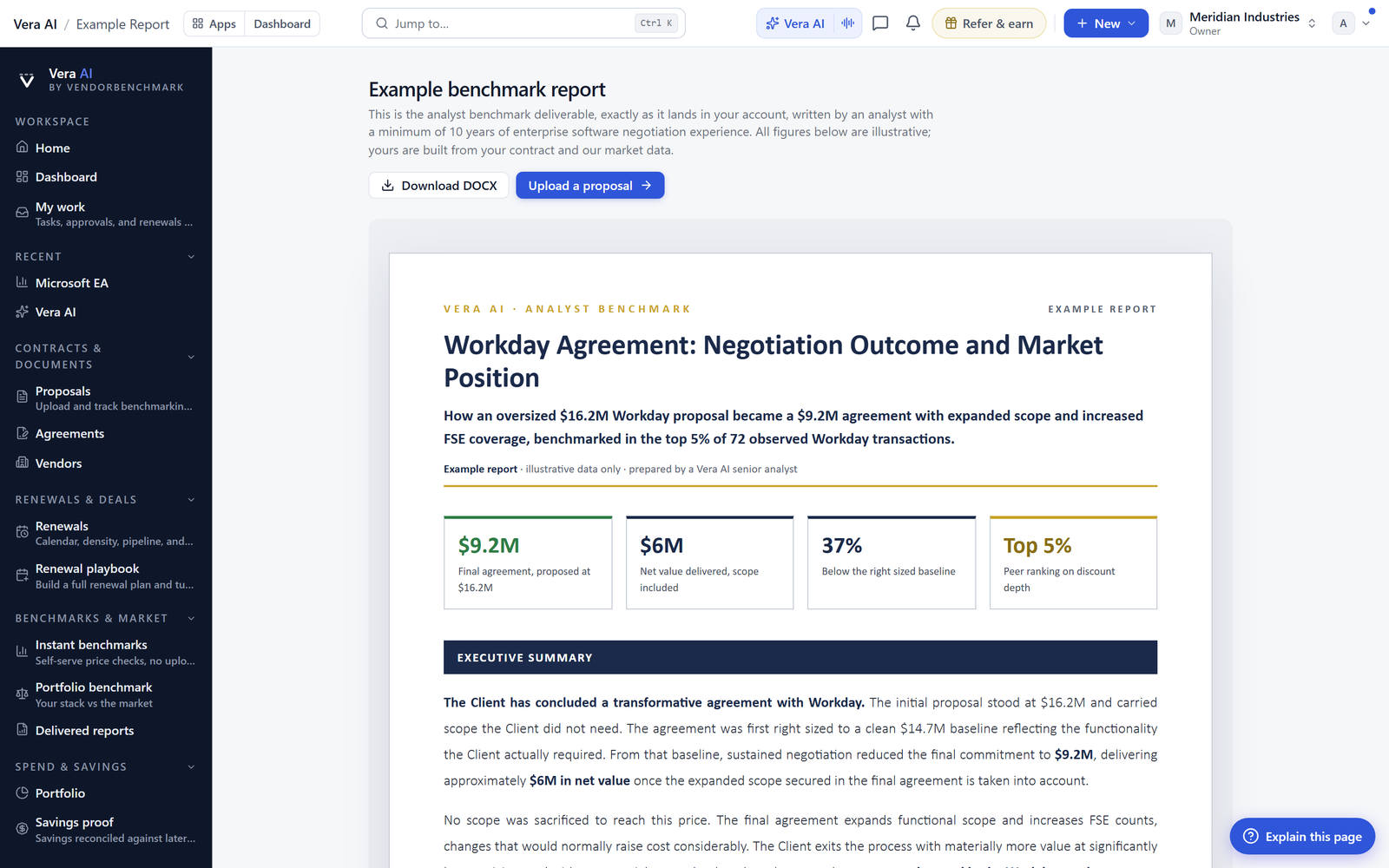
When you open an Entitlement Agent report today, it fills the window. The stake is stated at the top in four figures, so you know the money at issue before you read a word. Below it, an executive summary in plain sentences. Then the answers land as a dense grid, one row per term, with a verdict beside each one. The what-if lever works on the paper's own figures, so when you move a cap or a uplift rate the numbers recompute against what the contract actually says, not against a hypothetical. The lines read as a register view, and the source page opens beside the report at the exact quoted line. You are never guessing where a verdict came from. This is the same shift we described when the Entitlement Agent started working like an application, now carried all the way into the report itself.

Tabs, panes and right click, because that is how work actually happens
Real review is never one report at a time. You compare a renewal against last year's paper, you check an order form against the master agreement, you hold two vendor quotes side by side. So reports open in tabs and split side by side in the same window. Right click anything, an answer, a line, a figure, and you get a menu scoped to that thing. The window remembers density, zoom, panes, tabs and saved views, so the layout you built on Monday is the layout you return to on Thursday. This is the same single titlebar discipline we brought to the app window, applied where the reading happens.
Your colleagues are in the window, not in your inbox
Comments anchor to any answer, any line, or any figure, with mentions and a resolve state, so a thread lives on the term it is about rather than in a mail chain nobody can reconstruct later. The status bar shows who is in the window with you. You can assign a paper, an answer or a line to a colleague, or simply ask for a second pair of eyes on one verdict. When the read is done, share it with real scopes and export the report as Word, PDF or Excel in the house dress. The version that lands on the CFO's desk looks like it came from your team, because it did. If you want the shape of that handoff, we covered it in handing the verdict to your CFO.
What changes for a procurement buyer
Honest limits
A few things this update does not do, said plainly. The verdict beside each term is a read of the paper measured against market, and it is only as good as the paper you upload. A scanned image with poor text will produce weaker line anchoring than a clean digital PDF. The what-if lever recomputes on stated figures, so where a contract leaves a value to a future schedule, the lever can only show a range, not a fixed number. Comments, assignments and shared scopes are collaboration tools, not a legal sign off, and nothing here replaces your counsel's review on a material term. The house dress export carries the analysis, but the negotiation itself still happens in the room, or across the table, where our Agent Negotiation Protocol work is aimed. This is a workspace for reading and deciding faster, not a substitute for judgement.
Open a report, split the panes, and put the source page beside the verdict. You can find it in the entitlement office, and the window will be waiting the way you left it.
Want to be updated when major licensing and pricing changes land? One analyst brief a week: the price rises, metric changes and audit campaigns that move software costs. Work email only.
Morten brings two decades of enterprise and software procurement, with stints across Oracle, IBM, SAP, and Salesforce shaping how he reads a deal. He has led sourcing through hundreds of renewals, from mid market order forms to nine figure global agreements, and learned that the buyers who win are the ones who walk in knowing the market. He built VendorBenchmark to make that pattern recognition repeatable.


