The Research Agent, redrawn as the Wire Desk
The wire stops being a scroll of headlines. It opens as a desk, indexed by the vendors you hold and the day each change takes effect.
PRODUCT UPDATE and FROM THE ANALYST DESK. Every buyer knows the Monday problem. A market wire arrives, twenty or thirty items long, sorted by what happened rather than by what it touches. You scan it because you should, you flag two or three lines that look near your estate, and then the week takes you. By the time a price list actually changes, the note that warned you is four wires back. We have redrawn the Research Agent to end that pattern. The weekly wire now opens as the Wire Desk, a desktop application that reads as your firm's paper rather than the market's noise. If you have followed how the Agent Center opened as an application, this is the same idea carried into research.
The problem is not information, it is order
The wire was never short of signal. The benchmark library covers 1,471 vendors, and six specialist agents keep pulling changes into it, so the volume was fine. The failure was ordering. A generic wire sorts by recency or by category, which are the market's priorities, not yours. A buyer holding forty contracts does not need to know that a vendor you have never bought changed its packaging. You need to know that the one renewal you have in eleven weeks just moved its list price, and you need that line at the top, not buried at position nineteen. The old view forced you to do the sorting in your head every Monday. That is the work we have moved into the software.
How the desk is built
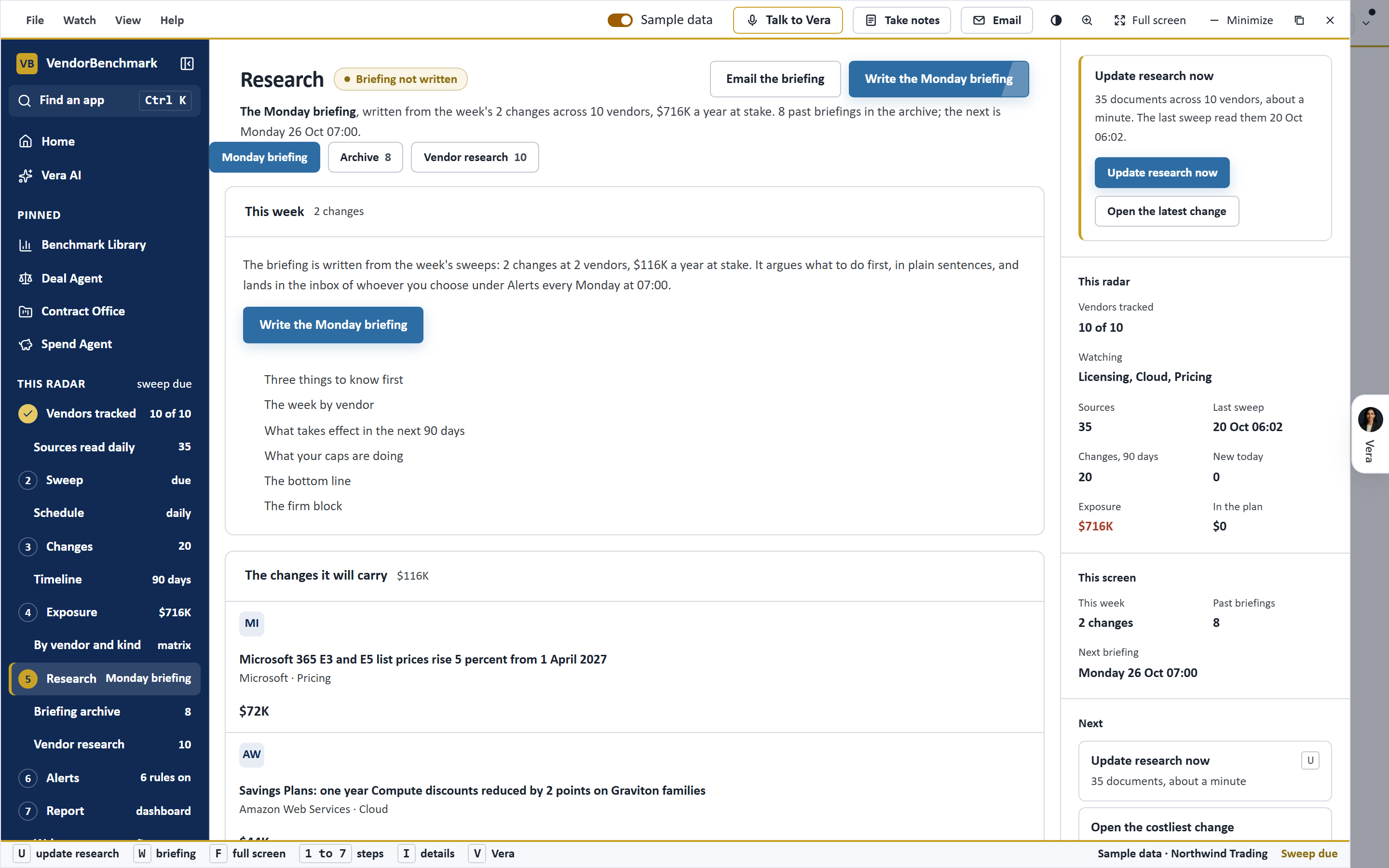
The layout will be familiar if you use our other desks. A navy title bar carries the menus. A dark rail runs down the left. In the rail sits a tree that indexes every finding four ways at once: by what the finding asks of you, by the vendors you hold, by vendor, and by week. That means you can enter the wire from any angle you happen to be working. If you are in a renewal, filter to the vendors you hold. If you are triaging, filter by what each finding asks of you, so the items that demand a decision surface above the items that are only context. The centre of the desk is a board of rows. Each row states the move, carries the story thread behind it, and gives the date the change lands. The story thread matters. A price change rarely arrives alone, and the thread lets you read a finding as the latest entry in a running story rather than a cold headline.
The stage and the inspector
Two elements do the daily work. The stage is the top of the desk, and it leads on the loudest finding on your paper, with a runway drawn to the day it takes effect. Loud here means near your estate and close in time, not loud in the market. A packaging change on a vendor you do not hold is quiet by definition. A list price move on a contract renewing in nine weeks is loud, and the stage says so with a runway you can read at a glance. The inspector opens on the right when you select a row. It states four things in order: the facts of the change, what it means for you, the moves available, and Ask Vera. That last line is the bridge into the analyst. You can carry a finding straight into a question, the same way the Document Agent lets the desk talk beside the clause, so the wire is not a dead end but a starting point for a case.
Where it sits in the workflow
The Wire Desk is a triage surface, not a replacement for a case. It answers one question well: of everything that moved this week, what touches me, and when does it land. From there the work hands off to the desks built to close it. A finding about a renewal opens toward the calendar and the record, in the same way the renewal record became a room Vera can take a case from. A finding about price supports a benchmark pull, and a finding about terms supports a clause review. The wire tells you which door to walk through. It does not walk through it for you, and that is deliberate. You can reach the full wire any time at the weekly wire, and the desk remembers where you left it.
The honest limits
Three things the Wire Desk does not do, stated plainly. First, its ranking is only as good as the estate it knows about. If your vendor list is incomplete, the tree will underweight findings it cannot connect to a contract you hold, and it will quietly overweight the market at large. Keep your holdings current or the paper is not yet your paper. Second, effective dates are read from vendor communications and public notices, and vendors move dates. Treat the runway as a strong estimate, not a contract term, and confirm the date before you act on a tight window. Third, the desk triages, it does not decide. It will surface a list price move nine weeks from a renewal and tell you what it means, but the decision to open a case, pull a benchmark or draft a counter is still yours. The wire is a faster way to see what deserves your attention this week. It is not a substitute for the judgement you bring once you are looking.
Want to be updated when major licensing and pricing changes land? One analyst brief a week: the price rises, metric changes and audit campaigns that move software costs. Work email only.
Morten brings two decades of enterprise and software procurement, with stints across Oracle, IBM, SAP, and Salesforce shaping how he reads a deal. He has led sourcing through hundreds of renewals, from mid market order forms to nine figure global agreements, and learned that the buyers who win are the ones who walk in knowing the market. He built VendorBenchmark to make that pattern recognition repeatable.


