The app window becomes universal: any tool over any page, with a dock
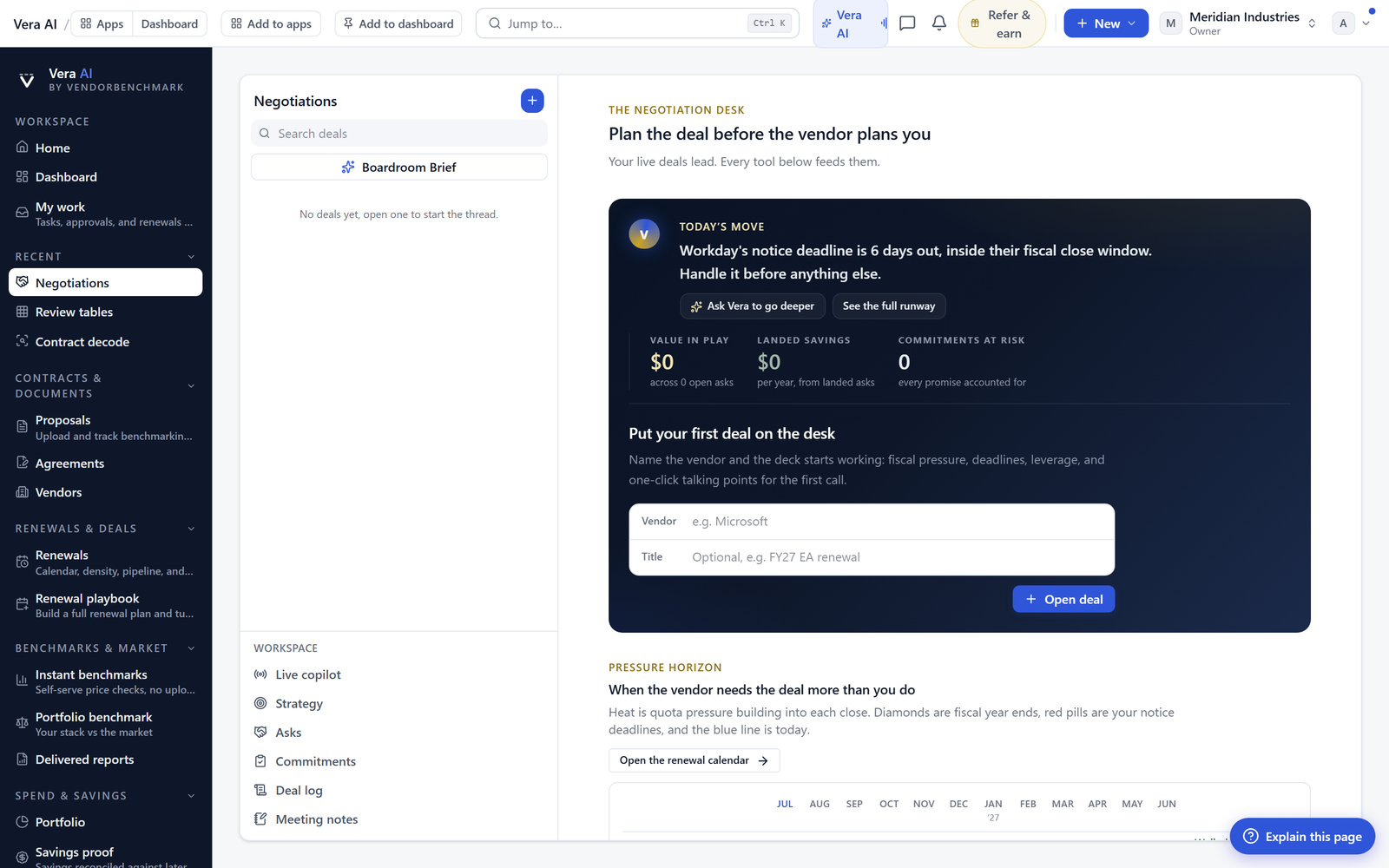
One window now runs every tool over the page you are reading, with a left navigation, a Jump to palette, and a dock chip that parks it without losing your place.
Every procurement buyer knows the tax of context switching. You are reading a contract clause, you need the benchmark that proves it is above market, and the moment you go to fetch that benchmark you lose the clause, the scroll position, and the thread of thought that connected them. This update removes that tax. The immersive application window now hosts the whole platform. It carries its own left navigation and a Jump to palette, so you move from tool to tool without ever leaving the page underneath. On the right, a tool rail lets you comment, invite and forward, ask what next, and draft an email about whatever is on screen. Apps opened from the dashboard launch straight into it.
The named problem: the tab you lose to fetch the thing you need
Call it the fetch penalty. Most enterprise tools treat every action as a navigation. Click benchmarks and the contract you were reading is gone. Click contracts again and the benchmark is gone. A buyer working a renewal touches five or six surfaces in a single sitting: the contract record, the clause library, the relevant benchmark, the renewal calendar, and the drafting surface where it all becomes an email. Under the old model each of those was a departure. You held state in your head, or in a growing pile of browser tabs, or in a scratch document that never quite kept up.
The universal window inverts that. The page you started on stays underneath. Tools open over it, not instead of it. This is the same principle we applied when the decode began reading on the page with your next steps beside it, now generalised to the entire platform rather than a single feature.

How it fits the workflow: navigation, palette, and rail in one frame
Three elements sit inside the window and do the work. The left navigation is the platform's own, so you are not memorising which tab held which tool. The Jump to palette, on Ctrl or Cmd K, is the fast path: type a few letters of a destination and land there without a page load. The tool rail on the right attaches actions to context. Comment on what is on screen, invite and forward it to a colleague, ask what next, or draft an email about it. None of these ask you to leave and come back.
This is the same command-desk logic that shaped how Vera AI opens as a command desk and how the Agent Center opens as an application. The window is now the consistent home for all of it, rather than each tool inventing its own frame.
The two new moves: the dock chip and the window-instead-of-navigate
Two additions complete the model. First, the amber control minimizes the window to a dock chip at the bottom of the screen, with everything inside preserved for the restore. When a call lands or the CFO stops by your desk, you park the whole working session, deal with the interruption, and restore it exactly as you left it. Nothing is thrown away and nothing has to be rebuilt.
Second, inside Jump to, Alt+Enter opens the highlighted destination as a window instead of navigating to it. That distinction matters. Plain Enter takes you there. Alt+Enter brings it to you, layered over what you already have open. A buyer comparing two benchmarks, or reading a clause while checking the renewal calendar, can now hold both in view rather than shuttling between them.
For a workflow like a renewal, this changes the shape of a session. You can start the way we recommend, with the renewal kickoff interview rather than a blank dashboard, then keep every tool it points you to open in the same frame. The dock chip means the session survives your day rather than dying at the first interruption.
What changes for the buyer
The honest limits
Be clear about what this does not do. It is a container, not a new analysis engine. The 1,483 vendors and the the modelled peer cohort behind them are unchanged. The window makes them easier to reach and hold in view. It does not make them say anything they did not already say.
There is a learning curve to the two-key habit. Ctrl or Cmd K for Jump to, and Alt+Enter for open-as-window, reward buyers who invest a week in the muscle memory. If you only ever click the left navigation, you get the container without the speed. The dock chip preserves one session at a time in the way most people will use it, so a buyer juggling several parallel deals should still expect to think about which session is parked. And some heavy surfaces, the full peer intros workspace among them, are built to fill the screen and will feel cramped if you insist on layering them over a dense page.
Finally, this is a change to how you move, not to what you decide. The window puts the benchmark next to the clause. Whether you challenge the term, and how hard, is still your call and your leverage. What we have removed is the friction that used to sit between noticing the gap and acting on it. That friction was never the interesting part of the job. Now it costs less of your day.
Want to be updated when major licensing and pricing changes land? One analyst brief a week: the price rises, metric changes and audit campaigns that move software costs. Work email only.
Morten brings two decades of enterprise and software procurement, with stints across Oracle, IBM, SAP, and Salesforce shaping how he reads a deal. He has led sourcing through hundreds of renewals, from mid market order forms to nine figure global agreements, and learned that the buyers who win are the ones who walk in knowing the market. He built VendorBenchmark to make that pattern recognition repeatable.


