15 · Your first 30 days
The reference chapters document every screen. This chapter is the ramp: what to actually do on day one, in week one, and by day 30, in the order that pays off fastest. Follow it as written and by the end of the month your contracts are on file, your renewal calendar is live and watching deadlines, your team is in, and you have taken at least one real position into a vendor conversation.
Two promises before you start. Nothing in this plan is busywork: every step leaves something standing that the platform keeps using. And nothing blocks you: every offer the platform makes (the introduction, the survey, the course) waits until you want it, so you can run this ramp at your own pace. Most days below cost 30 to 60 minutes; several cost nothing at all.
Who this is for. Anyone new to the platform. If you run the workspace (you invited the team, you hold the owner role), read this alongside the owner's handbook, which covers the setup only owners can do. If you joined a workspace someone else runs, this chapter alone is your ramp. For a reading path matched to your job, see the manual by role.
Before day one
Have three things within reach; none is mandatory, all three make the first week faster.
- One live document. A vendor quote, a renewal proposal, or a signed contract, as PDF or DOCX. Your first minutes on the platform are strongest on your own document.
- Your contract folder. Wherever your organization keeps its signed agreements today: a shared drive, a legal folder, a laptop. You will upload it in during week one. Subfolders and clutter are fine; the platform filters.
- Your renewal dates, if you keep them anywhere (a spreadsheet, a calendar, memory). Week two turns them into watched deadlines.
Access itself is covered in Chapter 00: creating your account is reviewed by a person, usually within 1 business day, and while you wait, the waiting screen offers a live demo workspace you can explore without saving anything.
Day 1: prove it on your own document
The goal of day one is not to learn the platform. It is to get one defensible result on a document you actually care about, so you know what the platform is for before you learn how it is laid out.
- Sign in. Set up two-factor authentication now, not later: open Settings › Security, scan the code with your authenticator app, and store the backup codes. It takes three minutes and it is the single highest-value security step you control.
- Upload your document on the ask bar at the top of Home and ask what you want to know, or send it to Contract Agent for the clause by clause read: either way the answer comes off your own document in minutes, saved as a real run rather than a demo. This needs an AI plan; on the Free plan, read the example report instead to see what a delivered report contains.
- No document handy? Load the sample portfolio instead, from the dashboard, so every screen has something to show while you explore. Remove it before you enter real data, and if it ever lingers, Troubleshooting has the fix.
- You met the welcome film on your first sign-in (rewatch it any time from the account menu). When the offer appears, take the setup survey: six questions that arrange the navigation around your work and put your vendors on watch.
- Before you leave, learn the three keys you will use every day: Ctrl/⌘ K jumps anywhere, Ctrl/⌘ J opens Vera over whatever you are looking at, and the Guide button in the top bar opens this manual at the section for the screen you are on.
What is standing at the end of day one: a secured account, one real verdict on your own document, and a workspace arranged around your answers.
Week 1: your estate on the table
The platform is only as sharp as the document it can read. Week one is about getting your contracts in, and it is shorter than it sounds: the archive does the reading.
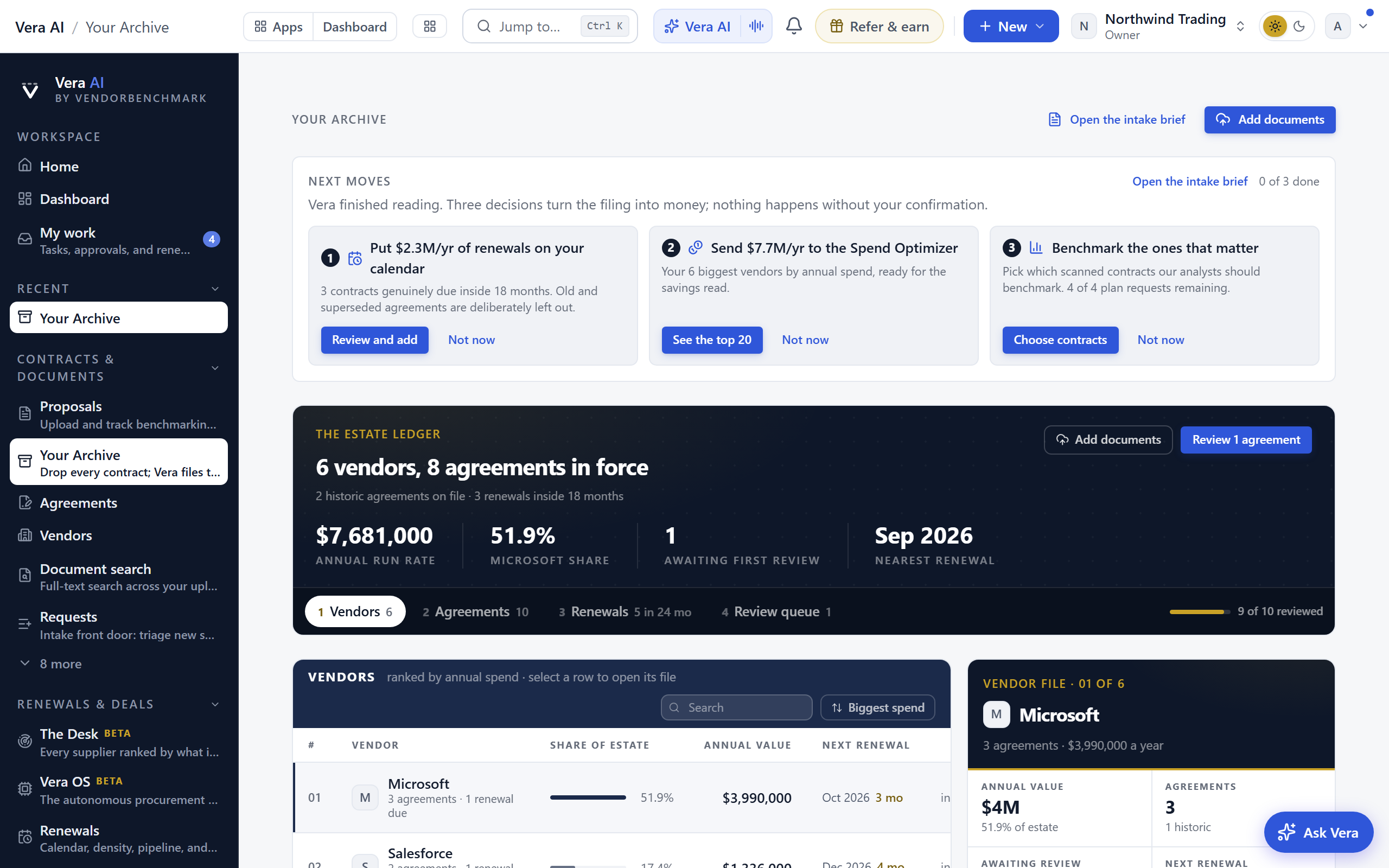
- Upload your contract folder into Contracts. The whole tree at once, up to 300 files per run, 200 MB each, PDF and DOCX; everything else is reported, never silently discarded. Vera reads every document, files it by vendor, and judges each agreement current, due, expired, superseded, or perpetual. You can leave while it runs; a progress button follows you and a notification brings you back.
- Work through Next moves when the scan finishes. It asks three questions with the money named on each: which due renewals go on the calendar, whether to review your top spend, and which contracts deserve a benchmark. Answer the renewals one at minimum; that is your calendar seeded in one sitting.
- Estates in the hundreds or thousands need a different tool: ask your owner about Enterprise Uploader, the guided run with staging, a register import, reconciliation, and a sign-off scorecard. It is open to every organization, and owner-run. A handful of documents needs neither tool: upload a proposal for anything you want benchmarked, or add Agreements by hand. Chapter 18 compares all four ways to bring contracts in, covers registers and spreadsheets, and answers the migration FAQs.
- Run your first instant benchmark. Open Benchmark Library, type a vendor you hold, and answer the questions. You get the three answers every buyer needs: the discount you are being offered, what comparable customers get as a range, and where your deal ranks. Faster still, drag the vendor's own quote onto step 1 of the Negotiation Workflow (Upload a quote, on plans that include AI) and the document is read for you. Allowances vary by plan; Chapter 10 has the table.
- Meet Vera properly. Press Ctrl/⌘ J and ask something hard about your own estate: "which of my vendors renews next and what should I do first?" Answers are grounded in your data and cited; Vera AI explains what she can see and do.
What is standing at the end of week one: your estate filed by vendor, the due renewals flagged, one market read on a real deal, and a working relationship with the assistant.
Week 2: the calendar and the team
Week two turns a filed estate into a watched one, and brings in the people who share the work. If you are not an owner, steps 3 and 4 are an ask to your owner rather than something you do yourself.
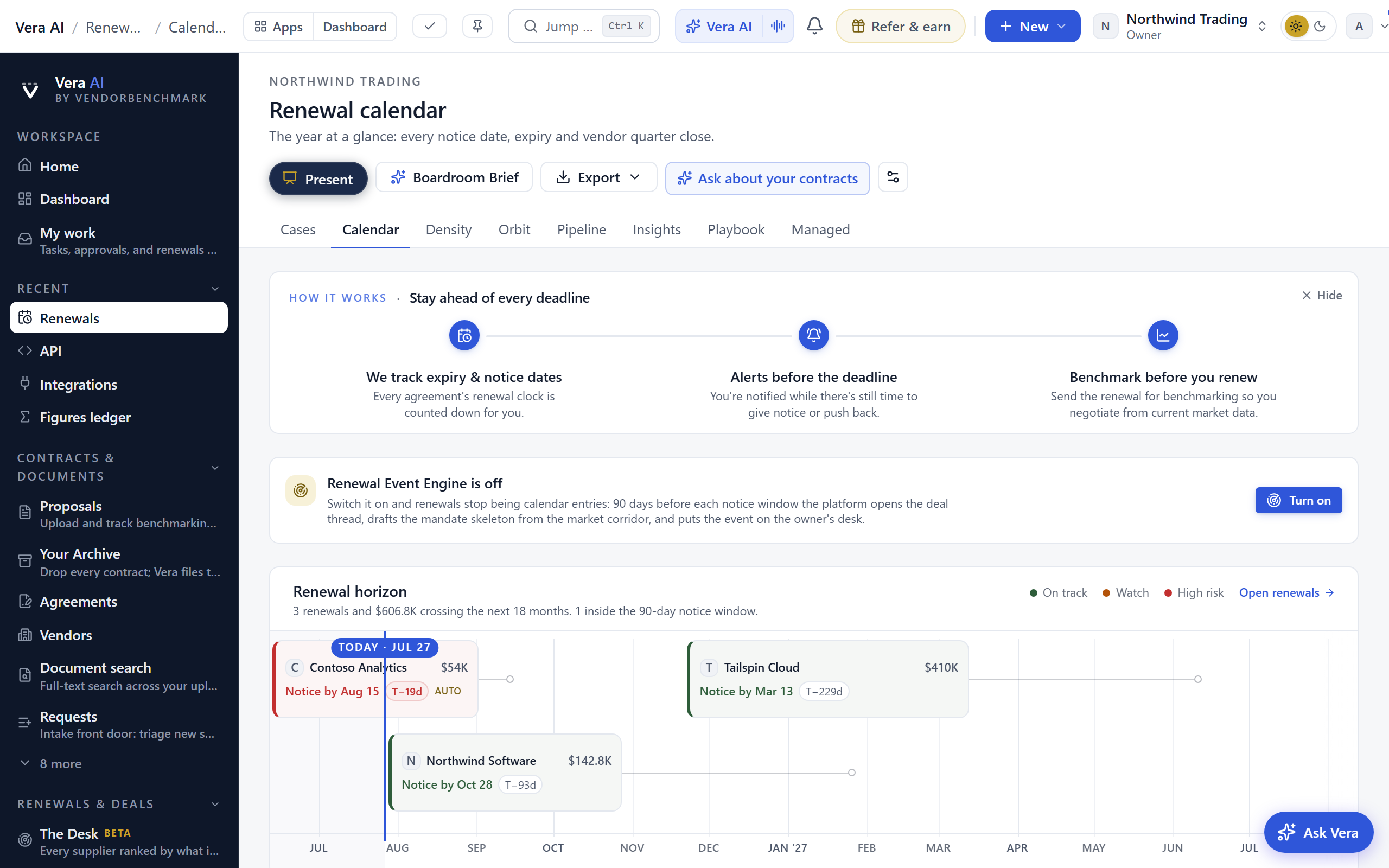
- Finish the calendar. Open Renewals and check every agreement you care about carries an expiry date and a notice period (30, 60, or 90 days). An agreement without both has no window to miss, so it cannot be watched. Add what is missing under Agreements; the Renewal calendar shows the year.
- Decide what is allowed to interrupt you. Everything about renewals is opt-in: the workspace stays silent about deadlines until someone asks for them. Open Settings › Notifications and press Turn on money-critical alerts to switch on the renewal set in one click, then pick your weekly briefings (price list changes, the Monday briefing, the knowledge briefing) and set quiet hours. Every email carries a one-click way off.
- Invite the team (owners): Members, one invite or up to 50 addresses at once, each with a role. Invitations expire after 7 days; a resend restarts the clock.
- Set up confidentiality before you need it (owners): create Teams named the way your company organizes (Procurement, Finance, Legal), so a restricted contract can be granted to a group once instead of person by person.
- Split the work. Assign owners to the renewals closing soonest, and start the day on My work, the queue of everything waiting on you personally.
What is standing at the end of week two: a live calendar that emails the team when a notice window opens, alerts you chose rather than inherited, and the right people inside.
Week 3: your first live deal
Everything so far was setup. Week three is the point of it: take the nearest real renewal and work it like the platform intends.
- Pick the deal. The renewal closing soonest with real money on it. The dashboard or Control screen will point at it; a gold renewals count means something is already on the clock.
- Get the market read first. Run the vendor through Benchmark Library, or send the document for analyst benchmarking if your plan includes it (plans without included analyst benchmarks can add one with a benchmark credit; the proposal page handles it). You want the discount, the peer range, and the rank in hand before any vendor call.
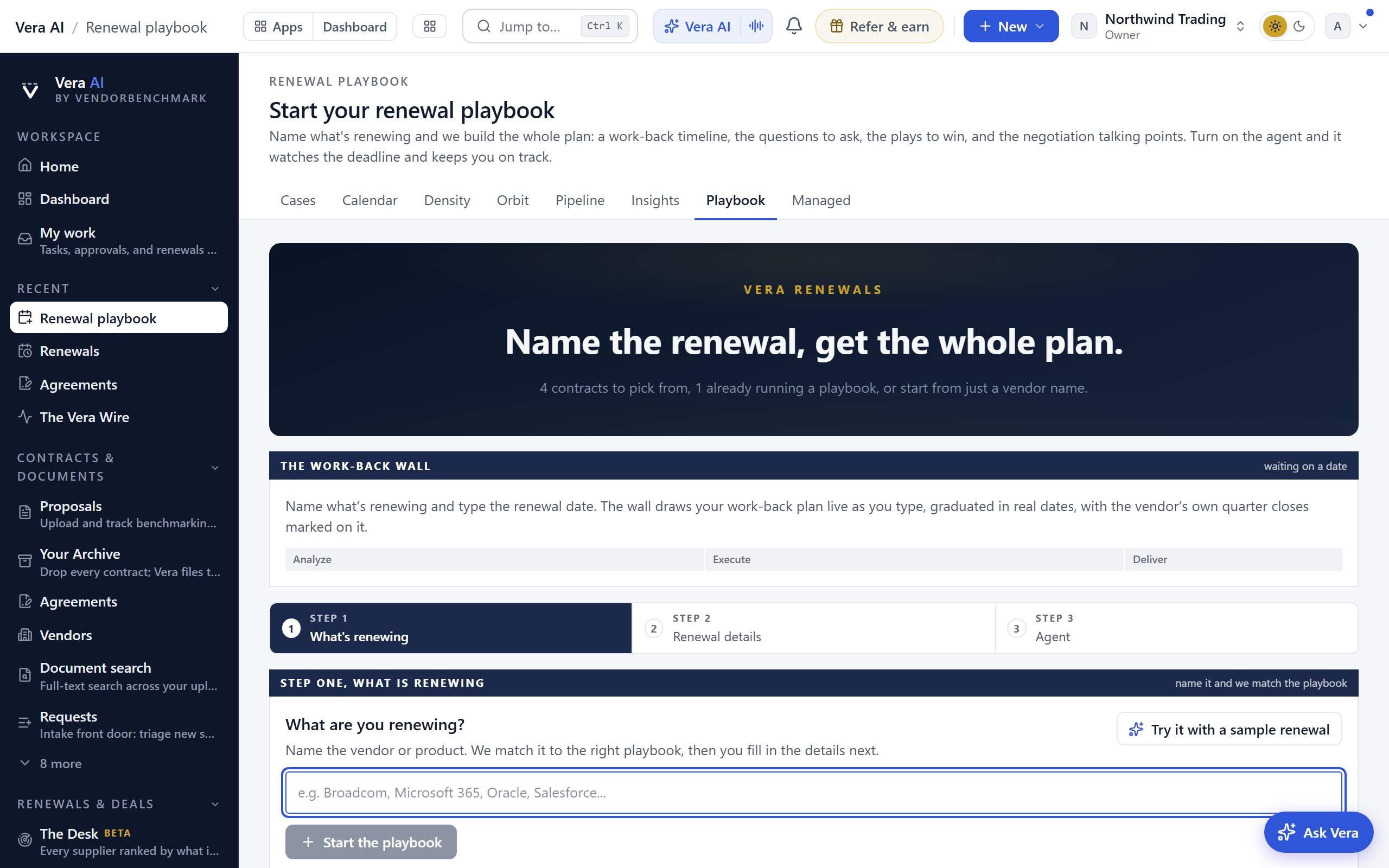
- Build the plan. Open the Renewal playbook for the step-by-step negotiation plan, then set your standard: your clause positions in the Contract policy and the Fair Renewal Rider as your standing protections.
- Track the negotiation. Open a tracked Negotiation: the mandate (target, walk-away), vendor emails analyzed for tactics, every give and get in the ledger, and vendor promises captured as commitments so they reach the contract.
- Watch the vendor while you negotiate. Follow them on Terms watch and subscribe to the Monday Vendor Radar; a price-list move or an earnings wobble mid-negotiation is leverage you want the same week, not at signature.
- Before the first call, walk the full recipe once: Plan and run a renewal negotiation in the cookbook stitches these screens into one sequence.
What is standing at the end of week three: one renewal being worked with a market position, a plan, a mandate, and a paper trail.
Week 4 and day 30: the operating rhythm
The last week converts a good start into a routine the workspace sustains on its own.
- Close the loop on money. When a deal lands, record what it saved from the contract's own page; Spend Agent verifies each claim against the invoices that follow, which is what makes the number defensible in front of finance. About 30 days after any delivered benchmark, answer the one-touch What happened? follow-up; a won reduction files itself.
- Check your data health. Open Data health: the completeness score and every gap ranked by what closing it enables. Work the top one or two; Connect your data and close the gaps is the recipe.
- Skim the wider platform. You have not needed the Spend Agent yet, with its Spend, Savings, Portfolio and Board steps; know it exists before leadership asks. The tool wall on All tools rewards ten minutes of browsing, and Which tool do I use? answers the question directly, by job.
- Set your weekly rhythm. Monday: the Vendor Radar and the renewal radar, if you switched them on. Daily: My work. Before any vendor meeting: the pack, per Prepare for a vendor meeting.
- Day 30, run the health check below. Anything unticked is your week five.
The day 30 health check
Tick these against your own workspace. Each line links to where it is done.
| Standing? | The check | Where |
|---|---|---|
| ☐ | Two-factor is on for your account | Security |
| ☐ | Your contracts are filed, by folder upload or migration | Contracts |
| ☐ | Every agreement that matters carries an expiry date and a notice period | Agreements |
| ☐ | Renewal alerts are on, or deliberately off | Notifications |
| ☐ | The team is in, with the right roles | Members |
| ☐ | At least one deal has a market read: discount, peer range, rank | Benchmark Library |
| ☐ | The nearest renewal has a plan and an owner | Renewal playbook |
| ☐ | Sample data is gone from your screens | Troubleshooting |
| ☐ | Data health is green, or its top gap has an owner | Data health |
If you only have one hour
The whole ramp, compressed to its spine: sign in and set up two-factor (5 minutes), upload a real document on the Home ask bar and ask about it (5 minutes), upload your contract folder into Contracts and answer the renewals question when it finishes (20 minutes, mostly the platform's), press Turn on money-critical alerts under Notifications (1 minute), and run one instant benchmark on the vendor renewing soonest (10 minutes). That hour buys you a watched calendar and a market position; everything else in this chapter deepens it.
Related: The manual by role · The owner's handbook · Common workflows
Next: Chapter 16 · The manual by role
Was this page helpful?
Thank you. Your note goes straight to the team that writes this manual.