21 · The Vera handbook
Vera is the platform's AI analyst, and like any analyst she does her best work for people who brief her well. This chapter is the working relationship in one place: where she lives, what she can and cannot see, how grounding works in plain language, the questions worth asking, how to teach her, where the humans take over, what the allowances mean in practice, and privacy stated plainly. The screen reference for the console itself is Vera AI; asking well is the compact recipe this chapter expands.
Everything conversational here requires an AI plan; Chapter 10 defines the gates.
Where Vera lives
One analyst, many ways in, the same grounding behind all of them:
- Ctrl/⌘ J, anywhere: the overlay opens on whatever you are looking at, and the screen you are on is context she can use.
- The console at Vera AI, with the full chat, memory, and saved threads behind the Full chat button.
- The Ask bar on the home screen: a question and a contract attachment share one field, and the first character you type opens Vera conversations as its own window with your sentence and documents carried along.
- The screen assistant, opened with Ctrl/⌘ / on every page: its question box is Vera herself, grounded in the screen you are on.
- Inside the work: the Ask Vera conversations in benchmark cases and workrooms, and the commission row's suggested question.
- Before you sign in: Ask Vera in the corner of every page of vendorbenchmark.com, the sign in page, and the free decoder. She answers from the public site only, and nothing typed there is saved.
- Where your team lives: Slack and Teams, and email for a question with a document attached.
What Vera can and cannot see
The honest boundary, because trust in an assistant starts with knowing its limits:
- She sees your organization's records: contracts, proposals, agreements, benchmarks delivered to you, your savings ledger, and the documents you uploaded. She never sees another tenant's workspace; isolation is enforced at the database, and the Trust center states it with live numbers.
- She sees the market evidence: the benchmark cohorts, the published research library, Market news. This is what lets her answer market questions without your data.
- She sees the screen you asked from, when you ask through the overlay or the screen assistant, which is why asking from the record beats asking from a blank page.
- She sees what you attach, for that conversation: the Ask bar takes a contract explicitly, a document uploaded into a chat stays with that chat (Attaching a document to the conversation), and nothing is attached unless you attach it.
- She reads the live web when your records and the research library cannot answer, and only then: published prices and rate cards, and market questions such as which providers serve a named region, the alternatives to a product, a vendor's partner network, or recent vendor news. Findings arrive with the source link they were read from, and the reasoning trail names the step. She reads public pages; she never posts your data to them.
- She does not send anything to a vendor outside Case Mode, where every send runs under a mandate you approved and you ride CC.
Attaching a document to the conversation
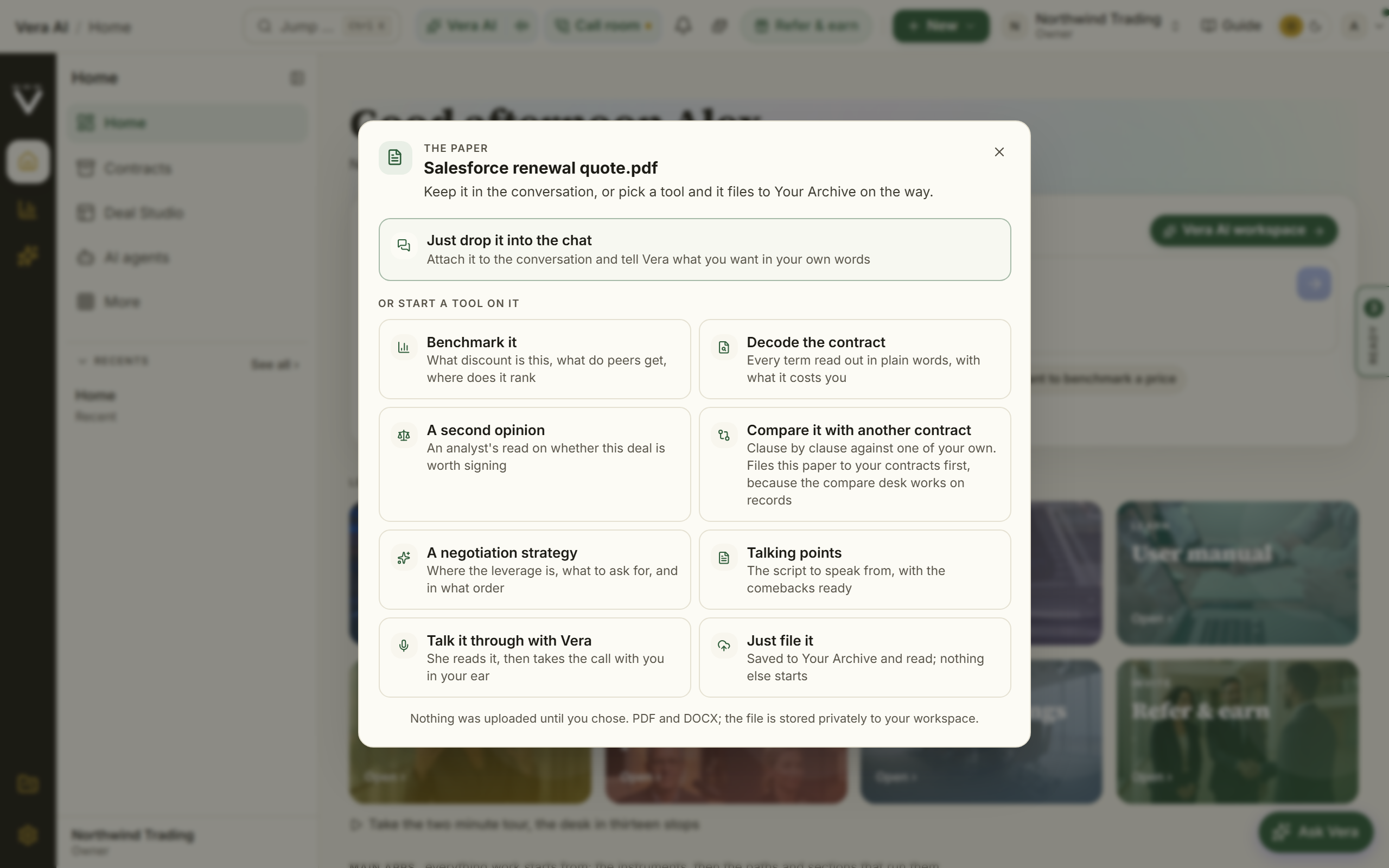
Drag a contract, quote, renewal or statement of work onto any screen and the platform asks what you want done with it. The first answer is Just upload it into the chat: no tool starts, the document goes into the conversation, and you say what you want in your own words.
Inside a conversation the question is already answered, so nothing asks it: a document uploaded anywhere on the Vera conversations window goes straight onto the composer as an attachment, and the next thing you type is answered off it.
On the screen
- The chooser — one dialog, opened by the upload, naming the file. The chat option sits alone at the top; the eight tools (benchmark it, decode it, a second opinion, compare it, a negotiation strategy, talking points, talk it through, just file it) sit under Or start a tool on it. Nothing is uploaded until you choose, so an upload you dismiss leaves no trace.
- Never mind, forget this file — at the foot of the chooser, for an upload you did not mean or changed your mind about. It closes the chooser and does nothing else. This upload only: the next one asks as usual.
- The attachment — once attached, the document appears by name above the box you type in, with an × to take it off.
How to use it
- Drag the file onto the window. PDF or Word, up to 8 MB each, four documents to a conversation.
- Press Just upload it into the chat.
- Type the question. "What is the worst term in here", "how does this uplift compare with what you would expect", "quote me the termination clause" all read the document itself, not a summary of it.
- Ask as many follow ups as you like. The document stays attached for the whole conversation, so turn nine still has it.
- Press the × beside the document's name when you are done with it, or start a new chat.
Tips
- Attaching is not filing. A document uploaded into a chat is stored privately to your workspace and is not added to Contracts; pick a tool, or Just file it, when you want it kept as a contract.
- A chat attachment survives a reload and a closed window, because what is remembered is the stored document rather than the file on your machine.
- One document per question beats four. Four fit, but a question aimed at one document gets a sharper answer than one aimed at a pile.
- Dropping onto a screen that owns its own drop zone (step 1 of the Negotiation Workflow and its Upload a quote lane, the archive's bulk import) still belongs to that screen; the chooser stands aside there.
- A window takes an upload anywhere on the screen, the app itself, its titlebar, the ground around it, and the taskbar alike, and the chooser opens over the window rather than behind it. One upload only ever opens one chooser.
How grounding works, in plain language
Grounded means every figure she gives you has a source you can check, and a number without one is refused rather than invented.
- Citations ride the answers. A price, a clause, a date arrives tagged to the record or evidence it came from; thirty seconds of following the tag is what makes an answer forwardable.
- AI-written reports open with their grounding state. The trust strip says "Figures verified against your data" or raises a review notice, with the source count and date, before you read a word.
- "Not on file" is an answer. Where your records cannot support a number, the honest response is that sentence, plus what to add to change it. A generated report says not on file instead of estimating; hold conversations to the same bar.
- The Figures ledger is the audit trail: every number the platform has cited for you, traced to its source fact and the day it was current.
When the answer is not in your data
Most questions are answered from your records. Three behaviors cover the ones that are not, and they are worth knowing because they change what you should type.
- She searches the market for you. A question about who else provides a service, the alternatives to a product, which providers actually operate in your region, or what a vendor announced recently is searched on the live web rather than answered from memory. The trail shows "Researched the market on the web" and each finding carries its source link.
- She asks for the one input the answer turns on. When the answer depends on a fact you have not given, your region, seat count, term, renewal date, or current spend, you get the general shape first and then a request for that single input. You will not get a question and nothing else. Naming the input in your first message, for example the region, skips a round trip and gets you named providers instead of a general answer.
- She says when it is not yours, and offers an analyst. Where an answer came from the market rather than your own records, she says so in one line rather than letting it read as your data, and where the next step is work rather than a fact, a live negotiation, a regional sourcing decision, a vendor selection, she closes with a link to Advisory to put a human analyst on it.
Twenty questions worth asking
Grouped by job. Each names the question and what comes back; the specific figures depend on your records, which is the point.
On price (the market questions)
- "Am I overpaying for Salesforce at 320 seats?" — your position against the cohort: the discount implied, the peer range, the rank, cited.
- "What discount should I ask for on this renewal?" — the range with the median, the strong ask, and the stretch, the same cohorts the instant benchmarks draw on.
- "What is a strong outcome for a deal this size with this vendor?" — the target floor and stretch, with what each is worth a year.
- "What did this vendor do to its prices in the last year?" — the terms-watch history, diffed, with the changes that touch your seats priced.
- "When should I time the ask?" — the vendor's fiscal geometry against your window.
On document (the clause questions)
- "What does our Northwind contract say about auto-renewal?" — the clause itself, quoted and cited to the document.
- "Which of our contracts have no uplift cap?" — the estate-wide answer, with Review tables as the exportable version.
- "What are the risks in this attached quote?" — the redline-style read on the document you attached.
- "What rights do we already hold with this vendor?" — the harvested register: true-downs, price holds, exit assistance, with exercise windows.
- "What changed between last year's document and this draft?" — the differences called out, with the Time machine as the full instrument.
On your portfolio (the estate questions)
- "Which of my vendors renews next and what should I do first?" — the calendar read with the recommended first move.
- "Where is the money across our stack?" — spend by vendor with the above-market positions ranked by prize.
- "Catch me up on our Microsoft position." — the takeover briefing: agreements, benchmarks, open deals, recent moves.
- "What did we prove in savings this quarter?" — the invoice-verified set, distinguished from the claimed.
- "What in my estate is exposed if this vendor audits us?" — the entitlement picture's defensibility, honestly bounded by what is connected.
On working (the platform questions)
- "How do I set up renewal alerts?" — the steps, with the manual section cited; the Guide button goes to the same place.
- "Draft the follow-up email to my CFO about this report." — the draft, built only from figures the report carries.
- "Which tool should I use to compare these three quotes?" — the routing answer; Which tool do I use? is the standing version.
- "Turn this answer into a standing watch." — the handoff into an agent or workflow, so the question keeps answering itself.
- "What would you need to answer that properly?" — the meta-question that pays best: she names the missing record, and closing it upgrades every future answer.
Teaching her
She learns from what you do with her output, and you hold the eraser:
- The learning is behavioral and slow by design: rating an answer, exporting a deliverable, applying or rejecting a staged suggestion. The pass runs weekly and writes a preference only after a repeated pattern, so a new account starts empty. A written feedback comment is the fastest teacher.
- Everything learned is inspectable and deletable under AI personalization; removing a preference stops it shaping answers immediately.
- Your organization's negotiation Memory is separate and shared: posture, durable facts, and lessons from past deals. Briefs, mandates, and Ask open with it, so pruning it is high-leverage maintenance.
- Corrections compound: fixing the same extracted field the same way twice teaches the extractor, and the next document from that vendor is read with your corrections in hand.
What she remembers
Vera's memory covers your documents, her own work, and your conversations, and every part of it is yours to inspect and prune:
- One memory per person, per organization. Since 1 October 2026 everything Vera holds about you is kept against both you and the organization you are working in. A colleague's conversations, questions, uploads and calls are never recalled to you, and yours are never recalled to them. If you belong to two organizations you have two memories, and what she learned about one firm's deals is not carried into the other.
- What is yours alone. The facts she learned about you, your conversations and their summaries, your conversations with the agents on the desk, the positions you settled, the promises still open, her own notes on your work, and the memo of any private talk you had with her or a specialist.
- Only while you are a member. Your memory in an organization is readable while you are an active member of it. Leave, and what she kept about your work there is closed to you; nothing is handed to anyone else.
- What the organization shares. The contracts, agreements, renewals and reports themselves, which are records every member can look up; the memo of a vendor meeting, which is filed for the team; an agent's own runs and the documents they wrote; and the shared record under Memory, which people write on purpose. Vera does not move anything you say in a private conversation onto the shared record.
- The contracts you uploaded. She knows which contracts you brought in yourself, so "the one I uploaded last week" has an answer.
- Your memory file. About you has Download your memory file: one document with everything she holds about you in this organization, compiled when you press it.
- In the chat, by default. The source picker opens on The web and our conversations: live web search, plus what you and she worked out before. Your contracts are read once you switch them on, with Your contracts or a wider preset. Web only reads nothing of yours. Talking to Vera by voice uses everything.
- Your documents, by their contents. Ask what any uploaded agreement says and she searches the indexed text of every contract, quotes the clause, and links the record. Wording never has to match: "can we walk away early" finds the termination language. Naming a vendor opens her standing dossier on that agreement first, the compiled analyst brief of its economics, decisive clauses, dates, and history, so answers start from an analyst's read rather than raw text.
- Her own reports. "What did the second opinion conclude" or "what did my benchmark report say about the uplift term" is answered from the stored report's actual contents, with the link alongside.
- Your conversations. Each night your conversations with her are distilled into short private memories she can recall in any later chat, so "what did we agree last week" works from anywhere, with a link back to the original thread. Long conversations keep a rolling summary, so nothing said early falls out of reach.
- Commitments. When she says she will check something, or you say you will send something, it lands on a ledger she follows up on, in later answers and in the greeting, until it is done or you upload it.
- Your deal history, as leverage. Before advising on a vendor your organization has negotiated before, she pulls your own record first: the asks raised last cycle with what landed against target, the confirmed outcomes, the promises the vendor made and whether they were kept, and how the same rep played across earlier threads. A benchmark brief for a second cycle opens acknowledging that history instead of reading like a first meeting.
- The decision ledger. Tell her a decision you have made ("we rejected the co-term because of the audit exposure") and she stages it onto the ledger with its reasoning and the alternatives you named; you confirm it like any other staged change. A year later "why did we reject that" is answered immediately, and before repeating or reversing a logged decision she says what has changed since it was made. The ledger is deliberately immutable: a wrong entry is corrected by logging the correction, never by rewriting history.
- What she remembered, under the answer. A settled answer shows the personal facts, learned preferences and workspace notes that actually shaped it, under What she remembered, behind the answer's corner control. Anything wrong takes a one tap Forget right there, and the fix holds everywhere.
- How you work, not just how you write. Alongside output style, she learns stated working habits: who you copy on what kind of matter, scheduling habits you have said out loud, how you want risk framed. A habit is learned only from your own words or repeated behavior, never inferred, and never carries facts or figures.
- The controls. Assistant memory, under the chat, has four tabs: Saved facts, Conversations, Commitments, and the Memory log. Every entry has its own forget control, and forgetting is immediate. Turning AI personalization off stops the learning itself, not just the display.
- The welcome that knows what changed. Coming back after time away, her greeting states what actually changed in your portfolio since your last visit, computed from nightly snapshots, alongside anything she owed you from the ledger. Open commitments also sit on the home screen until they are done.
- Slack and Teams threads hold. A follow-up in the same Slack thread or Teams conversation knows what came before: each connector conversation keeps its own recent history for 90 days, scoped to your organization. Private memory stays off shared surfaces.
Documents and minutes, on request
Ask out loud and Vera writes it: "put that in a document", "make me a sheet of the peer set", "turn it into a deck", "send me the minutes". Every specialist does the same. The document is written in the firm document style from your own records and what is on your screen, lands in My gallery, and is emailed to you with the file attached when you say so. She asks once which you want and remembers the answer. Minutes are written when the call ends; the seat in your meeting sends them to whoever sent her in, and to nobody else.
- What she is learning about you. Alongside what she remembers from your conversations, she keeps a short profile of your role, the vendors in focus, your priorities, your team and how you like advice, and on your own calls asks one light work question when a pause comes. All of it is on About you, where you can correct or forget any line.
When a human takes over
Vera is the analyst on call, not the whole firm. The handoffs, in the order they usually arrive: uploaded proposals go to human analyst benchmarking and come back as delivered reports; Advisory books our analysts for the moments a report is not enough; Managed renewals puts the program under human-approved mandates with the only fee 25% of invoice-verified savings; and Chat reaches the team directly when the question is really for us.
The allowances, in practice
The practical version of Chapter 10: conversation is protected by fair-use daily caps you will rarely meet and never meet unwarned, since a quiet meter appears near the input once less than half a day's cap remains. Trial workspaces meter Vera at ten questions a day and always see the meter. Tool runs count against their own windows, rolling rather than calendar, so allowance frees up on its own as older runs age out; the Billing page is the live meter for all of it. When something is grayed out, Troubleshooting names the fix.
Privacy, in plain words
- What is stored: your workspace's records, the conversations and deliverables you create, and the learned preferences and memory described above, all inside your tenant's isolation.
- What is never stored: documents the instant tools read in the moment. A file uploaded on the quote lane is read in memory and not retained, and the tool pages say so where it applies.
- What leaves the workspace: nothing, unless you send it. Share links are minted by you and guarded by a confidentiality scan; vendor-facing drafts never reveal your percentile, your cohort, or where the numbers come from; contributing anonymized data to the community benchmarks is a consent switch under Data controls, yours to leave off.
- The standing answer for security reviewers is the Trust center, including how the AI handles your data, written to be forwarded.
Related: Vera AI · Ask Vera well · Your AI agents
Next: Chapter 13 · Your AI agents, for the standing workforce built on the same analyst.
Was this page helpful?
Thank you. Your note goes straight to the team that writes this manual.