A renewal is rarely lost on price alone. It is lost across a dozen documents, three inboxes and two dates nobody keeps in the same place: the day the term ends, and the last day to give notice.
The Deal Agent is where Vera AI by VendorBenchmark runs a renewal from start to finish. It holds every renewal and negotiation in one window and walks each deal through six stages in order. This article follows one renewal through all six, and marks where you decide.
Every renewal starts as a dated move
A deal comes in three ways. Upload the vendor's quote or order form and it is read in front of you, filed as the first round and placed against comparable customers. Forward the vendor's email to your workspace's private deal address. Or connect a source: the renewals already on file, your Outlook calendar or Coupa.
Today then lists your moves in one table, in order. Each row carries the vendor, the move with its reason, the date with a meter of the days left, brick for a notice inside 30 days and gold inside 60, and one button that does the move: Draft the notice, Review and approve, Answer the offer, Approve the target or Ask for the quote.
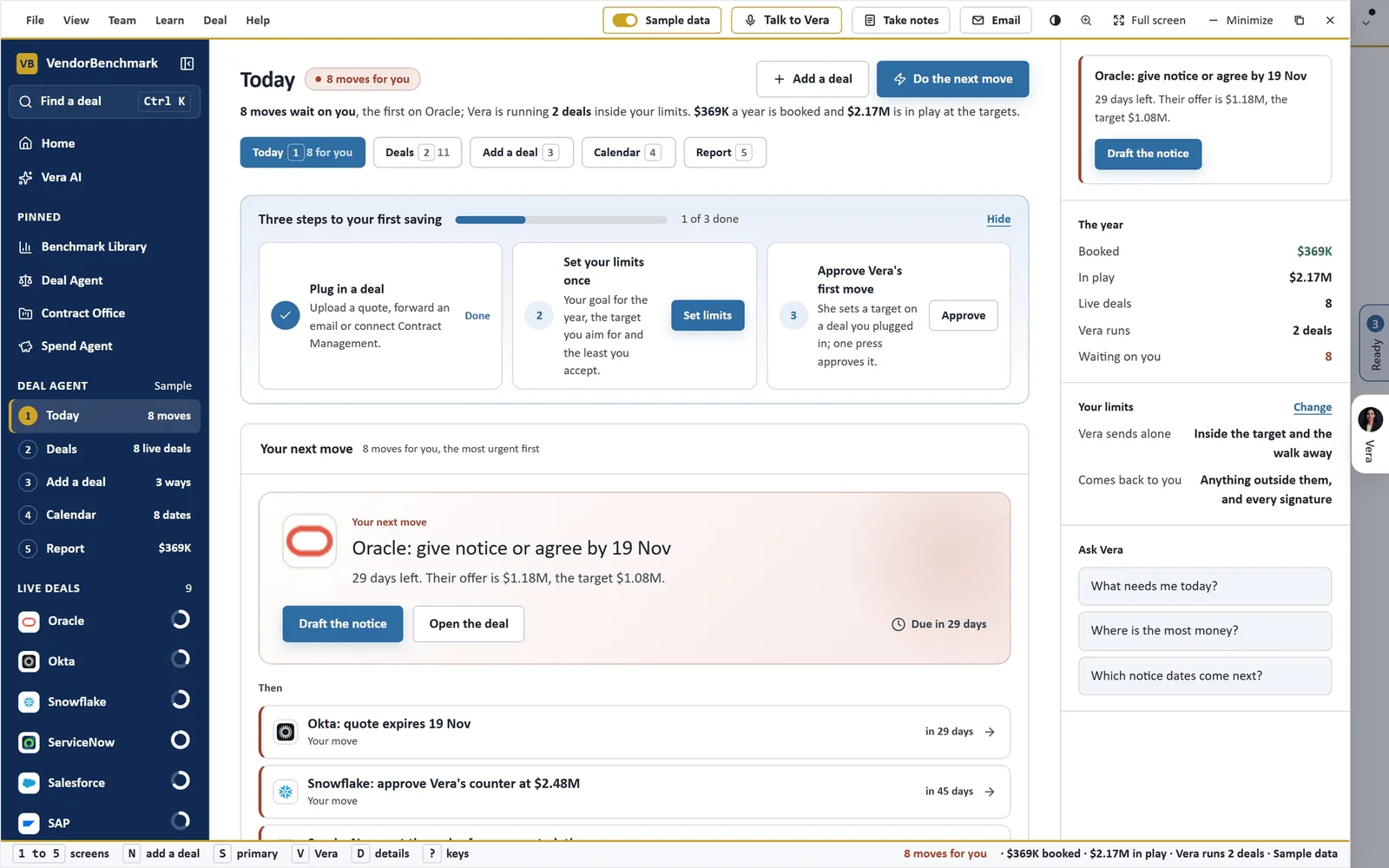
Today, on sample data. The next move leads with its date and its button: give notice or agree a price, with 29 days left. On the right, your limits: Vera sends alone inside the target and the walk away; anything outside them, and every signature, comes back to you.
Read and Benchmark: the paper first, then the price
Read lays out the deal's documents and figures. Every term the read found sits with its page, so a line about the uplift cap opens the contract on the sentence that states it. The billing is held against the contract too: what was billed in the last twelve months, what the contracts say, and the invoice lines that differ.
Benchmark answers three questions in order: what this deal costs, what comparable customers get for the same product at the same size, and where it ranks, with the gap to the midpoint over the term. A percentage off list appears only where the paper prints the list price. Where it does not, the screen says so once and compares rate against rate.
What if lets you move the settle point and watch the saving a year, what is still to go from their offer, and the rank it would earn. Make it the target keeps it. If the range is off shows the rank, the target and the saving with the comparable range 5 percent lower or higher.
Plan and Terms: settle the asks before the vendor calls
Plan sets the levers for the price, the cap and the term against the vendor's path. It lays out the ways to do the deal, shows what this vendor gave before, from past cycles and concessions to promises kept, and holds the mandate, down to the figure Vera never goes above.
Terms checks eight protections against your contract and says which ones it already holds. Six come from the Fair Renewal Rider: an indexed uplift cap, benchmark repricing, audit conduct rules, no retroactive true ups, co termination and change of control protection. The other two are a reduction at each anniversary and no automatic renewal.
A protection your contract lacks becomes an ask before the first call, not a regret after the signature. The same planning also runs as a guided screen of its own, for a single order form you want to work through by hand.
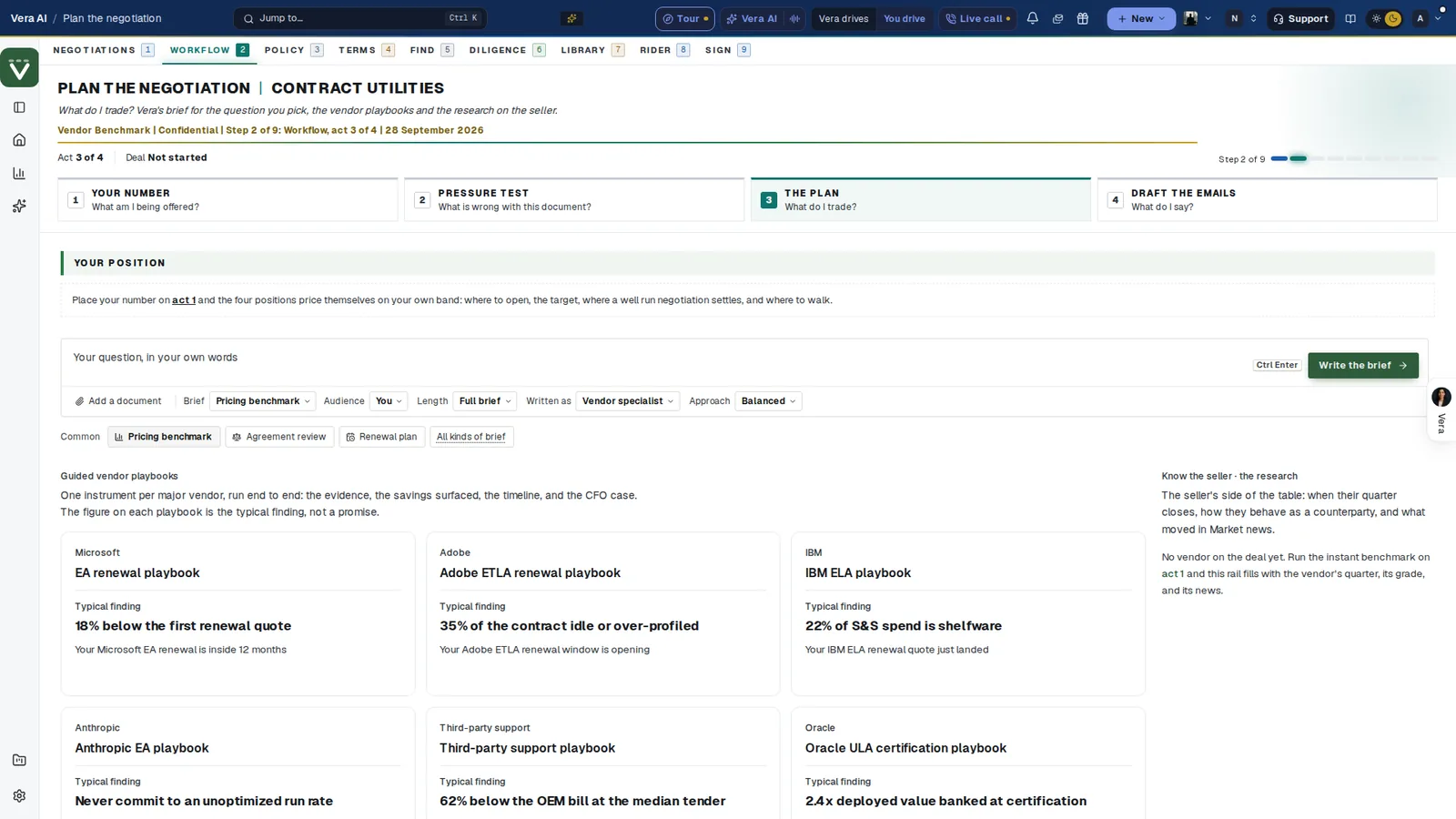
Planning a deal by hand. Your number, placed on your own band, prices four positions: where to open, the target, where a well run negotiation settles, and where to walk. Guided vendor playbooks sit underneath, each with its typical finding, which the screen itself says is not a promise.
Negotiate and Close: Vera drafts, you decide
Negotiate keeps every priced round on one ladder: their offers, your counters, the target and the walk away as lines, and the next move drafted by Vera in its own panel. On your own deals, Send the counter opens the email beside the screen, and nothing goes until you send it. Accept appears when an offer meets the target.
Who runs it is three choices: you run it, Vera drafts and you send, or Vera runs it and you approve. Your limits on the deal are two sliders that move the ladder's lines. Before a hard call, Rehearse puts you against Nadia, who plays the vendor's account executive: four things a vendor says, three answers each, scored with why.
Close records the outcome, what it saved and the record. Before a deal is marked signed it passes three checks: legal reviewed, approval and the e signature envelope. Mark as signed is a person's press.
The notice letter is written for you. Sending it is your decision.
Why the notice date is the real deadline
Every renewal has two dates. The term end is the one in the calendar. The notice date decides the outcome, because once it passes an auto renewal renews on the terms already in the paper, uplift included. It is also the date that slips.
The Calendar puts both on one line for every live deal: twelve months from the first of this month, brick up to a notice that falls inside 30 days, a mark on the last day to give notice and a dot at the term end. By window groups the dates inside 30 days, in 31 to 90 and in 91 to 120, with what each window is worth a year. Add the dates to Outlook downloads them as a calendar file.
Where it sits among the renewal agents
The Deal Agent is the file for one renewal. The full renewals guide shows what brings work to it.
- The overnight drive flags the renewals that need you, every night.
- AI Managed negotiates by email across the estate, inside limits an owner approves.
- Vendor Radar catches a vendor change and adds it to the renewal it reaches.
The Deal Agent page shows the app on one screen.
What to do first
- Plug in one deal. Open the Deal Agent, press Add a deal and upload the vendor's renewal quote.
- Read the price. Open Benchmark, move What if to a settle point you can defend, and press Make it the target.
- Set your limits. On Negotiate, set the two sliders and choose who runs it.
- Put the date in your diary. Open Calendar and add the notice dates to Outlook, so the last day to give notice sits where you work.
Questions buyers ask
What are the six stages?
Read, Benchmark, Plan, Terms, Negotiate and Close. A deal opens at the stage its work is at.
Does Vera email the vendor on her own?
Only if you choose Vera runs it, and then only inside the target and the walk away you set. Anything outside them, and every signature, comes back to you.
Does it serve the notice of non renewal?
No. Notices writes the letter from the deal and dates it a week before the notice date. You send it.
What if the quote prints no list price?
The screen says so once and compares rate against rate with what comparable customers pay for the same product at the same size.
Where do deals come from?
An uploaded quote or order form, an email forwarded to your private deal address, or a connected source: the renewals on file, your Outlook calendar or Coupa.