Most renewal emails are not hard to write. They are hard to write well, on time, for every renewal in the quarter, with the benchmark open in another tab. So they go late, or soft, or not at all, and the vendor's quote becomes the price.
AI Managed is the part of Vera AI by VendorBenchmark that negotiates renewals by email. It reads each renewal date, writes the plan, researches the vendor, benchmarks the price against comparable customers and drafts the emails. Here is what it sends, what it never sends, and what always comes back to you.
It does the homework before it writes
A negotiation starts on New negotiation, five steps as tabs. On Contracts you pick the renewals not yet with the AI. Each row shows today's value, what comparable customers pay, the rank, the notice date and the renewal, and quick selections pick the ones with notice in 45 days, renewing in 120 days, over $100K or below market.
The next three steps shape every email the AI writes.
- Persona. Collaborative, Balanced or Assertive. Each sets the ask, how long the vendor gets to reply, and when the AI follows up.
- Reasoning. The reason each first email gives, suggested from that contract's own facts. A reason the facts do not support is never used, and the AI never claims a budget, a quote or an alternative you have not confirmed.
- Target. The benchmark gap, one cut for every contract, or No target, best price, where the email asks for the vendor's best price and your target stays internal.
The threshold decides who writes. Under the value you set, the AI emails the vendor for a better price with a reason you allow. Over it, a negotiator drafts a plan for an owner instead: the opening ask, the target and the walk away.
You read the first email before it goes
The last step, Start, shows your four choices with Edit beside each, the first email exactly as it will go for each contract you picked, and what the AI may do and never does. Only then do the negotiations start.
By default each first email then waits for an owner, in Do now and in the Email log. An owner can let the AI send under the threshold without asking. Every mandate, every offer and every counter above the opening ask still waits for an owner. The one exception is a tier you raise to Negotiate and sign below the threshold: there the AI accepts an offer inside your floor, cap and approval threshold, confirms it to the vendor in writing and sends a one page acceptance to your approver to sign.
Every first email declares that it comes from an AI, and you are copied on everything the AI sends.
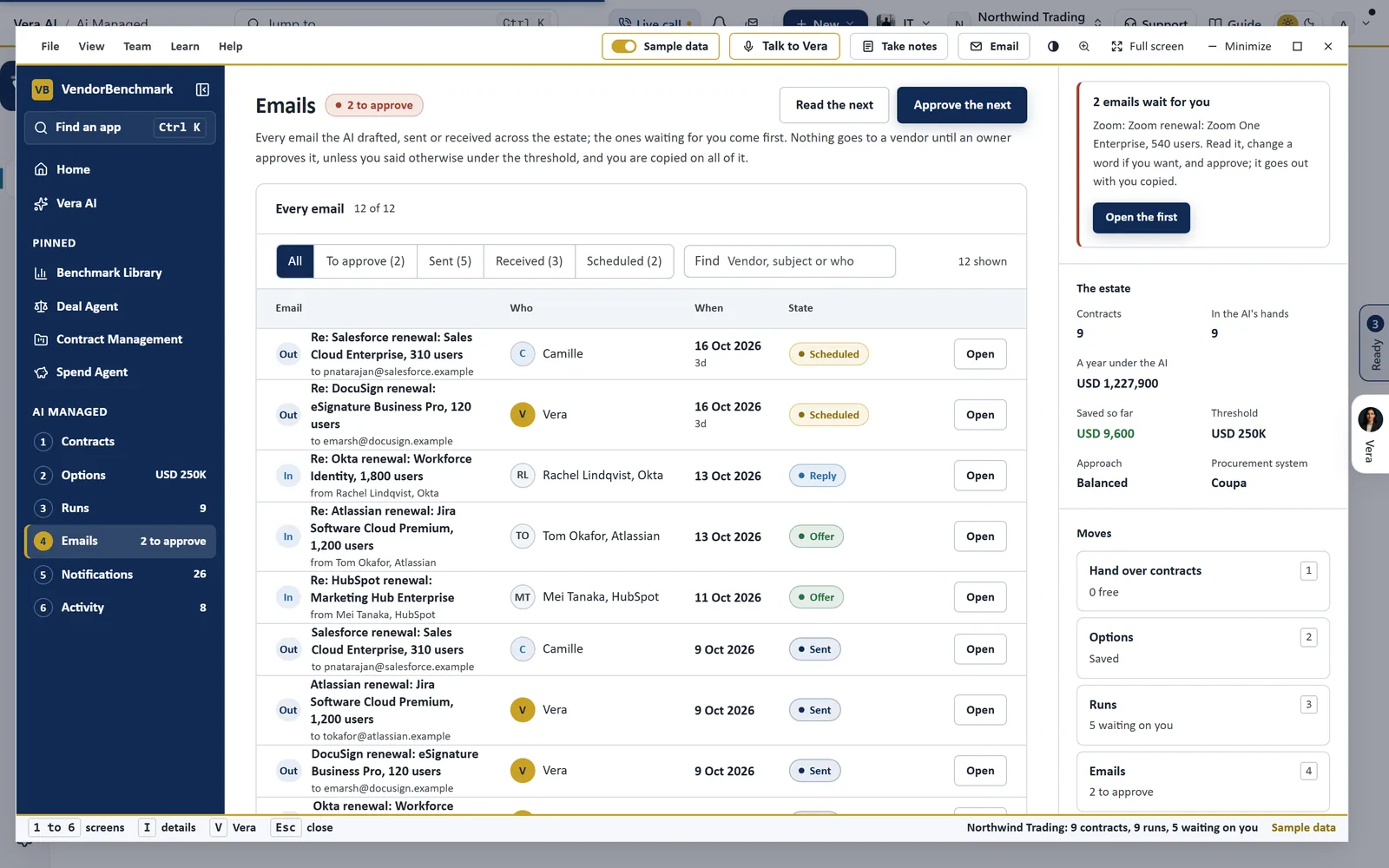
Every email in one list. What the AI drafted, sent or received, shown on sample data, with the drafts waiting for an owner first. The line at the top is the rule: nothing goes to a vendor until an owner approves it, unless you said otherwise under the threshold.
What comes back to you
Do now, on the Overview, lists every decision the AI is waiting on, offers first, then first emails, plans and contacts, each with its value and its due date.
- An offer. The vendor's words, the counter as a slider between your target and their offer, the saving a year as you move it, the price ladder and the rounds. Then Send counter, Accept offer, Hold 7 days or Draft email.
- A first email. The draft with its figures marked, and Approve email, Edit email or Hold.
- A plan. The opening ask, the target and the walk away, with Approve plan.
- A contact. Where the contract names no address, you add the vendor's name and email before anything goes.
Approving an email, a plan or a mandate is for org owners only.
The agent carries the emails. The offer, and your answer to it, stay with you.
Stopping it takes one press
The Email log holds every email between the AI and each vendor in full, under All, Sent, Received, Awaiting approval, Scheduled and Stopped. From any thread you can approve a draft, cancel a scheduled follow up or restore it, hold or resume the negotiation, or take it out of the AI's hands, which is final.
Stop all sending, in the head of the Email log, holds every live negotiation at once. No first email, counter or follow up goes to any vendor until Resume sending, which brings back exactly the negotiations the stop held. Vendors are told nothing, and their replies and offers still arrive.
For a single vendor, Paused on the Mandate page is the switch. Type the vendor, press Pause, and the AI only watches it. Anyone who edits can pause. Only an owner can resume.
When you would rather people ran it
Managed renewals sends the renewal to the Vera AI Team, the analyst team that runs renewals for you. The team declares itself as AI on first contact, copies you on every message and pauses on every formal offer, and nothing reaches a vendor until you approve that deal's mandate.
You pay 25 percent of savings verified against your vendor invoices, or a fixed fee you propose. The monthly statement shows the fee math line by line: each settled renewal, what verified it, the verified saving a year, the fee rate and the fee.
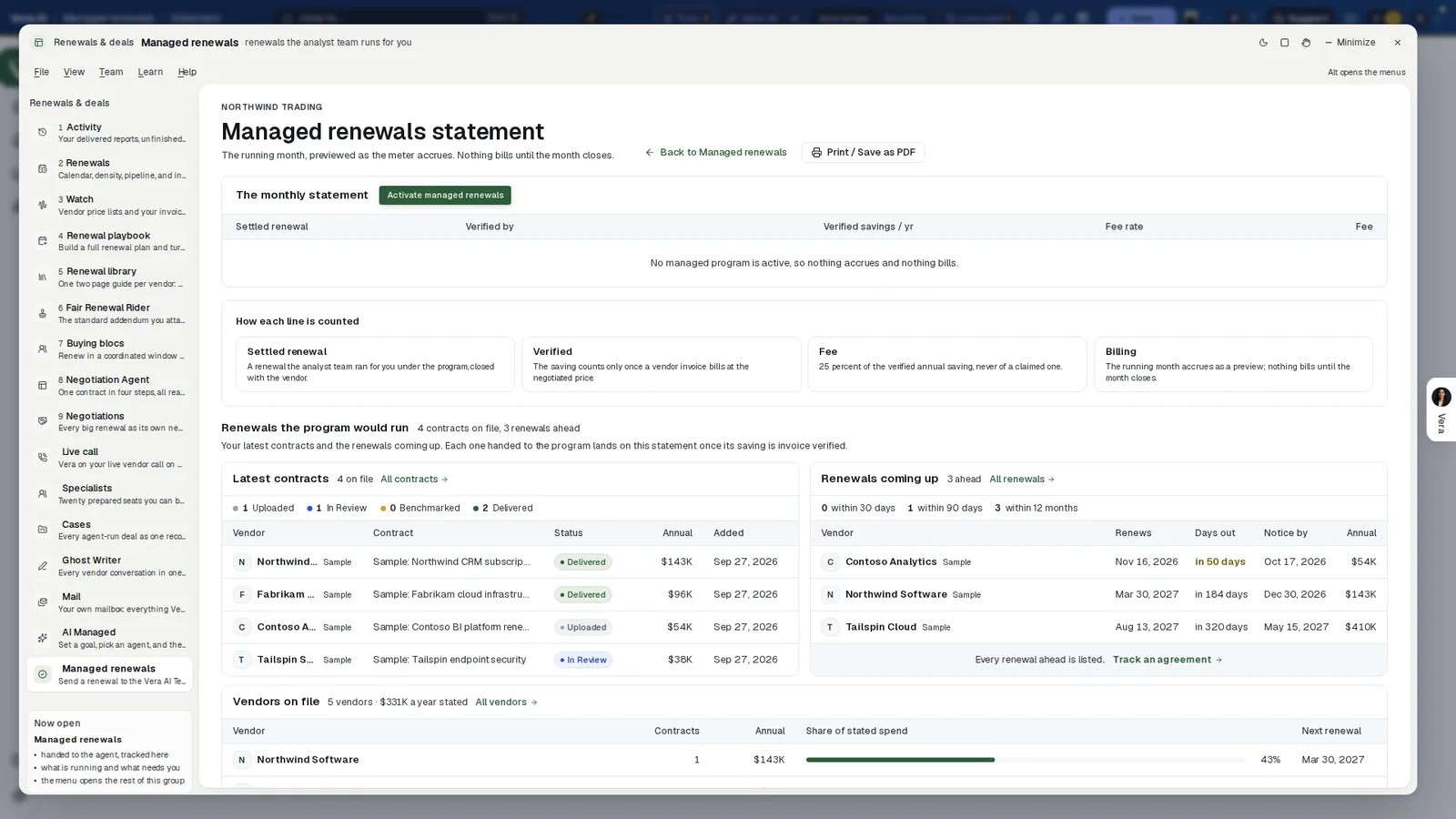
The monthly statement. Nothing bills until the month closes. Under it, how each line is counted: a saving counts only once a vendor invoice bills at the negotiated price, and the fee is 25 percent of the verified annual saving, never of a claimed one.
Where it sits among the renewal agents
AI Managed does the writing. The full renewals guide shows how the rest of the cluster feeds it.
- The overnight drive reads every renewal in your window each night and shows which ones need you.
- The Deal Agent runs one renewal through Read, Benchmark, Plan, Terms, Negotiate and Close.
- Vera on calls sits in when the vendor would rather meet than write.
The AI Managed page shows the app on one screen, and two older posts go further: one on how the agents negotiate on your behalf, and one on handing a renewal to the managed program and paying only on verified savings.
What to do first
- Pick one renewal. Open AI Managed, press New negotiation and choose a single contract from the quick selection for renewals in 120 days.
- Read the first email. On Start, read it word for word and check the reason it gives before you start the negotiation.
- Approve it. An owner approves the first email in Do now, adding the vendor's contact if the contract names none.
- Answer the offer. When it lands, move the counter to the figure you want and press Send counter, or Accept offer, or Hold 7 days.
Questions buyers ask
Does the vendor know it is dealing with an AI?
Yes. The AI declares itself as an AI in every first email and copies you on everything it sends.
What happens when the vendor makes an offer?
It comes to Do now with the vendor's words and the counter as a slider between your target and their offer. You press Send counter, Accept offer or Hold 7 days. The AI never agrees a price above your walk away.
Who approves the emails?
An owner. Approving a first email, a plan or a mandate is for org owners only, and only an owner can let the AI send under the threshold without asking.
How do we stop it?
Stop all sending holds every live negotiation at once, and Resume sending brings back exactly the ones it held. Pause stops the AI on a single vendor. Vendors are told nothing.
Can a person run the negotiation instead?
Yes. Managed renewals sends a renewal to the Vera AI Team, paid as 25 percent of savings verified against your vendor invoices or a fixed fee you propose.