Vendors reprice you through their documents as well as their price lists. A redefined license metric, a new meter in a cloud policy or an indexation clause can change what you owe without a new price on any page you watch. Nobody on a buying team reads those pages every morning.
Vendor Radar, in Vera AI by VendorBenchmark, does. It reads your own agreements, every contract with an annual value, and the public documents the platform reads every day for each vendor you follow. It matches each change to the agreements of that vendor and prices it where the figures are on the agreement. Here is how a change reaches you, and what you do with it.
It reads the vendor's own documents every morning
The documents are the vendor's own: the Microsoft Product Terms, the Oracle policies, the AWS service terms and the rest. Following decides what the radar reads, with three switches for every vendor at once, Prices, Licensing, and Cloud and AI, and a switch per kind on each vendor. Switch a kind off and the radar stops reading those pages and stops counting those changes.
Alongside it, the platform's daily sweep compares the licensing and cloud policy documents of the major vendors with yesterday's copy, 32 documents in all, and logs each change with the exact lines that moved.
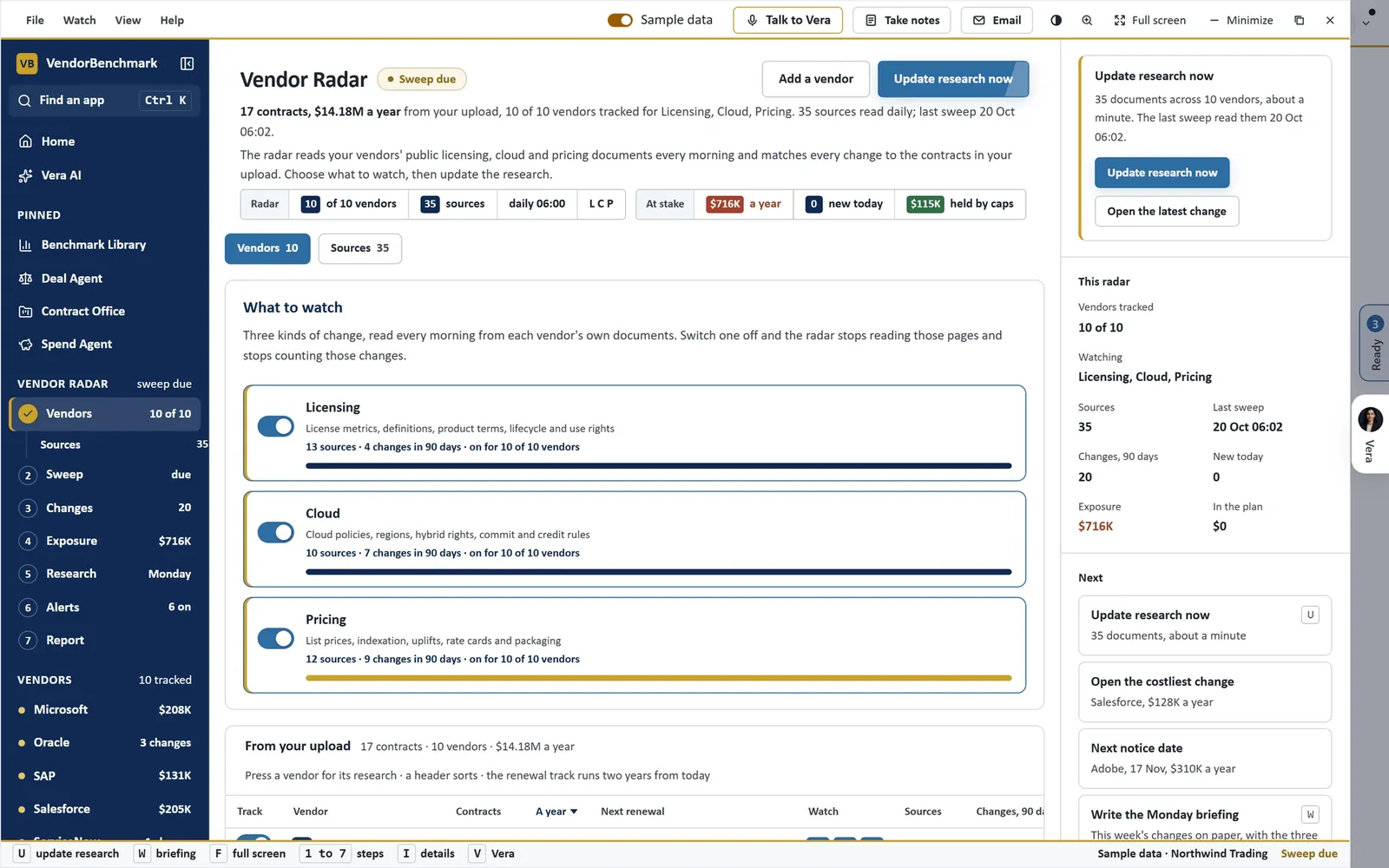
What to watch, on sample data. Three kinds of change, licensing, cloud and pricing, read every morning from each vendor's own documents and matched to the contracts in your upload. Switch one off and the radar stops reading those pages.
Each change is held against your agreements
A change opens on one page in three parts.
- Change. The summary, before and after, the vendor's own words, and the pages they were read on, opened at the passage.
- Agreement impact. For each agreement it reaches, the clause that decides it with the deciding words marked and a link to the contract at that page, then the terms: annual value, price cap, renewal, notice date and when the change takes effect.
- Actions. The next steps in order, with the email drafted beside them.
Each agreement it reaches gets an effect, Cost, Watch, Benefit or No impact, and an estimated impact a year with Vera's analysis. Inputs move the estimate to your situation: users at renewal, whether the cap is confirmed, a quote received, a requested increase. A change that reaches no agreement says so and offers no email.
The date that matters, and the next action
Today lists the changes that need a response: near notice dates first, then new charges, then priced costs. Each row names the change, the agreement it reaches with its effect, the key date with a meter that fills as it nears, brick inside 30 days and gold inside 90, and the next action as a button.
The actions run in order: the email to the vendor, adding the change to the renewal in the Deal Agent, reminders before the notice date, an analyst review, and a forward to a colleague. Draft email writes the email from the change and your inputs, then lists six checks before you send: the notice date named, the answer asked in writing, the clause quoted, nothing committed, the right recipient, the CFO copied. The draft opens in Outlook on the web, your mail app or Gmail.
A vendor change should reach you as a dated action, not as a surprise in the renewal quote.
Before each renewal, Agreements shows every change that reaches it. Price protection splits your annual value between agreements with a price cap and those renewing at the vendor's list, and Unpriced meters lists the new charges no agreement prices.
You choose how you hear
Alerts sets the delivery: on an agreement, the recommended setting, on every change, or the Monday summary only, each showing what it would have sent in the last 30 days. Rules decide what alerts at once: a change that costs money, a notice date inside 30, 60 or 90 days, or anything worth more than a floor you set. The channels are email, Teams, Slack and the app, with reminders before a notice date and quiet hours.
A weekly vendor report also lands on the radar every Monday morning, and the research agent's weekly radar places each market finding by how soon it lands.
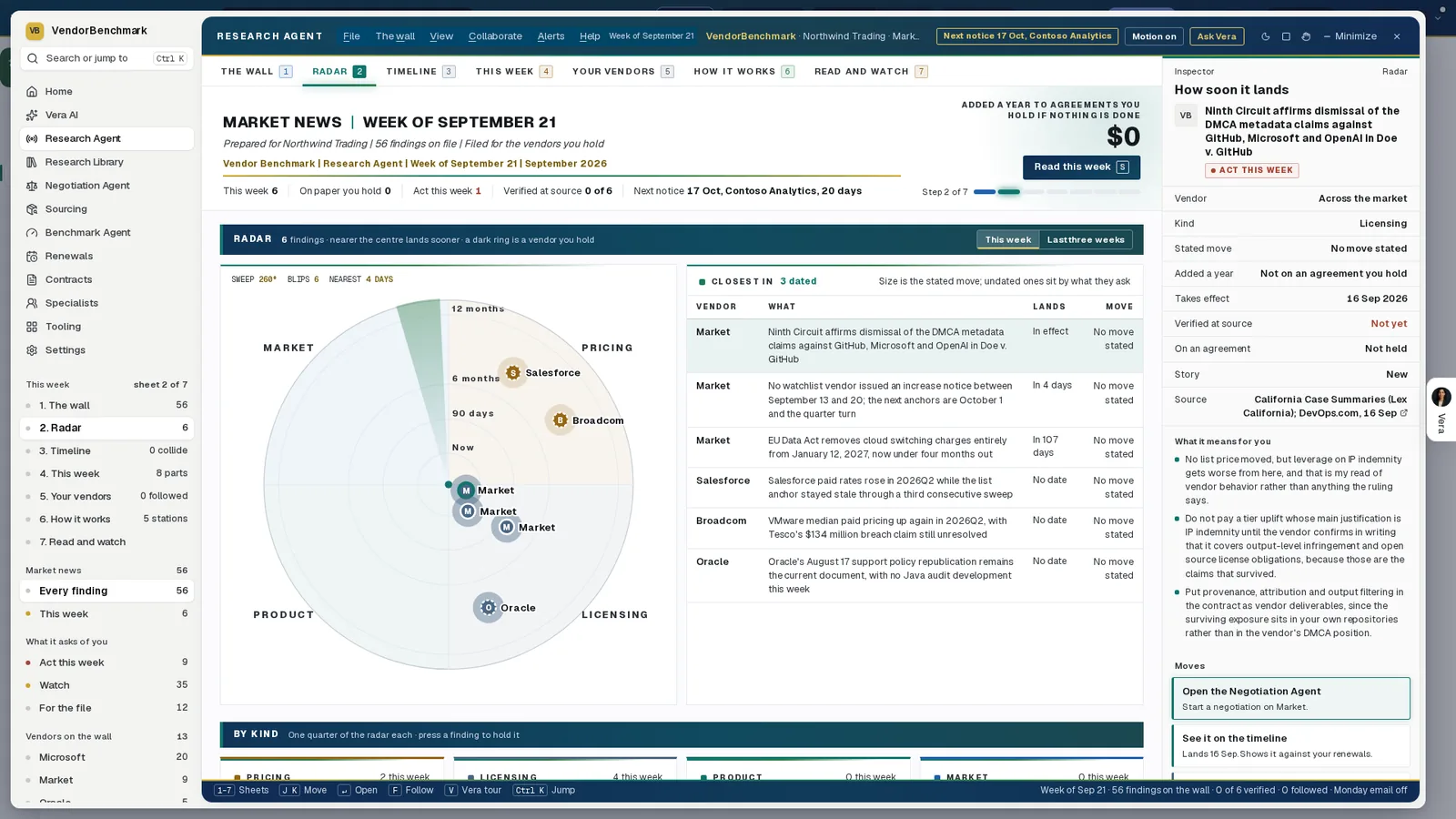
The week on one radar. Each finding sits in its quarter, pricing, licensing, product or market, and nearer the centre lands sooner; a dark ring marks a vendor you hold. The inspector on the right says what a finding means for you and whether it is verified at source.
Why the fine print is where prices move
A renewal quote is the vendor's opening position. The terms behind it move all year: a metric redefined, a support policy reissued, a cloud credit rule rewritten. By the time the quote lands, the change is the baseline, and arguing against a baseline is harder than answering a change.
The radar's value is timing. A change caught the week it is published can be answered while the notice date is still months away, in writing, with the vendor's own words quoted back and the clause in your agreement beside them.
Where it sits among the renewal agents
Vendor Radar watches the vendor. The full renewals guide shows who acts on what it finds.
- The Deal Agent takes the change into the renewal it reaches.
- The overnight drive reads every renewal in your window against the market each night.
- Workflow agents can mail your team a weekly brief of dated vendor news.
The Vendor Radar page shows the app on one screen.
What to do first
- Choose what to follow. Open Following and switch off the kinds of change you do not need.
- Set how you hear. On Alerts, keep delivery on an agreement and pick your channels.
- Open the first change. On Today, double click the top change under Action required, read the clause under Agreement impact and move the Inputs to your situation.
- Draft the reply. Press Draft email, clear the checks and open the draft in your own mail.
Questions buyers ask
Which documents does Vendor Radar read?
Your own agreements, every contract with an annual value, and the public documents the platform reads every day for each vendor you follow, such as the Microsoft Product Terms, the Oracle policies and the AWS service terms.
Does it put a figure on every change?
Only where the figures are on the agreement. A price rise is priced at the next renewal and held to the agreement's cap. A change the daily sweep catches shows Not priced until an analyst prices it.
Does it email the vendor?
No. Draft email writes the email from the change and your inputs, with checks before you send, and opens it in Outlook, your mail app or Gmail. The platform sends nothing.
How do the alerts reach us?
By email, Teams, Slack or in the app: on an agreement, on every change, or as the Monday summary only, with reminders before a notice date and quiet hours.
Can we check the vendor's own wording?
Yes. Each change shows the vendor's own words and the pages they were read on, opened at the passage, beside the clause in your agreement with the deciding words marked.