The vendor call is where a renewal is often decided and rarely recorded. The account team arrives with a script, a deal desk and a quarter to close. The buyer arrives with a list of points and a memory of what was promised last time.
Vera on calls puts an analyst from Vera AI by VendorBenchmark in the meeting. You paste the link once, and Vera or a specialist joins the call, introduces herself when the host admits her, and files the minutes when it ends. Every call becomes a record: the prep before it, the call itself, and after it what was decided, who owes what, and the follow up.
You paste the link once
Add a call is one box. Paste the meeting link, then choose This call for a meeting that is running or about to start, or Every week for a recurring one. A recurring Teams or Zoom meeting keeps one link, so you never paste it twice.
Under the box you pick who joins: Vera, the analyst, or one of the specialist seats, one per vendor family and one per craft. One minute before each call she asks to join, and you admit her from the lobby like any guest. Each call is booked a day ahead and read again from the schedule the moment she is sent in, so a change you make before the day still applies.
Prep holds the call ahead: the goal, what she reads first, the talking points, what is still open from earlier calls with that vendor, the newest research notes, and the agreement's end and notice dates.
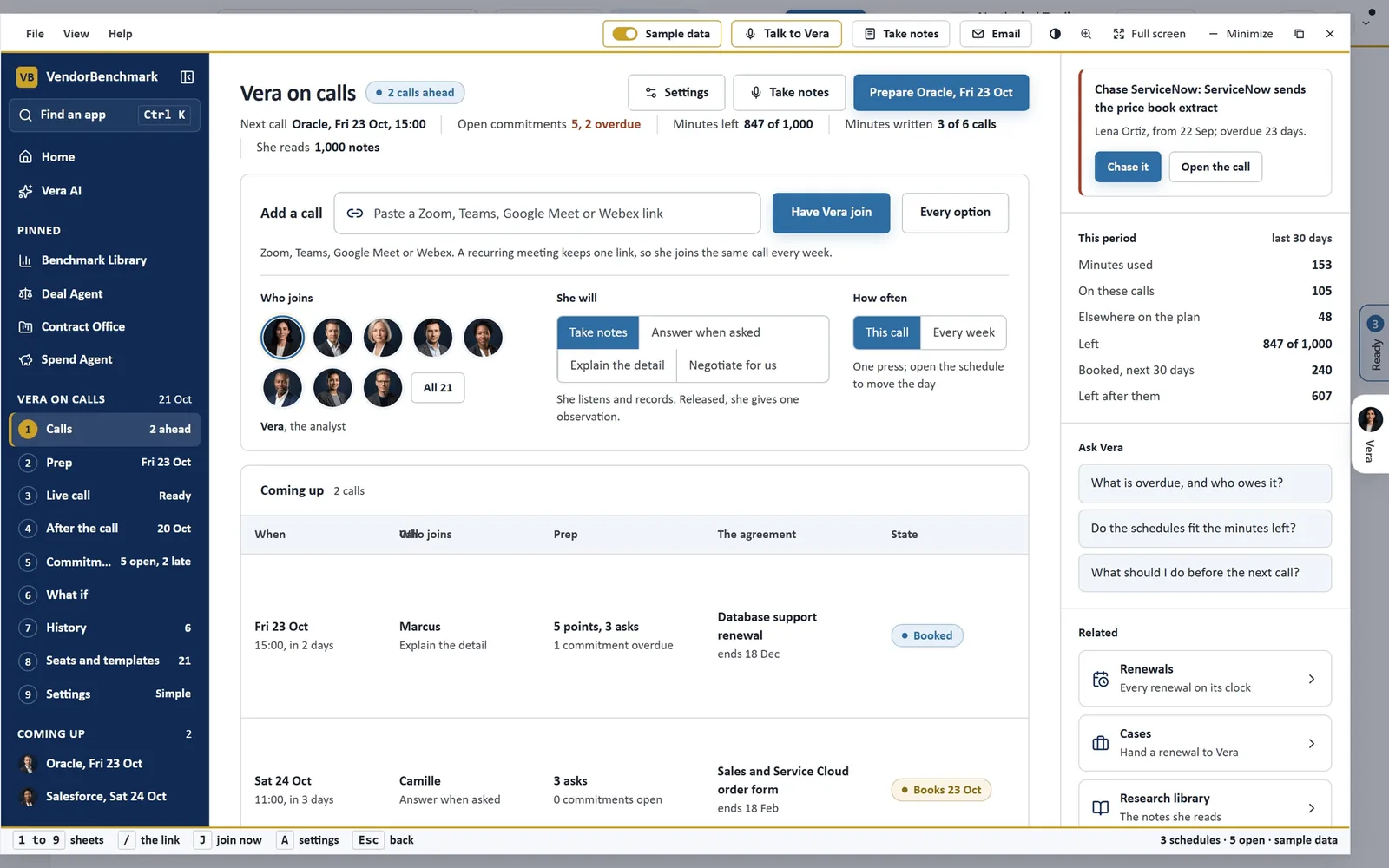
Vera on calls, on sample data. Add a call takes the link, who joins, what she will do and how often. Coming up lists each booked call with its prep and the agreement it concerns.
You decide how forward she is
She will takes one of four roles: Take notes, Answer when asked, Explain the detail or Negotiate for us. The role decides how much she says.
- Take notes. She stays silent unless the room speaks to her or you release her.
- Answer when asked. She fields what the room puts to her and leaves the rest alone.
- Negotiate for us. She argues your side, pushes back and puts the ask, working from the goal and talking points you set and our research on that vendor.
Whatever the role, you hold the controls. Her private line runs to your headset, and the meeting hears her only when you release her. Mute her cuts her off mid sentence. Walk her out has her say one goodbye to the room and leave. She stops the moment somebody else starts talking.
What she knows, and what she cannot say
She has no figures of her own. Every number she says is looked up in the moment from your own agreements, benchmarks and spend, and when nothing on file covers the question she says so rather than estimating. Asked about a figure on your deal, she says one short line that she is checking, then looks it up.
She is open about being there. Her name is in the participant list and she introduces herself when the host admits her, so nobody is recorded without knowing. Recording and transcription law varies by country and state, so tell the other side if your policy asks you to. And on a Teams call booked from AI Managed, she agrees nothing on the call; every offer comes back to you.
She can argue your side. She cannot reveal your walk away, because she never knows it.
After the call, the minutes are already written
When the call ends she writes the memo: the call in brief, every figure and who said it, the commitments in both directions, the flags and your next moves, grounded only in what was said.
After the call shows what was decided, every commitment with its owner, date and state, and the follow up drafted from that call's own minutes, ready to copy. Commitments gathers every action from every call, overdue first, filtered by Owed to us, Owed by us, Overdue or Done. Chase asks Vera to draft the chasing email; Track and Mark done keep the commitment in Tasks with its date. The next call with that vendor opens knowing how the last one ended.
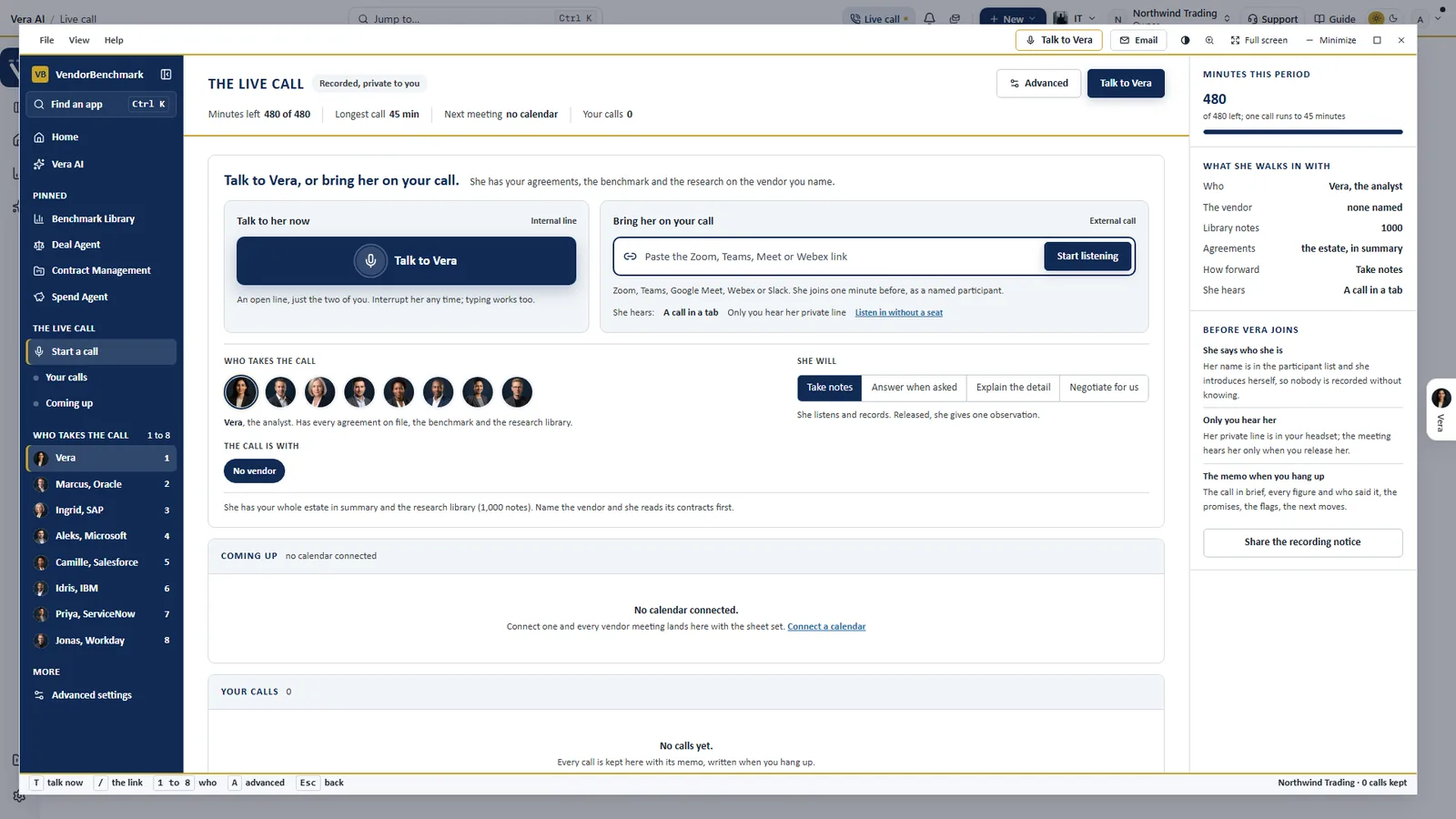
The live call. Talk to Vera on an internal line, or bring her onto your call. Before she joins, the panel on the right says what she walks in with and how she behaves: she says who she is, only you hear her private line, and the memo is written when you hang up.
Why the call needs a record
Much of what a vendor gives in a renewal is said before it is written: a credit offered on a call, a price held if you sign by quarter end, a promise to send the price book. If nobody writes it down with a date and an owner, it is gone by the next call.
Vera on calls turns each of those into a line in the minutes, with who said it, and keeps it on Commitments until somebody marks it done. The record is the leverage for the next call.
Where it sits among the renewal agents
Vera on calls covers the meeting. The full renewals guide shows the agents that cover the paper and the email.
- AI Managed negotiates by email, and can book Vera onto a Teams call with each vendor, with the run's mandate as her goal.
- The Deal Agent holds the deal the call is about, from the first read to the close.
- Workflow agents chain the routine work around a renewal into email, Slack and tasks.
The Vera on calls page shows the app on one screen, and two older posts come at it from other angles: what a live analyst in your ear does during the call, and how Vera joins a meeting already running while you choose who walks in.
What to do first
- Add one call. Open Vera on calls, paste the link of your next vendor meeting and pick who joins.
- Start with Take notes. She listens and records, and speaks only if the room asks or you release her.
- Prepare it. Open Prep the day before, add your talking points and check what is still owed from the last call.
- Close the loop. After the call, send the follow up and track each commitment to its date.
Questions buyers ask
Which meeting platforms does it join?
Zoom, Teams, Google Meet and Webex. A recurring meeting keeps one link, so she joins the same call every week.
Will the vendor know she is there?
Yes. She joins as a named participant and introduces herself when the host admits her, so nobody is recorded without knowing. Tell the other side about recording if your policy asks you to.
Can she agree terms on the call?
No. Everything she can reach is read only, so nothing she does in a meeting changes a record, sends anything or commits you. She does not know your targets or your walk away.
Where do her figures come from?
From your own agreements, benchmarks and spend, looked up in the moment. When nothing on file covers the question, she says so rather than estimating.
What do we get after the call?
The memo with every figure and who said it, what was decided, each commitment with its owner and date, and a follow up drafted from that call's minutes.