An SAP renewal is three arguments at once: how many users of each type you really need, what the documents your interfaces create should cost, and whether RISE with SAP beats staying where you are. SAP arrives with an answer to all three, built on its own count.
SAP Suite is the app in Vera AI by VendorBenchmark that puts your count beside SAP's. Each module runs on its own, and each fills in the next: the license position gives RISE its user count, Digital Access gives it the document charge, and the strategy and the talking points are written from all three.
The license position, read from USMM
Inputs comes first: every file the suite reads and every value you type, on one screen ahead of the results. The USMM exports go there, one per system, as TXT or XML or a zip of them, up to 60 MB each and 40 in all. Engagement holds the contract currency and four dates: SAP's quarter end, the end of ECC mainstream maintenance, your go live and the renewal. It also keeps every figure the modules find, with where it came from, and any one of them can be set to your own value.
License position reads the exports, classifies every account and picks the production system for you. It shows three scenarios of what you own against what you use, the named users by bucket and system, the findings and the account list. Download Excel saves the ECC license position workbook, ten tabs with no user names or email addresses, and the clean up list saves the accounts to remove as CSV.
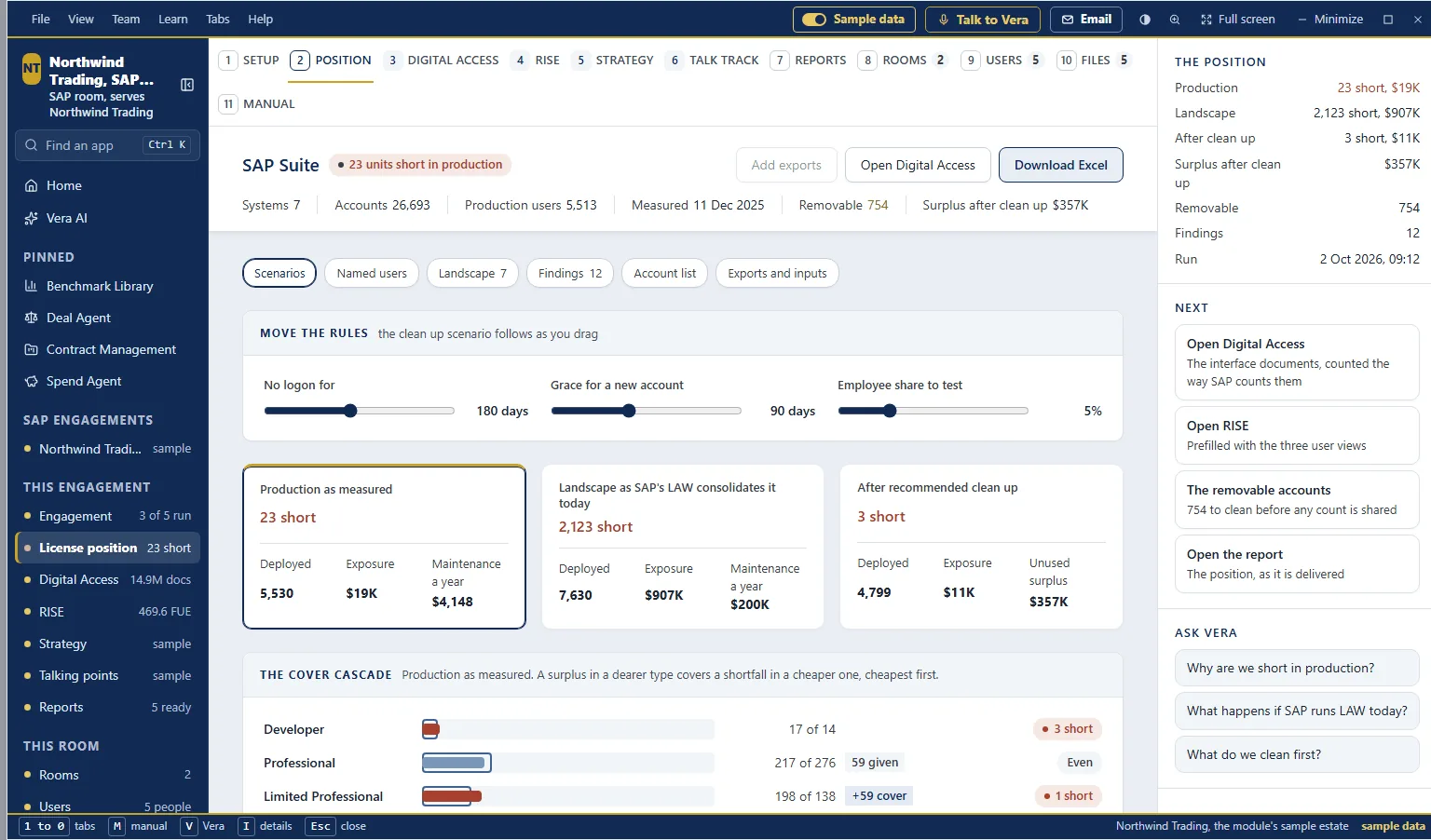
Three scenarios on the sample estate. Production as measured, the landscape as SAP's LAW consolidates it today, and after the recommended clean up, under sliders for the clean up rules. Below, the cover cascade: a surplus in a dearer type covers a shortfall in a cheaper one, cheapest first.
Digital Access, priced three ways
Digital Access is priced on documents, the ones your interfaces create in SAP. The module counts them by type and prices the charge three ways: as a full Digital Access license, as the adoption program, and as staying on indirect use. First estimate from USMM starts from the position; enter SAP's own counts when you have them.
The walk from measured to weighted applies SAP's rules in order. Documents created by SAP applications are exempt. Documents created by licensed named users are exempt only where the contract says so. Bots under dialog user ids still count. Follow on documents, created automatically from a counted one, come off. The questions to put to SAP sit beside their answers.
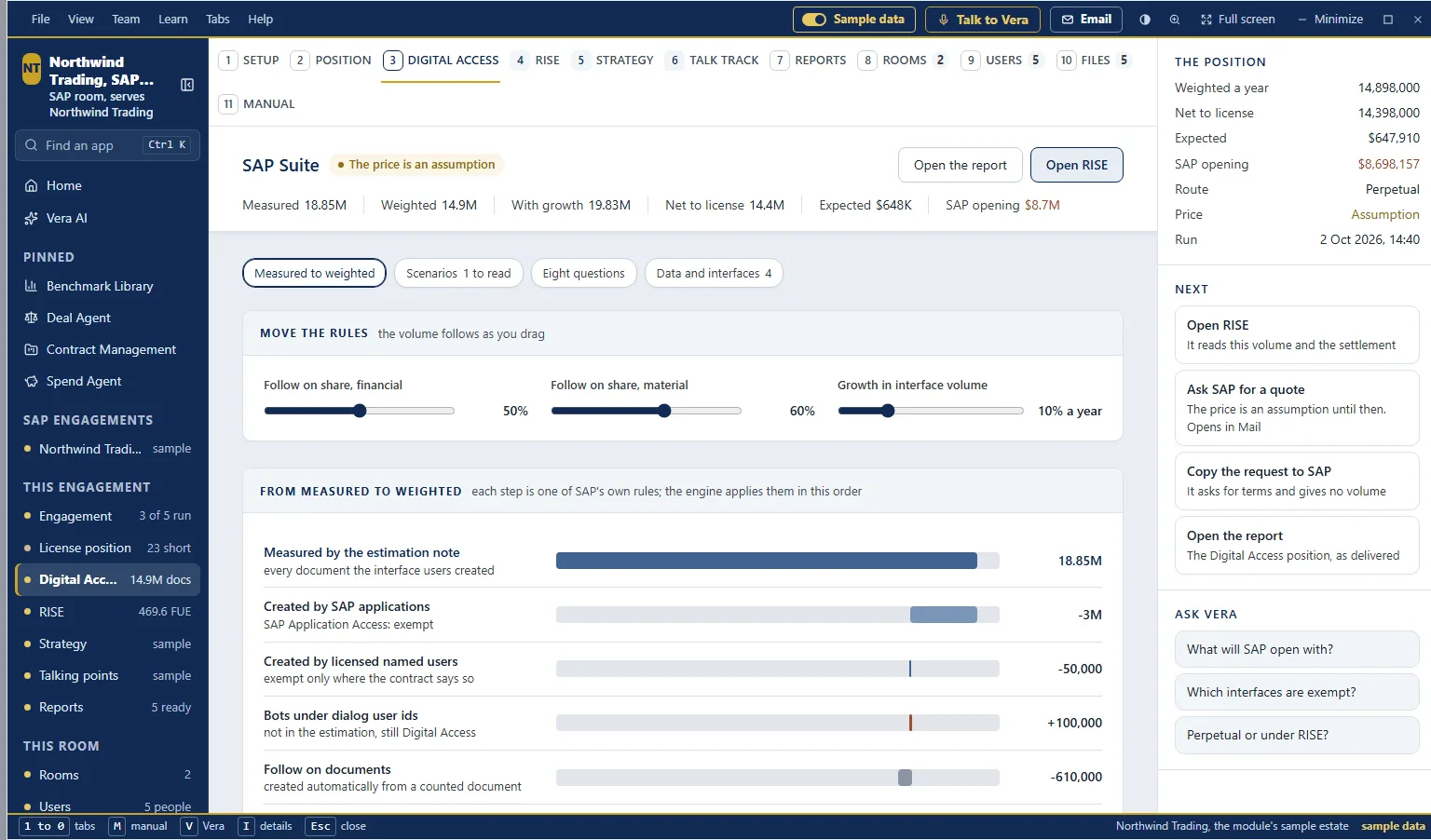
From measured to weighted. Each step is one of SAP's own rules, applied in order, from the documents in SAP's estimation note to the volume that needs a license. Sliders move the follow on shares and the growth in interface volume.
RISE with SAP against staying
RISE takes its inputs from the other modules, marked as prefilled: the users in three views and the license value from the position, the document volume and settlement from Digital Access, and the commercials you type. Back to the prefill undoes your changes.
It shows the FUE count, the bill of materials, five years year by year, staying where you are, a sensitivity table and the checklist for the order form. Download Excel saves the RISE model workbook, seven tabs.
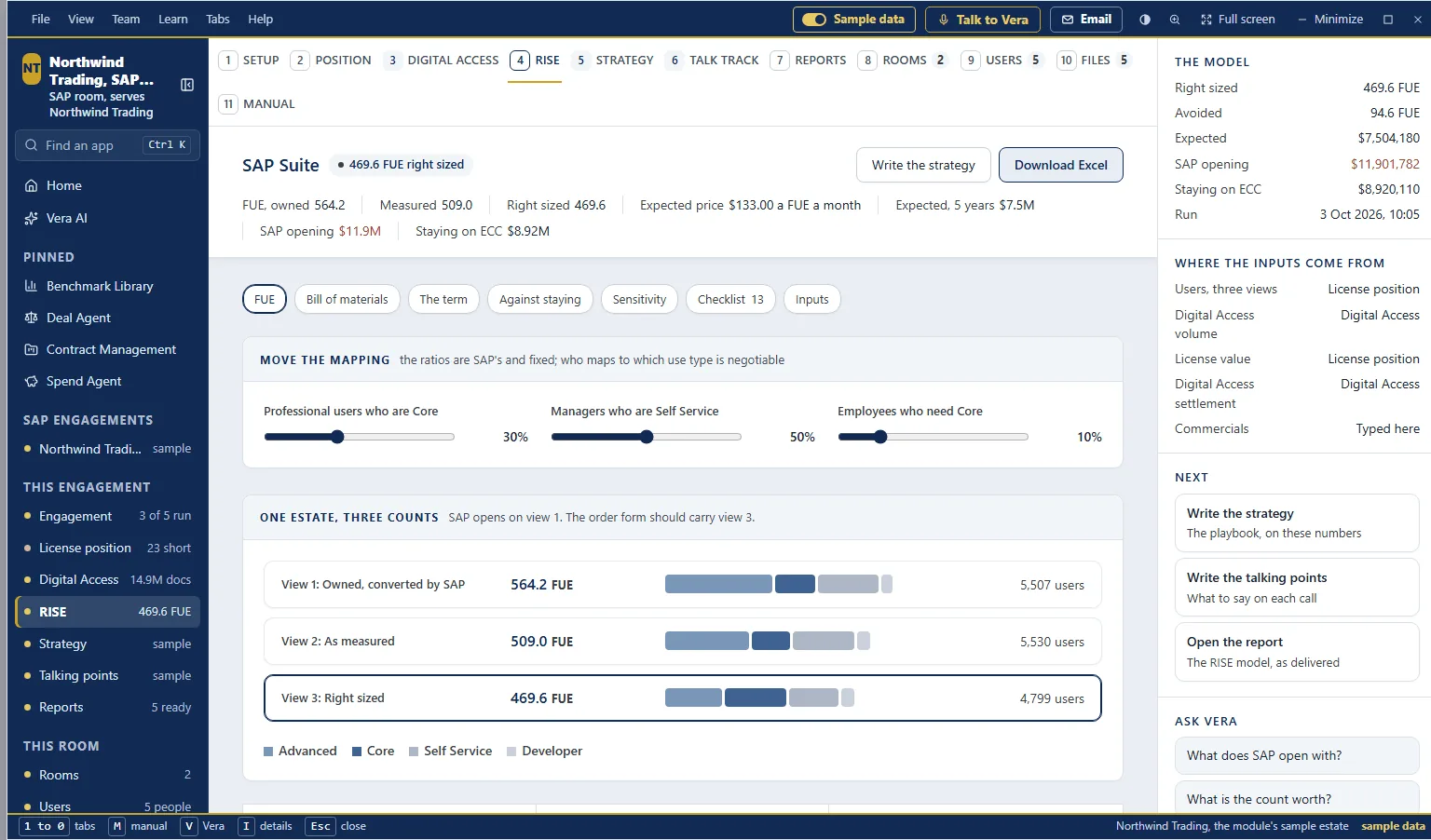
One estate, three counts. The same users as converted by SAP, as measured and right sized, with the line the screen draws under them: SAP opens on view 1, and the order form should carry view 3.
SAP opens on its count. The order form should carry yours.
The mapping is where the argument is. The ratios that turn users into FUE are SAP's and fixed. Who maps to which use type is negotiable, and the sliders on the screen move it.
The strategy and talking points, from your figures
Write the strategy and Write the talking points, what to say on each call, start the last two modules. The progress shows research, the outline, the writing and the review, and you can close the window while it carries on. Once written, the screen shows what each document is built from: the modules' figures, the term against staying, each part as rows, the asks and the lines to use as written. The document itself is a PDF.
Only counts and totals go to the writer, never user names or email addresses, and the workbooks leave them out too. The exports sit in a private store in your workspace, open only through a link that lasts 60 seconds, and every read is in the audit log. Every figure argues in US dollars; set the contract currency and its rate when SAP prices in another.
Since 29 October the suite also measures SAP Ariba, SuccessFactors, Concur and BTP against their order forms, from their own exports, read in your browser.
Where it sits
SAP Suite is the self serve route for SAP. When you would rather send the files and have people check the result, Same Day ELP covers RISE with SAP, ECC, S/4HANA and Digital Access, with conversion credits and a total cost comparison on ECC and S/4HANA, and right sizing on RISE.
- What to upload lists what an SAP position needs from you.
- How Same Day ELP works follows a request through the 24 hours.
- Automated or human checked helps you pick the route.
The Same Day ELP guide covers the whole cluster, and the SAP Suite page covers the app itself.
What to do first
- Open the sample. Switch on Sample data for a finished engagement on a fictional estate of 26,693 accounts across seven systems.
- Ask Basis for the exports. Ways in drafts the request: Open in Mail or Copy the request.
- Run the position first. Upload the USMM exports on Inputs, check the production system, enter the license lines you own and press Run the position.
- Then Digital Access, then RISE. Add the interfaces or SAP's counts, check the prefilled RISE inputs, enter the quote's figures and write the strategy.
Questions buyers ask
Which files does SAP Suite read?
USMM exports, one per system, as TXT or XML or a zip, up to 60 MB each and 40 in all. Digital Access starts from the position and takes SAP's own counts when you have them.
What are the three Digital Access prices?
A full Digital Access license, the adoption program, and staying on indirect use.
Does RISE use our own figures?
Yes. Its inputs come prefilled from the license position and Digital Access, and you enter the commercials from the quote.
Do user names go to the AI?
No. Only counts and totals go to the writer, and the workbooks leave user names and email addresses out.
Can a client's team use it on its own?
Yes. A room gives one client SAP Suite and nothing else, with its own people, files and sign in, and two factor set up at the first sign in.