A license position is only as good as the paper and the data under it. Miss an amendment and the owned side is wrong. Pull the deployment export from the wrong system and the deployed side is. Either error survives every careful calculation that follows.
Same Day ELP, the license position service in Vera AI by VendorBenchmark, asks for both halves in a fixed shape. Every product has an upload guide: entitlements on the left, the data requested on the right, each item marked Required or If you have it, with its accepted formats and, where a file is hard to pull, How to pull this file. Here is what goes in, what each vendor adds and what happens when something is missing.
Three items every position needs
Whatever the vendor, the required list starts the same way.
- The signed agreement and every amendment. The master agreement, license agreement or subscription agreement with the vendor.
- Every order form still in force. The ordering documents, license schedules or order forms, with their quantities and metrics.
- The deployment data the product's guide lists. What you run: installations, users, employee counts, cores or the vendor's own measurement exports.
Three more help if you have them. Support or maintenance renewals for the last two years show what is current on support. Virtualization maps show which VMs run on which hosts and clusters, wherever the metric counts processors or cores. And the audit letter or vendor request, if one arrived, sets the position to its exact scope and dates.
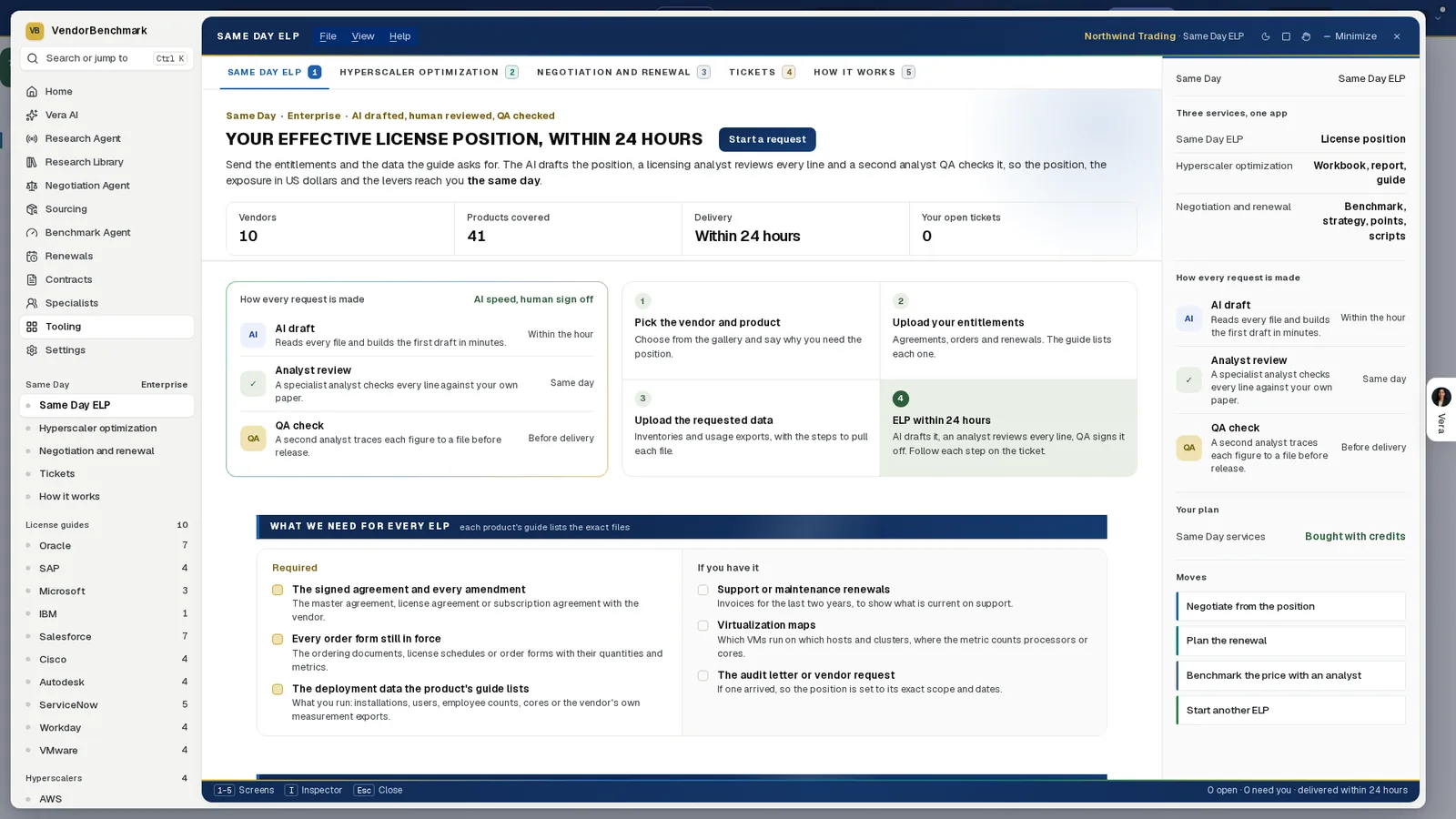
What we need for every ELP. The required items on the left and the ones that help on the right, with the license guides listed by vendor down the side of the window.
What the four vendors' guides cover
The guides then name the exact files for each product. For the four vendors in the title, the gallery holds these products.
| Vendor | Products with a guide | Worth knowing |
|---|---|---|
| Oracle | Java, E Business Suite, Siebel, Primavera and PeopleSoft | Database and Middleware are in beta. Java runs as its own service, with a position and an exit plan. |
| SAP | RISE with SAP, ECC, S/4HANA and Digital Access | Reports add conversion credits and a total cost comparison on ECC and S/4HANA, and right sizing on RISE. |
| Microsoft | Microsoft 365, SQL Server and Windows Server | Every position carries a bill of materials, every SKU, quantity and price on the agreement. Microsoft 365 adds the suite decision, E1, E3, E5 or E7 by group of users. |
| IBM | Every Passport Advantage product | The request asks which product families are in scope. |
The other six vendors follow the same pattern: subscription positions against what is in use for Salesforce, ServiceNow and Workday, and entitlements against the deployed estate for Cisco, Autodesk and VMware.
Oracle Java needs the least paper of all. A Java request needs no agreement to start: one export with Java evidence from any discovery tool is enough, as Excel, CSV or text, with your employee count and three plan dates, the plan start, the date for zero licensable installs and the audit ready date. Each further kind of file closes a gap the workbook would otherwise name.
How the files go in
Step two of a request is one box. Drop every file you have on it, up to 60, or press Choose files.
- Matched by name. Each file goes on the item its name matches. The first required item still open takes any file it cannot place.
- Counted as you go. A ring counts the required items covered and says when the clock can start.
- Explained in place. Press an item's name for exactly what to send and the steps to pull it. Add file puts files on one item.
Your uploads are saved as you go. Close the window and the request is where you left it.
When a file is missing
A gap is not a reason to stop. The checklist treats it as information.
- Before you send. I don't have it, or Skip on an optional item, opens a box for the reason. The reason goes to the analyst with the request, and the clock can still start.
- After you send. If the analyst needs a file, the ticket says so and the clock pauses. Upload on the ticket restarts it, and the paused time is added back.
- In the result. Anything missing from the submission is named, so the position is never quietly incomplete.
A missing file is information. The position names it rather than guessing around it.
So send what you have, with honest reasons, rather than waiting for a perfect set. The analyst works to the scope you set, and a named gap is easier to close than a hidden one.
How your files are kept
These are contracts and deployment data, among the most sensitive files a buyer holds.
- Private storage. Files stay in your workspace's private storage and are checked for type and malware on arrival.
- Short links. A file opens on the ticket through a link that lasts 60 seconds, and every download is logged.
- Checked twice. When you press Send and start the clock, every file is checked again: where it is stored, its size, its type and a malware scan.
Where it sits
This is the intake. The rest of the guide covers what happens after it.
- How Same Day ELP works follows a request through the 24 hours to the delivered position.
- The QA behind a Same Day ELP shows how two analysts check the draft against the files you send.
- IBM ILMT gaps, priced covers the self serve app that reads the same IBM exports in your browser.
The Same Day ELP guide covers the whole cluster, and the Same Day ELP page lists the coverage by vendor.
What to do first
- Open your product's guide. Read both panels, what you bought and what you run, before you pull anything.
- Ask for the deployment data early. If another team holds the exports, give them the guide's steps for each file.
- Collect the paper in one pass. The agreement, every amendment and every order form still in force.
- Write a reason for every gap. A clear reason lets the clock start and tells the analyst what to work around.
Questions buyers ask
What counts as a complete submission?
Every required item has a file, or a stated reason it is not available. Then the 24 hour clock starts.
What if we cannot find an amendment?
Mark it I don't have it and give the reason. The reason goes to the analyst, and anything missing is named in the position.
How many files can one request take?
Up to 60. Drop them all on the box and each one is matched to its item by name.
Who sees our files?
Your organization and the named VendorBenchmark analyst assigned to your engagement. Files open through links that last 60 seconds, and every download is logged.
Is Oracle Java different?
Yes. A Java request needs no agreement to start: one export with Java evidence from any discovery tool, your employee count and three plan dates.