A Mothership run is how Mothership, the main agent in Vera AI from VendorBenchmark, turns one goal for every software contract into assignments for the other agents and a short list of decisions for people. This post walks through one run, screen by screen, for a procurement lead or IT asset manager who has not seen it.
For the short answer to what Mothership is, read What is Mothership? first. The product page is at Mothership. Here we go one level down: the twelve screens, the run you watch, what lands in Approvals and how the Ledger counts money from identified to realized.
PART ONE
The twelve screens, and what each one is for
Mothership opens as one window with twelve screens in the left menu.
- Command and Start. Command holds Ask Mothership, the fleet, progress and every message. Start is where Mothership opens every time, with three steps: add contracts, set the goal, sign the goal.
- Goals and Plan. Goals shows the goal against its target. Plan shows the plan by vendor and keeps its versions.
- Approvals. The screen that waits on you: vendor sends, notice letters, offers and signatures.
- Portfolio and Ledger. Portfolio lists every contract on the goal, as a table or a runway. Ledger shows the money by stage, from identified to realized.
- Agents, Brief and Activity. Agents shows the fleet in full, with Watch on any agent. Brief is the week on one page. Activity is every message and decision as it happened.
- Reports and Mandate. Reports keeps the deep dive reports your questions returned. Mandate holds the defaults the charter sets.
The status bar under every screen carries the autonomy rung the agents are working at and Stop all.
PART TWO
How to start a run, step by step
- Add contracts. Upload the estate or connect a source, and the Contract Agent reads each file. Start shows read coverage: how many contracts on file have been read and what is still in the queue. The goal works only from what has been read.
- Set the goal. Type one sentence for the whole estate, such as cutting cost by 12 percent or keeping every uplift at 0 percent. Mothership reads the sentence back as fields and sizes it on your contracts. Example goals sit under the box, each with the figure that sizes it.
- Sign the goal. A goal takes two signatures. The owner signs, then finance countersigns the baseline, so the starting figures are agreed before work begins. Mothership never signs.
- Press Send. On Command, Send turns the fleet into the run. Assignments travel out to the agents, reports come back, and every hand off passes through Mothership.
- Watch, or do not. You can pause the run, skip to the end or replay it. It plays only when you press.
- Open Approvals. What needs a person goes to You. That queue is covered below.
Notice protection, the uplift cap and benchmark coverage are on for every goal. They are guardrails Mothership keeps, not targets you set.
PART THREE
The time a run saves each week
Once a goal is running, the weekly work changes shape. The status is already written, so the time goes to deciding. Here is one weekly review of a savings program done both ways. The hours are illustrative.
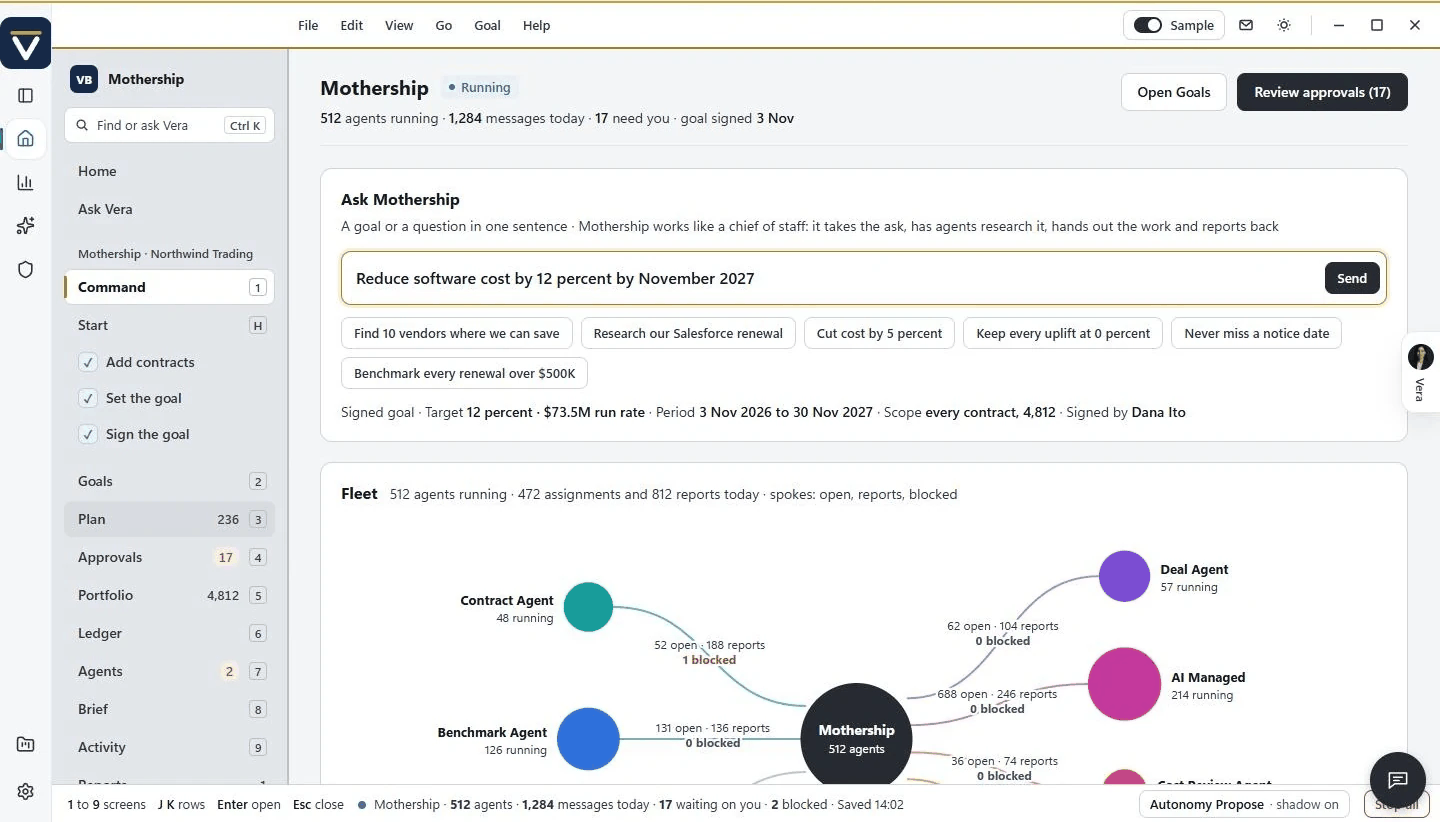
Mothership's Command screen on sample data: the goal in the Ask Mothership box, the signed goal under it and the agents working around Mothership.
THE SAME JOB, TWICE
TODAY, BY HAND
- Collect the status of each renewal from its contract owner by email and chat
- Update the savings tracker spreadsheet by hand, line by line and stage by stage
- Work out which notice dates and vendor offers need a decision this week
- Write the weekly summary for finance and chase the approvals that are late
Roughly 8 hours a week for a procurement lead with about 100 contracts in play
WITH VERA
- Open Brief to read the week on one page
- Open Approvals and decide each waiting item with its evidence beside it
- Open the Ledger to see which lines moved between stages
- Export the decisions and the ledger for finance
About 45 minutes a week, most of it on the decisions themselves
What changes: roughly 8 hours of collecting and retyping status each week becomes about 45 minutes of reading and deciding. For example, over a 13 week quarter that is roughly 104 hours against about 10 hours.
What the time depends on: how many contracts are on the goal, how much of the paper has been read, how many people must approve, and how many decisions the goal produces in a given week. The first weeks also carry the setup: adding contracts and getting two signatures on the goal.
PART FOUR
What lands in Approvals, and what does not
Approvals holds only what the charter keeps for people: vendor sends, notice letters, offers and signatures. Each one arrives with its evidence, and like items can be handled as a batch.
On the sample estate the screen sorts what is waiting by due date, then by money, with the evidence for the selected row beside it: the comparable range, the midpoint, this deal and the gap for a price decision, or the drafted email for a send.
- Batches are narrow. A batch takes one kind of item under a set limit. Offers, signatures, notice letters and changes to the mandate go one at a time.
- A send can be pulled back. On the sample, a vendor send that a person releases sits in a short hold with Undo before it leaves.
What does not land there is the work itself. Reading a contract, placing a price against comparable customers and drafting an email are done by the agents without asking.
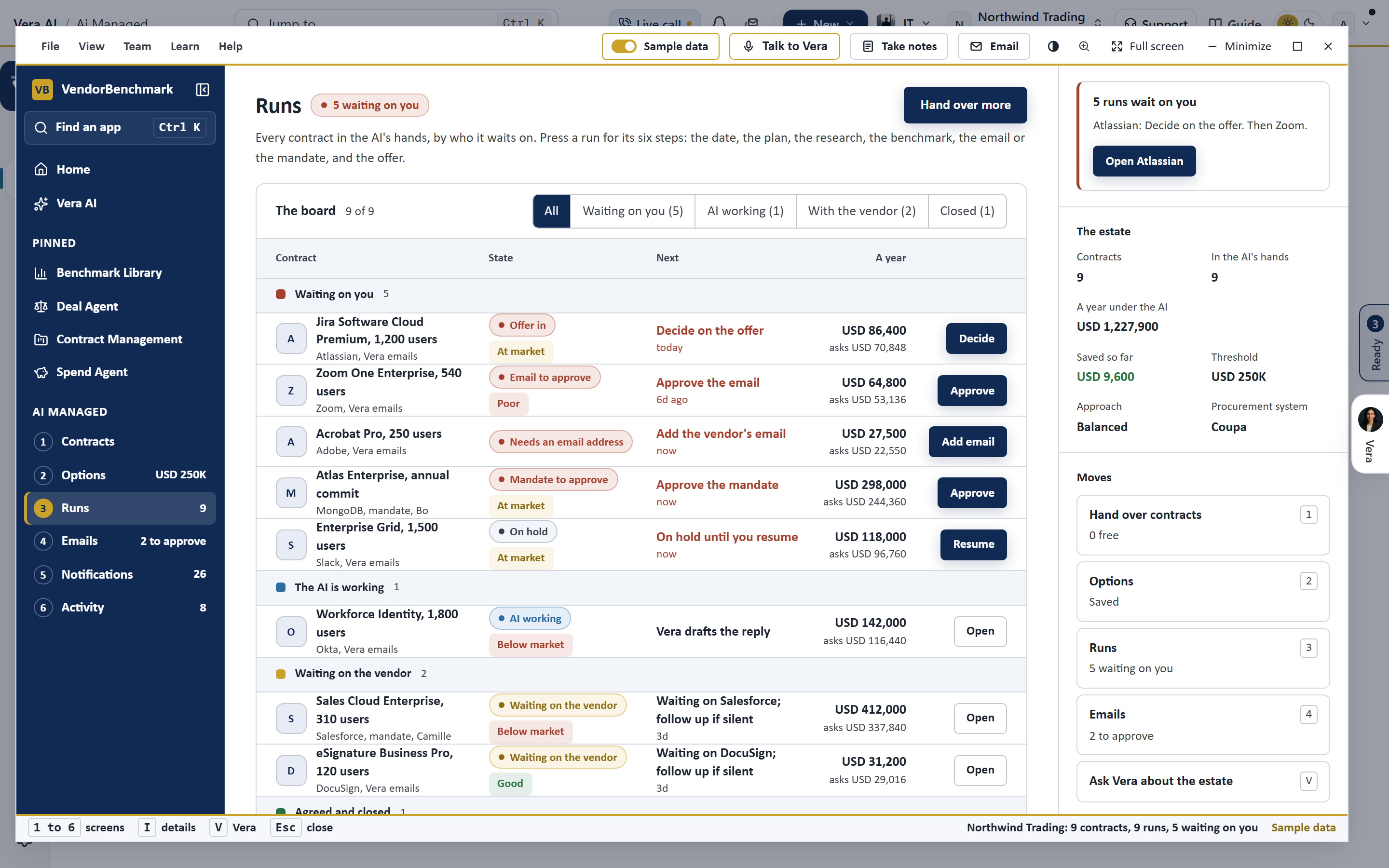
The runs board in AI Managed, one of the agents Mothership directs, on sample data: every renewal grouped by who it is waiting on.
PART FIVE
How the Ledger counts money, from identified to realized
The Ledger answers the question finance asks about any savings program: how much of this is real? It sorts every line into five stages.
- Identified. A saving an agent has found that is not yet in the plan.
- Planned. A line in the plan, with its estimate.
- In negotiation. The ask is with the vendor.
- Agreed. The vendor has agreed, and no invoice has shown it yet.
- Realized. An invoice has confirmed the agreed price.
Only Realized counts as saved. The earlier stages are estimates, and the Goals screen weighs each one at its confidence before setting the total against the target.
Two kinds of money are kept apart. Cost avoided, meaning increases refused or capped, and one time money, meaning credits and refunds, are reported beside the run rate and never counted toward the target. The Ledger also lists leakage: invoices billed above the agreed price, with a dispute drafted for each.
A saving is realized when an invoice confirms the agreed price, not when the vendor says yes.
That is the standard we argue for in savings proof: the number the board hears should be the number billing confirms.
PART SIX
What the AI does in a run, and what stays with people
The AI does the reading, the comparing and the drafting. Mothership sizes the goal on your contracts, splits it into assignments, reads every report and revises the plan, keeping each version with what changed and who approved it. The agents read contracts, place prices against comparable customers and draft the emails, letters and briefs.
You can check the work. A press on a figure opens the rows it is made of, and a contract opens at its clause and page. On the Agents screen, an agent's state comes from the record of its runs, and a blocked agent shows its cause, such as a cited document that is not on file.
People hold everything that commits. The Mandate screen sets one ladder for every agent on the goal: Read, Move, Stage, Propose, Act within mandate and Commit. Commit, which is accepting an offer and signing, belongs to a person only. A notice letter goes out only when a person releases it, and a change to the mandate is itself an approval.
Stop all pauses every agent at its step with one press. Activity lists every agent and person action with the mandate version it ran under.
Where it stops: Mothership counts only contracts in force and works only from files that have been read. On your own contracts, before a goal is signed, Start, Command and Portfolio draw your estate, and the other screens show what they will hold. The sample estate is where all twelve are populated.
PART SEVEN
Common questions
- What are the twelve screens in Mothership? Command, Start, Goals, Plan, Approvals, Portfolio, Ledger, Agents, Brief, Activity, Reports and Mandate.
- What comes to Approvals in Mothership? Vendor sends, notice letters, offers and signatures, each with its evidence. Reading, benchmarking and drafting do not wait for approval.
- When does the Mothership Ledger count a saving as realized? When an invoice confirms the agreed price. Identified, planned, in negotiation and agreed are earlier stages and are not counted as saved.
- Who signs a Mothership goal? The owner signs and finance countersigns the baseline. Mothership never signs.
- Can I watch a run before I load my own contracts? Yes. In a free trial the Sample switch shows a sample estate, Northwind Trading, and the run plays on it.
The short version: a run starts with one sentence and two signatures, the agents do the reading and the drafting where you can watch, and your week becomes the Approvals queue and the Ledger. The team view of the same idea is in the agent team.
