Autonomy in Vera AI, the platform from VendorBenchmark, is a setting that decides how far an AI agent goes on a software renewal before a person is asked: Watch, Prepare and ask, or Negotiate and ask. Your organization's owners choose it, every action taken under it is written to a log, and at every setting the offer itself comes to a person.
The reasoning is simple. Autonomy without limits is not something a CFO signs off, so it comes in settings. This post explains each one, who may change it, what the AI never does at any setting and what the record shows. The settings are introduced on the AI agents page, and they do their work in AI Managed, the agent that negotiates renewals by email.
PART ONE
The three settings: Watch, Prepare and ask, Negotiate and ask
The setting is chosen per vendor tier, so a small renewal and a strategic one do not get the same freedom.
- Watch. The AI reads the renewal and reports. It writes to nobody.
- Prepare and ask. It benchmarks the price, drafts the plan and the first email, and waits for you.
- Negotiate and ask. It writes to the vendor, counters inside your floor and cap, then brings you the offer.
Above all three sits one rule: you decide. Every offer a vendor puts on the table pauses the run and comes to a person, who accepts it, counters or holds it. The AI never accepts, signs or serves notice. An earlier setting that could close below a threshold was removed in November 2026, and a tier saved on it now reads as Negotiate and ask.
So how much should an agent do alone? The product's own default is the cautious answer. With the mandate switched off, the AI prepares and asks on every vendor. A wider setting is something you grant, tier by tier, after you have seen what the AI would do with it.
PART TWO
The time the settings save
The settings exist because of the renewals nobody has time for: the long tail of small ones, and the busy quarter when every renewal moves at once. Here is that tail handled both ways. The hours are illustrative.
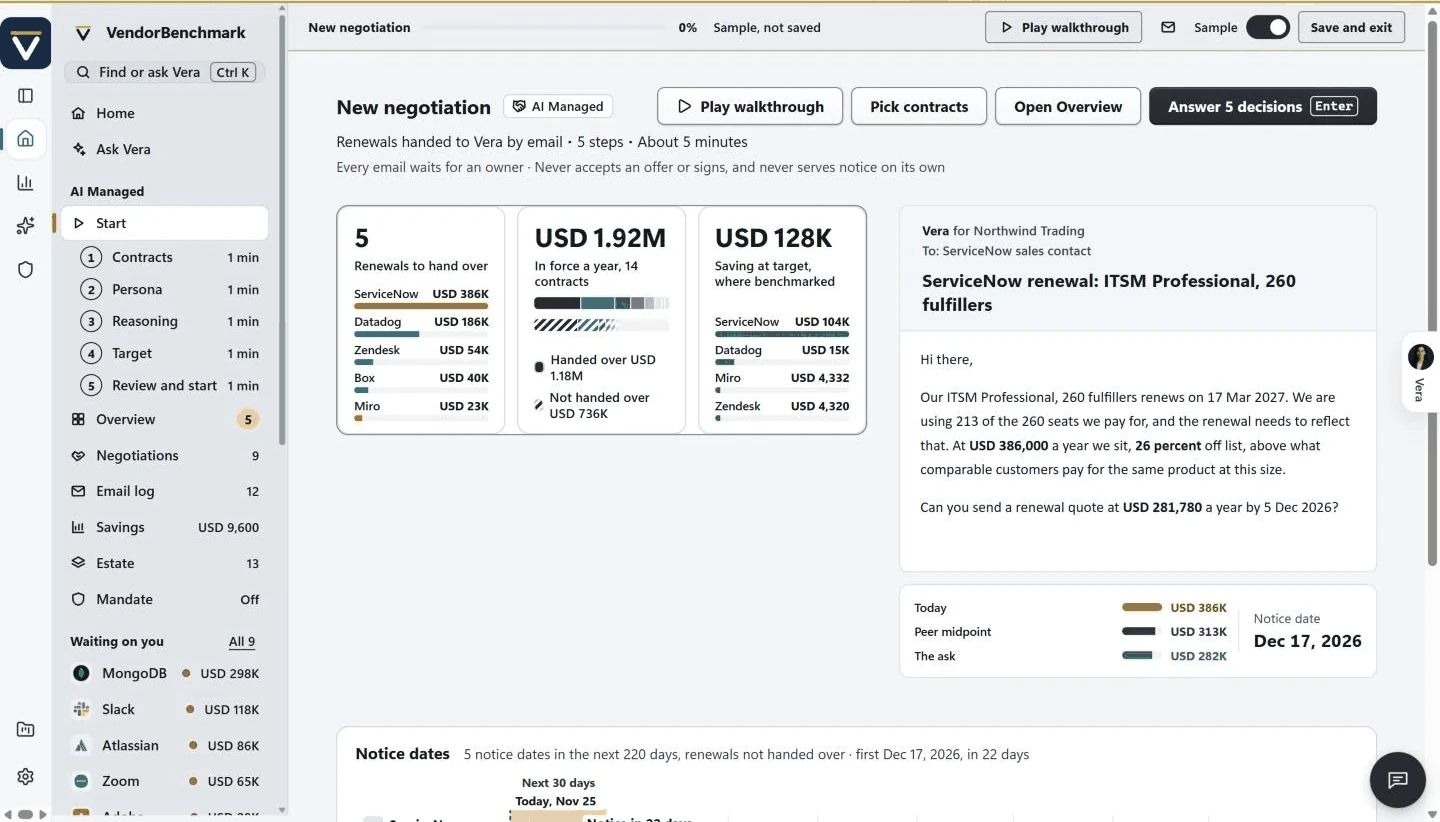
AI Managed on sample data: the renewals to hand over beside a drafted renewal email with today's price, the peer midpoint and the ask.
THE SAME JOB, TWICE
TODAY, BY HAND
- Find the renewal date and the notice deadline in each contract
- Look up what comparable customers pay, where you can find it at all
- Write the first email to each vendor and follow up when it goes quiet
- Collect the replies in your inbox and decide each offer
Roughly 2 hours per renewal, so about 40 hours for 20 small renewals in a quarter
WITH VERA
- Select the contracts in AI Managed and hand them over
- Set the approach, the threshold and the justifications once for the whole estate
- Approve the first email for each renewal, or have an owner allow sends under the threshold
- Decide each offer when the vendor replies: accept, counter or hold
About 10 minutes per renewal, so roughly 200 minutes for 20
What changes: roughly 40 hours of reading, emailing and chasing becomes about 200 minutes of approvals and offer decisions. For example, 20 renewals at about 10 minutes each is 200 minutes, a little over 3 hours.
What the time depends on: the setting itself, how many emails you choose to approve one by one, how quickly each vendor replies, and whether the contract names a contact to write to. Watch saves the reading, Prepare and ask adds the drafting, and Negotiate and ask adds the chasing, with every offer still coming to you.
PART THREE
How to set the ceiling, step by step
The ceiling lives on the Mandate screen in AI Managed.
- Open Mandate. It is a table of three vendor tiers by annual value, with edges you can move.
- Set the numbers for each tier. The discount floor is the least discount the AI holds to when it counters. The uplift cap is the most a renewal may rise a year in anything it counters. The preferred term is 12, 24 or 36 months.
- Choose the setting for the tier. Watch, Prepare and ask, or Negotiate and ask.
- Set the approval limit. Above this figure every email the night's runs write waits for an owner, whatever the dial. Add a vendor to Ask first and its renewals come to an owner before anything is sent.
- Run the dry run. It replays the quarter behind and previews the quarter ahead on your estate as it stands: what the AI would do with each renewal under this mandate, and why it would ask.
- Turn it on. The AI then reads the estate against the mandate every night and brings what it may not do alone to you as a card, with the answers you can give.
PART FOUR
Who holds the ceiling
Organization owners do. Only an owner changes the mandate, runs its dry run and turns it on. Everyone else can read it.
The permissions are deliberately lopsided. Widening is for owners only: letting the AI send under the threshold without asking, raising the threshold, resuming sending. Narrowing is open to anyone who can edit: lowering the threshold, going back to every email waiting, and Stop all sending, which holds every vendor at once.
Widening what the AI may do is for owners only. Narrowing it is open to anyone who can edit.
An owner can also pause the AI on one vendor. It then only watches, and every run on that vendor goes on hold at once.
Beside the mandate sit three options, set once for the whole estate. The approach is collaborative, balanced or aggressive. The threshold decides the route: under it the AI emails the vendor, and over it a negotiator drafts a mandate for an owner to approve. The justifications are the arguments the AI may use, and it uses one only when it is true for that contract.
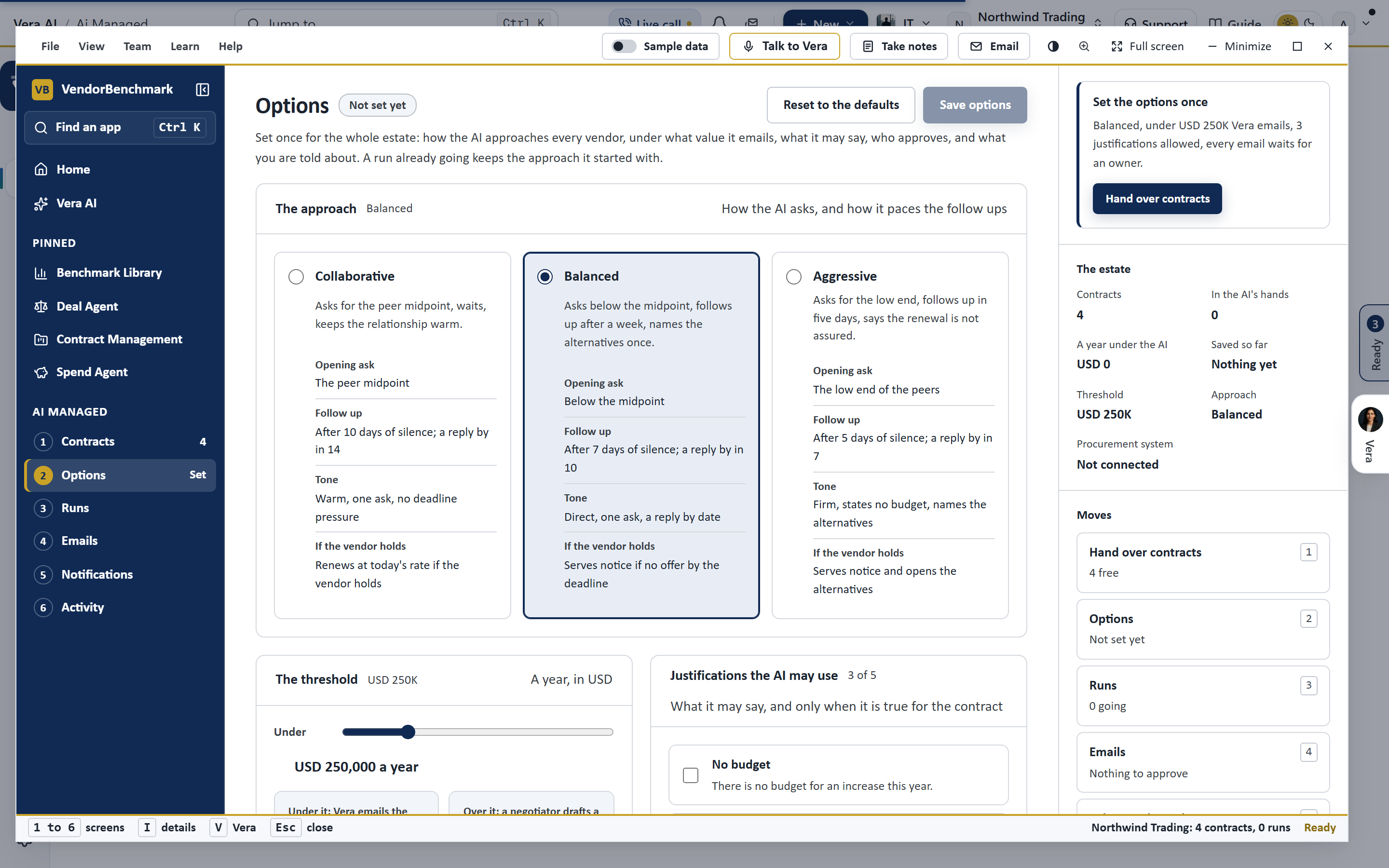
The Options screen in AI Managed: the three approaches, the threshold and the justifications the AI may use, set once for the whole estate.
PART FIVE
What the AI does at each setting, and what it never does
What the AI does alone is the preparation. It reads each contract for the renewal date and the notice deadline, benchmarks the price against comparable customers before a word goes to the vendor, researches the vendor, and drafts the plan, every email and every counter.
What it asks an owner: every offer, the emails your approval setting holds, the notice of non renewal at the deadline, and anything for a vendor on Ask first. Some things are outside every setting.
- It never accepts an offer or signs. A person accepts, counters or holds. Your approvers sign off in the order your policy sets, and signers sign in DocuSign or Acrobat Sign.
- It never serves notice of non renewal on its own. It drafts the notice. A notice goes only when an owner has authorized it.
- It never agrees a price above your walk away. The walk away never appears in an email in any form. If a person accepts an offer above it, they must confirm and give a reason, which goes on the audit log.
- It never writes to a vendor without naming itself as an AI. The first email always carries a fixed line, written by the platform, saying the sender is an AI your organization authorized.
Each email is also checked against the mandate before it leaves, on the exact words that go. Only a clear result sends, and a flagged email is held with the reason shown. The longer list of lines we hold is in what we will not let the AI do on your deals.
PART SIX
The audit record, and where the settings stop
Each email, offer and change is logged with the reason and the source, so audit, legal and finance can see what happened. The mandate keeps its own log: every action it allowed, with the mandate line that allowed it, every pause and resume, and every answer you gave.
The organization's audit log records who did what, exports as CSV and can stream to a SIEM. Why that matters is covered in the audit trail.
Where the settings stop: they govern what the AI may send, not how strong your position is. The AI never claims a budget, a quote or an alternative that nobody confirmed. Above your threshold the work belongs to a person, and a negotiator takes the mandate. How a single negotiation runs is in how AI agents negotiate for you.
PART SEVEN
Common questions
- What are the autonomy settings in Vera AI? There are three: Watch, Prepare and ask, and Negotiate and ask, chosen per vendor tier.
- Who can change how much the AI does alone? Only an organization owner changes the mandate and turns it on. Anyone who can edit can narrow it, for example with Stop all sending.
- Can the AI accept a vendor's offer? No. Every offer pauses the run and comes to a person, who accepts it, counters or holds it.
- Does the vendor know it is talking to an AI? Yes. The first email always carries a fixed line saying the sender is an AI your organization authorized.
- Can I test a setting before I turn it on? Yes. The dry run shows what the AI would do with each renewal under the mandate, and why it would ask.
The short version: let the AI prepare everywhere, let it write to vendors only where a tier's numbers say so, and keep the offer, the notice and the signature with people.
