Every renewal has an alternative, even if it is only renewing at a better price. The trouble is that most alternatives are mentioned rather than priced. An alternative nobody has costed is hard to use, because the first question back is what it would cost you to move.
Competitive scenarios is the tool in Vera AI by VendorBenchmark that answers that question before it is asked. Name the product you are renewing, and Vera researches the credible options, prices three to five cost scenarios against the renewal over your term, and writes a competitive options review you can put in front of the vendor.
Start from the contract you hold
The first step is the renewal itself. The Vendor field completes from every vendor and product the platform benchmarks, with the contracts on file marked. Press one on file and the value a year, the term, the renewal date and the notice days fill from the contract. For any other vendor, type what you pay a year, the units, the term, the increase and the renewal date.
Every renewal on file sits in a list with its notice date and the days left as a bar, which turns gold inside 90 days and brick inside 30. Before the comparison runs, the step shows what renewing as proposed costs year by year. After it runs, it shows where you stand: what comparable buyers pay as a band, the middle as a tick and you as a dot, with the gap a year and over the term.
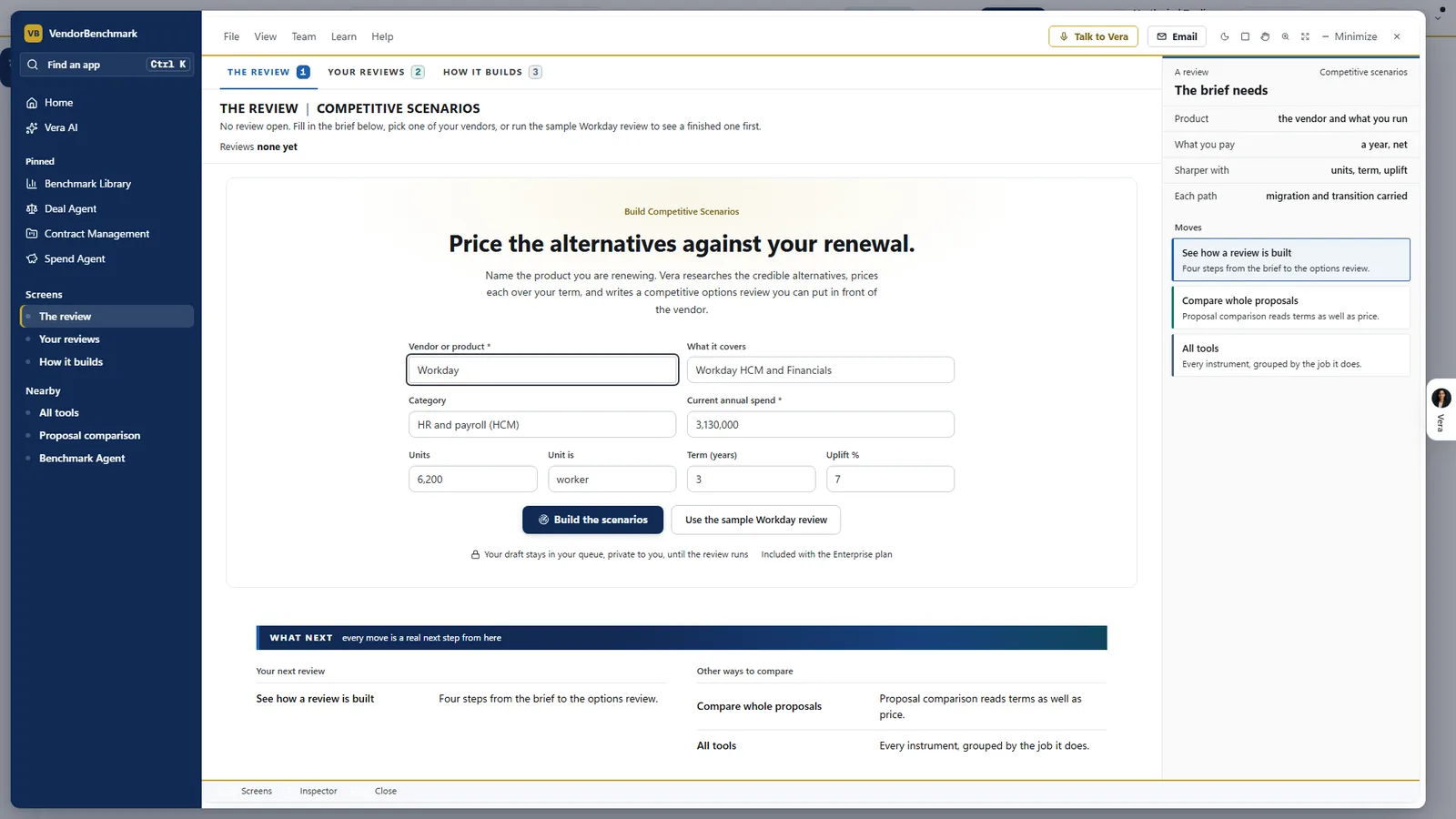
The brief is short. A Workday HCM and Financials renewal: the product, what you pay a year, and for a sharper review the units, the term and the uplift. The panel on the right states the rule every path follows: migration and transition carried. A sample Workday review shows a finished one first.
Three to five paths, priced over the term
Press Compare my options and Vera works in four stages: reading your contract, finding alternatives, pricing each one and comparing over the term, and the alternatives land beside the stages as they are found. Each scenario carries the license, migration and transition cost, so renewing as proposed, repricing to market and switching to each alternative are priced side by side.
The result leads with three cards ranked by total cost with the move included: Best, the other way and As proposed. The other way is the best switch when renewing wins, or renewing at the market rate when a switch wins. Each card gives the total over the term, the software, the cost a year, the time to move and the month from which it costs less.
- Cost over time. Every path drawn by month, with a gold dot where a switch gets under the renewal.
- The alternatives Vera priced. Each with its fit, its license a year against yours, the time to move and when it costs less, and a switch to keep it in or out.
- Assumptions. Moving cost at half, as estimated or one and a half times; whether both bills run while you move; and the rate the renew option rests on.
Change an assumption and every path is priced again. That is the honest part of the exercise. A switch that only wins if migration comes in at half its estimate is a weak alternative, and the chart shows it before the vendor does.
One figure to ask for, and where to say no
The third step turns the paths into a position. Ask the vendor for is one figure, with three rows on one scale: Start at, the low of what comparable buyers pay; Aim for, the middle, which is the figure on the review; and Say no above, the rate at which switching costs less. Today's price and the proposal are marked on the same scale.
The walk away is not a feeling. It is the rate at which switching costs less.
When the vendor comes back with a number, move the figure and read Accept, Counter or Say no, with the total and the gap against the aim. What to say is a numbered list of lines, each with the figure behind it, for you only.
What the vendor sees, and what stays with you
The last step splits the paper in two. What goes to the vendor is the email and the review as a PDF, with no target and no notes. For you only: the plan workbook, the boardroom slide, the note to your leadership and your lines. Send to the vendor opens the email with the review in your own mail, and Mark as sent records the date.
The email tells the account team you have completed an options review and are evaluating alternatives. It names no target, and the alternatives behind it are the ones the review priced. Email a copy sends the review to colleagues first, so finance and the business owner see the same figures before the vendor does.
The plan workbook is one Excel file with every figure derived from the paths: the plan to the notice date, the talking points, pricing per supplier, every path by year and the assumptions. The boardroom slide puts the cost over time and the figures on one page for your leadership.
Where it sits
Competitive scenarios prices the alternative. The rest of the cluster prices the deal itself.
- The three answers on the incumbent's price: what it costs, the peer range and the rank.
- Proposal comparison, once the vendor comes back with a revised offer.
- Choosing a benchmark speed for the renewal you are pricing.
The AI benchmarking guide maps the cluster, and the tooling app page lists the instruments around it.
What to do first
- Open the sample. Switch on Sample data to see a finished Workday comparison before you run your own.
- Pick a renewal on file. Choose one whose notice date is still months away, so the review lands while it can change the outcome.
- Set the assumptions. Choose the moving cost and whether both bills run while you move before you trust any total.
- Send the review, keep the plan. Send the vendor safe review from your own mail and keep the workbook and your lines for the call.
Questions buyers ask
How many alternatives does it price?
Three to five cost scenarios against your renewal over the term, each carrying license, migration and transition cost.
Does the vendor see my target?
No. What goes to the vendor is the email and the review as a PDF, with no target and no notes. The plan workbook, the boardroom slide and your lines stay with you.
Does it send anything on its own?
No. Send to the vendor opens the email in your own mail with the review attached, and Mark as sent records the date once you have sent it.
Can I try it before running my own?
Yes. Everyone can preview the sample Workday review. Running your own review needs a paid plan; trial plans are limited to the sample.
What happens when the vendor sends a new offer?
Take it to Proposal comparison, which marks every pricing and term change improved, worse or unchanged against the earlier offer.