Most software estates live in folders nobody has read end to end. The renewal date sits in an order form, the price cap in an amendment, and the master agreement that governs both was never uploaded. AI contract analysis means agents read all of it, so every question about what you bought starts from the paper.
This guide covers the agents in Vera AI by VendorBenchmark that work on contracts: what each one reads, what it gives back and what always comes back to you. Each section links to a full article.
Five agents read the paper, each for a different question
One brings the estate in. One lists what each contract grants. One reviews a single document clause by clause, one answers a question across all of them, and one reads every offer before it is signed. A sixth app sets two versions of the same contract side by side.
500 contracts uploaded in the morning. What the agents know by evening.
The day one estate: every contract read, filed by vendor, scored for completeness and placed against the market.
Read it → 3.2 · Entitlement AgentEvery product, price, term and limit, read from the contract
One register of every priced line, with a vendor's companies folded into one vendor.
Read it → 3.3 · Contract AgentClause by clause: the changes worth asking for, the wording and the cost
Every clause reviewed, each change priced, and the redline drawn on the page for the vendor.
Read it → 3.4 · Document AgentAsk 5,000 contracts one question
Ten terms read in every contract, and any words you type, answered with the clause on its page.
Read it → 3.5 · Vera in the LoopA benchmark inside DocuSign and Coupa, before anyone signs
A two page brief on every envelope, checked against your templates and policy, approved by the people you name.
Read it → Also · CompareTwo versions of the vendor's paper, side by side
Every changed passage lit in red, priced, and the reply drafted on the asks you tick.
See the app →The work moves from upload to decision in one order
The agents hand work to each other in a fixed order. A person steps in at two points: the values the read was unsure of, and every decision that changes a contract or commits you to one.
Bring them in
A folder or a ZIP, a connected drive, DocuSign or Coupa, or a private email address.
Read and filed
Every page read, each document filed under its vendor, amendments bound to their agreement.
You settle the doubts
A value the read was unsure of waits for a person, beside the passage it came from.
Reviewed and watched
Clauses reviewed, questions answered across the estate, and new contracts read on arrival.
You decide
Every redline, reply, approval and signature waits for a person's press.
The order matters. A renewal date read from a master agreement without the amendment that extended it is wrong. So the read comes first, amendments are bound to the agreement they change, a person settles what the read doubted, and every review, search and brief builds on that record.
The agents read and draft. People decide.
Each agent does a defined piece of work on its own and stops where a decision belongs to a person. The table sets out the line for every app in the cluster.
| App | Does on its own | Waits for you |
|---|---|---|
| Enterprise Uploader | Reads every document in the run, files it by vendor, binds amendments to their agreement and scores how complete the record is | The values it could not settle, and the one press that takes the estate live |
| Entitlement Agent | Lists every priced line with its quantity, metric, list and net price; maps how the documents connect; names what is not on file | Confirming a value it was unsure of, and asking the vendor for a missing agreement |
| Contract Agent | Reviews every clause, prices each change, writes the wording and draws the redline on the page | Approve or skip on every change, and sending the redline under your name |
| Document Agent | Reads ten terms in every contract and answers any words or question with the clause on its page | Correcting a reading, and what you do with the answer |
| Vera in the Loop | Reads every DocuSign envelope before signature, benchmarks it, checks your templates and policy, writes the brief | Every approval, in the order you set, and the signature in DocuSign |
| Compare | Reads two versions side by side, lights and prices every change, drafts the reply | A decision on every change, and the press that sends the reply |
Contract Office is where the read lands day to day: every signed contract from signature to renewal, with the deadlines, the renewal cost, the price caps, the risky terms and the letters. Its terms check reads ten key terms in every contract against your standard, OK, Neutral or Risky, with the money at stake and the suggested wording. A term a contract does not state reads Not stated and is never counted as risky.
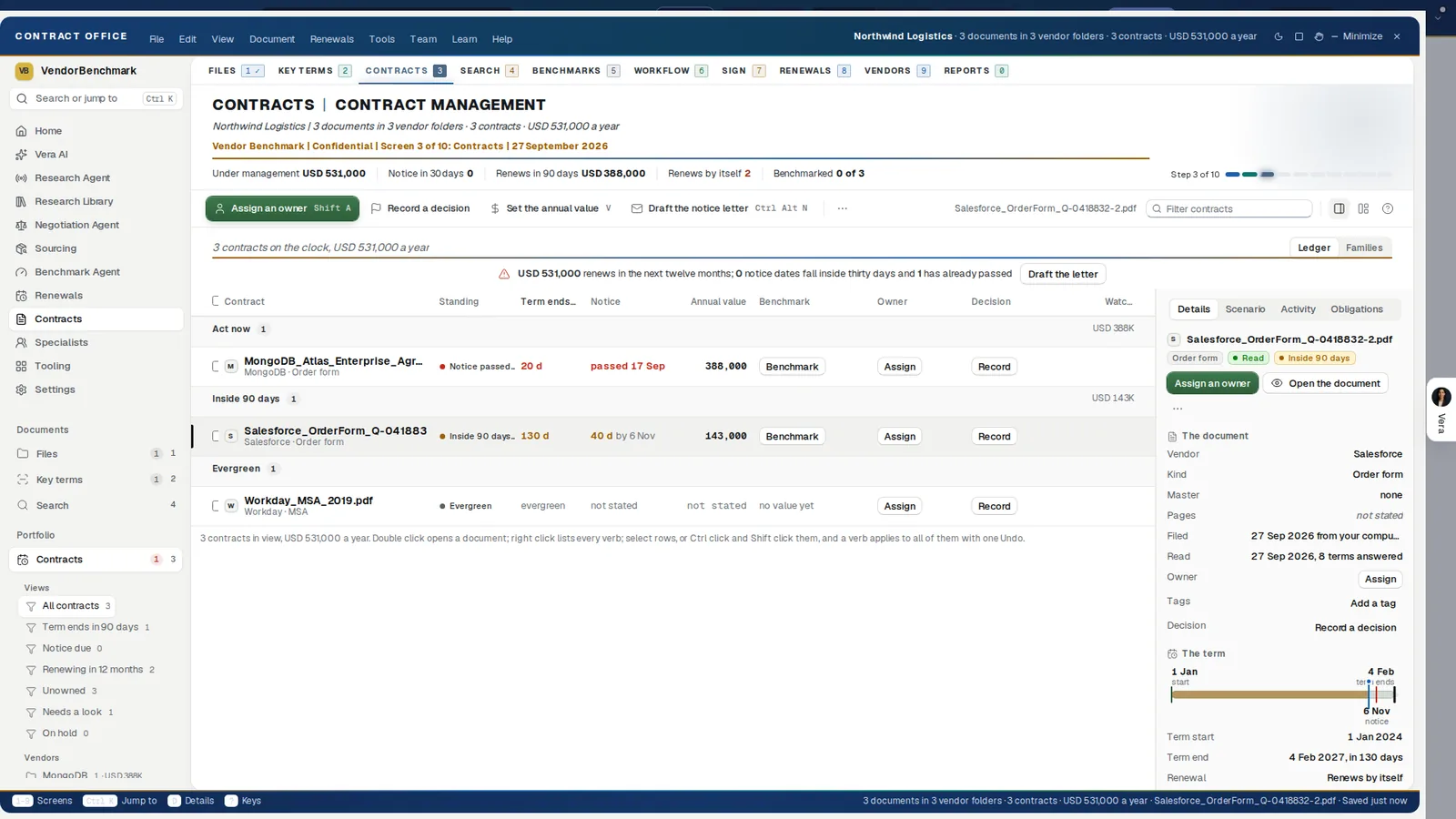
Where the estate lives. Contract Office groups every contract by what it needs, act now first, with its term end, notice date, annual value, benchmark and owner on one row. The details beside it carry what the read answered and the term drawn from start to notice to end.
An estate is only as clear as its least read contract
The problem is rarely one contract read badly. It is hundreds never read at all. A master agreement can say the term ends years before the amendment that extended it, and only the two read together show the real date. A price cap stated one way in an order and another way in its amendment is a conflict nobody sees until the renewal quote arrives.
Reading every contract changes what the rest of the platform can do. Benchmarks place your real prices, renewals count down from real dates, and Vera answers from your own paper rather than from memory. Nobody migrates by retyping: documents are read, registers are mapped, and your corrections always outrank the machine's reading.
The reading is also held to a standard you can check. A term the paper does not state reads Not stated and is never filled with a guess. A figure carries the sentence and the page it came from, and a sentence the read could not place on a page shows no page rather than a wrong one. Where the paper prints no list price, we do not derive one.
Agents do the reading. People do the choosing, checking and deciding.
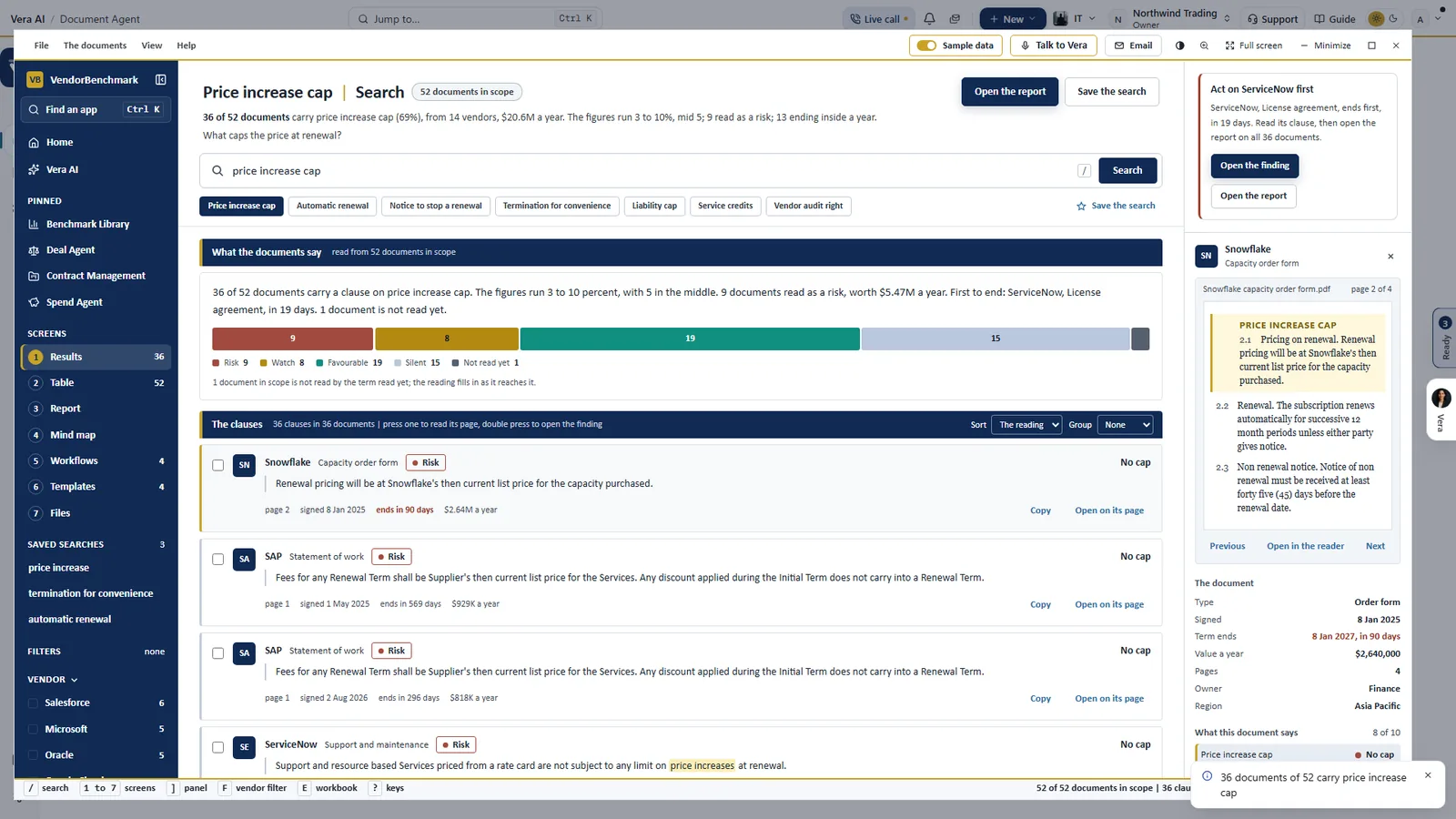
One term across the estate. Price increase cap on a sample estate of 52 documents: one bar of readings from Risk to Silent, each clause in the contract's own words with its page and value, and the page itself on the right with the clause marked.
Some documents deserve a person, and get one
Agents read fast and the same way every time. An analyst reads with judgment, and some documents call for it: a contract that will decide a large renewal, a statement of work with a disputed scope, a master agreement that runs to hundreds of pages. Each agent in the cluster has a way to hand the document to a person.
- From the Contract Agent. Ask a VendorBenchmark analyst sends the whole document to a senior analyst, and the answer is back within 24 hours.
- Human benchmark. The Ask a human app takes a contract, a quote or an order form and returns what you select, a benchmark, a negotiation strategy, talking points or research, written by hand within 24 hours.
- Same Day ELP. For a license position before an audit, a renewal or a deal, delivered within 24 hours of a complete submission, with an analyst checking every line.
- From the Enterprise Uploader. Any exception on the review board can be escalated, so a person reads the document instead of the platform guessing.
The rule behind all four is the same one the read follows: you typing the number is always better than the platform guessing it, and the record marks your values as yours.
What to do first
- Load the sample. Switch on Sample data in any contract app and walk the screens on a sample estate before your own paper goes in.
- Upload one folder. Drop it on the Entitlement Agent's Upload step. Nothing is extracted until you confirm the estimate it shows.
- Ask one question. Type price increase cap into the Document Agent and press Risk on the reading bar.
- Put Vera in the loop. An owner connects DocuSign once, so the next offer arrives with its two page brief.
Questions buyers ask
Does the AI change or sign our contracts?
No. The agents read, list, review and draft. Approving a change, sending a redline, approving an envelope and signing stay with people, and the signature happens in DocuSign.
How many contracts can it read, and how fast?
Up to 5,000 documents in one run. Reading runs at roughly a hundred documents an hour, so 500 take most of a working day, and the read carries on with the browser closed.
What happens when the read is not sure?
The value goes to a review list with the passage it came from. You confirm it, enter the right figure or mark it as not in the document, and your answer is saved with your name and the page.
Will loading our estate email anyone?
No. Everything the Enterprise Uploader loads is held in staging, invisible to alerts and digests, until an owner presses Go live. Renewal alerts stay off until each person switches them on.