Most contracts are benchmarked, if at all, before the quote is accepted. By the time the final paper reaches DocuSign, the price and the terms are assumed settled, and the signer reads whatever summary came with the email. It is also the last point at which a change can be asked for before it binds.
Vera in the Loop is the part of Vera AI by VendorBenchmark that sits between an offer and its signature; on Home its card reads Check before you sign. Here is what it reads, what the brief says, who decides and where the signed contract goes.
Every envelope reaches Vera before anyone signs
An owner connects DocuSign once, under Settings, Integrations: the address from the DocuSign panel goes into DocuSign Connect, with Envelope Sent, Envelope Completed and Envelope Voided selected and Include Documents on. From then on every envelope your account sends takes the same route: Vera first, then the approvers, then the signer. Nothing changes in DocuSign, and the envelope goes out to its signers as normal.
On the Read step, Vera works through the offer and says what she found on each check, one line each:
- The paper. The envelope arrived, the file checks passed and every page was read.
- The price. Placed against what comparable buyers sign, with the discount and the rank.
- The terms. Read against the market, against your corporate policy and against the template that applies.
- The call. The value over the term, the terms that read worse than the market, the money on the table and Vera's call.
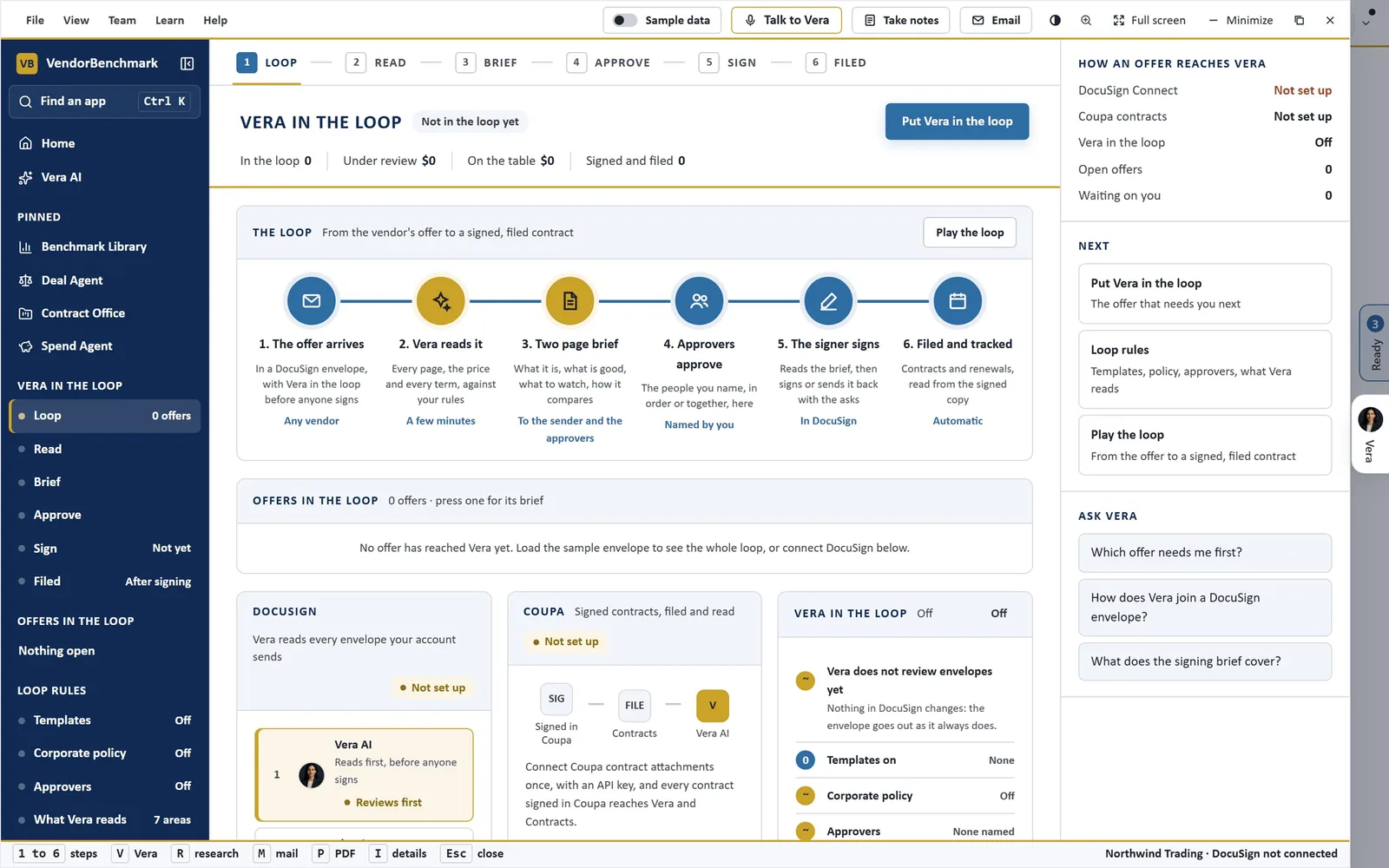
The loop, before anything is connected. Six steps from the vendor's offer to a signed, filed contract, and the panels that set it up: DocuSign, Coupa and the switch that puts Vera in the loop. The loop rules, templates, corporate policy, approvers and what Vera reads, sit in the left column.
The brief fits on two pages
The signing brief is written on two A4 pages for an executive with five minutes. Page 1 says what the agreement is, Vera's call and why, the key facts, what is being bought line by line, the money by year, what is good, what to watch, and the three things to settle before signing, with who does each and by when. Page 2 is the benchmark: where the deal ranks, the discount against what comparable buyers sign, the terms against the market, the asks in the order to ask them and what each is worth, the policy and template checks, the dates that matter and the bottom line.
The What if beside the brief moves the discount and shows the money over the term and the rank that discount would earn, on this deal's own figures. Download PDF prints it. Send back with the asks has Vera draft the email to the vendor in Mail, for you to read and send.
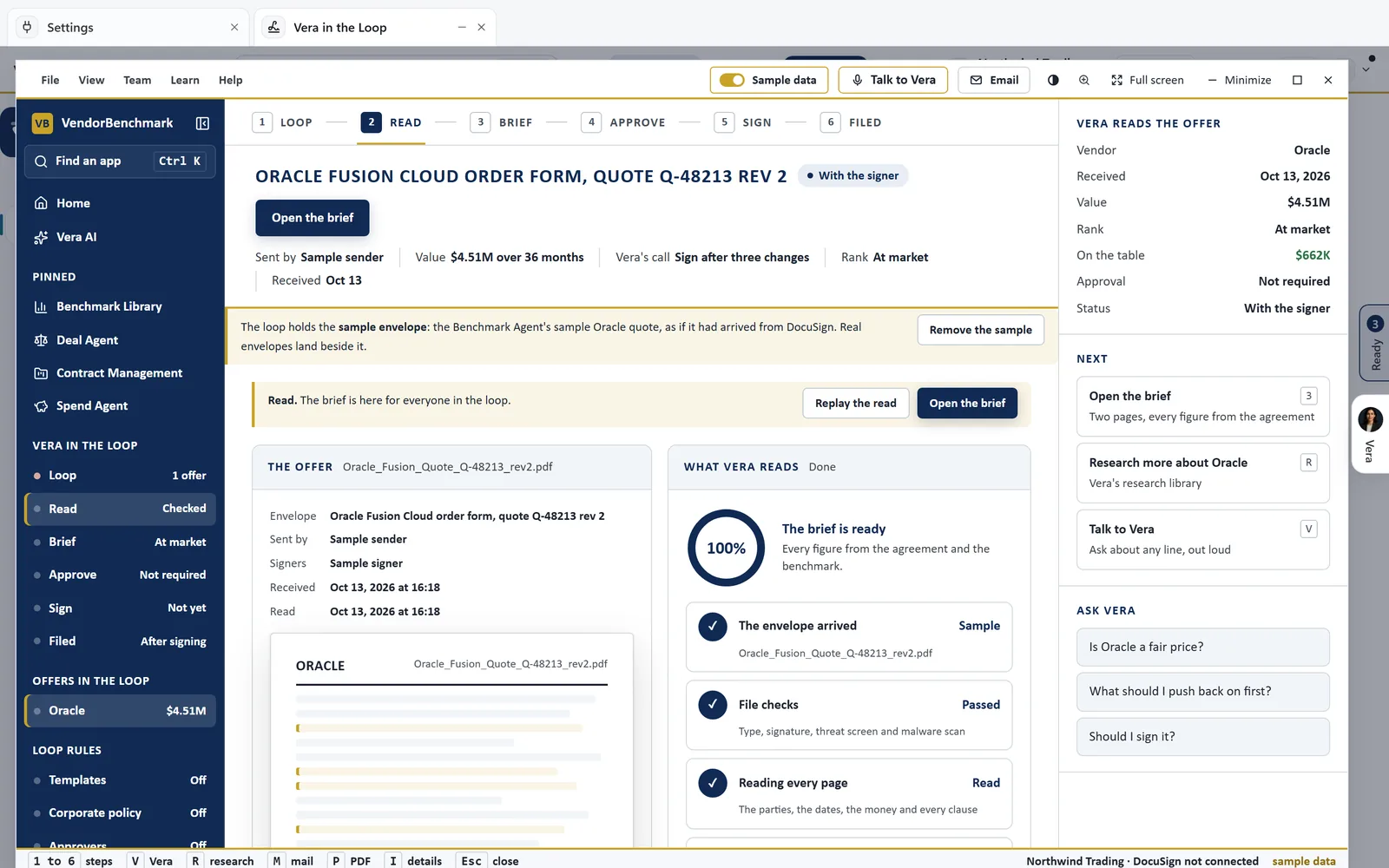
The sample envelope, read. An Oracle Fusion Cloud order form loaded as if it had arrived from DocuSign: the envelope arrived, the file checks passed, every page read and the brief ready for everyone in the loop. Vera's call, the rank and the approval status sit beside it.
Your templates, your policy and your approvers set the bar
The loop rules are yours to set. Everyone can read them, only owners change them, and a change applies from the next envelope.
- Templates. NDA, MSA and SOW, each on or off, with the points Vera checks. A template applies when the envelope's subject names its type, and every point the agreement misses is flagged.
- Corporate policy. Each rule Required or Preferred. A breach of a required rule goes to the top of the terms to push back on. Start from six common rules or write your own.
- Approvers. Up to eight members of your workspace, in order, everyone or any one. They get the brief by email and decide on their own turn.
- What Vera reads. The areas she covers, from price and renewal uplift to liability and governing law, your must haves, the value below which an envelope is filed without an email, and the subjects to skip, such as NDA, DPA and offer letters.
On the Approve step the chain shows Vera's review, each approver with their decision, their note and when they decided, and whose turn it is. Every decision puts a name and a time on the envelope and in the audit log, and each policy and template point is marked met, breach, departs, missed, partly or unclear, with the clause that decides it.
The signature stays in DocuSign, and the filing is automatic
On the Sign step the signer sees Vera's call with the rank, the things to settle before signing and how many terms are good and how many to watch. Open in DocuSign to sign takes them to the envelope, where it is signed. Vera never signs.
Vera reads, briefs and routes. The signature is always a person's, in DocuSign.
Once DocuSign returns the signed copy, the Filed step shows where it went: a record in Contracts with the signed copy, the renewal and notice dates on the renewals calendar, the signed text indexed for search and for Vera, and the price and rank kept in the Benchmark Agent's ledger, beside the audit trail of who sent, read, approved and signed.
Coupa connects once as well, with an API key that reads contracts and their attachments. Vera reads the signed contracts held there every day, and an owner can press Import from Coupa now rather than wait. Every contract signed in DocuSign or Coupa is filed in Contracts automatically, whether it went through the loop or not.
Where it sits among the contract agents
Vera in the Loop is the last read before a signature. The rest of the cluster works earlier and wider.
- The Contract Agent redlines the vendor's paper while there is still a round to run.
- The day one read brings in every contract already signed.
- The Document Agent answers one question across all of them, signed paper included.
For the app itself, see the Vera in the Loop page, and for every system Vera connects to, the integrations page. Our step by step guides cover connecting Vera AI to a DocuSign account and connecting it to Coupa, with the limits of each.
What to do first
- Load the sample envelope. An Oracle Fusion order form runs the whole loop with its brief before DocuSign is connected, marked as a sample wherever it shows.
- Set the rules. Switch on the templates you use, put back the starter policy or write your own, and name your approvers.
- Connect DocuSign. An owner pastes the address into DocuSign Connect, with Envelope Sent, Envelope Completed and Envelope Voided selected and Include Documents on.
- Put Vera in the loop. One switch, for owners. The next envelope your account sends is read and briefed before anyone signs.
Questions buyers ask
Does Vera in the Loop change anything in DocuSign?
No. The envelope goes out to its signers as normal. Vera reads it, writes the brief and routes it to your approvers, and the signer signs in DocuSign.
Can Vera sign or approve an envelope?
No. Approvers decide on their own turn, with their name and the time on the envelope and in the audit log, and the signer signs in DocuSign. Vera never signs.
Does the vendor see the brief?
No. The brief goes to the sender when they are an active member of your workspace, to the approvers and to the addresses an owner lists. A signer outside your organization never receives it.
Does it work with Coupa?
Yes. Connect Coupa once with an API key that reads contracts and their attachments. Vera reads the contracts held there every day, and every contract signed in Coupa is filed in Contracts automatically.