Someone in finance asks whether the estate caps price increases at renewal. Someone in legal asks which agreements a divested business could keep using. Both are fair questions, and without an index each one means opening every PDF you hold.
The Document Agent is the part of Vera AI by VendorBenchmark that answers across every stored contract at once, each answer in the contract's own words on its page. Here is what it reads, how an answer looks and what you can do with it.
Ten terms are read before you ask
A background read goes through each contract's term sheet for ten items: price increase cap, automatic renewal, notice to stop a renewal, termination for convenience, liability cap, service credits, vendor audit right, payment terms, data protection and benchmarking right. Each document's answer on an item reads Risk, Watch or Favorable, Silent when the document says nothing on it, or Not read yet while the read has not reached it.
There are three ways to ask:
- An item. Type it or its usual words, uplift, auto renew, notice period or sla, or press it on the rail under the box.
- Your own words. Anything else searches the stored text of every document, as plain words or a phrase in quotes, and each document reads Found or Silent.
- A question. Plain English, such as which contracts renew by themselves, becomes the item, the readings and the filters it implies, shown as chips you can edit. The same question always runs the same search.
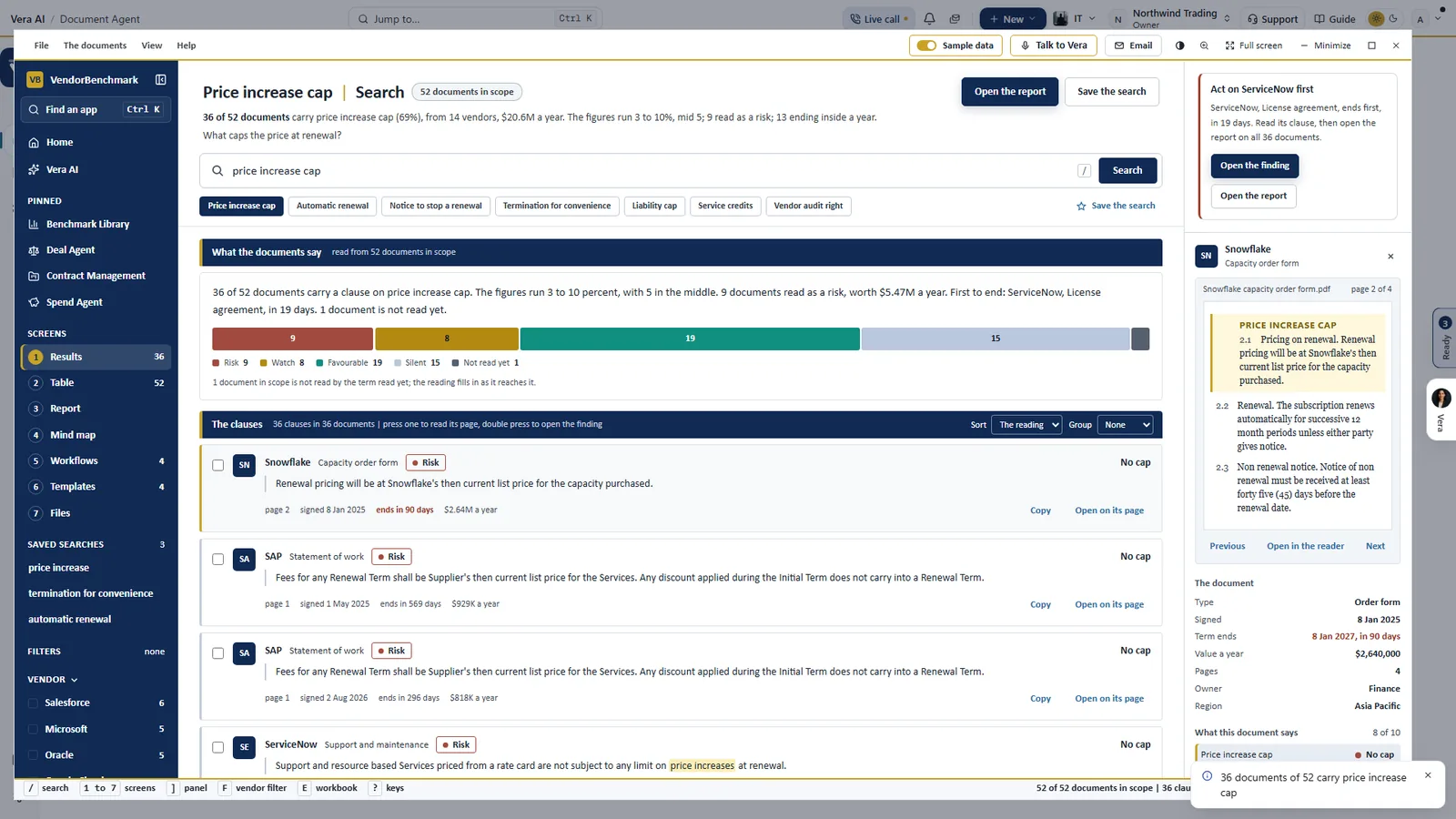
One term across the estate. Price increase cap on a sample estate of 52 documents: one bar of readings from Risk to Silent, each clause in the contract's own words with its page, term end and value, and a Snowflake order form's page on the right with the clause marked.
Every answer arrives with its page
Results lists one row per document in aligned columns: the vendor, the document, the reading, the answer, the clause with the words marked, the page, when the term ends and the value a year. Rest the pointer on a clause and the passages before and after it show in place. Press a row and the details column draws the stored PDF's page as a picture with the passage lit, with the page thumbnails beside it and every other item on the same page tagged in the margin.
Double press a row for the finding: the clause in the document's own words with its file and page, what the answer leaves you with, the value that rides on it, and when the term ends and the date to act by. If the read got it wrong, Correct the reading takes what the document really states. The correction is yours, the background read never overwrites it, and every screen and file redraws from it.
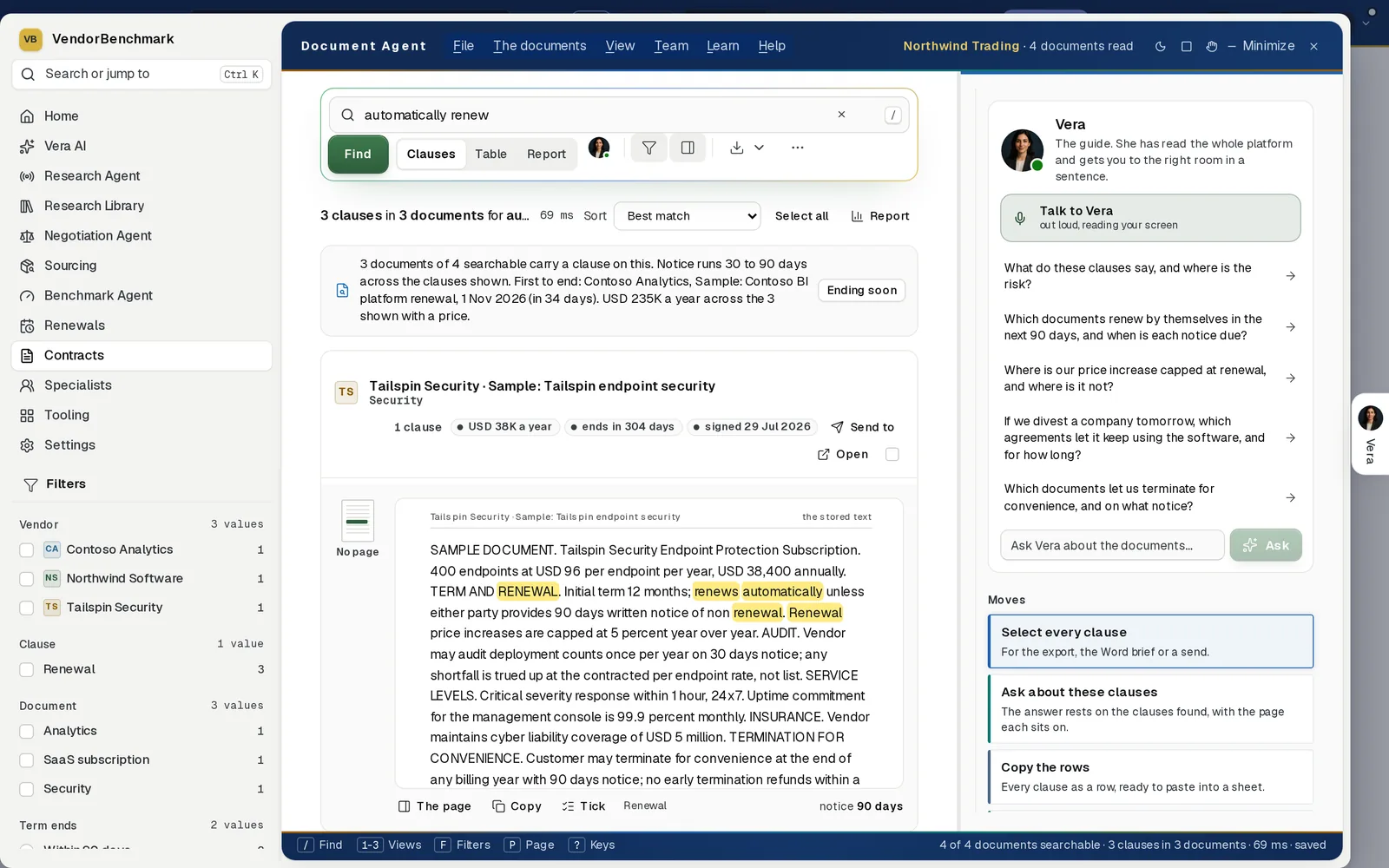
Your own words. Automatically renew, typed into the box: three clauses in three documents, each in the document's stored text with the matched words marked. This sample document has no stored page, so the result says No page instead of printing one. Vera's questions sit beside it, including which agreements let a divested company keep using the software.
Every clause on the screen is the contract's own stored text. Nothing is written for you.
One answer becomes a picture of the estate
The same readings roll up. The Dashboard sets the ten terms side by side by reading, weighed by documents or by value a year, and Do now lists the notice dates inside 90 days and the outliers, in order. Vendor by term puts every vendor against the ten items, each cell the weakest reading among that vendor's documents.
Four more views read the same answers another way:
- Table. Every document on one row with a column for each item, a price cap over your policy or no cap at all marked in brick, and a pivot by vendor, owner, region or document type.
- Mind map. The item in the middle and its branches by reading, vendor, type or owner, each branch as wide as its value a year.
- Deadlines. The notice runway for the next twelve months, and every agreement that renews by itself with nothing to limit the price, ranked by value.
- Report. The answers written up as a paper, with a policy slider from 3 to 10 percent on the price cap that moves every figure with it.
Answers leave the window in eight formats
Exports writes the Word report, a PDF, the Excel workbook with summary, documents, clauses, vendor and renewal sheets, an eight slide board deck, the clauses as CSV, the data as JSON, the notice calendar and a clause pack of cited passages, one to a page. Each can be downloaded, emailed to colleagues in the workspace, or scheduled weekly, monthly or quarterly.
- Watch a search. It looks again once a day and brings each new matching document to your notifications.
- Run a workflow. Renewal sweep, Price increase exposure and Exit and risk check read every document in scope, and can run on a schedule.
- Subscribe to the dates. A calendar link keeps Outlook, Google Calendar or Apple Calendar current as new notice dates arrive.
A schedule, a watched search and a calendar link read the documents as the person who set them up may see them, so nobody receives more than their own window shows.
Where it sits among the contract agents
The Document Agent works across the whole estate. The rest of the cluster brings the paper in and works it in depth.
- The day one read brings in up to 5,000 documents in one run for it to search.
- The Entitlement Agent lists what each contract grants, line by line.
- The Contract Agent takes one clause it finds and reviews the whole document around it.
For the app itself, see the Document Agent page, and for why every figure carries its source, read grounded or it does not ship. Our earlier post on one search box that returns every clause as a crop of its page shows where the design began.
What to do first
- Bring the documents in. Add documents takes uploads, PDF or Word up to 25 MB each, a connected SharePoint, Drive or Box folder, or anything forwarded to your own address.
- Press one term. Price increase cap on the rail, then Risk on the reading bar.
- Open the worst finding. Double press it for the clause, what it means and the date to act by.
- Watch the search. Watch looks again once a day and brings every new match to your notifications.
Questions buyers ask
Does the Document Agent write its own answers?
No. Every clause on the screen is the document's own stored text. A question in plain English becomes a search, and the chips over the results show exactly what Vera ran.
What are the ten terms?
Price increase cap, automatic renewal, notice to stop a renewal, termination for convenience, liability cap, service credits, vendor audit right, payment terms, data protection and benchmarking right.
What does Silent mean?
The document says nothing on that term. It is shown as Silent, its own reading, rather than as a risk or a guess.
Can I correct a reading?
Yes. Correct the reading on the finding, say what the document really states and save. The correction is yours: the background read never overwrites it, and every screen and file redraws from it.
Who sees a scheduled export?
Each schedule reads the documents as the person who set it up may see them, so nobody receives more than their own window shows. Every file sent is noted on the audit log.