A vendor's paper is written to be signed as it stands. The clauses that cost money over a term, a renewal priced at the vendor's own list, an uplift with no cap, seats that cannot come down, read as boilerplate unless someone knows to look.
The Contract Agent is the part of Vera AI by VendorBenchmark that looks. It reads one document at a time and puts every change worth asking for on the page, with the wording to ask in and the money on each change. Here is how a review runs, what you decide, and how the redline reaches the vendor.
The first changes are on the page inside a minute
Upload a PDF or Word file up to 200 MB, forward it to your contracts address or open one of seven samples. The first pass lands inside a minute and the whole read in three to five, each change arriving with its page and its money a year. A contract is also read within a minute of being stored, whichever door it came through, up to 40 reads on arrival a day, so the review is often waiting before anyone opens it.
The finished read opens on the change worth most, every change in the margin level with its own words. Beside the page sit the verdict, the money on the table, each benchmarked term on a scale of the market range, and what is good and should be kept as written.
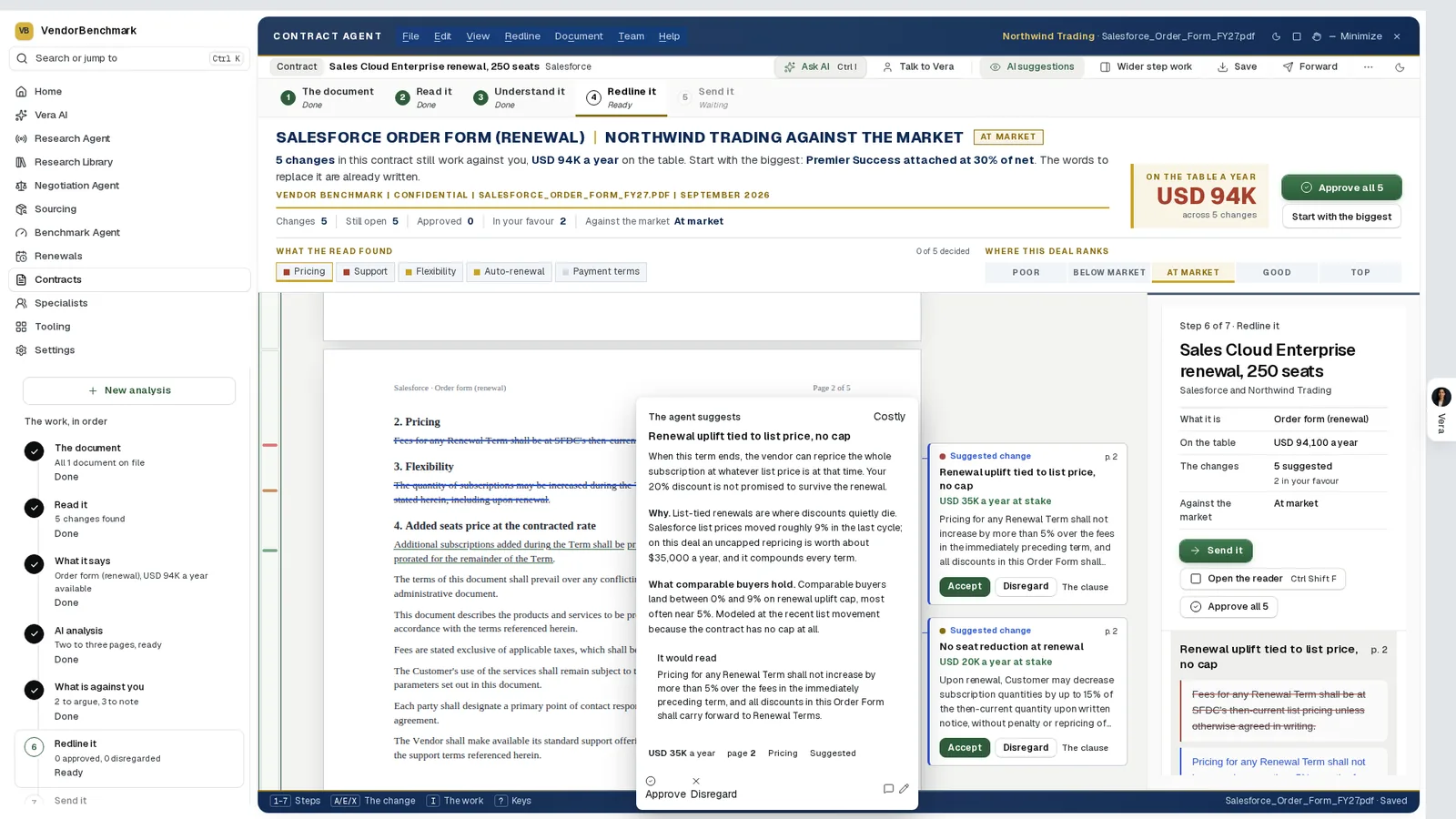
A review in progress. A sample Salesforce renewal order form at the Redline it step: the clauses the agent would change struck on the page, its suggested wording in a card beside each, the money a year at stake on every change, and Accept or Disregard on each card. Where the deal ranks sits on one scale from Poor to Top.
Three views divide the changes: Legal, Commercial and License compliance. On a master agreement the legal view is the review that decides whether counsel needs to look at all; on a statement of work the read finds where the scope leaks and sets the rate card against the market.
You decide one change at a time, worth most first
The change in hand opens as a decision card: its view, its page and its weight, one sentence that says why, then what the contract says beside what the agent suggests. Approve puts it in your redline, Skip leaves the clause as written, and Change the wording lets you write your own. The next change opens by itself.
The redline is drawn on the page the way Word draws tracked changes:
- Suggested. The words a change strikes carry a red line, with the replacement written above, dashed while the agent only suggests it.
- Approved. The same change turns solid once it is in your redline.
- Yours. Select any words to strike, replace or comment on them. Your own changes are solid red and go under your name.
- Theirs. A counter the vendor sends back is drawn in blue.
The agent suggests. The redline holds only what you approve.
Your standard decides what is off, not ours
My template checks the document against one of your templates or against your contract policy, which starts as a set of 22 terms, from payment terms to data return, until you edit it in the clause library. Each rule comes back Falls short, Silent, Unclear or Meets it, grouped as off your standard, to review and meeting it. Press a rule and the page goes to its words.
Rules keep the check honest. A term is read only on the kinds of document that can carry it. A term whose usual words are nowhere on the page is Silent at once, with no quote. A quote is kept only when its words are in the document. And a rule whose term lives in an agreement that is not on file is set apart under that agreement's name, with Upload it and check again. Redline it then strikes the clause and puts your wording in its place, as a change of your own.
The redline reaches the vendor under your name
Send is three doors: forward the redline to the vendor under your name, with a message drafted from your changes; take it as Word with tracked changes; or email a colleague the verdict, the changes and a link. Before anything goes out, the screen lists the changes still open, the must have rules still off your standard and the comments that stay with your team. Where your approval matrix asks for it, Send for approval routes the redline by its value a year.
The rounds are kept. The vendor's reply is read against every change you sent, and each one comes back accepted, countered or refused. You take their wording or hold yours for round 2, and a one page decision memo gives the approver every change with your decision.
The same discipline runs inside Contract Office. Press Redline on a document there and their language is read against your clause positions, finding by finding, and accepted language becomes Word tracked changes on the document's version chain.
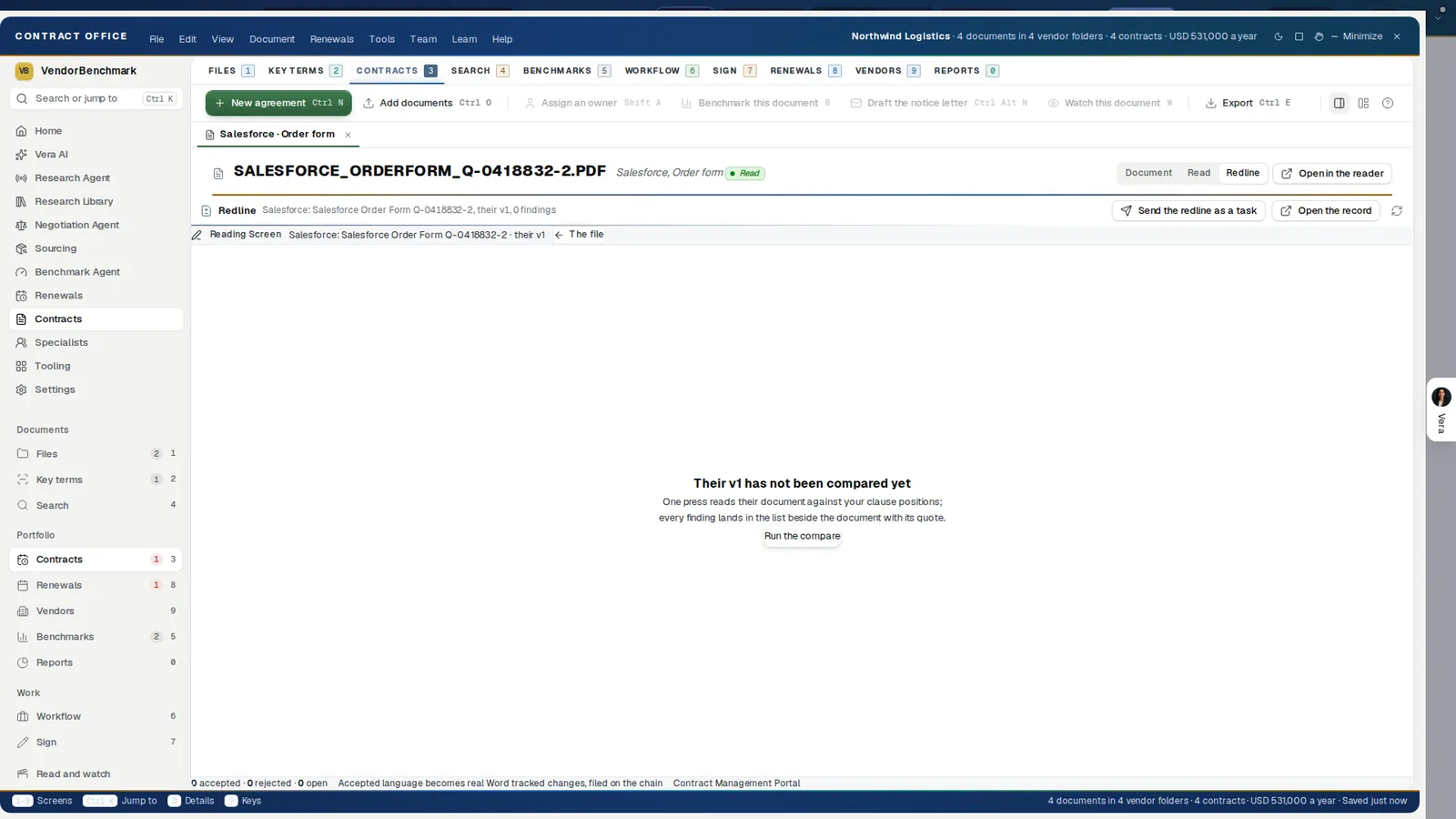
The redline in Contract Office. Before the compare runs, the screen says what one press does: read their version against your clause positions and list every finding beside the document with its quote. Accepted language becomes real Word tracked changes, filed on the chain.
When the vendor sends a new version instead of a markup, Compare sets the two side by side, lights every changed passage in red, prices what moved against you and drafts the reply on the asks you tick.
Where it sits among the contract agents
The Contract Agent reviews one document in depth. The rest of the cluster works across many.
- The Entitlement Agent lists what every contract grants, line by line.
- The Document Agent finds one clause across every contract you hold.
- Vera in the Loop reads the final paper in DocuSign before anyone signs.
For the app itself, see the Contract Agent page. Our earlier post on challenging a vendor's paper in its own margins walks through a redline round.
What to do first
- Open a sample. Three contracts, two statements of work and two master agreements open without an upload and spend nothing.
- Set your standard. Edit the starter contract policy in the clause library, or draft a template from a contract you already like.
- Send in the vendor's paper. Upload it, or forward it to your contracts address so it is read on arrival and waits under Documents.
- Decide the costliest change first. Approve, skip or rewrite each one, then send the redline under your name or take it as Word.
Questions buyers ask
Does the Contract Agent send anything to the vendor on its own?
No. It suggests the changes and drafts the message. The redline goes to the vendor when you press Forward to the vendor, under your name.
How long does a review take?
The first changes are on the page inside a minute, and the whole read lands in three to five.
Can it check a contract against our own standard?
Yes. My template checks the document against one of your templates or your contract policy, rule by rule: Falls short, Silent, Unclear or Meets it, with a quote wherever the document has the words.
What happens when the vendor sends its markup back?
The reply is read against every change you sent. Each one comes back accepted, countered or refused, and you take their wording or hold yours for round 2.