The cloud bill grew again, and nobody can say exactly why. The answer is already written down: every cloud produces a detailed cost export. What is missing is someone with the time to read it, resource by resource, across four providers.
The Cloud cost optimizer in Vera AI by VendorBenchmark reads those exports for you. Upload the AWS, Azure, Google Cloud or Oracle Cloud cost files and it returns the suggestions, a plan with owners and the reports, from your own rows. Here is the path from one export to one plan.
Start with the export each cloud already makes
What we need has a tab for each cloud with the export to make and the console steps, spelled the way that console spells them.
| Cloud | The export to make |
|---|---|
| AWS | The Cost and Usage Report 2.0 |
| Azure | The cost details export |
| Google Cloud | The billing export |
| Oracle Cloud | The cost and usage reports |
Each tab also carries the command line with Copy, the columns read and which of them are required, the first lines of a real export, and Send the steps for whoever holds the console. Utilization is optional: 13 weeks of CPU by machine turns rightsizing into a finding at high confidence. What we never need says it plainly: no keys, no passwords, no personal data.
On Upload, drop every export at once, as CSV or gzip. Each file gets a card with its format named exactly, the days, accounts, services and resources it covers, the columns found, its checks in plain words and the currency converted to US dollars once. A file that cannot be read says why and names the export to make.
Build writes the reports in front of you
Build the reports writes eight documents with the real counts as it goes: rows read, resources checked, rule checks, machines priced on four clouds, findings and the money. Skip to the end at any time. Until its three steps are done, Start here sits first in every head: upload the exports, build the reports, start the first item in the plan.
Overview then shows the money from today's run rate to the run rate after the plan, lever by lever; spend by day with the clouds stacked; What moved in the last 30 days; and the twelve months ahead with and without the plan, the gap shaded with the saving a month written inside it.
Explore groups the spend by cloud, account, service, region, team, environment, category or resource, and switches the chart to Cost against CPU. A resource opens as its own page: its cost by day, its CPU by week, what to do and what it saves, its price on the other clouds, and the rows of the file behind it with their line numbers.
Every suggestion shows the rows behind it
Suggestions lists what Vera found in your rows, each with the money a month and a year and the confidence as a meter with its reason. Four tabs sit under each: the rows behind it, what Vera checked, how to do it with the command, and the resources. Add to the plan, Not now and Ask why are the three answers, and Ask Vera answers from the files.
Where a suggestion is a commitment, Arm, spot or archive move, it is priced from that cloud's own catalog. AWS is read from its bulk price list, Azure from its Retail Prices API and Oracle Cloud from its price list, every night. Google Cloud has no feed, so it stays on its published list and says so.
No keys, no passwords, no personal data. The export is enough.
A plan with owners, and a file for every reader
Plan lists every finding with an owner taken from the team tag, the month it lands and its status, and draws the savings a month as each one lands, planned against landed.
Reports carries Savings by lever, Where the money is and the eight documents, each opening in a reader with contents, find, zoom and comments. The workbook is a real Excel file built in your browser: a summary with charts, the findings as a table with filters and totals, owner, month and status dropdowns, the plan by formula and the evidence rows. The board PDF is the review for the steering committee, its charts drawn as vectors. The email to the platform team, a monthly reminder for your calendar and the engineering tickets as CSV close the page.
Right click any resource, finding or row to open it, save it to a list, tag it, add it to the plan, ask Vera or export it. Lists starts you with five lists, each with its money a year and the biggest item in it.
Rooms keep each project and its people apart
Cloud work pulls in people outside procurement: the platform team, finance, an adviser. The optimizer holds that work in rooms. A room is a project with people in it: its estates, levers, scenarios, plan, reports, files and the log of everything saved.
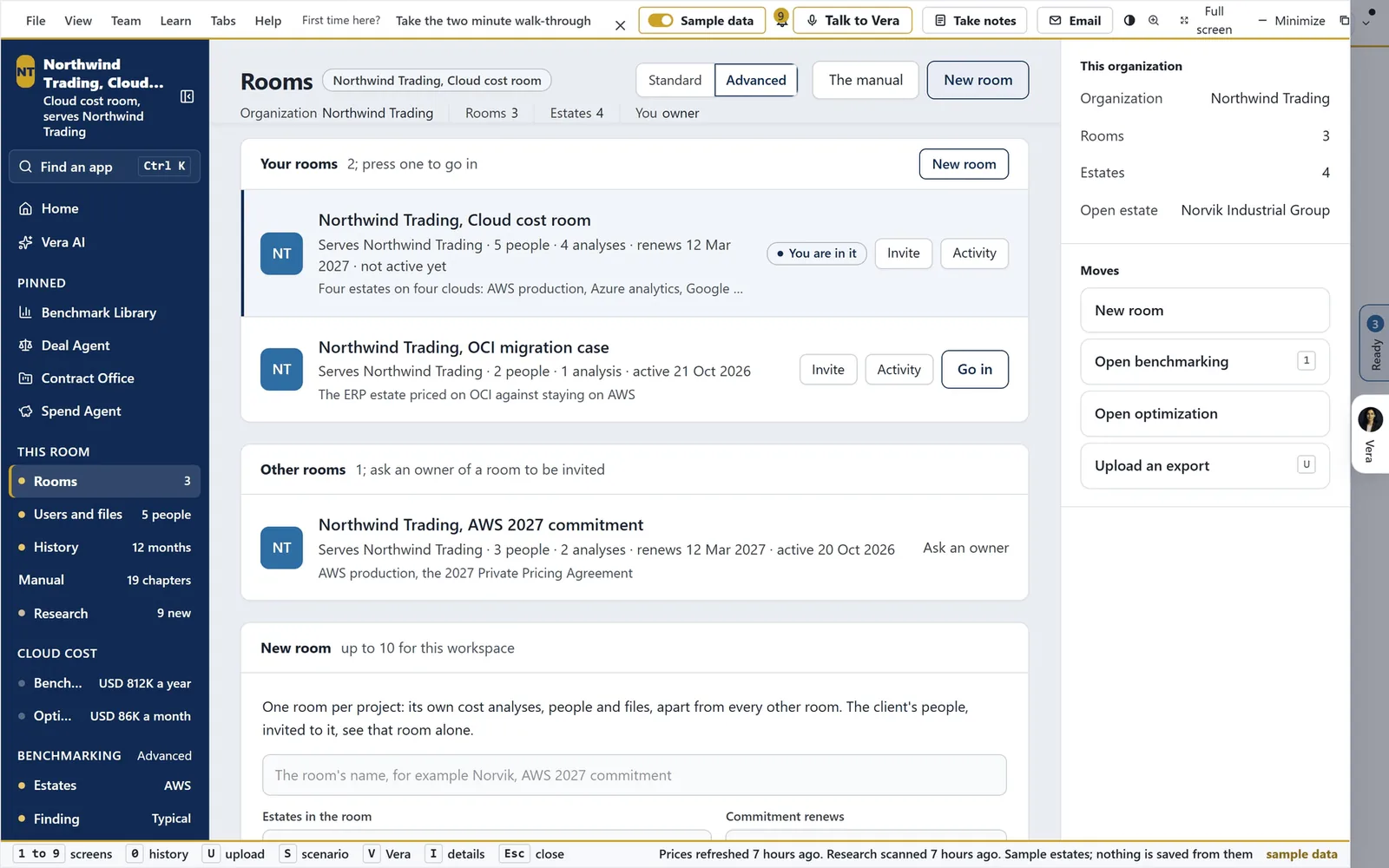
One room per project. Rooms on the sample workspace: a cloud cost room holding four estates on four clouds, an OCI migration case and an AWS commitment room, each with its people, its analyses and its renewal date.
A member sees the rooms they are in. An org admin sees every room in the organization and every member's role. An organization never sees another's rooms.
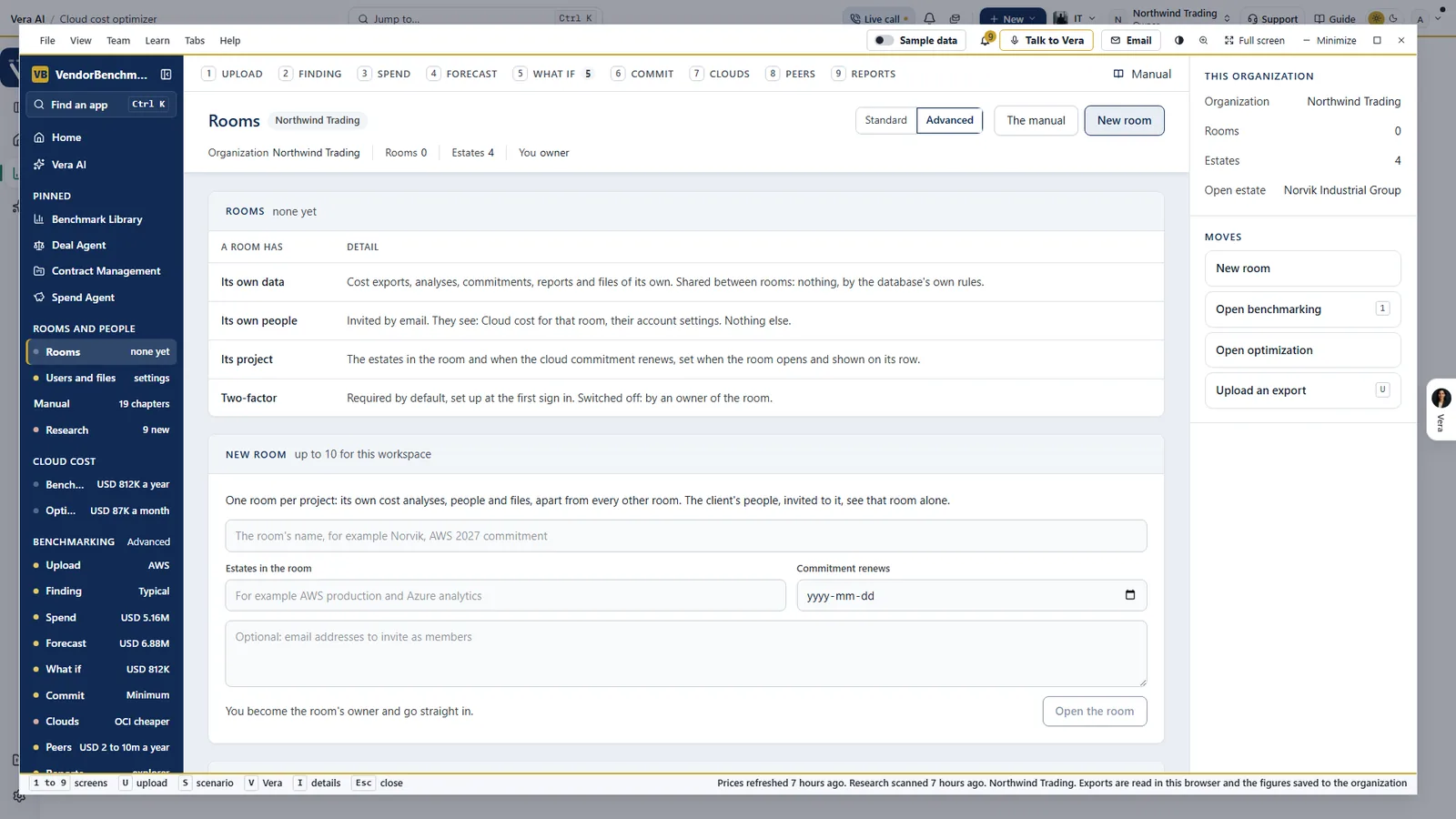
What a room has. Its own data, its own people, its project and two factor sign in, required by default. Shared between rooms: nothing. A workspace opens up to 10 rooms.
Where it sits among the spend agents
Cloud bills move every day, not at renewal, so they get an agent of their own. The full guide to AI spend analysis shows how it fits with the rest.
- The ranked savings cover the software contracts and the ledger, including commitments against real use.
- SaaS Manager does for SaaS apps what this does for cloud accounts: what is paid for, held against what is used.
- The app is on the Cloud cost optimizer page. For the product overview, see cloud optimization.
What to do first
- Send the steps. Open What we need, pick the cloud, and press Send the steps to whoever holds the console.
- Upload every export at once. Or press Use the five sample files to read Northwind Trading's four cloud bills first.
- Build the reports. Press Build the reports, then read Overview from today's run rate to the run rate after the plan.
- Start the plan. Add the first suggestion to the plan, check its owner, and send the email to the platform team.
Questions buyers ask
Do you need access to our cloud accounts?
No. The cost export each cloud already produces is enough. What we never need: no keys, no passwords, no personal data.
Which exports does it read?
The Cost and Usage Report 2.0 for AWS, the cost details export for Azure, the billing export for Google Cloud and the cost and usage reports for Oracle Cloud, as CSV or gzip.
Where is the file read?
In your browser, resource by resource. What you decide on it, the plan, tags, lists and comments, is kept for you.
How sure is a suggestion?
Each carries a confidence meter with its reason and the rows behind it. Add 13 weeks of CPU by machine and rightsizing becomes a finding at high confidence.
What do we hand to engineering?
The engineering tickets as CSV, the email to the platform team, and the workbook with an owner, a month and a status for every finding.