Most teams give real attention to their ten biggest software contracts. The rest renew at the price the vendor asked for, the invoices go unread, and the tail grows. AI spend analysis turns that around: agents read the whole ledger and every contract at once and show where your time is worth spending, and where it is not.
This guide covers the agents in Vera AI by VendorBenchmark that work on spend: the Spend Agent with its invoice and anomaly checks, Report Studio, the Cloud cost optimizer, SaaS Manager and Sourcing. Each section links to a full article, and each article ends in the same place: a decision that waits for you.
The agents that work your software spend
Two articles cover the Spend Agent: the ranked savings and the checks on every invoice. Two cover spend a contract review misses, cloud bills and SaaS apps. One covers the board pack, and one the next purchase.
Your top 10, 25 or 50 savings, ranked by an agent
Every saving scored out of 100, at floor, target and stretch, with its evidence.
Read it → 5.2 · Spend AgentInvoices against what you signed
Seven verdicts on every invoice line, and a weekly watch on the estate.
Read it → 5.3 · Report StudioThe board pack the agent writes
80 reports from your own agreements, every figure checked before filing.
Read it → 5.4 · Cloud cost optimizerOne cloud export, one savings plan
AWS, Azure, Google Cloud or Oracle Cloud, read in your browser.
Read it → 5.5 · SaaS ManagerEvery SaaS app you pay for or sign in to, on one list
Sign ins, bills and contracts joined: shelfware, duplicate apps and renewals.
Read it → 5.6 · SourcingSourcing a new purchase end to end with an agent
Requirements, bids, the comparison and the award, in one window.
Read it →How the money moves from the ledger to the board
The agents work in a fixed order. The decision that matters most is yours: which savings go into the plan. Every message that leaves, every claim and every award is a separate press after that.
Read and price
The Spend Agent reads the ledger and the contracts and places each line against what comparable customers pay.
Rank
Fifteen detectors find the savings. Vera scores each out of 100 and names the date to act by.
You approve
A saving joins the plan when you press Approve. The ambition, floor to stretch, is yours.
Draft the asks
The email to management, the letters to vendors and the invoice claims are drafted. You send them.
Report and prove
Report Studio writes the board pack; the invoices that follow prove each saving or show it leaking.
What the agents do, and what stays yours
| Stage | The agent does on its own | Waits for you |
|---|---|---|
| Read | Reads the ledger, the contracts and the invoices, and matches each name in the ledger to a vendor | Connecting the ledger or uploading the contracts |
| Rank | Runs fifteen detectors and scores every saving out of 100, with its evidence and sources | The ambition: floor, target or stretch |
| Plan | Drafts the plan, the decisions for the board and the email to management | Approve, Move on and every board decision |
| Invoices | Gives every line a verdict and drafts the claim and the payment hold note | Send the claim, and the outcome you record |
| SaaS licenses | Finds shelfware and leavers, and lists who a reclaim run would touch | An owner approves the run; removals stay off until an owner turns them on |
| Buying | Drafts the requirements, scores the bids and writes the decision memo | Who to invite, the award and every letter |
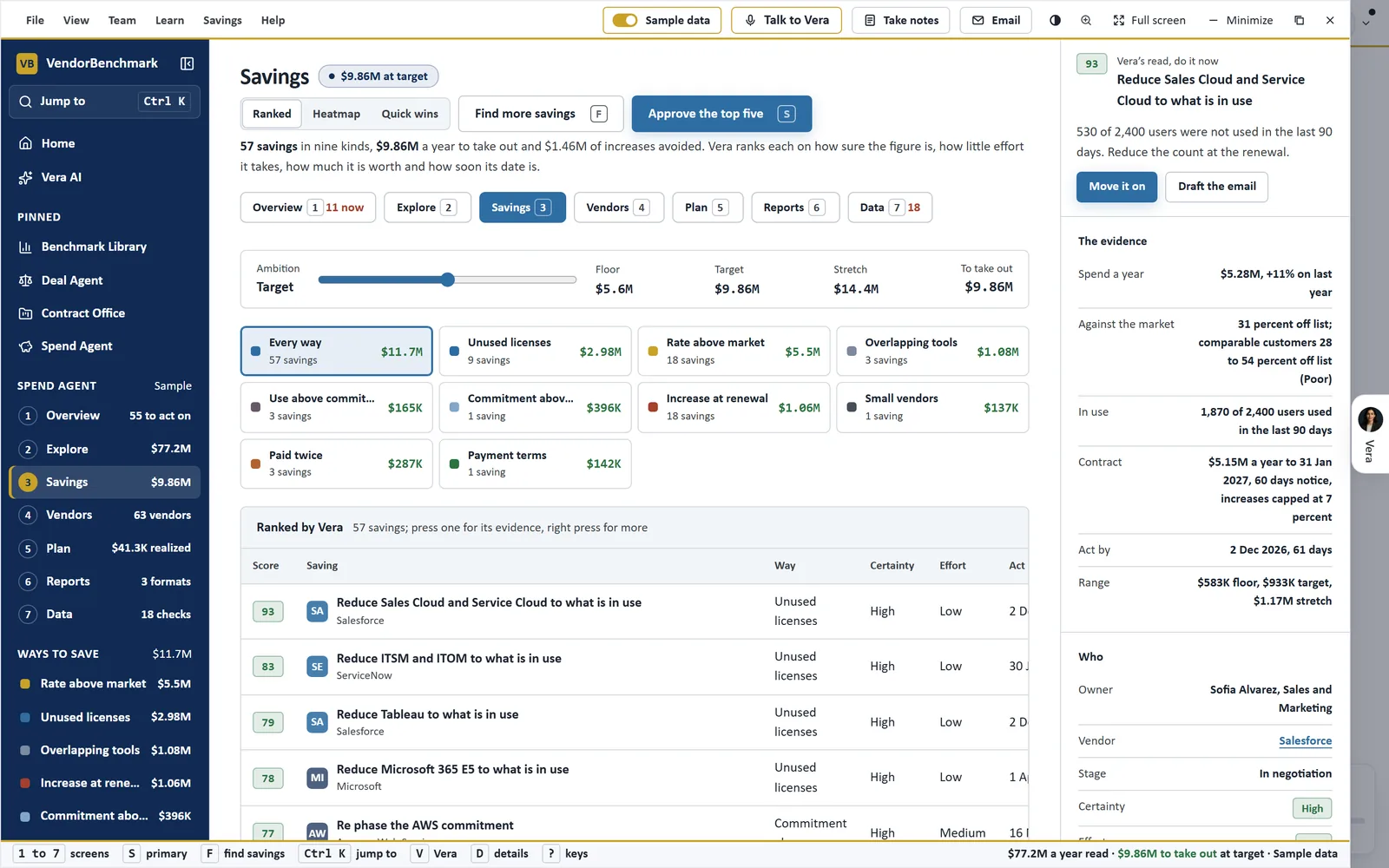
Ranked by Vera. The Spend Agent's Savings screen on the sample estate: every way to save with its count and value, each saving scored out of 100 with its certainty, effort and date, and the evidence for the saving in hand at the right.
Every figure opens its evidence
A savings figure nobody can trace is a figure finance discounts. So in the Spend Agent every figure is a door. Press the spend in the head, a vendor's line or the amount on a saving and a sheet opens with the ledger rows behind it, newest first, each with its date, reference, vendor, wording, GL account and amount, and Save as CSV for every row.
Each saving carries a whole file: Vera's read with its certainty and why, the spend, the peers at this size and where that range came from, what is in use, the contract and the date. On a rate finding it answers the three benchmark questions: what the line costs and how that compares, where comparable customers land, and where you rank, with the gap in money over the term. Its sources name the benchmark curve or the Software Price Index cell, the contract page the Contract Agent read, and any working assumption the rule rests on.
When a figure needs a second pair of eyes, Ask a human sends the saving to an analyst with the evidence pack filled in, and the answer comes within 24 hours.
Approved savings become a plan, a pack and a proof
Approve puts a saving in the plan. From there it moves through five stages, Found, Approved, In negotiation, Agreed and Realized, and each move is a press on Move on, with Undo in its notice. Decisions for the board list what the board is asked, by when, what it is worth and Vera's recommendation, with Approve and Defer.
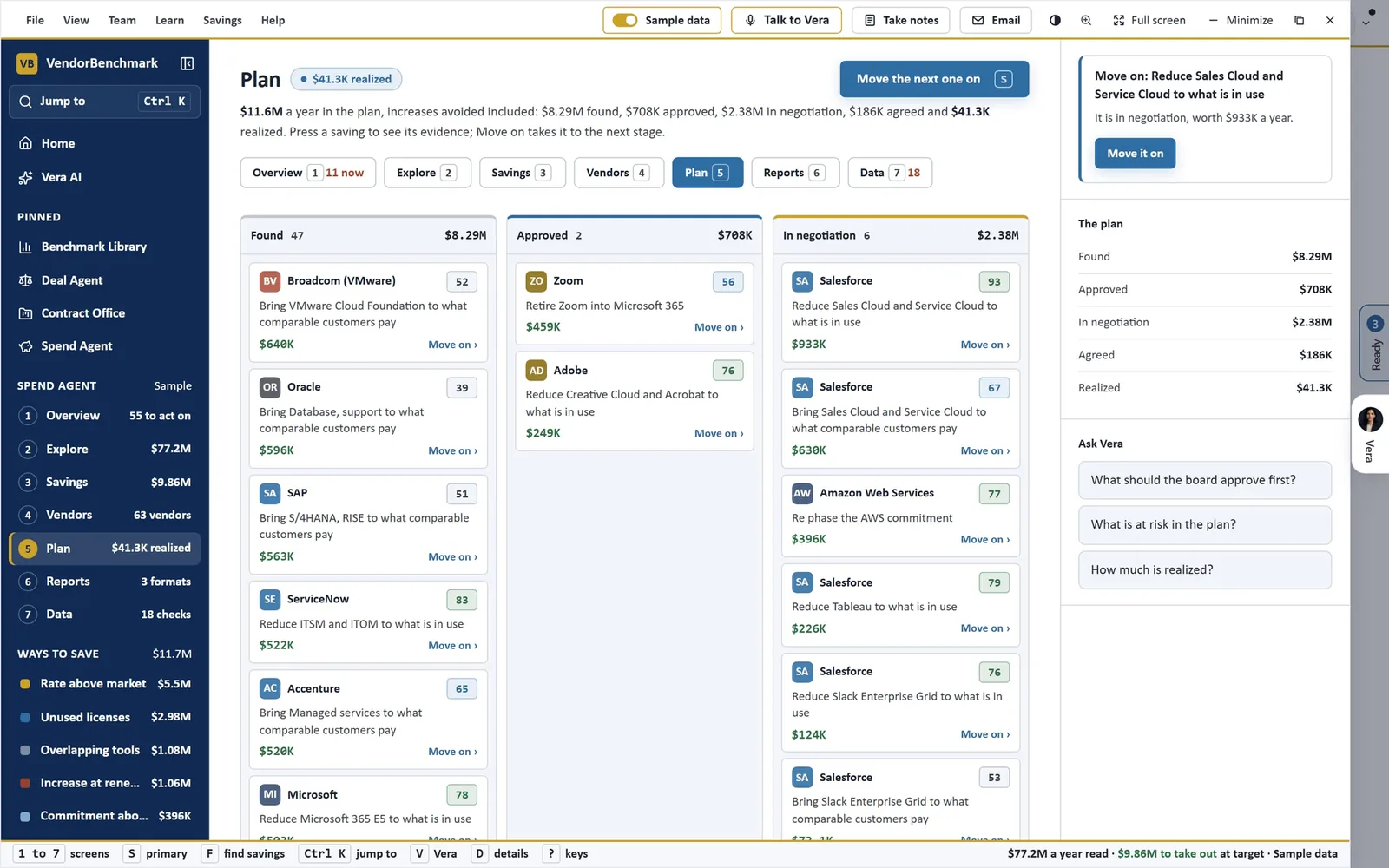
The plan in stages. On the sample estate each card carries the vendor, the saving, Vera's score and the money a year, with Move on beside it. The column at the right totals the plan from Found to Realized and offers three questions for Vera.
The review goes out as an Excel workbook, a Word report and a PowerPoint deck built from the same figures, with a savings register, a renewal calendar for Outlook or Google Calendar, and a letter to each vendor with an ask, ready for you to send. For anything else the board asks for, Report Studio writes it from your stored agreements and checks every figure before it is filed. New spend starts in Sourcing, where a request is routed under your purchasing policy before it becomes a purchase, and the award opens the agreement in your estate so the renewals calendar holds it from day one.
Then the proof. The Savings Proof Statement holds every claimed saving against the vendor invoices that followed it: confirmed, awaiting an invoice, or leaking above the price you negotiated. The product pages show the same path in brief: contract savings for the folder to plan workflow, spend reports for the reporting, and cloud optimization for the cloud bill.
Why spend needs agents now
The problem is rarely that a team negotiates badly. It is that a large estate holds more lines, invoices and renewal dates than people can price. A rate drifts above the market and nobody notices. An invoice bills a line the contract never priced. An increase with no cap lands at renewal, and it compounds every year after.
Two kinds of spend move faster than a contract review. Cloud bills move every day, and SaaS apps arrive on expense cards and through sign ins nobody approved. The Cloud cost optimizer reads the cost export each cloud already produces, and SaaS Manager joins sign ins, bills and contracts into one list of apps, so neither waits for a renewal to be seen.
Agents change the arithmetic. Every line gets priced, every saving gets a score and a date, every invoice gets a verdict, and the watchdog scans the estate every Tuesday. Your team's attention goes to the savings that rank first and the decisions only a person can make.
The agents find, price and draft. Approving, sending and awarding stay with you.
What to do first
- Add the data. On the Spend Agent's Add data screen, upload the contracts or import the ledger as a CSV from Coupa, Ariba or NetSuite.
- Set your ambition. Choose floor, target or stretch, then press Find more savings and watch the fifteen detectors run.
- Approve the first saving. Open the top of Vera recommends, read the evidence, and press Approve.
- Check a month of invoices. Upload them on Invoices and work the lines above contract, dollars first.
Questions buyers ask
What data does the Spend Agent need?
Contracts, the AP ledger, or both. Upload contracts as PDF, Word or a zip, or import the ledger as a CSV from Coupa, Ariba or NetSuite; what was paid then takes the place of what the contracts commit.
Does an agent approve or send anything on its own?
No. A saving joins the plan when you press Approve. A claim leaves when you press Send the claim, with you in copy. An award is a confirm press in Sourcing, and at or above your approval line it needs an approval first.
How are savings ranked?
By Vera's score out of 100: how sure the figure is, how little effort it takes, how much it is worth, how soon its date is and the way to save. Press the score to see each part and the rule behind it.
Can we prove a saving to finance?
Yes. The Savings Proof Statement reconciles each claimed saving against the invoices that followed it, and a recovered invoice claim counts once, as one time money.