Ask a procurement team for its savings list and you usually get the ten contracts someone remembered, in the order they came to mind. The figures are rough, the dates are missing, and nobody can say why the third item sits above the fourth.
The Spend Agent in Vera AI by VendorBenchmark replaces that list with a ranking you can audit. It reads the ledger and the contracts, runs its detectors across the whole estate and gives every saving a score, three figures and a file of evidence. Here is how to read it, and where your press comes in.
Ask for the top 10, 25 or 50, and the list answers
The Ask screen starts with the questions a buyer starts with, answered from your own contracts. Its first group, Where to save, lists the vendors to save on first, and the top of that list switches in place between 10, 25, 50 and 100. Beside it sit the savings to act on this quarter and the quick wins, high in confidence and low in effort.
Six more groups follow: Dates, Price, Use, Overlap, Money back and Risk. Each question shows its count and its money, with money a year and one time money kept apart. Press one and the answer fills the screen: one sentence with the figures, a chart of the biggest rows and the table. A question with nothing to show says what was checked, and every answer counts only what is still to do.
Type a vendor's name instead and Analyze opens a report on that vendor in one of eight kinds, from a savings report to a renewal brief. The copy written for the vendor carries the asks and the dates, with no owner, no floor and no internal note.
Every saving gets a score out of 100, and three figures
Vera ranks each saving on five parts, and the score is never a black box. Press it and Why it ranks opens: each part, what Vera read on this saving, the rule and the points it earned, then what decides its place against the saving above it and the one below.
| Part | Up to | What it weighs |
|---|---|---|
| Certainty | 30 | How sure the figure is, from what is on file: the contract, the ledger rows, a usage source, the peers and the date |
| Size | 25 | What the saving is worth against the biggest saving found |
| Way to save | 20 | The lever, in the order buyers act on them |
| Effort | 15 | How little work it takes |
| Date | 10 | How soon its date falls |
The score reads as a word too. From 75 it says Do it now, from 55 Strong, from 40 Worth it, and under 40 Later.
A saving is never one number. Each carries a floor, a target and a stretch, and your ambition decides which of the three the totals read. Assumptions lists every figure a rule rests on, from the increase at a renewal with no cap to your standard payment terms, each with its source and a slider.
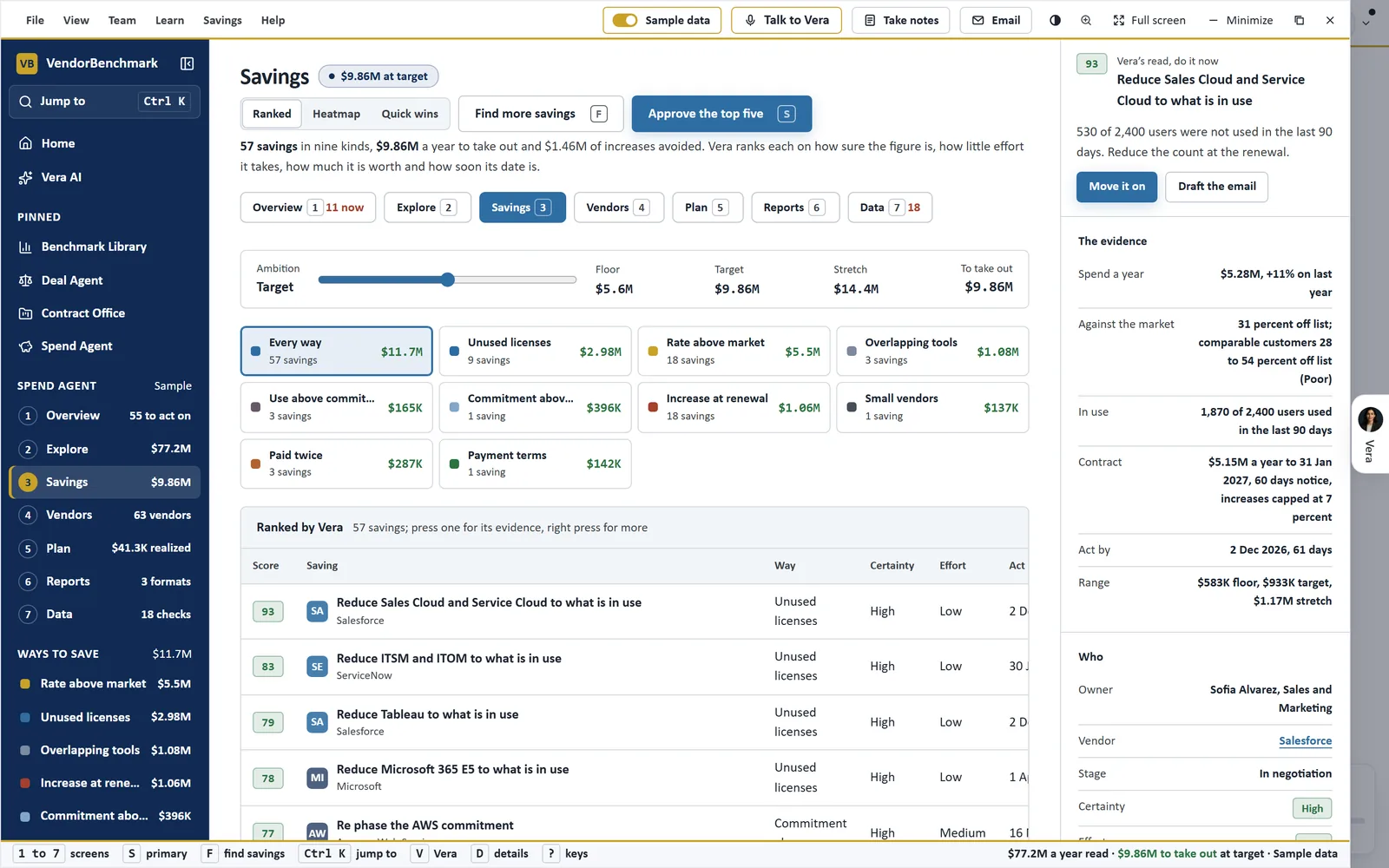
Ranked by Vera. The Savings screen on the sample estate: the ambition from floor to stretch, each way to save with its count and value, and the ranked list with score, way, certainty, effort and the date to act by. The saving in hand shows its evidence on the right.
Fifteen detectors, in the order a buyer acts
Every way to save is a filter with its count and its value, listed in the order a buyer acts on them: rate above market first, then downgrading the edition, shelfware, the increase at renewal, switching to a tool you already own, a cheaper product and commitments, then the checks and the estate wide finders.
Find more savings runs fifteen detectors in front of you: the twelve kinds of saving and three more finders. One looks for renewals near the vendor's fiscal year end, one for vendors with several contract end dates to bring together, and one for small vendors to consolidate in one category, priced at a 15 percent consolidation discount and labeled as an assumption. Each detector shows what it found as it finishes.
On your own contracts the review also holds each agreement against the ledger and the market. It flags a ledger paying more than 10 percent above the contract's value a year, invoices rising faster than the cap allows, payments after a contract ended, an auto renewal with its notice date in the next 12 months, and two vendors under contract for one job.
Every saving opens its whole file
Press any cell in the ranked list and the saving's file opens at that part. The amount shows floor, target and stretch with your ambition marked and the figure over the term; the date shows the act by date, the contract end, the notice, the increase cap, the owner and the stage.
Beside it sits the evidence: Vera's read with its certainty and why, the spend, the peers at this size with where the range came from, what is in use and from where, and the contract. On a rate finding the file answers the three questions every benchmark owes you: what the line costs and how that compares, where comparable customers land, and where you rank, with the gap in points and in money over the term.
Sources close the file: the benchmark curve or the Software Price Index cell with its quarter, the contract, the ledger rows, the usage counts, the research library and Vendor Radar for the vendor, and any working assumption the rule rests on. Where the Contract Agent has read the agreement, the evidence carries the contract page and the clause in its own words.
When a figure deserves a second pair of eyes, Ask a human sends the saving to an analyst with the evidence pack filled in, and the answer comes within 24 hours. Talk to Vera about it puts the same evidence in the question.
The score ranks the list. Your press decides what goes in the plan.
From the ranked list to the plan your management reads
Approve puts a saving in the plan. The plan runs in five stages, Found, Approved, In negotiation, Agreed and Realized, and Move on takes a saving to the next. Every change, from an approval to a change of ambition, carries Undo in its notice.
The plan reaches management three ways. Draft the email writes the note from the saving's own figures, for you to send. Reports builds the Excel workbook, the Word report and the PowerPoint deck from the same figures, for the CFO, the board, procurement or IT. The guide sets out the first 90 days, the twelve months and a chapter for each vendor, with the ask, three talking points and the walk away.
A saving is not done when it is agreed. The Savings Proof Statement holds each claimed saving against the vendor invoices that followed it, so every line reads confirmed, awaiting an invoice, or leaking above the price you negotiated.
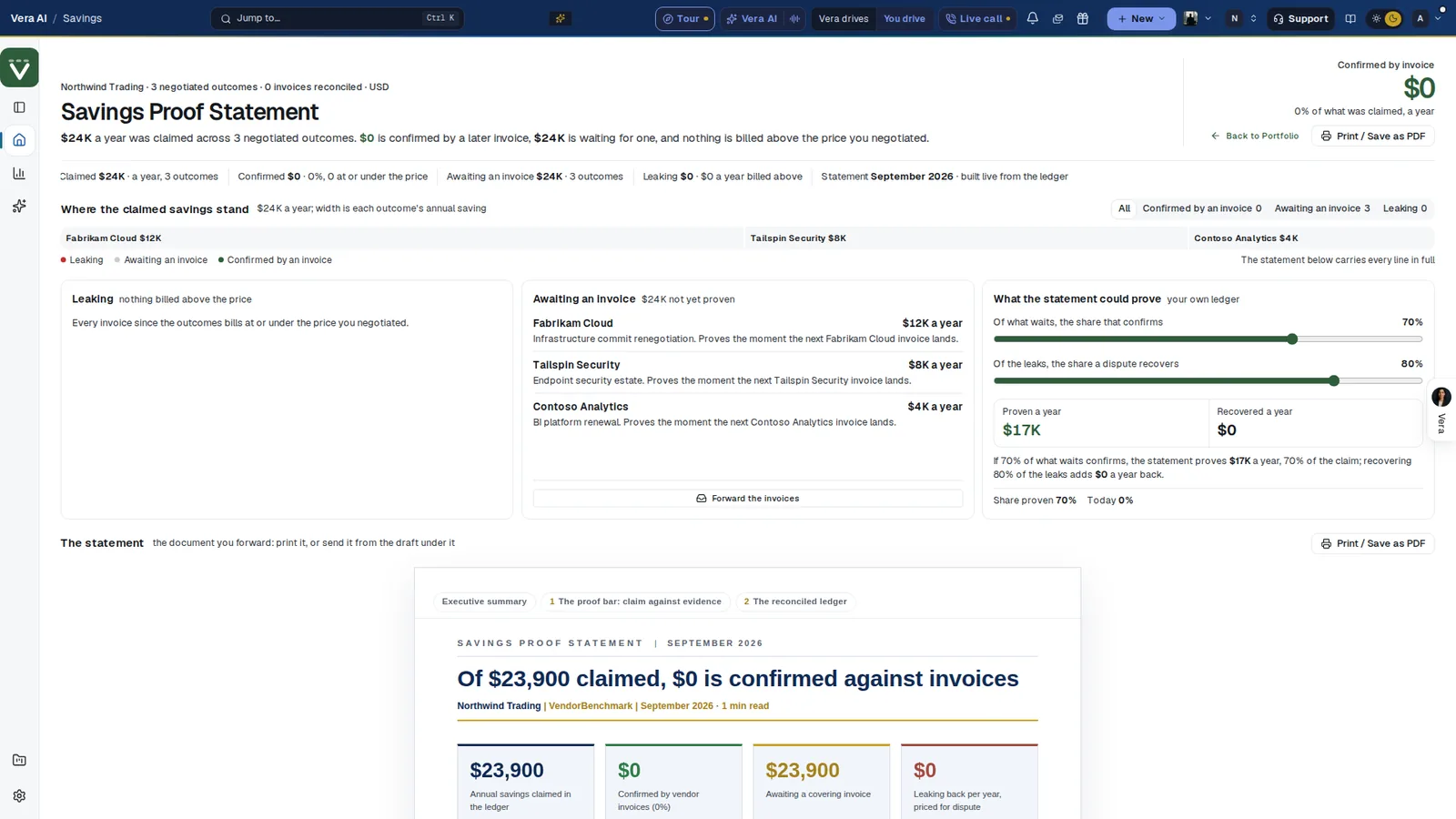
Proof after the plan. The Savings Proof Statement on a sample workspace: what was claimed a year, what a later invoice confirms, what waits for one and what bills above the negotiated price, with the statement itself ready to print or send.
Where it sits among the spend agents
Ranking is the center of this cluster, and the full guide to AI spend analysis shows how the other agents feed it.
- Invoices against what you signed checks every invoice line and proves each saving against the bills that follow.
- The board pack turns the approved plan into a report for the board, the CFO or the CIO.
- SaaS Manager brings in the apps bought outside a contract, with their shelfware and renewals.
- The app itself is on the Spend Agent page.
What to do first
- Add the data. On Add data, upload the contracts as PDF, Word or a zip, or import the ledger as a CSV from Coupa, Ariba or NetSuite.
- Set the ambition. Choose floor, target or stretch, and read the figures under Assumptions before you trust a total.
- Run the detectors. Press Find more savings and read Vera also found when the last detector finishes.
- Approve the first one. Open the top saving, read its evidence and sources, and press Approve.
Questions buyers ask
How does Vera decide the order?
By a score out of 100 in five parts: certainty up to 30, size up to 25, the way to save up to 20, effort up to 15 and the date up to 10. Press the score on any saving to see each part and the rule behind it.
Does a saving go into the plan by itself?
No. A saving joins the plan when you press Approve, and every change carries Undo. Moving it from stage to stage is a press on Move on.
What do floor, target and stretch mean?
Three figures for every saving, from the cautious to the ambitious. Your ambition chooses which one the totals read, and it is your setting, not the workspace's.
Where do the market figures come from?
From the benchmark curve or the Software Price Index cell named in each saving's sources, with the contract, the ledger rows and the usage behind it. A working assumption is named as one.
Can an analyst check a saving before we act?
Yes. Ask a human sends the saving with its evidence pack filled in, and the answer comes within 24 hours.