SaaS spend hides in three places at once. Some apps are paid for and nobody signs in. Some are signed in to and never pass through procurement, because they went on an expense card. And some are bought twice, by two teams, for the same job.
SaaS Manager in Vera AI by VendorBenchmark puts every app the company pays for or signs in to on one list. It reads your sign ins, your bills and your contracts, joins the three, and finds the money in the gaps between them. Here is how the list is built, what it finds, and what it never does without an owner.
Three sources, one row for each app
Get started offers three connections, each read only. Connect your sign ins reads Okta, Entra or a usage file. Connect your spend reads NetSuite, Coupa, Ariba or a spend file. Add your contracts has Vera read the licenses, the rate, the term, the renewal date and the notice. Connecting a source is for workspace owners and admins; everyone can use the list.
Once apps are found, each says how it was found: signed in and paid for, paid for with no single sign on, or signed in with nothing paid. Each group asks its own question. Who signs in to the app paid for outside single sign on, and who approved the one people sign in to with nothing paid?
Sources takes two more files from a workspace owner. A people file, a CSV with an email column and a status or left on column, finds the licenses of people who left. A card spend file, with the merchant, amount and date, and employee email and department where you have them, shows software bought on expense cards as apps. It never takes a card number.
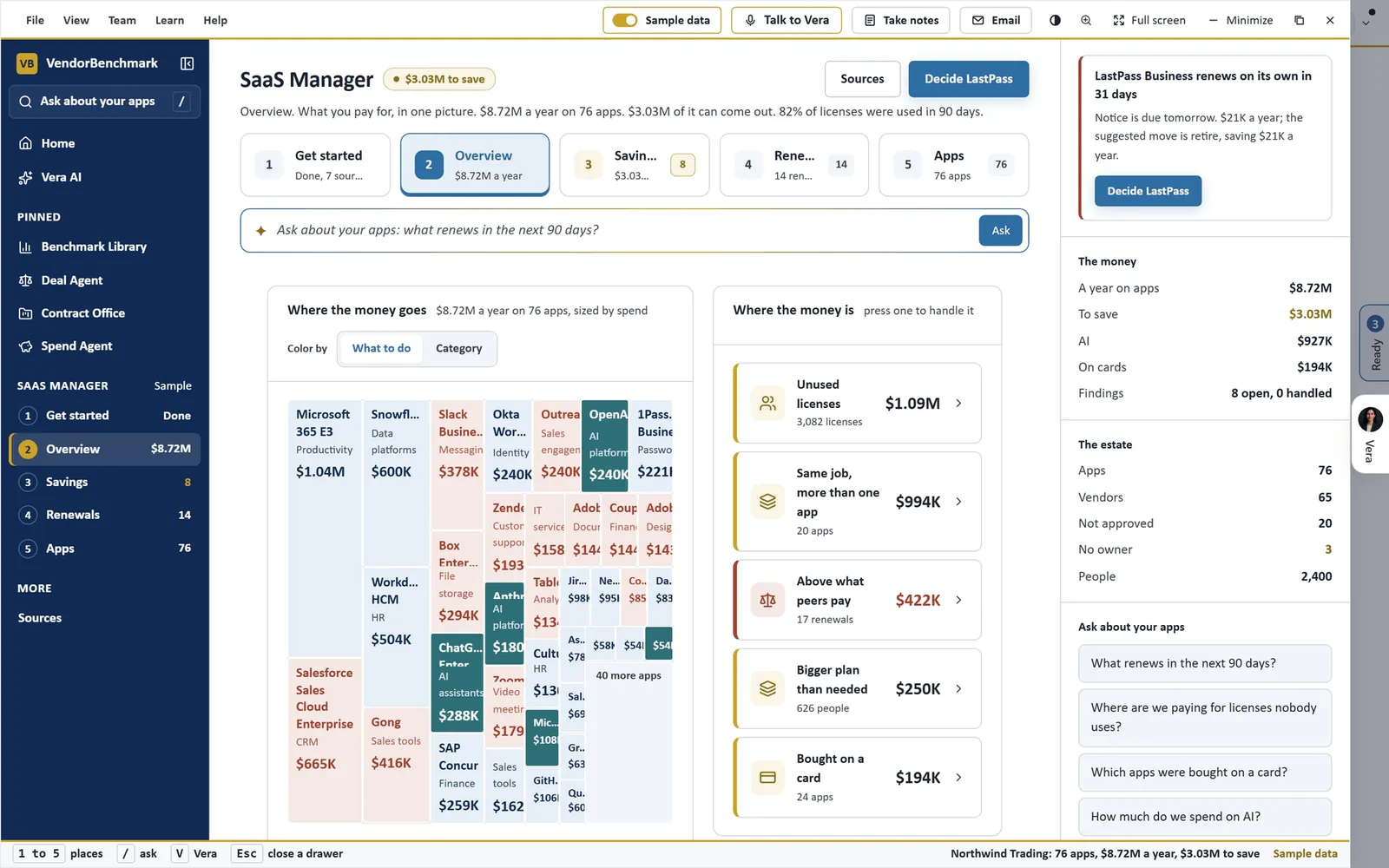
What you pay for, in one picture. SaaS Manager's Overview on the sample workspace: every app as a tile sized by what it costs a year and colored by what to do, with Where the money is beside it, from unused licenses to apps bought on a card.
Eight kinds of finding, worked one at a time
Savings puts every finding in one queue, biggest money first, and shows them one at a time. Each has its one action and Download the list. Mark as handled moves it under Handled, and Next goes to the next one. A finding your sources cannot support yet is not shown.
- Shelfware licenses. Pick 30, 60 or 90 days where your sources report them, and the spare to keep in each app.
- People who left. Licenses still held by people the people file says have gone.
- A bigger plan than needed. People on a plan above the one they use.
- Same job, more than one app. Pick the one to keep.
- Above what peers pay. Renewals priced above peers; aim for the middle or the best peer price.
- Bought on a card. Approve, review or mark not approved.
- AI spend. Spend against its commitment, forecast from the last month or three.
- Apps nobody owns. Name the owner.
Twelve months of renewals, each with a decision
Renewals draws the next twelve months as a runway, each month's renewing value and what can be saved, then lists every renewal with its date, the notice date, how much of it was used in 90 days, where it ranks against peers, the saving and a decision. For an app that renews on its own, the notice date turns red inside 30 days.
The decision starts as the suggested move, renew, rightsize, renegotiate, retire or raise the commitment, and holds what you pick. A renewal read from the bills before the contract is on file says so. An app's owner, its status and the decision on its renewal are saved for everyone in the workspace.
Apps is the full register: category, owner, cost a year, use, sources, renewal and status, with filters for approved, not approved, under review, no owner, AI and on cards. A row opens the app with who uses it, its price against peers, the move at renewal and the apps doing the same job. The Ask bar answers from the apps on file, for example what renews in the next 90 days.
Taking a license back needs an owner
From shelfware licenses or people who left, Ask for the run starts a reclaim run. The people on it are chosen from what Okta and Entra reported. For shelfware, that is everyone assigned who has not signed in to Okta for over 30 days, less the spare you keep. For leavers, it is everyone assigned whom the people file says has left.
A workspace owner approves or cancels the run in the same drawer. After the wait, seven days for shelfware and none for leavers, anyone who signed in keeps the license and the rest are unassigned in Okta or Entra, each removal written to the audit log.
Removals in Okta and Entra is the owner's switch, and it starts off. Until an owner turns it on, an approved run marks each person and changes nothing, so the list can be checked before a single license moves.
With removals off, an approved run marks each person and changes nothing.
Where it sits among the spend agents
SaaS Manager covers the apps a contract review alone would miss. The full guide to AI spend analysis shows the rest of the cluster.
- The ranked savings take the contracts and the ledger and score every saving out of 100.
- The weekly anomaly watch raises software paid with no contract on file, including apps five or more people sign in to through Okta or Entra ID.
- For software installed on machines rather than signed in to, see agentless discovery.
- The app is on the SaaS Manager page.
What to do first
- See it working first. Turn on the sample: Northwind Trading, 2,400 people and 76 apps, shown to you alone.
- Connect two sources. Ask a workspace owner or admin to connect your sign ins and your spend in Settings.
- Import the people file. A CSV with an email column and a status or left on column finds the licenses of people who left.
- Work the queue. Start at the top of Savings, biggest money first, and ask for a reclaim run on the leavers.
Questions buyers ask
Does SaaS Manager change anything in Okta or Entra?
Only through a reclaim run a workspace owner approves, and only with Removals in Okta and Entra switched on. The switch starts off, and every removal is written to the audit log.
Which systems does it read?
Sign ins from Okta, Entra or a usage file; spend from NetSuite, Coupa, Ariba or a spend file; and your contracts. Each connection is read only.
How does it find apps bought on expense cards?
From a card spend file a workspace owner imports: merchant, amount and date, with employee email and department where you have them. It never takes a card number.
What if a contract does not allow fewer licenses?
The app shows Held. The spare licenses go to new starters, and the cut is asked for at the renewal.
Who sees the decisions we make?
An app's owner, its status and its renewal decision are saved for everyone in the workspace. The levers and the findings you mark handled are kept for you.