A new software purchase is a project with too many documents: the requirements, the invitations, bids in every format, the scoring sheet, the price comparison and the memo that justifies the choice. Most of the effort goes into assembling them, and the decision gets whatever time is left.
Sourcing in Vera AI by VendorBenchmark runs the purchase in one window, in five plain steps: Need, Suppliers, Bids, Compare and Award. Each step has one thing to do, shown first under Next. Vera drafts and reads. You choose, invite and award.
Every request is routed before it becomes a purchase
Requests from the business land on Requests, raised on a short form or mailed in, and each gets a suggested route under your purchasing policy. Run a purchase is for new spend at or above the award approval threshold. Renew with the Deal Agent is for a renewal of software you already run. Buy direct, check the price is for anything under the threshold.
Intake names each request that looks like something you already own, and prices it. Every waiting request wears its clock, 24 hours to be read unless your org sets otherwise, and org owners can add up to 12 questions of their own to the request form. A request under the threshold needs no purchase: check the quote against the market in the Benchmark Library and buy.
Requirements and a shortlist, drafted from one line
On Purchases, type what you need to buy in your own words and press Start. Vera drafts the weighted requirements and the invitation pack and suggests suppliers, which takes up to a minute.
Need shows the brief, today's supplier and price, and the budget, then the requirements grouped by category with each category's weight. Press a priority to change it between Must have, Important and Nice to have, remove a requirement or add one, and press Save requirements. If you have your own RFP, RFI or RFQ, upload it as a PDF or DOCX and every bidder receives your document as written.
Suppliers lists the shortlist with Vera's fit, why and what to watch out for on each. An address Vera proposed is marked to confirm. Tick who to ask, choose when bids are due, in 14, 21 or 28 days, and press Invite. Each supplier gets its own invitation with the requirements, the order form, a private reply address and the portal link.
Bids are read, scored and answered the same for everyone
Bids counts down to the deadline and keeps one track per supplier: Invited, Opened, Asked, Bid in or Declined. A bid emailed to the reply address files itself onto the purchase, and Add a bid reads a PDF or Word bid you received another way. Score with Vera scores any bid not yet scored, and each score carries a quote from the bid document that justifies it.
Questions from suppliers show as they arrive. Write the answer or ask Vera to draft it, and Send to all sends it to every bidder without naming who asked, so the process stays defensible.
Options holds what an advanced buyer reaches for: sealed bids, a price sheet, a second round, a blind evaluator panel, demos, a split award, and sign off by Security and Legal.
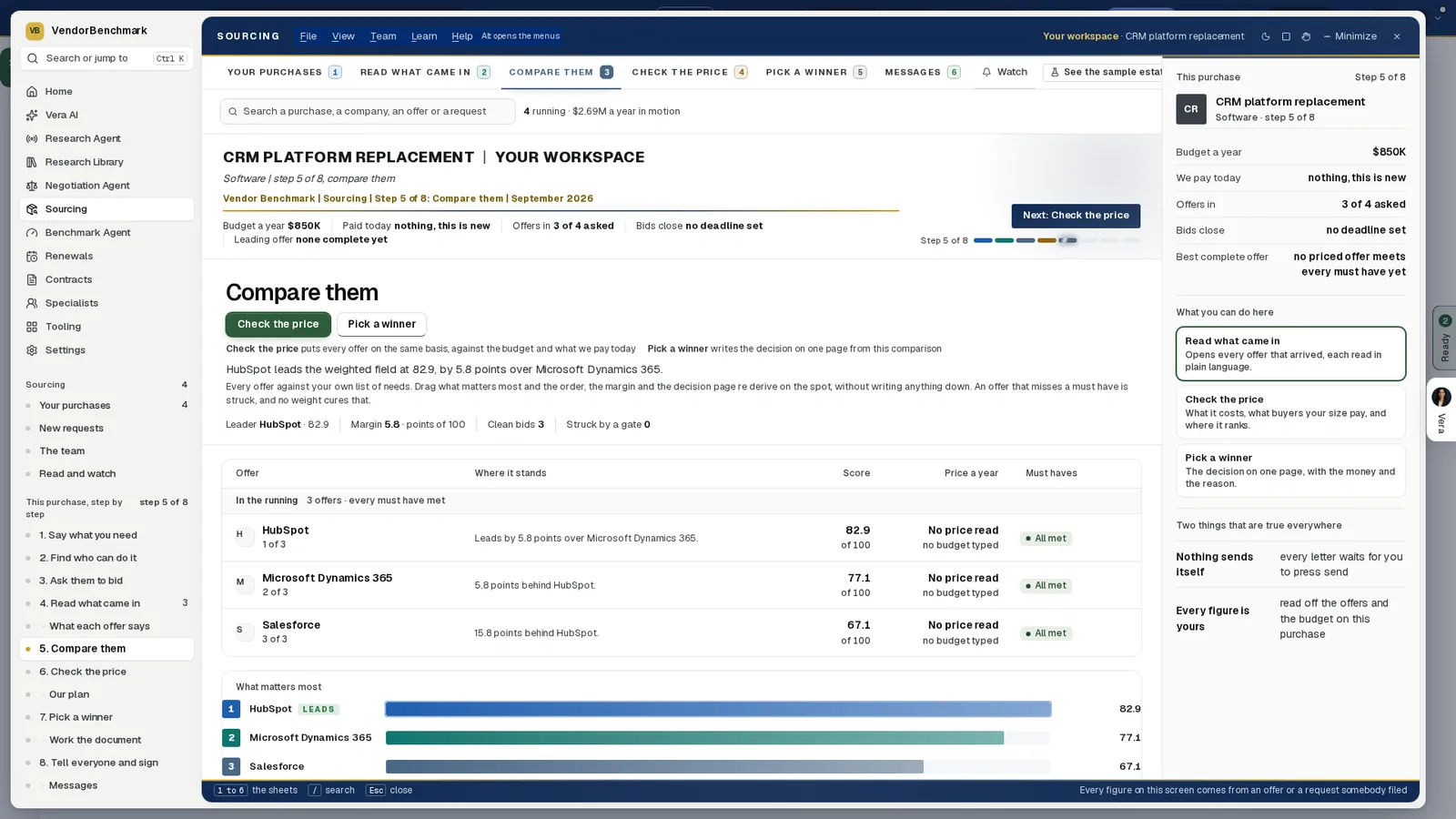
Compare them. A sample CRM purchase at step 5 of 8: three offers ranked by weighted score, each with where it stands, its price and its must haves, and the score race under What matters most.
The comparison answers the three benchmark questions
Compare opens on The answer for the leading bid: what it costs, what comparable buyers get, and where it ranks, from Poor through Below market, At market and Good to Top of the market, with the gap to the midpoint in money.
Ranking blends quality and price by the weights above it. Move a weight and the ranking follows. A bid that misses a must have stays in the table and can never win, whatever the weights. Each bid's discount off list is placed on the market range; a bid that prints no list price is named under the scale rather than placed, and the screen names what to ask for in writing instead.
Deal pricing prices every move still open from the quotes you hold: award as quoted, hold the supplier to its own discount band, make it match a competing quote, switch to the cheaper response, or bring the deal back inside the budget. Nothing there is estimated. Headroom, the gap between the quote on the table and the best move still open, is the number to walk into the call with.
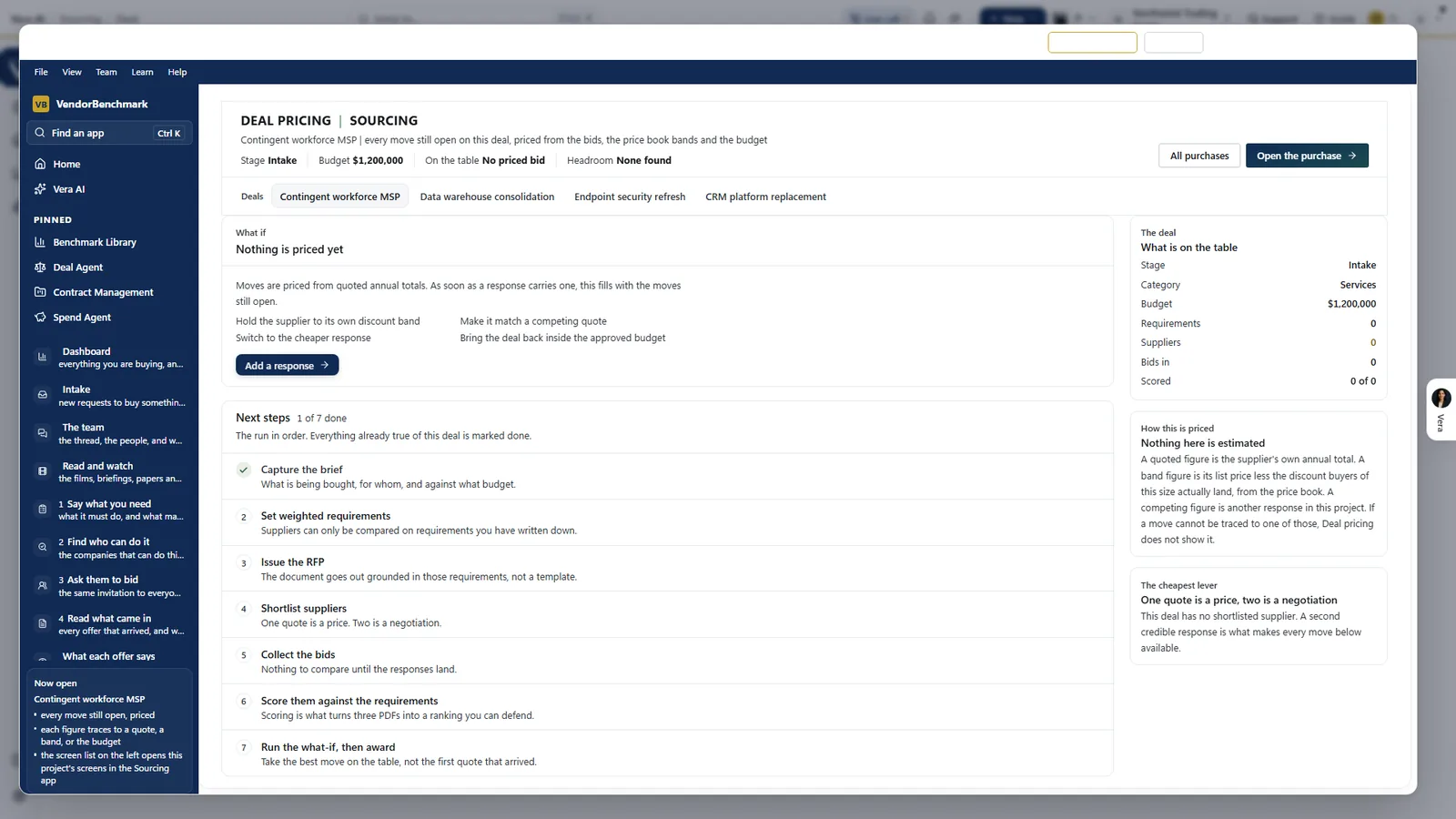
Deal pricing, before the first price. A sample purchase with no priced bid yet: the moves it will price once a response carries a figure, the run in seven steps with what is already done, and the rule on the right. Nothing here is estimated.
The award is your press, and it is gated
Award sets out the decision: the winner, why, what to watch and the runner up. Ask before you sign lists the move to the market midpoint and the bid's own open points, and you untick any ask you want to leave out. The saving over three years is set against the renewal; the three year cost is the annual price times three plus any one time charge the bid states, a planning term rather than a commitment.
The award itself is an arm and confirm press, and it is gated. At or above your approval threshold, 100,000 dollars a year unless your org sets otherwise, it needs an approved request naming that supplier. A supplier whose critical document has lapsed cannot be awarded until it is renewed, and where your policy requires it, the award memo takes a named sign off first.
Then the letters. The award and regret letters are drafted for you to send, and each losing bidder's debrief is written from their own scores only, never another bidder's data. Decision memo downloads the case for the decision in Word. The award opens the agreement in your estate, so the renewals calendar holds the new term from day one.
Vera drafts and reads. You choose, invite and award.
Where it sits among the spend agents
Sourcing is where new spend starts, and the rest of the cluster watches it once it is signed. The full guide to AI spend analysis shows how.
- The ranked savings include switching to a tool you own and a cheaper product, the findings a new purchase can answer.
- The board pack carries the decision to the people who approve the budget.
- A renewal of software you already run goes to the Deal Agent instead: see one renewal from notice date to signature.
- The app is on the Sourcing page.
What to do first
- See the sample. Turn on Sample data for three purchases at three steps; changes to the sample stay in the window.
- Start one. On Purchases, type what you need to buy and press Start, or pick a category chip.
- Fix the requirements. On Need, change a priority, remove or add a requirement, then press Save requirements.
- Invite two or more. On Suppliers, confirm each address, choose when bids are due, and press Invite.
Questions buyers ask
Does Vera contact suppliers on its own?
No. Invitations go when you press Invite, and letters when you press Send. Nothing sends itself to a supplier.
How is the leading bid chosen?
It must meet every must have and carry a price. Then it is ranked on the purchase's own weights, then the lower price, then the earlier arrival. The award is yours to make.
What if a bid prints no list price?
It is named under the market scale rather than placed on it, and the screen names what to ask the supplier to confirm in writing.
When does an award need approval?
At or above your approval threshold, 100,000 dollars a year unless your org sets otherwise. The award waits for an approved request naming that supplier.
What happens after the award?
The award and regret letters are drafted for you to send, and the agreement opens in your estate so the renewals calendar holds the new term.