An invoice is the last place a contract can go wrong, and the least read. Accounts payable checks that a bill was approved, not that its unit price matches the order form signed at the last renewal. And a rate error does not happen once. It repeats on every invoice until someone corrects it.
The Spend Agent in Vera AI by VendorBenchmark carries two checks for this, on its steps 10 and 11. Invoices reads every line a vendor billed and reconciles it against what you contracted. Anomalies is the weekly watchdog that scans the whole portfolio for what moved. Here is what each does, and what waits for you.
Every invoice line gets a verdict
Invoices arrive one of two ways. Drag a PDF or DOCX onto Check an invoice, with an optional vendor to improve matching, or forward them to the private email address an owner connects under Settings, Integrations, and each one is processed as it lands. Hand to accounts payable opens an email to them with the instruction.
Lines are numbered from 1, the same on the page, the exhibit and the claim letter, and each gets one of seven verdicts.
| Verdict | What it means |
|---|---|
| On contract | The line matches the rate and quantity you contracted |
| Above contracted rate | The unit price is above the rate on your order form |
| Over entitlement | More units billed than you are entitled to |
| Off contract | An item you never bought, with no order form or entitlement on file |
| Uplift cap breached | A rise above the cap written into the contract |
| Above MSA rate card | A consulting line billed above your saved MSA rate card |
| No baseline | Nothing on file to check the line against yet |
Every total is in US dollars. An invoice billed in euros or pounds is converted once, with its own currency recorded, and each line is checked against your entitlement's unit cost converted to the invoice's currency, so a pound invoice is never compared with a dollar rate.
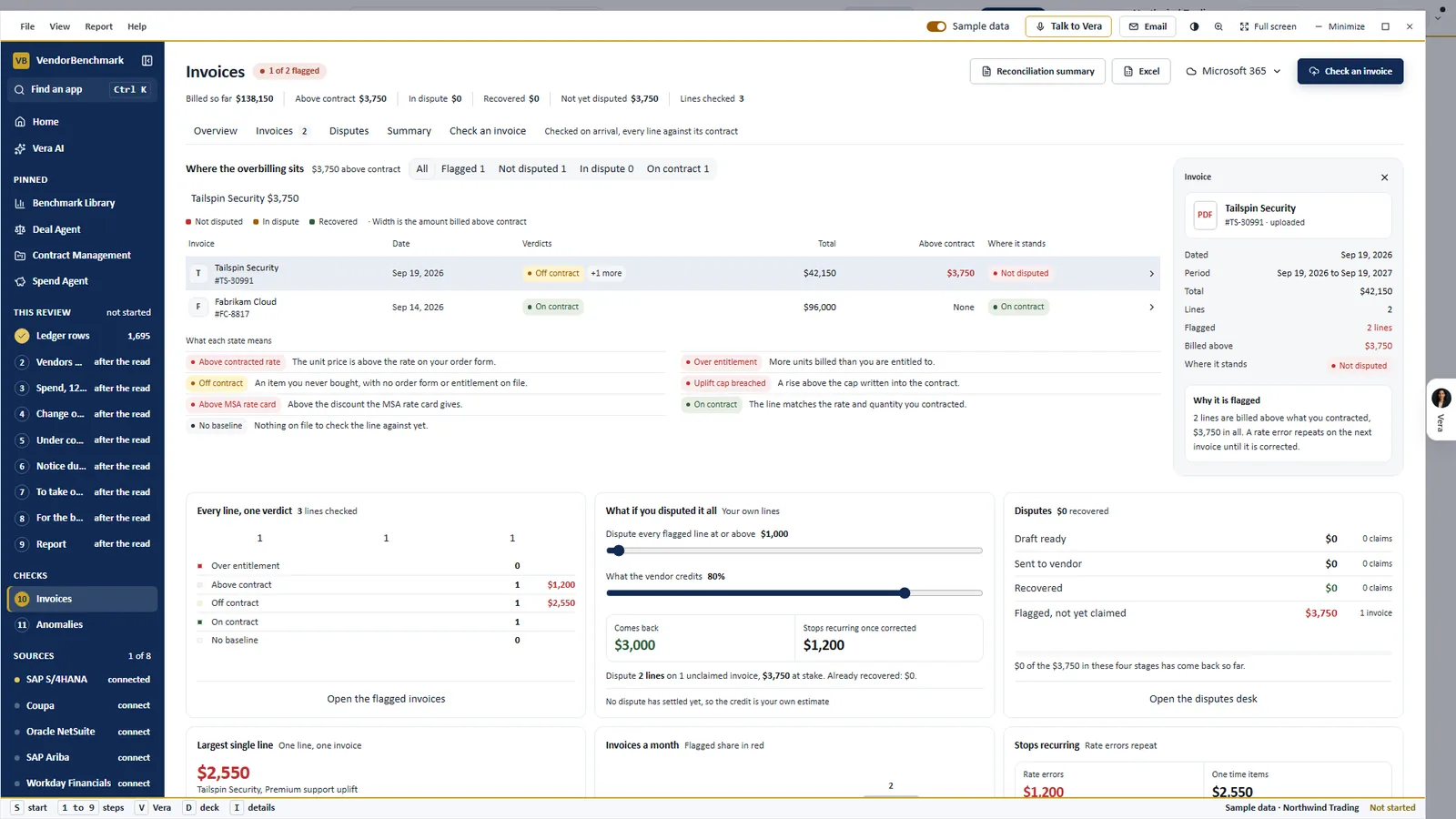
Billed against contracted. The Invoices step on the sample workspace: the facts in one row from billed so far to lines checked, where the overbilling sits, what each verdict means, and the flagged invoice open at the right with a plain sentence on why it is flagged.
The claim is drafted. Sending it is your press.
A flagged invoice prepares a claim: what was billed against what was contracted, the gap in the currency the invoice was billed in, every evidence line citing the invoice line and the contract term it breaks, and a letter you edit in place. Send the claim mails it from the platform with you in copy. Nothing sends without that press.
Disputes follows every claim through its stages, from not yet claimed and draft ready to sent and recovered. Draft them all drafts a claim for every flagged invoice still unclaimed, and Record the outcome takes what came back, or marks the claim written off. The invoice's workroom also drafts the payment hold note for accounts payable from the invoice's own lines.
What if you disputed it all prices the claims not yet raised. Set the smallest line worth a claim and the share the vendor credits, and read what comes back. The rate errors that stop recurring once corrected are shown beside that figure and never added to it.
A rate error repeats on every invoice until someone corrects it.
A reconciliation finance can forward
Summary sets the period out as one table: a row for each vendor with its invoices, what was billed, what sits above contract, what is in dispute and what came back, an Other claims row so the rows add up, and a totals row that matches the head. Word and the Summary sheet in Excel carry the same figures, and Excel lists every invoice and line in its own currency with a US dollar column beside it.
Printable opens the paper you forward: one sentence on what was billed, what sits above contract, what is in dispute and what came back, then the reconciliation. To send one invoice to a colleague, Copy a link to this invoice opens Invoices with that invoice in the panel.
A weekly watch on everything else
Invoices only see what arrives. Anomalies looks at the whole portfolio. The watchdog runs itself every Tuesday at 05:00 UTC, and you can run it whenever you like, for example straight after an upload, rather than waiting for Tuesday.
It raises ten kinds of finding, among them a missed notice window, a right about to expire unused, billing above the contract, software nobody has a contract for, an uplift with no cap and shelfware seats. Software with no contract has two checks: a vendor paid two months or more at 5,000 USD a year or more, or five or more people signing in through Okta or Entra ID. Each such finding also files a task to upload that vendor's contract.
Every finding keeps the evidence it was raised on: the clause from the contract with the words marked, the figures as a table, and a chart against the contract line or the notice runway. The fix is drafted as an email to open in your own mail, or as the screen that settles it. Assign hands it to a teammate with a due date, Resolve records what happened and the money recovered, and Dismiss records why, so the scan stops raising it.
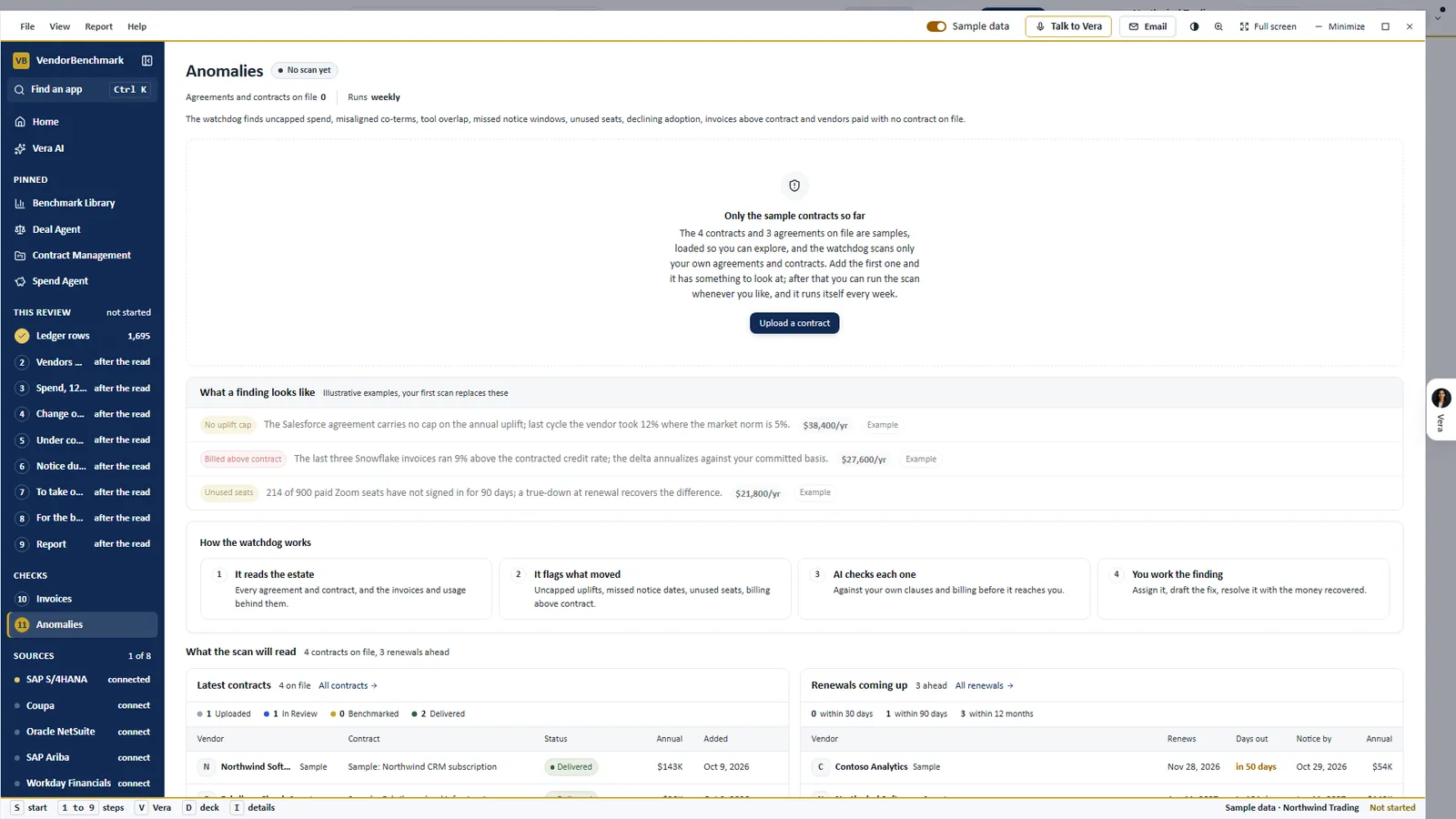
Before the first scan. Anomalies on the sample workspace shows what a finding looks like, with illustrative examples, and how the watchdog works in four steps: it reads the estate, flags what moved, the AI checks each one, and you work the finding.
A correction counts once the next invoice agrees
Sending a claim is not the end. A correction only counts once later invoices confirm it. Billing watch compares, every day and for each vendor and SKU, what you are billed against what you are entitled to and what the market pays, and drift arrives with its corrective draft attached.
The confirmed saving then lands in realized savings on the Savings Proof Statement, where each line reads confirmed, awaiting an invoice or leaking. If a later invoice contradicts the claim, the saving reads disproven. That is the design: a number that survives contact with billing is a number finance can use.
Where it sits among the spend agents
The invoice check is the proof end of the cluster. The full guide to AI spend analysis shows where each agent hands over.
- The ranked savings include the ledger checks, from paid twice to billed above the contract, ranked by Vera's score.
- SaaS Manager finds the apps bought on a card, and the ones people sign in to with nothing paid.
- The board pack carries the recovered money and the proven savings to the board.
- Invoices and Anomalies are steps 10 and 11 of the Spend Agent.
What to do first
- Check one invoice. Drag last month's biggest invoice onto Check an invoice and read the line verdicts.
- Route the rest. Ask an owner to connect the forward in address under Settings, Integrations, then press Hand to accounts payable.
- Work the money first. Draft the dispute on the invoice with the most at stake, edit the letter, and press Send the claim.
- Run the scan. Open Anomalies, press Run the scan, and assign the first finding with a due date.
Questions buyers ask
Does the platform send a dispute to the vendor on its own?
No. Send the claim mails it from the platform with you in copy, and nothing sends without that press. You can also copy the email and send it from your own mail.
What happens to invoices in other currencies?
Each is converted to US dollars once, with its own currency recorded. A claim keeps the currency the vendor pays in, because that is what the letter quotes.
How does a recovery show in our savings?
Press File as verified saving on a dispute resolved with money back. The amount joins realized savings once, as a one time recovery, never multiplied across a term.
When does the anomaly scan run?
Every Tuesday at 05:00 UTC, and whenever you press Run the scan, up to four runs an hour per organization. Running it yourself notifies nobody.
Who can work a finding?
Owners and analysts can run the scan, assign and resolve. Approver and viewer seats read the findings.