Before a security team approves an AI agent, it asks two questions: what can the agent read, and where does what it reads go? Both deserve answers you can check in the product, not a paragraph in a policy.
Here is how Vera AI by VendorBenchmark answers them: the connections its agents read through, the files they read without sending anything, what leaves the workspace and what never does, and the controls an owner holds over retention and deletion.
The connections read, and never write
The licensing agents read the systems that know your licenses and how they are used. Each connection is read only, and each states what it reads on the page where you connect it.
| System | What the agent reads | The limit |
|---|---|---|
| Microsoft 365 | The tenant, through the workspace's connection and Microsoft Graph | Read only, and only an owner connects it, under Settings, Integrations |
| Salesforce | Licenses, active users, sign ins and records edited, counted per person, through a connected app | Read only: it never writes, changes or deletes anything, never reads record contents, emails or files, and never signs in as a person |
| Cloud billing | AWS, Azure and Google Cloud billing, read only, or each cloud's own export | An export is read in your browser and never uploaded, and needs no keys, passwords or personal data |
| Document sources | SharePoint and Google Drive libraries and folders | Read only, and only the folders you point Vera at |
Only a workspace owner can save the Salesforce key and secret. The secret is sealed before it is stored and never shown again, and blocking or deleting the app in Salesforce revokes it.
Some files never leave your computer
For several exports the reading happens in your own browser, and the file stays where it is.
- IBM License Position. The Passport Advantage and ILMT exports are read in the browser by their columns, never by their names, and kept on the computer that read them between visits. Nothing is sent, so each person keeps their own position.
- Cloud cost optimizer. Every cloud's own export is read in your browser and never uploaded. What you decide on it, the plan, tags, lists and comments, is kept for you.
- Microsoft 365 Optimizer. Uploaded exports are read in your browser, and the user list is kept in your workspace.
- Specialist calls. A call with a specialist is recorded only when you press Record, and the file is written on your own computer and never uploaded, so the platform holds no copy.
Read only where an agent connects, and in your own browser wherever it can be.
What leaves the workspace, and what never does
Your documents and your name never leave the workspace. Your contract data is never used to train any AI model, ours or a third party's. Documents you upload are processed to produce your analysis and are visible only to your organization and, where you request an analyst review, to the VendorBenchmark analyst assigned to your engagement.
Anonymized figures are a separate question, and the answer sits in two places an owner controls.
- Community benchmarks. Numeric data points only, anonymized, and shown when five or more organizations add to a figure. Switching it off deletes what you gave.
- The benchmarking pool. Every organization is in the anonymized pool unless an owner opts out under Settings, Data and AI, Benchmarking pool. A figure is released only when it reflects at least five unrelated contributors, and an opt out lands in the audit log.
Retention, location and deletion are yours
An owner sets how long data is kept and how it leaves, under Settings, Data and AI, Data controls. Every hard deletion writes a certificate you can hand to an auditor.
- Keep data for. Indefinitely, or 12, 24, 36, 60, 84 or 120 months after upload. Retention deletes rows and files by upload date, and before you save, a table lists what the next nightly run would delete.
- Live call recordings. A separate, shorter clock, from 30 days up to 2 years, for the audio, transcript and memo of a live call.
- Stored in. The United States, in Vercel and Supabase US regions.
- Documents from tools. Kept by default. Switched off, those tools read in memory and keep nothing.
- Export and delete. Export the workspace as one JSON file, request deletion, or start the estate again, which keeps people, settings, the audit log and the certificates.
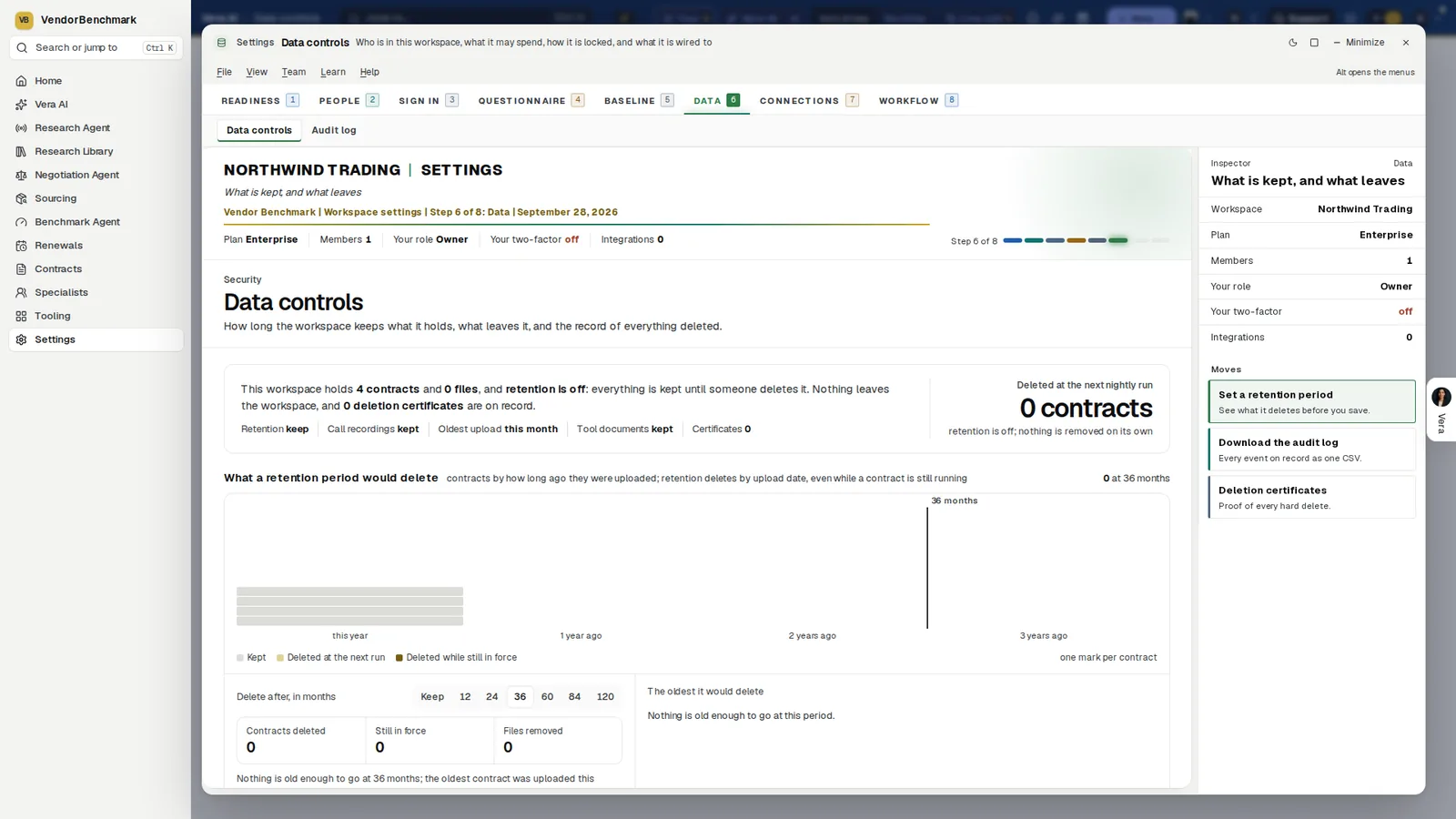
Data controls. How long the workspace keeps what it holds, with retention from Keep to 120 months and a chart of exactly what a retention period would delete, contracts still in force marked, before anything is saved.
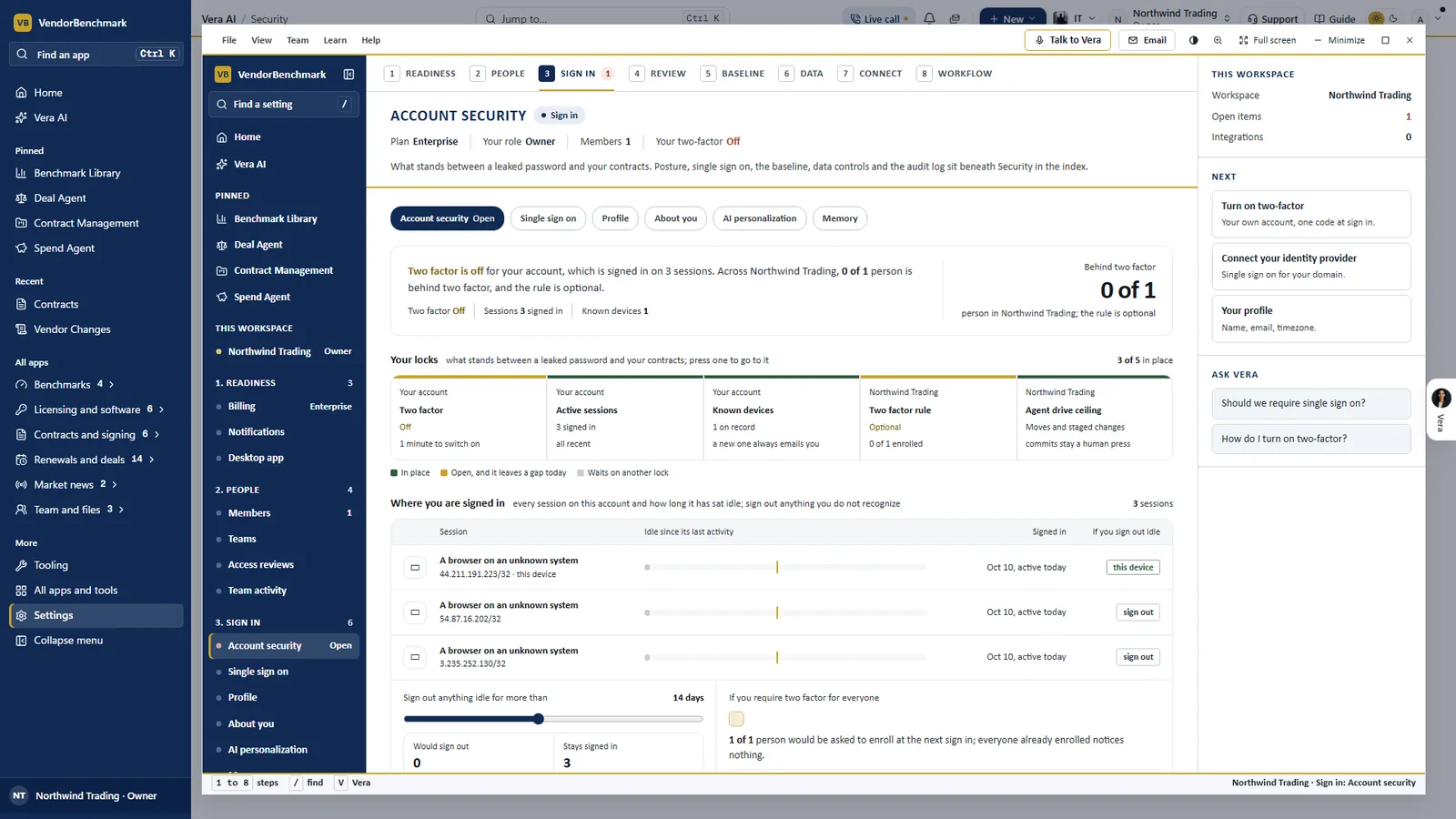
Account security. Five locks stand between a leaked password and your contracts: two factor, active sessions, known devices, the two factor rule and the agent drive ceiling. Every session is listed with its address and a sign out.
Where it sits
Data controls close our guide to governed autonomy.
- The audit trail records every view and download of a contract file, and every agent action.
- The autonomy ladder sets how far the agents may act on what they read.
- The security review package collects the security overview, the security team FAQ, the data processing agreement, the subprocessor list and our resilience evidence.
What to do first
- Read your data controls. Settings, Data and AI, Data controls. Read what a retention period would delete before you save one.
- Decide on sharing. Set community benchmarks and negotiation outcomes, and read the benchmarking pool consent with your legal team.
- Connect read only. Start with Microsoft 365, read only through Microsoft Graph, and add Salesforce and the cloud exports after.
- Send the package. Hand your security team the security review package and the Trust center's printed summary.
Questions buyers ask
Does Vera train AI models on our contracts?
No. Your contract data is never used to train any AI model, ours or a third party's.
Can the Salesforce connection change anything in Salesforce?
No. It is a read only connected app. It never writes, changes or deletes anything in Salesforce, never reads record contents, emails or files, and never signs in as a person.
Where is our data stored?
In the United States, in Vercel and Supabase US regions. No setting moves it.
What happens to the IBM exports we add?
They are read in your browser by their columns and kept on the computer that read them. Nothing is sent.
Is any of our data shared?
Your documents and your name never leave the workspace. Anonymized numeric data feeds community benchmarks if you switch them on, and the anonymized benchmarking pool unless an owner opts out.