Most AI governance documents describe intentions. A buyer needs something narrower: the setting that decides what an agent may do today, who changed it last, and what the agent does when it reaches the limit.
In Vera AI by VendorBenchmark that setting is the drive ceiling. It sits under Settings, Security, Sign in policy, beside two factor and single sign on, because it is a security control, not a preference. Here is what each of its five settings allows and how the top one is earned.
Five settings, and the tightest answer wins
Each setting adds to what the agent may do on your screens. None of them hands over the commit.
| Setting | The agent may | Waits for a person |
|---|---|---|
| Off | Drive nothing. The overnight drive skips the workspace too. | Everything |
| Show and explain | Show where and explain why. It moves nothing. | Every move |
| Moves | Move levers on the screens it can drive, each read back off the screen, the newest undoable with Put it back | Every change to a record |
| Moves and staged changes | Move, and stage changes for you to keep or discard. This is the default. | Keeping each staged change |
| Queued commits | Queue commits, overnight up to three a night, one per renewal. Earned, never granted. | The press that commits each one |
Each kind of screen follows the workspace ceiling or takes its own: the benchmark library, the contracts list, the agreements ledger, the Deal Agent and more. Each person adds a standing answer under Settings, Vera and you: Ask each time, Drive when asked, or Never. Where the answers differ, the tightest one wins.
A staged change waits for your press
The line between a move and a staged change is the line between a screen and a record. A move is reversible: a value set on the benchmark library, a filter on the contracts list, the term lever on a renewal. Every move a specialist lands appears as a line in the conversation, and the newest one carries Put it back.
A staged change would alter a record: a landed price, a decision with its reasoning, a renewal stage, an owner or an alert snooze. Vera puts it on your screen with Keep it and Not now, and repeats money back so a misheard figure is caught before anyone keeps it. Nothing changes until you press keep.
Changes you leave undecided wait in Approvals, on a tab called Staged by Vera, worst first by annual value and then the nearest notice date, each with Keep or Discard. They are yours alone. A colleague's staged changes live in their own queue.
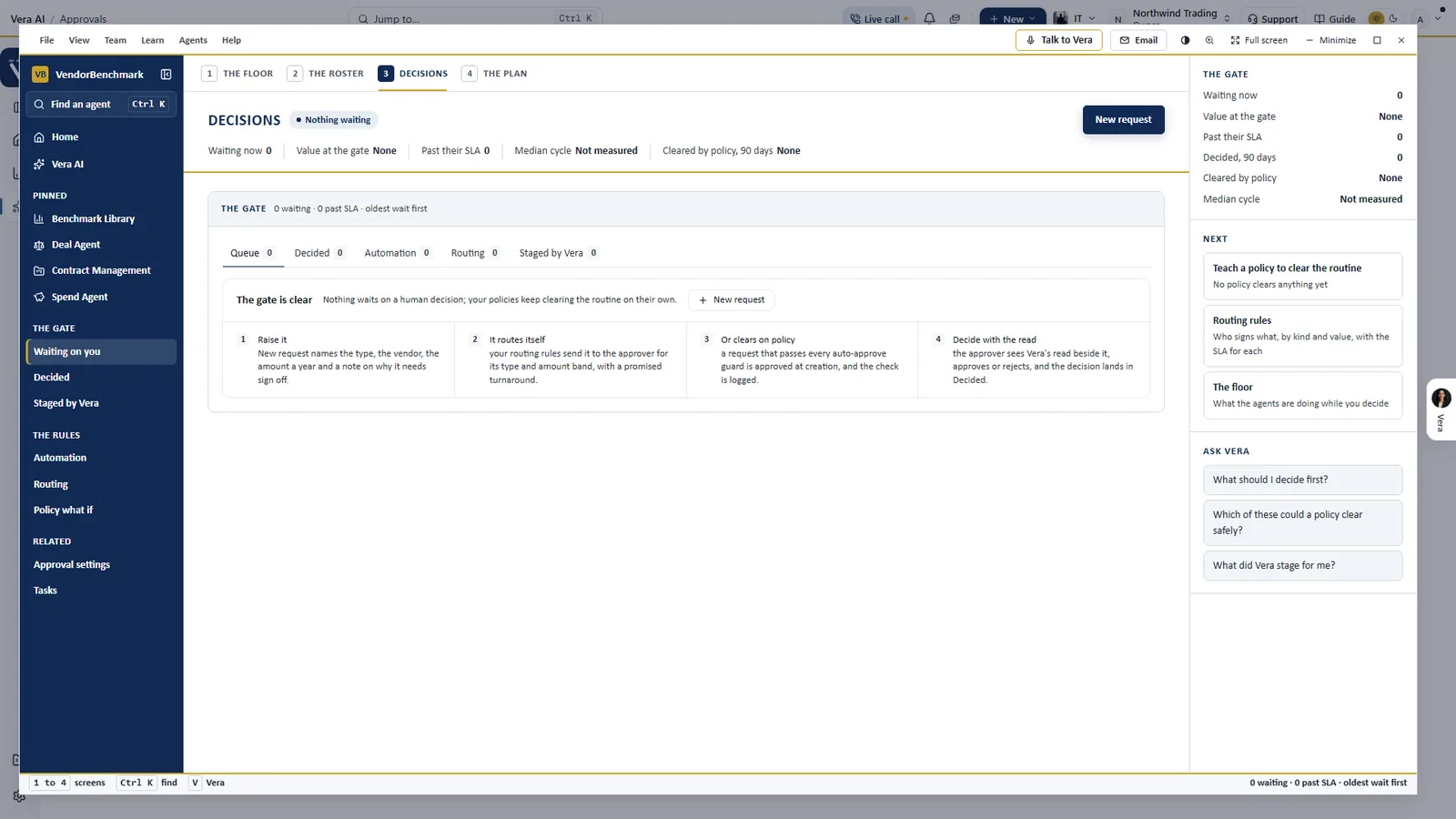
Staged by Vera. Changes a specialist staged for you get their own tab on the Decisions screen, beside the queue, the decided ledger, automation and routing.
Queued commits is earned, never granted
The fifth setting is the one an owner cannot simply pick. It takes zero misses across at least 20 verified moves in 30 days. A miss is a move the agent reported and the screen did not confirm: before a specialist says done, the platform reads the change back off the screen itself. Until a workspace holds that record, the server refuses the setting and shows the workspace its own numbers.
With Queued commits on, the overnight drive may queue up to three commits a night, one per renewal, of three declared kinds: a renewal inside 35 days still marked Upcoming, proposed to In negotiation; a renewal that needs you with nobody's name on it, proposed to you; and an auto renewal whose notice window has closed, proposed quiet until the day after it renews. Each waits for the same one press confirmation every staged change uses.
At the top of the ladder the agent may queue a commit. A person still presses it.
The limits live on the server, not in a prompt
A ceiling an agent could talk its way past would be decoration. So the setting is enforced on the server, and the screen refuses locally as well, which stops a blocked move twice. Every refusal names the policy, so a blocked drive reads as a sentence, not a mystery. The setting itself is signed by whoever saved it last, with the date.
- Screens never driven. Billing, members, data deletion and the signing screen are never driven, on principle.
- Constants in code. More than 12 landed moves inside a minute pauses a trip with a plain sentence, and staged changes cap at 20 per call session.
- A report you can read. The monthly autonomy report emails what Vera did on its own every Monday, and a silent week sends nothing. Under its switch sit the last 30 days: driven actions, misses, refusals held, the times a person took the wheel back, trips run, and staged changes kept and discarded.
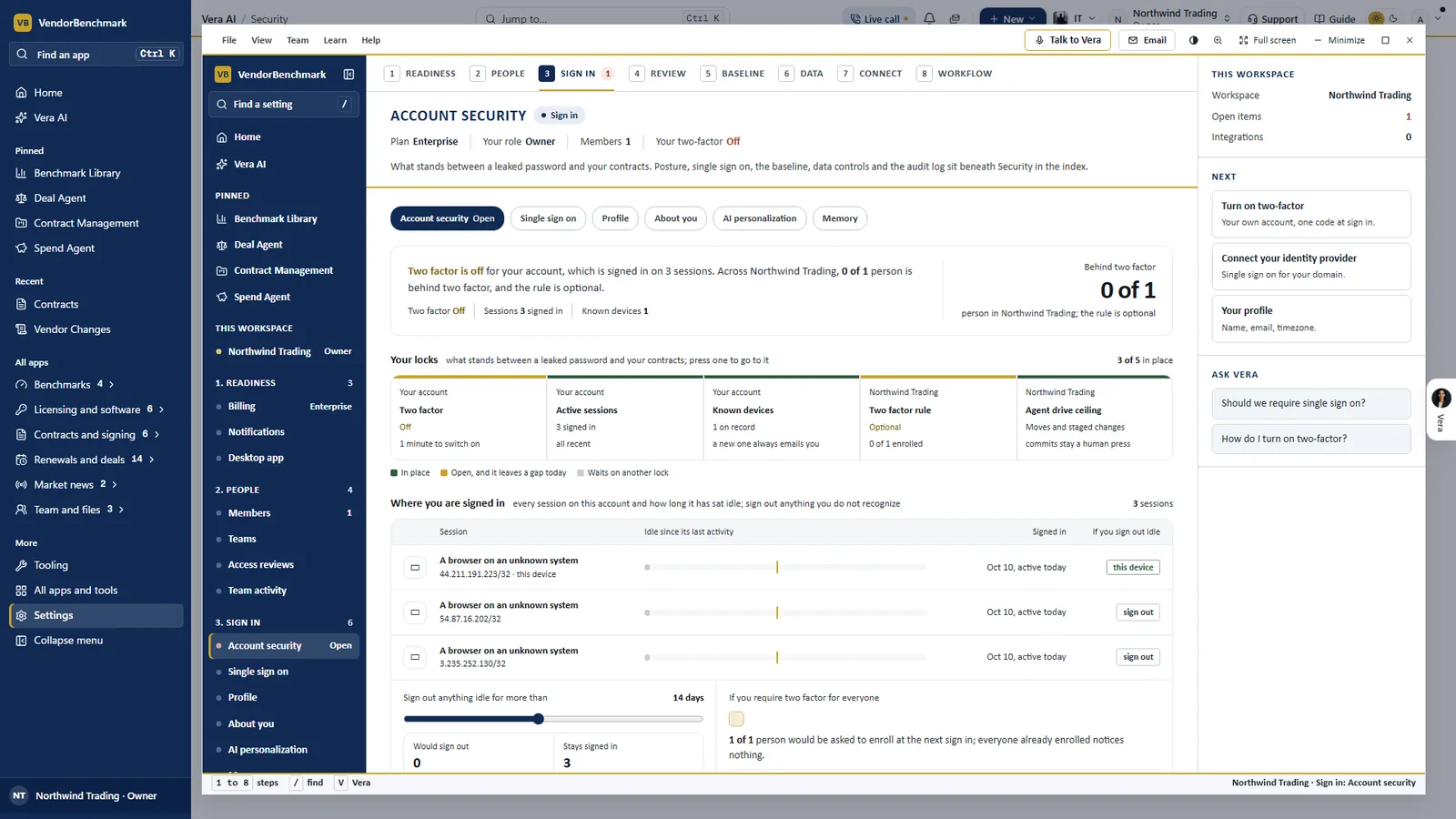
The ceiling among the locks. Account security lists the agent drive ceiling beside two factor, sessions and known devices: here at Moves and staged changes, with commits staying a human press.
The same rule when an agent writes to a vendor
Email is the other half of autonomy, and AI Managed follows the same pattern. Only org owners approve an email or a mandate, or let the AI send under the value threshold without asking. Anyone who edits can pause the AI on a vendor; only an owner resumes it, and Stop all sending holds every live negotiation at once. The AI never signs, never serves notice of non renewal, never agrees a price above your walk away and names itself as an AI to the vendor. By default every offer waits for your answer; at the highest mandate setting it may accept an offer inside your floor, cap and approval threshold, and a person still signs.
Where it sits among the controls
The ceiling is the first control in our guide to governed autonomy. The rest of the cluster covers what happens inside it.
- Who is driving explains the wheel each person holds, window by window, and how a touch takes it back.
- The audit trail shows how every driven action, halt and refusal lands on the record.
- AI Managed runs renewals by email inside the mandate an owner approves.
For the longer list of what we keep out of the AI's hands on a deal, read our note on the limits we set for it.
What to do first
- Read your ceiling. Settings, Security, Sign in policy, Vera driving screens. Note the setting and who saved it last.
- Tighten by screen. Keep the workspace at the default and lower it on the screens your team drives by hand.
- Switch on the autonomy report. The Monday email and the 30 day figures show what the agent did and what people kept.
- Clear Staged by Vera. After a long session, open Approvals and keep or discard each staged change in one sitting.
Questions buyers ask
Can the agent commit a change on its own?
No. Committing a change is always a person's press. At the top setting, Queued commits, the agent may queue a commit, and each one waits for that press.
Who can change the ceiling?
Workspace owners, under Settings, Security, Sign in policy. Everyone else reads it locked, and the setting shows who saved it last and when.
How does a workspace earn Queued commits?
With zero misses across at least 20 verified moves in 30 days. Until then the server refuses the setting and shows the workspace its own numbers.
What happens when the agent reaches its limit?
It stops and says why. Every refusal names the policy, and refusals held are counted in the monthly autonomy report.
Can one person keep the agent off their screens?
Yes. Under Settings, Vera and you, Never keeps the wheel with that person everywhere, and specialists talk them through instead.