The AI agents in Vera AI, the platform from VendorBenchmark, are twenty five agent apps and more than 150 AI agents that read, benchmark, watch and negotiate software contracts for an enterprise buyer. This field guide sorts them into families for the procurement lead or IT asset manager who wants to know which agent does which job.
Every agent has its own page, and the full directory is at AI agents. This post does not list all of them. It names each family, says what it does and gives a few examples by their exact names.
PART ONE
How the agents are organized
There are three layers. At the top is Mothership, the main agent: you give it one goal for every contract and it directs the others. Below it are the twenty five agent apps, each a full application for one kind of work. Inside and beside those apps run the single agents, each with one narrow job, grouped into families.
An agent does not replace the buyer. It takes the reading, the chasing and the first drafts off the buyer's desk, so the decisions get the attention. We made the wider case in AI agents in procurement.
PART TWO
The time the watching agents save
Much of the agents' value is in checks that a team means to run and rarely does. Take the weekly watch round: price lists, invoices, the register and vendor news. Here it is both ways. The hours are illustrative.
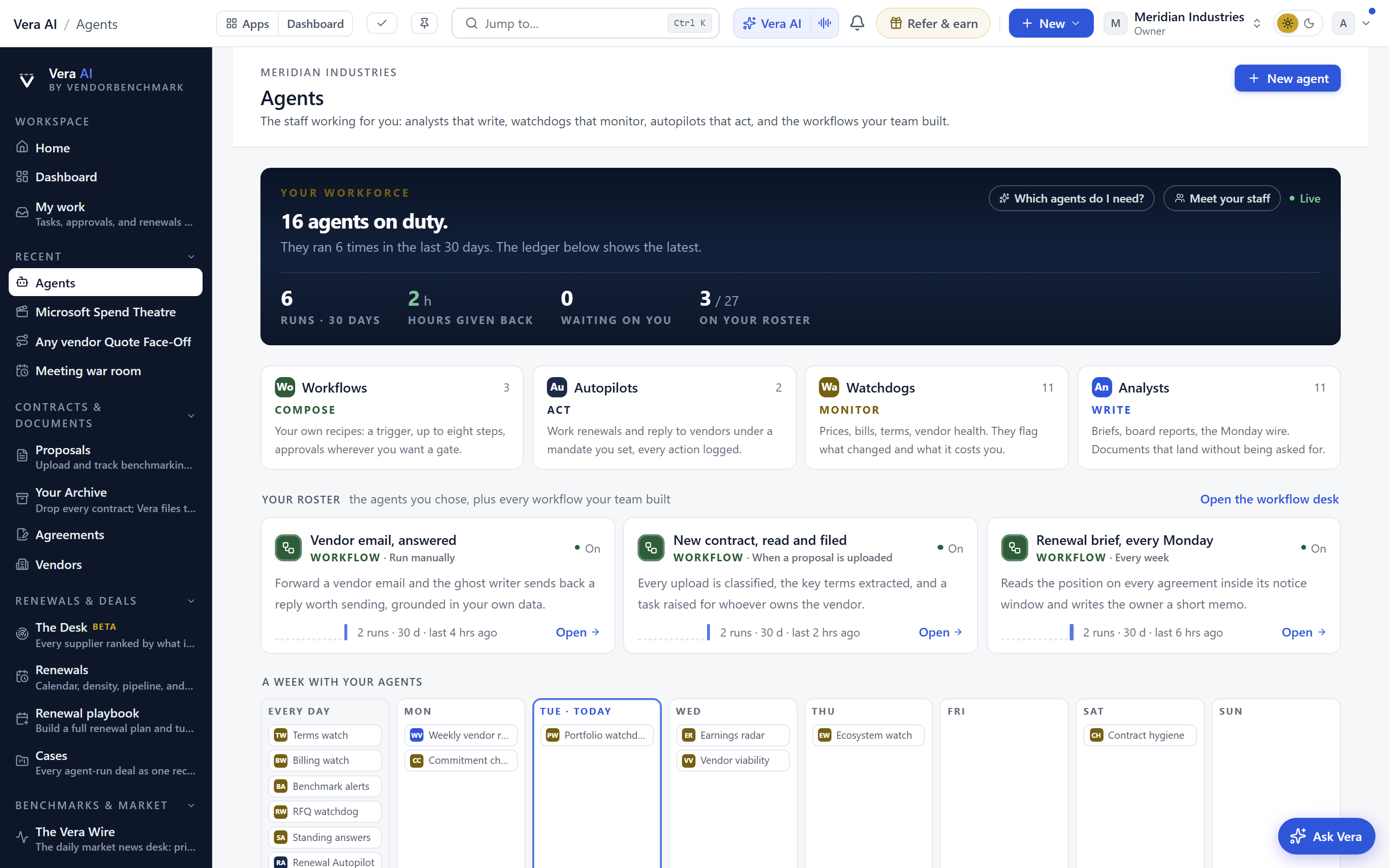
The agent floor on sample data: what each agent reads, the agents themselves and where their work lands.
THE SAME JOB, TWICE
TODAY, BY HAND
- Check each vendor's published price list for changes since last week
- Compare a sample of invoices with the contracted rates by hand
- Scan the contract register for missing notice dates and unset values
- Read vendor news and earnings coverage for anything that changes your position
Roughly 1 working day a week for a team that does it properly, which is why it is usually skipped
WITH VERA
- Open the list of agents and put Terms watch and Billing watch to work
- Switch on Contract hygiene and Earnings radar for the weekly sweeps
- Turn on the email digest for the findings you want sent to you
- Read each finding with the record behind it and decide what to act on
About 15 minutes a week reading findings, after about 10 minutes of setup
What changes: roughly 8 hours of checking a week becomes about 15 minutes of reading. For example, over 50 weeks that is roughly 400 hours against about 13 hours, and the checks run every day or every week instead of when someone remembers.
What the time depends on: how many vendors you hold, how many agents you put to work and how much of your paper is on file. A watchdog reads only the data named on its own page, so an agent with no contracts to read finds nothing.
PART THREE
The twenty five agent apps, by the work they do
- Renewals and negotiation. The Deal Agent runs every renewal from notice to signature. AI Managed negotiates renewals by email inside your limits. Vera on calls joins vendor calls and records what was decided. The AI benchmark ranks a vendor's offer against comparable buyers.
- Contracts and signing. The Contract Agent marks every suggested change on the page. The Document Agent finds any term in every contract, with the page. The Entitlement Agent shows what you own by publisher and product, from the contracts. Check before you sign reads every envelope before anyone signs.
- Spend and vendor changes. The Spend Agent shows every vendor you pay and where you can save. The Reporting Agent builds any report on your spend. Vendor Radar prices every vendor change on your contracts.
- Licensing and usage. SaaS Manager, Software Discovery, Java Assistant, the Microsoft 365 Optimizer and Cloud cost each read one kind of usage, install or billing data and show what can come out or what needs a license.
- Buying, and other spend categories. Sourcing runs a purchase from intake to the signed contract. Category agents do for other spend what the rest do for software: the Agency, Facilities, Freight, MRO, Rate Card, Staffing and Travel Agents.
- Questions. Ask Vera answers questions from your own contracts, with the page each answer came from.
Ready made work that several of these apps do together is packaged as Agent jobs.
PART FOUR
The families of single agents
- Watchdogs. They monitor and flag on the platform's clock. Examples: Terms watch, Billing watch, Benchmark alerts, Contract hygiene and Earnings radar.
- Analysts. They write documents, on demand or on a schedule. Examples: Executive Brief, Legal Terms, License Specialist, Negotiation Talking Points and Board reporter.
- Autopilots. They act under a mandate. Examples: the Renewal Autopilot, which works your renewal calendar at the autonomy you set, and the Negotiation ghost writer, which drafts replies to vendor emails you forward.
- Call specialists. AI seats, not people, that join a vendor call: negotiators for the major vendor families, and discipline seats such as a lead negotiator, licensing and audit defense, FinOps and contract terms.
- Vera's agents. Standing checks Vera runs on your estate. Examples: Invoice check, Promise keeper, Quote benchmark and Renewal preparation.
- Deal Agent's agents. The hand work on a live deal. Examples: Vendor reply reader, Signature desk, Intake and filing and Sponsor brief.
- Vendor agents. Research and preparation on one vendor. Examples: AI Research, Vendor Deep Research, Negotiation Prep and Vendor Watchdog.
- Playbooks agents. They keep renewals on their playbook. Examples: Notice date check, Clause check and Renewal brief writer.
- Compare agents. They work a contract comparison. Examples: Change triage, Money reconciler and Reply drafter.
- Proposal Comparison agents. They work competing proposals. Examples: Shortlist leveler, Counter drafter and Offer clock.
- Competitive Scenarios agents. They work a renewal against its alternatives. Examples: Outgoing guard, Reply reader and Market watch.
- Report Studio agents. They look after filed reports. Examples: Figure check, Board pack composer and Out of date watcher.
- Signing agents. They watch the paper around signature. Examples: Loop clock, Signed copy check and Outside the loop.
- File Share agents. They watch shared files and access. Examples: Link guard, Share review and Access report.
- What's New agents. They read the product's own release notes for you. Examples: Settings watch, Change record and Team heads up.
- Agent apps. Single agents that work as small apps: the MSA Agent, the SOW Agent and the Research Agent.
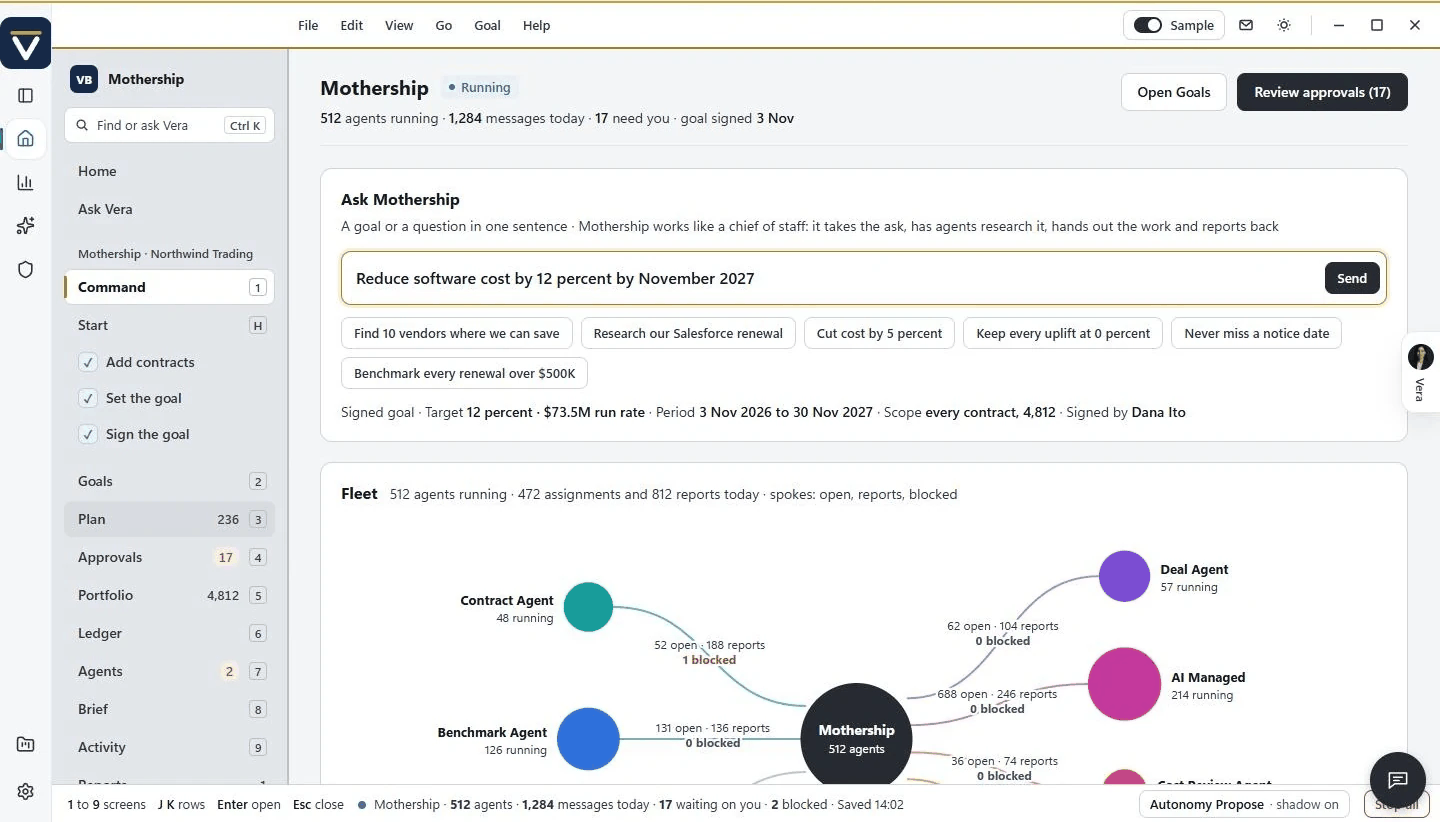
Mothership's Command screen on sample data: the goal, the signed goal and a map of the agents working under Mothership.
PART FIVE
How to put an agent to work, step by step
- Find it. Start from the job, not the name. The directory at AI agents groups every agent by family, and each has a page saying what it reads, when it runs and what it hands you.
- Give it something to read. Upload the contracts, quotes or invoices it works from, or connect the source they live in.
- Switch it on. An agent you have not put to work tells you nothing, in the app, by email or in chat. Email digests are off until you turn them on.
- Set how far it goes. For agents that negotiate, your owners choose the setting: watch, prepare and ask, or negotiate and ask. The choice is recorded in the audit log.
- Read what comes back. Findings link to the records behind them. Drafts wait for your approval.
PART SIX
What the AI does in every family, and what it never does
Across every family the AI does three things. It reads: contracts, order forms, quotes and invoices, into products, prices, terms and dates, with the page each fact came from. It judges: the price against what comparable customers pay, across a benchmark library that covers 4,100 vendors, and the renewal against the calendar. And it acts within limits: it drafts, watches and negotiates up to the ceiling you set.
- It never signs. Committing a change is always a person's press.
- It never serves notice of non renewal. Notices are drafted for a person to send.
- It never agrees a price above your walk away. Anything outside the mandate comes back to you.
- It never writes to a vendor without naming itself as an AI. And you are copied.
- It leaves a record. Each email, offer and change is logged with the reason and the source.
A person is also a click away. You can ask a human analyst from inside the platform, and analysts answer within 24 hours. For how a small team uses several agents together, see staffing a procurement desk with AI.
Start from the job on your desk, not from the name of the agent.
PART SEVEN
Common questions
- How many AI agents does Vera AI have? Twenty five agent apps and more than 150 AI agents, each with its own page.
- What is the difference between an agent app and a single agent? An agent app is a full application for one kind of work, such as the Deal Agent. A single agent has one narrow job, such as Terms watch, and usually runs inside or beside an app.
- Which agent is in charge? Mothership is the main agent. You give it one goal for every contract and it directs the other agents.
- Do the agents run without being asked? Only after you put them to work. Watchdogs then run on a daily or weekly clock, and others run on an upload or when you ask.
- Can I see what each agent actually does? Yes. Each has a page, and the product draws each one as its pipeline, as shown in see what every agent actually does.
- Can I try them without my own data? Yes. The free trial needs no card, and every app opens on a sample company.
The short version: three layers, one main agent, twenty five agent apps and families of single agents under them. Pick the family that matches the work, put one agent on it and read what it finds.
