Every software audit starts with the same question: what is installed, and where. Answering it usually means an agent on every machine, one more piece of software to deploy, update and keep alive. Discovery should not need its own maintenance team.
Software Discovery is the part of Vera AI by VendorBenchmark that answers the question without one. Two small read only scanners, one for Windows servers and desktops and one for Linux, push each machine's programs to your workspace, where every title is named and held against the lines you pay for. Software Discovery+ adds an agentless collector for estates that want nothing installed on the machines at all. Here is what runs where, what it reads, and how to start.
Two read only scanners, rolled out once
The scanners are two small scripts, a PowerShell one for Windows and a shell one for Linux. There is no agent to install and maintain: your distribution tool runs them on the schedule you set. Under Get started, Roll out to every machine, you pick the tool you already use and copy its line. Intune, Group Policy, Configuration Manager, WinRM, Ansible, cron and SSH each have one.
Each machine then pushes its installed programs every six hours, daily or weekly. The Scan step shows what each schedule costs in scans and data before you choose; daily is typical. Machines that report land on the map by site, and the ones quiet for a week are listed, with a download, so a machine that drops off is noticed rather than forgotten.
Two cases need no push at all. A machine off the network writes a scan file that you upload by hand. The same route lets you try the scanner on your own laptop first, with no endpoint configured and nothing sent until you choose to upload.
The agentless collector leaves nothing behind
Some estates do not want a script scheduled on every machine. Software Discovery+ is agentless: you install the collector on one machine, and once a day it scans every machine on its list remotely, Windows machines over WinRM, which is PowerShell remoting, and Linux machines over SSH.
On each machine the read only scanner runs once from a temporary folder. Its result comes back to the collector and the folder is deleted. Nothing is installed on the machines, and they need no internet access, because only the collector sends scans to your workspace.
- Where it runs. One domain joined Windows machine, or one Linux machine for an estate read over SSH. On Windows it appears in Apps and Features like any other program.
- Which machines. Its list comes from Active Directory, the enabled computers seen in the last 30 days, or from a file with one machine per line: the name, the site, and Windows or Linux.
- As whom. A group managed service account, so no password is stored, a service account or SYSTEM. Linux machines are read with an SSH key and user.
- What it missed. A status script shows the last collection and every machine not reached, with the reason, and a single machine can be retried on its own.
- What it cannot reach. Laptops off the network and closed segments take a per machine package instead: the machine scans itself once a day and needs outbound HTTPS.
Java Scanner carries the same design for Java. Its agentless collector, installed on one Windows machine, reads every other Windows machine over the network with nothing installed on them, and Linux and Mac over SSH.
What the scanners read, and what they never read
The scanners change nothing on a machine and need no administrator rights. They read the programs that are installed. They never read file contents, user names, email or IP addresses, and the machine identifier and serial number are sent only as hashes.
The key a scanner pushes with is push only. A workspace owner creates it under Get started; it is shown once, with Copy, only its hash is kept, and it expires in a year. With it a scanner can add scans and cannot read the workspace. Every push is written to the audit log, and owners see each key with the scans it received and revoke it under Scanners and keys.
For your security team, every install package states its size and checksum, so the file can be checked before it goes anywhere. Prices that appear on the risk steps are published list prices in USD, marked as such, never what you pay.
Nothing on a machine changes, and no file, user name or address leaves it.
What you see when the first machine lands
Press Listen after the first scan and the page checks every few seconds; the Overview opens the moment the first machine lands. From there the estate reads in four places: Get started, Overview, To do and Inventory.
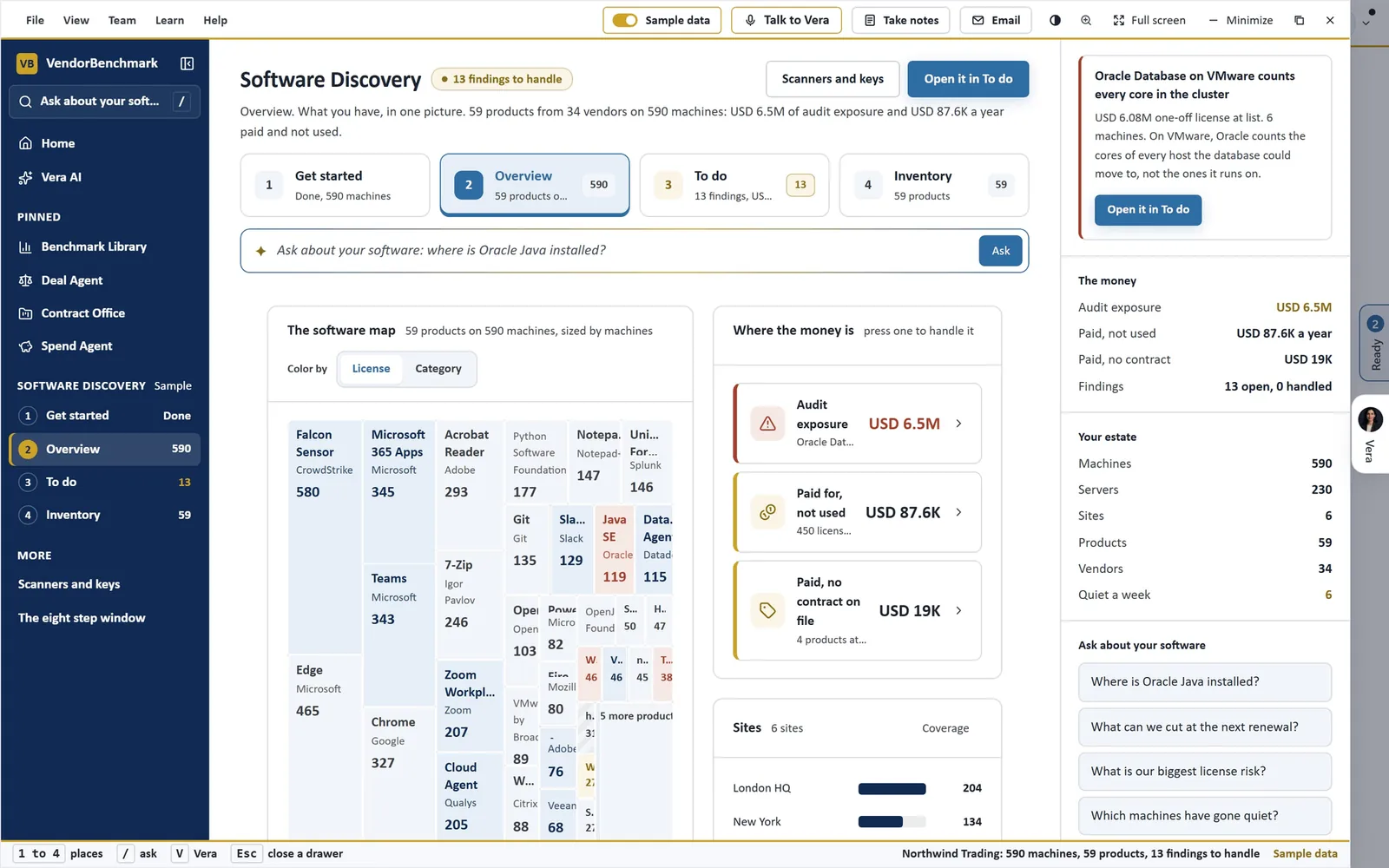
The Overview. Software Discovery on the sample estate: 59 products on 590 machines, the map sized by machines and colored by license, where the money is, and the questions the Ask bar answers from the machines that reported.
- Overview. The software map, every product a tile sized by its machines and colored by license or category, and Where the money is: audit exposure, paid for and not used, and paid with no contract on file.
- Every title named. Each install is named by the catalog, a pattern or the component the scanner read. A title nothing recognizes waits for one press of Name it, and the name is kept as a rule, so every later scan of that title arrives named.
- To do. Every finding in one queue, biggest money first: the audit risks, lines installed beyond what you pay for, licenses paid for and not used, paid software with no contract, idle machines, two tools doing one job, software past the end of support and titles still to name.
- Inventory. Products or machines, with filters for audit risk, paid with no contract, servers, laptops and desktops, and machines quiet a week. A machine opens what is installed on it.
The Ask bar under the tabs answers from the machines that reported: where Oracle Java is installed, what can be cut at the next renewal, the biggest license risk, which machines have gone quiet.
Where it sits in agentless discovery
The scanners are the collection. The rest of the agentless discovery guide turns what they send into a position.
- Software Discovery+ holds every install against your contract lines: owned against deployed, idle installs, each saving counted once.
- The weekly position mails one licensing report per publisher, weekly or monthly, with nobody running it.
- Java Scanner reads every Java on every machine and says which installs need an Oracle license.
The Software Discovery page shows the workflow end to end. When the position has to stand up in front of a vendor, Same Day ELP is the other path: your data in, a position checked by two analysts within 24 hours.
What to do first
- See it working first. In Software Discovery, Get started, See it working first loads the sample estate: 590 machines across six sites, with every step filled.
- Create the scanner key. A workspace owner creates it under Get started. It is shown once; store it where only the system account can read it.
- Scan one machine. Pick Windows or Linux, download the scanner, run the one line with your key in it and press Listen.
- Roll out, or install the collector. Copy the line for the tool you already use, scheduled daily, or put the collector on one machine in Software Discovery+ and let it read the rest.
Questions buyers ask
Is Software Discovery agentless?
There is no agent to install and maintain: your distribution tool runs two small read only scripts on a schedule. For nothing installed on the machines at all, the agentless collector in Software Discovery+ reads them from one machine over WinRM or SSH.
Do the scanners need administrator rights?
No. The scanners change nothing on a machine and need no administrator rights. The collector is different: it runs on one machine as a service account that must be able to reach the machines on its list.
What data leaves the machine?
Each machine's installed programs. Never file contents, user names, email or IP addresses; the machine identifier and serial number go only as hashes.
How often do machines report?
Every six hours, daily or weekly, as you set it. The collector reads every machine on its list once a day.
What about laptops that are rarely on the network?
They take a per machine package that scans the machine itself once a day and needs outbound HTTPS. A machine with no network at all can write a scan file for you to upload.