A license position built by hand, for an audit letter or a renewal, starts to age the day it is finished. Agentless discovery keeps it current instead: the machines report on a schedule, and AI does the counting that nobody on the team has time to do.
This guide covers the apps in Vera AI by VendorBenchmark that do licensing with no human operator: what each one reads, what it finds, and the decisions that always come back to you. Each section links to a full article. One word first. Agentless refers to your machines: there is no agent to install and maintain on them. The agents in this guide are AI, and they work in your workspace, not on your estate.
The apps that do the licensing
Four articles cover the machines, from the scanners to the weekly report. Two cover the subscriptions no scanner can see, Microsoft 365 and Salesforce, read through a read only connection or the exports you already pull.
Agentless discovery: every install found without installing an agent
Two read only scanners rolled out once, or one collector that leaves nothing on the machines it reads.
Read it → 4.2 · Software Discovery+Owned against deployed: the AI reconciles every install to your contracts
Every paid product short, spare or even, idle installs priced, and each saving counted once.
Read it → 4.3 · Software Discovery+A license position every week, with no human operator
One licensing report per publisher, weekly or monthly, mailed to the people who asked for it.
Read it → 4.4 · Java ScannerWhich Java installs need an Oracle license?
Every Java on every machine, kept current four ways, with the exit plan to zero.
Read it → 4.5 · Microsoft 365 OptimizerSeven rules an agent runs on every Microsoft 365 user
The licenses to remove or move down, a script for your admin and a report on a schedule.
Read it → 4.6 · Salesforce OptimizerSalesforce renewal: Data Cloud and Flex Credits sized to use
Shelfware seats, the credits sized to what you burn, and the renewal at the price peers pay.
Read it →How the licensing runs
You set it up once. After that the machines report on their schedule and the agents carry the work until a decision needs a person.
You roll it out once
The scanners through Intune, Configuration Manager, Group Policy, Ansible, cron or SSH, or the collector on one machine.
Machines report
Read only, every six hours, daily or weekly. The collector reads its whole list once a day.
Named and counted
Every install named, then held against the lines you pay for, with the money a year.
Ranked and sent
The biggest money and the audit risks first, and a report per publisher by email.
You decide
Removals, reclaims and renewal cuts are a person's press. Nothing changes on its own.
What the agents do, and what stays yours
No human operator does not mean no human. It means nobody has to collect the data, match it to the contracts or count the gaps. The table shows where the line sits.
| Stage | The agents do on their own | Waits for you |
|---|---|---|
| Collect | Machines report on schedule; the collector reads every machine on its list once a day and names the ones it could not reach | Rolling out the scanners or the collector once; an owner creates the scanner key |
| Name | Each install named by the catalog, a pattern or the component the scanner read, and kept named on every later scan | A title nothing recognizes waits for one press of Name it |
| Count | Paid against installed for every line: over, under or matched, with the money a year | Adding the lines you pay for, and how a per person line counts |
| Rank | Every finding in one queue, biggest money first, the audit risks priced at list | Marking a finding handled or a saving captured |
| Act | Removal and reclaim lists, a PowerShell script, the renewal sheet and drafted emails | Running the change, sending the email and deciding the renewal |
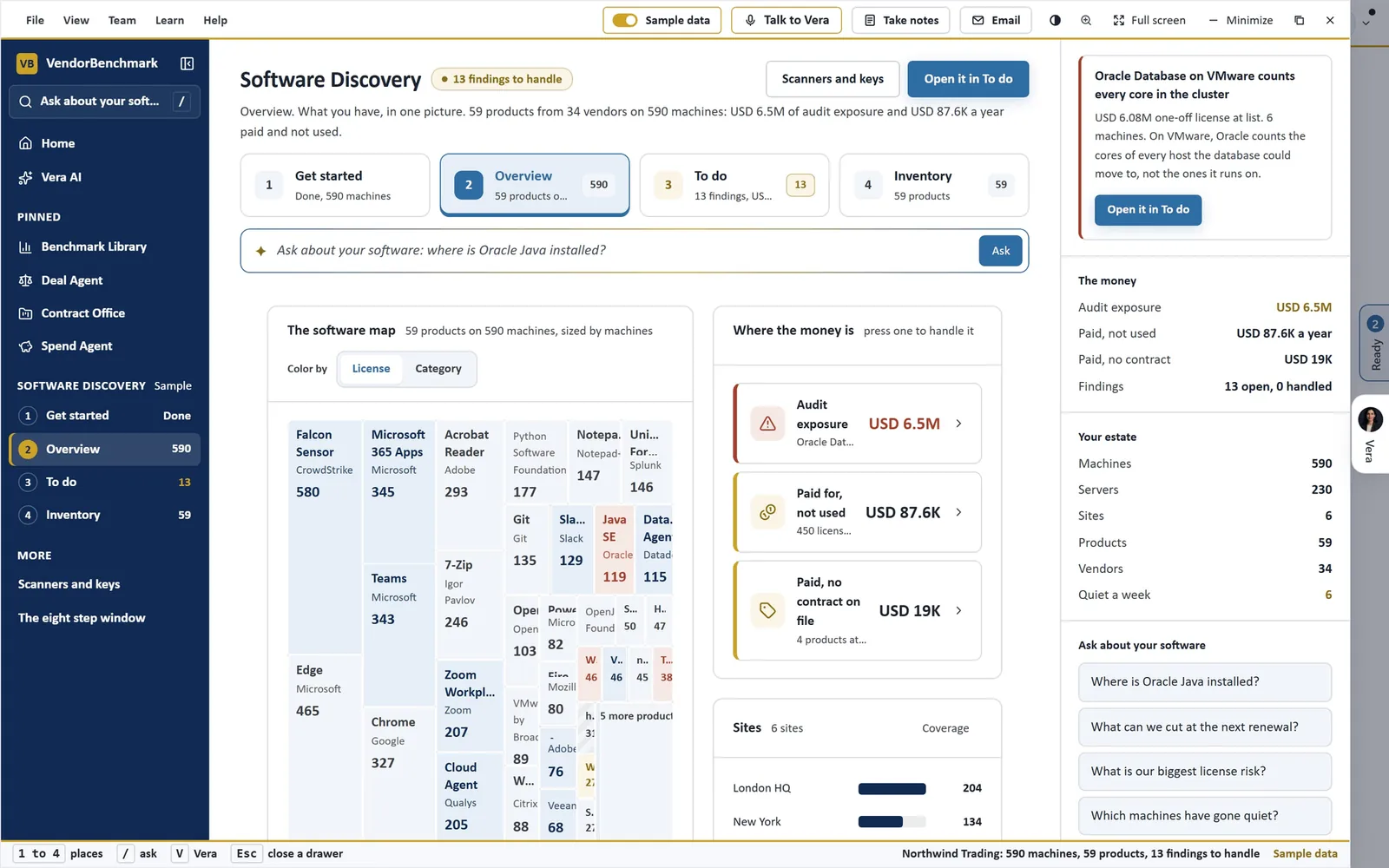
The estate on one screen. Software Discovery's Overview on the sample estate: 59 products on 590 machines as a map sized by machines; where the money is, as audit exposure, paid and not used, and paid with no contract on file; and an Ask bar that answers from the machines that reported.
Why the position has to run itself
License exposure rarely sits where a spreadsheet looks for it. Oracle prices Java per employee, so one install that needs a license puts the whole company in scope. On VMware, Oracle counts the cores of every host a database could move to, not the ones it runs on. A paid seat on a laptop nobody has signed in to for months costs the same as one in daily use.
A position built for an audit letter is a snapshot, and the estate keeps moving. A Java auto updater adds a new install. A team installs a tool nobody bought. A renewal arrives before anyone counted the true down. When the machines report on a schedule and every install is named and held against what you pay for, those changes show up in the next run instead of the next audit.
That is the case for agents here. Not cleverness: consistency. The run that would have been skipped in a busy quarter happens anyway, and the findings wait in one queue, biggest money first, for the person who decides.
The machines report. The agents count. The decisions stay with you.
The subscriptions no scanner can see
A scanner sees what is installed on a machine. It cannot see who holds a Microsoft 365 license or a Salesforce seat. For those, the agents read the system itself, read only.
- Microsoft 365. Microsoft 365 Optimizer reads the tenant through Microsoft Graph, or the admin center exports, and runs seven rules on every user.
- Salesforce. Salesforce Optimizer reads the org through a read only connected app, finds the seats to take back by seven rules of its own and sizes Data Cloud and Flex Credits to use.
- Every other SaaS app. SaaS Manager joins sign ins, bills and contracts into one list of apps; it is covered in the spend guide.
None of them writes anything back. The Microsoft 365 PowerShell script is a list of license changes for your admin to read and run, and in Salesforce an Approve marks the seat on the renewal sheet; nothing changes until an admin makes the change there.
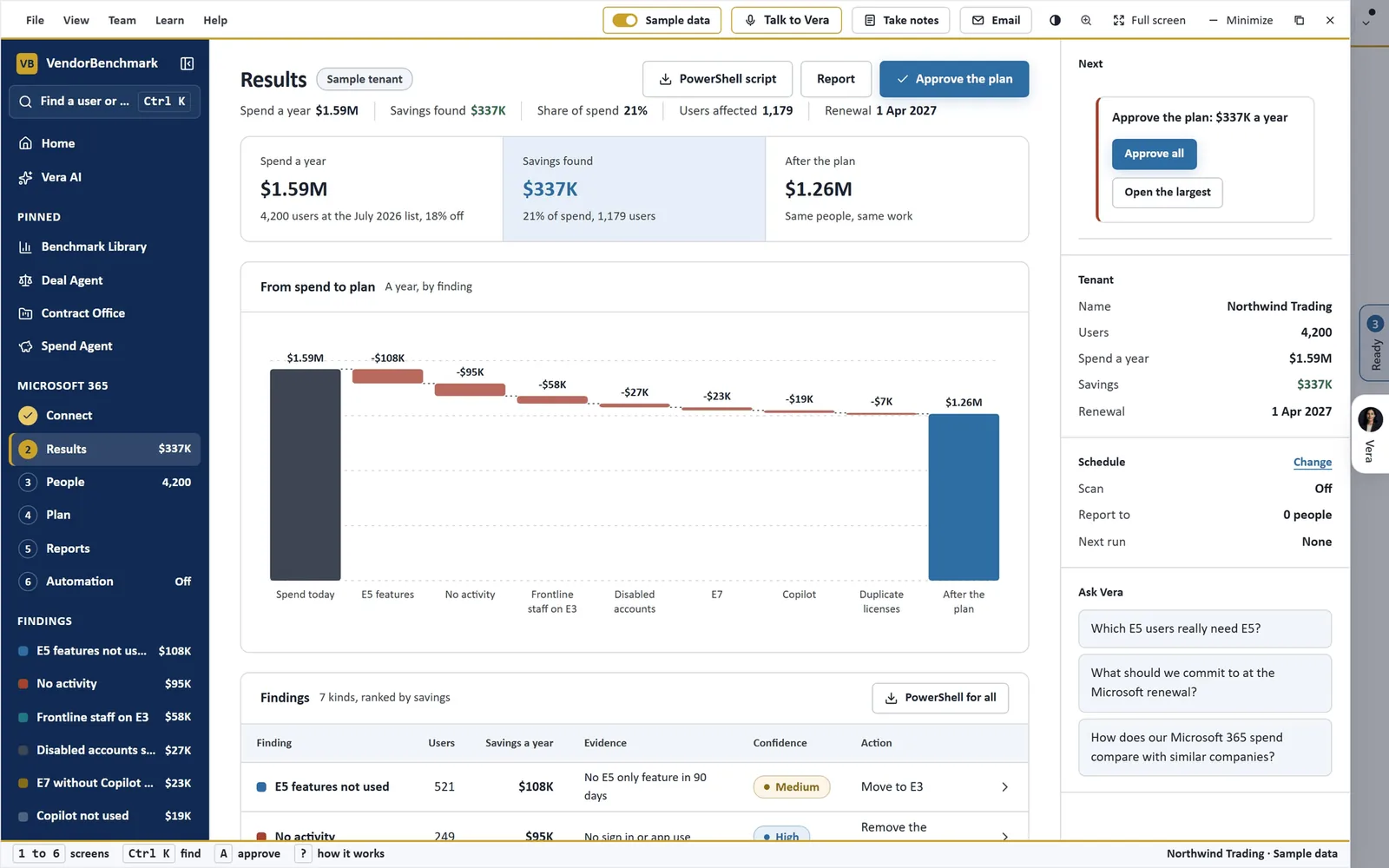
A tenant, read only. Microsoft 365 Optimizer's Results on a sample tenant: what it pays a year, the savings walked finding by finding from today's spend to the plan, and seven kinds of finding ranked by savings, with the PowerShell script and Approve the plan at the top.
When you want a checked position instead
Agentless discovery states what the scan can see and says what it cannot. For every major publisher, Software Discovery+ lists what a true position needs beyond the scan: cores and clusters, the agreement and the license statement, named users and the vendor's own consoles, each with where it comes from and why the position is wrong without it.
Some moments need that gap closed by people: an audit letter, a true up, a renewal you are about to sign, a deal. For those, Same Day ELP takes your paper and your deployment data. AI drafts the position, an analyst reviews every line and a second analyst checks it, delivered within 24 hours of a complete submission. It covers 41 products and is part of the Enterprise plan.
What to do first
- Load the sample estate. In Software Discovery, Get started, See it working first: 590 machines across six sites, with every step filled.
- Scan one machine. An owner creates the scanner key. Download the scanner for Windows or Linux, run the one line with the key in it and press Listen.
- Roll out, or install the collector. Copy the line for the tool you already use, or put the collector on one machine in Software Discovery+ and let it read the rest.
- Connect the subscriptions, then choose the reports. Microsoft 365 and Salesforce through read only connections; then pick the publishers to manage and press Send me the reports.
Questions buyers ask
What does agentless mean here?
Nothing stays installed on the machines you scan. With the agentless collector, one machine reads the others over WinRM or SSH; on each, a read only scanner runs once from a temporary folder, and the folder is deleted. With the scanners, your distribution tool runs a small read only script on a schedule, so there is no agent to install and maintain.
Does anything change on our machines?
No. The scanners only read and need no administrator rights. They never read file contents, user names, email or IP addresses, and the machine identifier and serial number are sent only as hashes.
Who runs it once it is set up?
Nobody has to. Machines report on the schedule you set, every six hours, daily or weekly, AI names each title and builds the position, and a workspace owner can have one licensing report per publisher mailed weekly or monthly. Removals, reclaims and renewal cuts stay a person's decision.
When should we use Same Day ELP instead?
When the position has to stand up in front of a vendor: an audit letter, a true up, a renewal or a deal. AI drafts it, an analyst reviews every line and a second analyst checks it, delivered within 24 hours of a complete submission.