A Salesforce renewal can carry three meters at once: seats, Data Cloud credits and Agentforce Flex Credits. The quote prices all three. Your own consumption is the better guide to how much of each to commit.
Salesforce Optimizer is the part of Vera AI by VendorBenchmark that reads the org and sizes all three. It finds the seats to take back and the ones on the wrong license, measures Data Cloud and Flex Credits against what the contract commits, and writes the renewal sheet with the ask for the account executive. Two companions carry the work further: the Agentforce book in Commitment Studio sizes a Flex Credit commitment from your Digital Wallet export, and the Salesforce SELA playbook takes the renewal to the vendor.
A read only connection, set up once
A Salesforce admin connects it once, in about 15 minutes: an integration user on the Salesforce Integration license, five of which come free with Enterprise and Unlimited; a permission set that only reads; and a connected app on the client credentials flow. A workspace owner pastes the key and the secret; the secret is sealed before it is stored and never shown again.
It reads user licenses and permission set licenses, active users with their license, profile and last sign in, frozen users, sign ins over 90 days and how many came through the API, and records edited in 90 days, counted per person. It never writes, changes or deletes anything in Salesforce, never reads record contents, emails or files, and never signs in as a person. To revoke it, block or delete the app in Salesforce; Disconnect Salesforce removes the stored key and secret.
No connection yet? Upload the exports instead, starting with Active users, or open the sample org. A finding only uses what the read could see: Active users alone finds frozen, never signed in, duplicate and idle seats, while the inactive, integration and platform fits need the login history and the record activity.
Seven rules, one finding a person
Every user gets one finding, from the first rule that applies, in this order.
- Frozen, still licensed. Deactivate.
- Never signed in. Created more than 30 days ago.
- Same person, two accounts. The older account has not signed in for 90 days.
- Idle. No sign in for the days you choose: 30, 60, 90 or 180.
- Inactive. One to four sign ins in 90 days, and no record created or edited.
- Integration on a full CRM license. Only API sign ins: move it to the Integration license.
- CRM seat, platform use only. No lead, opportunity or case in 90 days: move it to Platform Plus.
Findings also counts the seats bought but never assigned, and sets the flagged seats by department, biggest saving first, so the users can go to each manager as a download. People carries every user with license, department, last sign in, sign ins over 90 days, finding, saving and decision.
Data Cloud and Flex Credits, sized to what you burn
Data Cloud shows what is contracted, what is used so far and what will sit unused at term end, with credits a month by meter against the contract's pace and the shortfall shaded. For the next term you choose the growth you expect, flat, 10, 25 or 50 percent, and the commit is sized with 10 percent headroom.
Flex Credits sets the pool and the use so far against what your use cases need: conversations a month, actions each, voice or text. Until you enter what you pay, it prices at Salesforce's list: $500 per 100,000 credits, 20 credits a standard action and 30 a voice action.
For an Agentforce commitment, the Agentforce book in Commitment Studio goes further. It reads your Digital Wallet export, or a typed monthly burn if agents are not live yet, then prices the minimum, medium and growth commitments against your forecast over the term. Its verdict carries a robustness score: how many of roughly thirty perturbed futures still pick the same level. When a commitment does not beat pay as you go, the memo says so plainly, and nothing you upload leaves your browser.
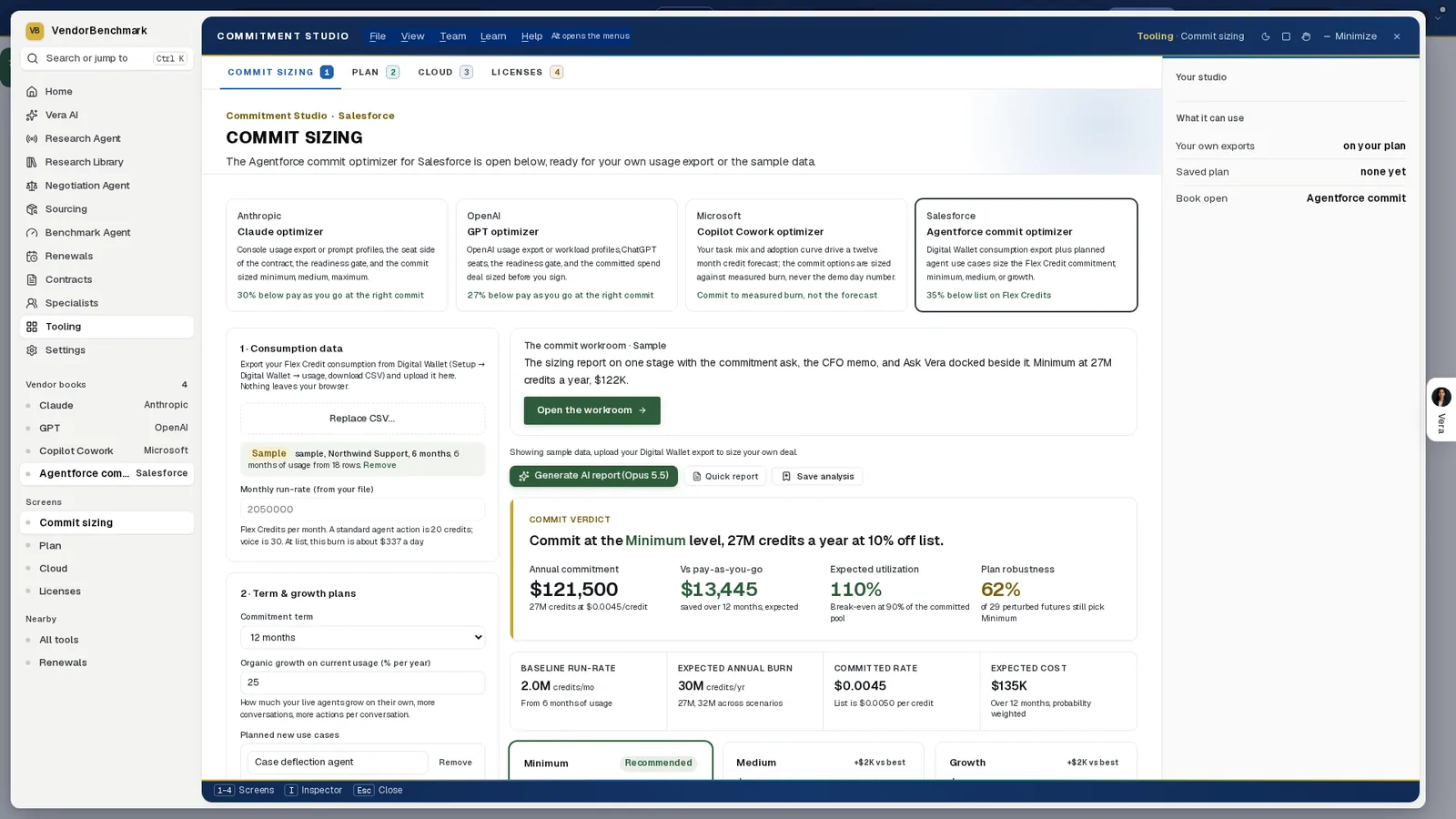
The commitment, sized. The Agentforce book in Commitment Studio on its sample, six months of Digital Wallet usage: the verdict with the annual commitment, the difference against pay as you go, expected utilization against its break even, and how many of 29 perturbed futures still pick the same level.
Commit to what you burn, not to the roadmap.
The renewal at the price peers pay
Price position sets what you pay off list against the band peers at your size get, and where you rank, with the peer midpoint, the upper range or the top fifth as the target. Renewal sheet sets Renew as it stands against Renew to this sheet, line by line, and walks from one to the other, a saving in green and a line that grows in brick. The workbook downloads in Excel and the sheet as CSV.
Action plan dates every step from today to the renewal and writes the ask to the account executive, ready to copy. Press Read now before the notice date, so the counts you send are this week's.
When the renewal is a SELA, the Salesforce SELA playbook carries it to the vendor. It plans the rounds back from your anniversary, pinned to the weeks before Salesforce's January 31 year end, and its What Next screen drafts the email from your own figures. The draft states your asks and your own usage facts only. Your target, your corridor and your savings estimate stay out of it, and nothing sends from the platform.
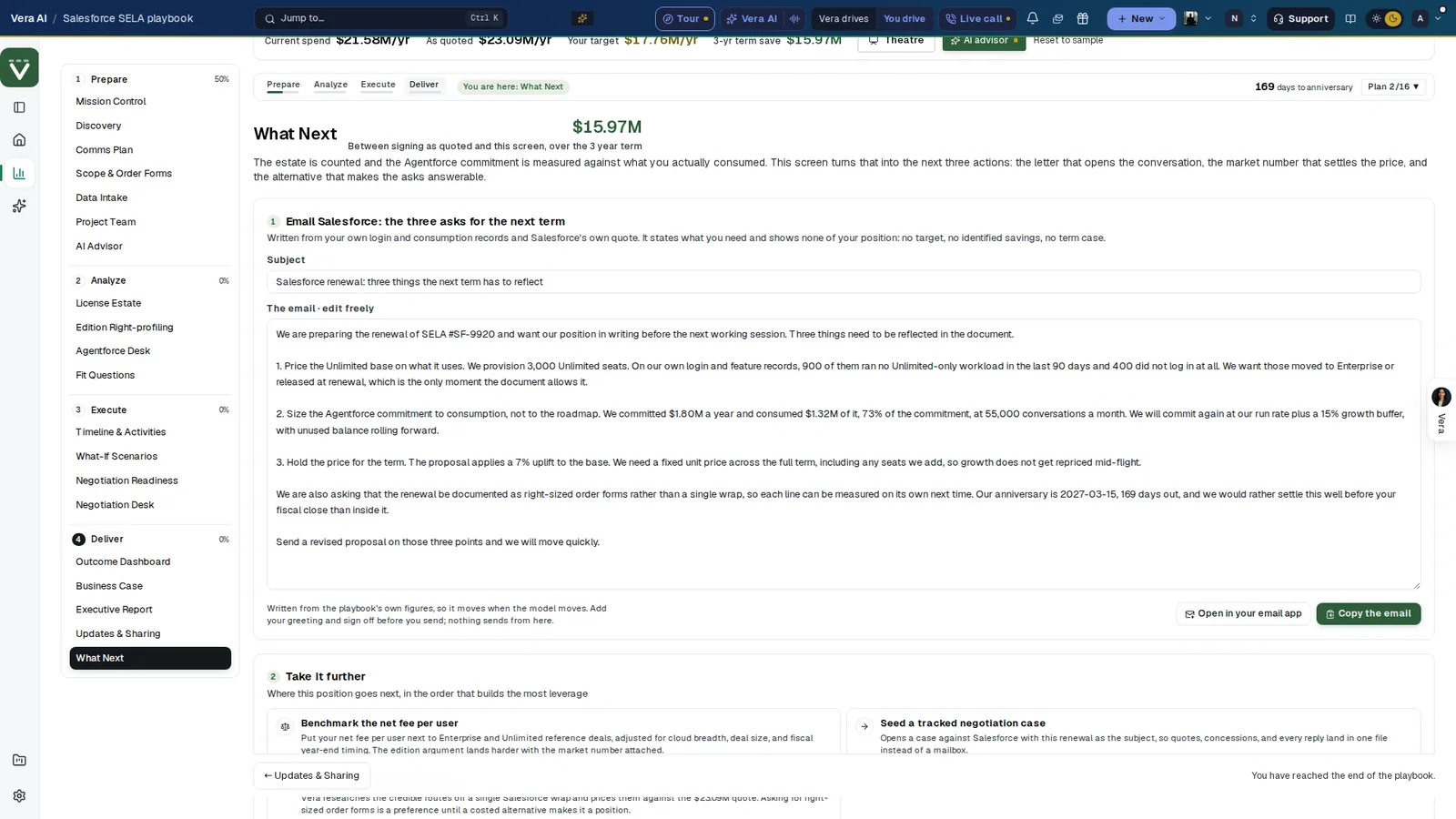
Three asks, in your own words. The SELA playbook's What Next screen drafts the email from the playbook's figures: price the Unlimited base on what it uses, size the Agentforce commitment to consumption, hold the price for the term. It shows none of your position, and nothing sends from here.
Where it sits in agentless discovery
Salesforce Optimizer covers a subscription no scanner can see. In the agentless discovery guide it sits beside three others.
- Microsoft 365 Optimizer takes the same read only approach to a Microsoft tenant.
- Software Discovery+ holds installed software against the lines you pay for.
- AI benchmarking prices the renewal against what comparable customers pay.
The commit optimizers size every commitment before you sign it. We wrote earlier about the true down, the bundle and fiscal timing in a Salesforce renewal. For a Salesforce position checked by two analysts, with the Agentforce commitment at three levels, Same Day ELP is the other path.
What to do first
- Send the guide to your admin. On Connect, How to connect has the six steps. Or upload the Active users export, or switch the sample on.
- Enter the order form. The renewal date, the notice period, what you pay a user a month for each license, and the Data Cloud and Flex Credit commitments.
- Work the findings. Start with the biggest, open each person and Approve or Keep, and download the users for each manager.
- Size the credits, then copy the ask. Set the growth and your Agentforce use cases, pick the price target, download the sheet and copy the ask before the notice date.
Questions buyers ask
Does Salesforce Optimizer change anything in Salesforce?
No. It never writes, changes or deletes anything in Salesforce. An Approve marks the seat on the renewal sheet, and nothing changes until an admin deactivates or moves the user there.
What access does the connection need?
A read only connected app on the client credentials flow, run as an integration user with API Enabled, View Setup and Configuration and View All Users, plus Read and View All on six objects for the record activity findings.
Can it size Data Cloud and Flex Credits?
Yes. It measures what is contracted against what is used and what will sit unused at term end, then sizes the next term to the growth you pick, with 10 percent headroom on the Data Cloud commit.
How is the renewal price judged?
Price position sets what you pay off list against the band peers at your size get, and where you rank, with the peer midpoint, the upper range or the top fifth as the target.
Who sends the ask to Salesforce?
You do. The Action plan writes the ask for the account executive, ready to copy, and the SELA playbook's drafted email opens in your own mail app. Nothing sends from the platform.