Reconciliation is where license work usually stalls. The installs sit in one system, the contracts in another, and joining them line by line is the job nobody has time for.
Software Discovery+ is the part of Vera AI by VendorBenchmark that does the join. It reads the same scans and contract lines as Software Discovery, so nothing is set up twice, and holds every install against the line it rests on. Here is how the count works, where it is careful, and what you do with the answer.
Two halves: the lines you own, the installs you run
A position needs both halves. The owned half is your contract lines: the product, the contract, how many you pay for, the price and the metric, each added once with Add a line. The deployed half is what the scanners push, or the collector reads, on schedule.
The owned half is already written down in your contracts. License position reads it line by line from the contracts on file: each license with its quantity in its own metric, its price a year where the contract states one, and when it ends. It is careful about the line between owning and using, and it shows that care on the screen.
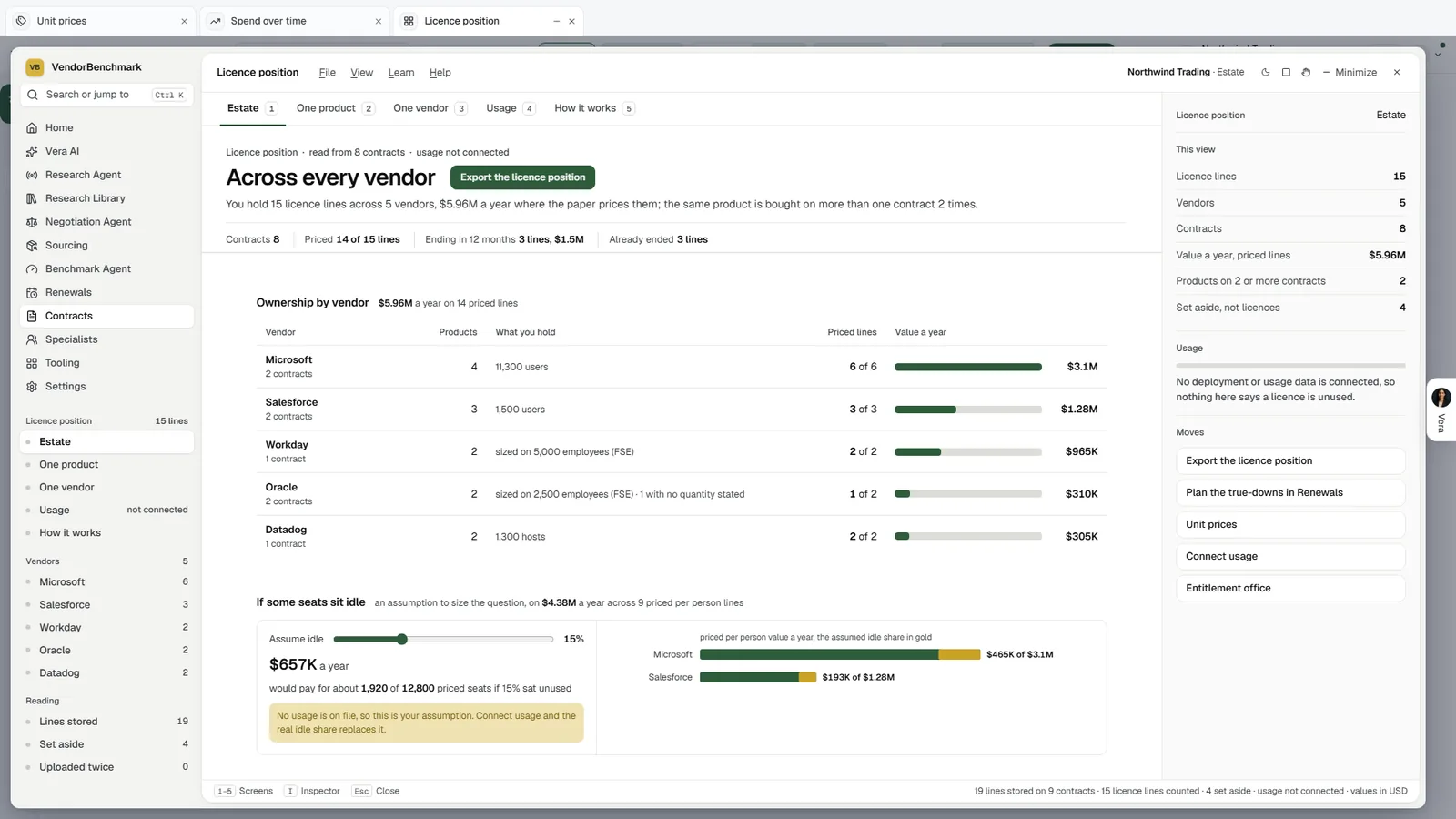
The owned half. License position reads what you hold from the contracts on file, each product in its own metric, priced where the paper prices it. With no deployment data connected it says so plainly: nothing on the screen calls a license unused, and the idle share stays a lever labeled as your assumption.
Software Discovery+ is where the two halves meet. Once a line is on file and the machines report, every paid product has an answer.
How the position is counted
Compliance lists every paid product with its metric, what you own, what is deployed, and whether it is short, spare or even, with the exposure or the spare money beside it. The four positions sit above the table as tiles that filter it: under licensed, over licensed, adequately licensed, and paid software with no contract on file.
Two notes on the screen explain the count. How the position is counted says how each metric counts. If an auditor came today lists the audit findings with their money at list, so the exposure is never a single unexplained number.
Discover carries the detail behind every row. Each application is under a contract, paid with no contract, an audit risk, free or open source, or not yet named, and each shows its machines, the share used in 30 days, the contract line it rests on and its position. How each title is named sets the raw names the scanners sent beside the product, vendor and version they became, with the rule that named them.
Idle installs, and when a license really comes back
Usage sets every paid product's installs used in the last 30 days against its installs on idle machines, the most idle money first. Reclaim from idle machines is the control: choose the idle days before a license comes back, 30, 60, 90 or 120, and the licenses back, the money a year and the machines all move with it. Download the reclaim list saves those machines, and Idle machines by site shows where they sit.
The careful part is the contract. Since 1 November 2026 a reclaim or a right size counts only where the contract lets the count fall, from the renewal or anniversary the saving names. Oracle and SAP support savings are priced net of the repricing of the support you keep.
A license on an idle machine is not money back until the contract lets the count fall.
That rule costs some headline numbers. It also means the figure you take to the CFO is one the paper supports, dated to the renewal or anniversary when it can land.
Every saving once, every renewal with its use
Savings lists every saving once, biggest first, each as a card with what it is, why, and the money a year.
- Reclaim idle. Licenses on machines idle past the days you chose.
- Right size at renewal. Lines paid beyond what is deployed, cut when the contract allows.
- A cheaper edition. SQL Server Enterprise cores that fit inside Standard's limits.
- Consolidate. Two tools doing one job, with the one to keep.
- Buy under a contract, and the audit risks. Paid software with nothing on file, and the findings an audit would open with.
Each license is counted once, so two savings never claim the same seat. The first button on a card does the work: the removal, reclaim or change list downloads, or the Deal Agent opens with the figures. Mark captured, or Mark fixed for a risk, adds it to the captured total, with Undo, and the bar at the top shows captured, in progress and open.
Renewals lays the next 12 months on one runway, each contract on its renewal date with its value a year, red inside 60 days and gold inside 120. Every renewal lists each line with its use and what to take out at renewal, and Prepare opens the Deal Agent with the line, the price and the use. Reports writes the same estate as an Excel workbook and a board report in Word, PowerPoint or PDF, built on the server from the levers as they stand, so the file never disagrees with the screen.
Where it sits in agentless discovery
Software Discovery+ is the reconciliation. The rest of the agentless discovery guide feeds it and carries its answer on.
- The scanners and the collector bring in the deployed half, with nothing installed that changes a machine.
- The weekly position turns the same count into one report per publisher, weekly or monthly.
- The Deal Agent takes a renewal from Prepare to the signature, with the line, the price and the use.
The Software Discovery page shows the product end to end. For a position checked line by line by two analysts, Same Day ELP is the other path.
What to do first
- Load the sample estate. See the four positions, the savings and the renewals before your own machines report.
- Add the lines you pay for. Under Connect, Add a line takes the product, the contract, how many you pay for, the price and the metric.
- Set the idle days. On Usage, pick 30, 60, 90 or 120 and download the reclaim list for the machines it names.
- Prepare the next renewal. On Renewals, press Prepare on the first line inside 120 days and take the use into the Deal Agent.
Questions buyers ask
Where do the contract lines come from?
You add them once under Connect with Add a line: the product, the contract, how many you pay for, the price and the metric. Software Discovery+ reads the same lines as Software Discovery, so nothing is set up twice.
How does it count products sold per person?
The scanner counts machines, not people. The Count each person as setting moves every per person line, so the position follows the metric the license is sold on.
When does an idle license count as a saving?
Only where the contract lets the count fall, from the renewal or anniversary the saving names. Until then the license is idle, but it is not yet money back.
Does Software Discovery+ tell me what a product should cost?
No. It speaks of what is installed, owned, used and renewing. What a product should cost is the job of the Benchmark Library and the Deal Agent, and Prepare hands the renewal to the Deal Agent with the line, the price and the use.
Can I share the result?
Yes. Reports writes an Excel workbook and a board report as Word, PowerPoint or PDF, built from your estate and the levers as they stand, so the file matches the screen.