Java was the runtime nobody counted. Since Oracle began pricing Java SE per employee in 2023, one forgotten install on one server can bring the whole headcount into scope.
Java Scanner is the part of Vera AI by VendorBenchmark that answers one question for every Java on every machine: does it need an Oracle license? It does the whole job in one app: the scan, the license position and the exit plan. Here is how it decides, how it keeps the list current, and where analysts come in.
Three answers for every install
Every install gets one of three answers: Needs a license, Check one thing, or Fine as it is. A fourth figure prices the first answer: a year at Oracle's list.
The rules behind the answers are Oracle's own. Oracle's builds are judged by version: Java 8 Update 202 and earlier are free, Update 211 and later and Java 11 to 16 need a license, and the lines under Oracle's no fee terms are free inside their window. Every OpenJDK build, SapMachine and SAP JVM are free. An Oracle product includes a restricted use license for the Java inside it, SAP products run on SAP's Java, and IBM products on the IBM Java they ship.
One rule catches teams out. Oracle's commercial features, Flight Recorder, Mission Control, Usage Tracker, the Advanced Management Console and the rest, were never covered by Oracle's Binary Code License, so even Java 8 Update 202 and earlier need a license where one is switched on. The scan reads the start line of every running Java to find them.
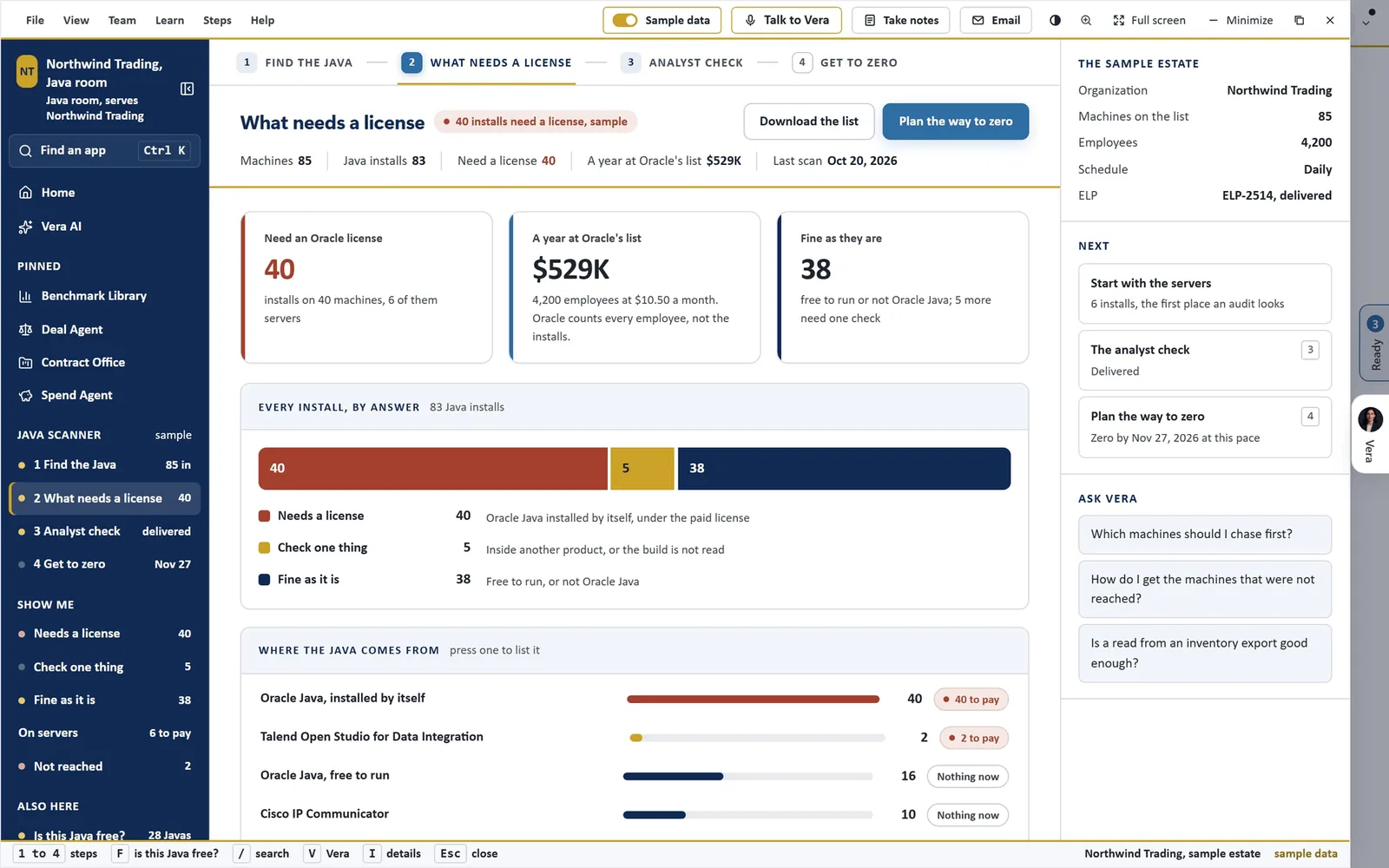
What needs a license. Java Scanner on its sample estate: 83 Java installs on 85 machines, 40 that need an Oracle license, 6 of them on servers, and a year at Oracle's list worked out as 4,200 employees at $10.50 a month, because Oracle counts every employee, not the installs.
Four ways to keep the list current
A license position is only as good as its last scan. Java Scanner takes the data four ways, used together or alone.
- A script on each machine. One read only script for Windows and one for Linux and Apple computers, sent with the tool you already use: Intune, Group Policy, Configuration Manager, WinRM, Jamf, Ansible, cron or SSH.
- The agentless collector. Installed on one Windows machine, it reads every other Windows machine over the network with nothing installed on them, and Linux and Mac over SSH.
- Through an API. Eleven asset and inventory tools are read over their APIs, Intune and Jamf Pro among them, and each scheduled run pulls every connected tool first. Your own tool can push to the API instead.
- An inventory export. One row for every Java with four data points: the machine name, the distribution, the version with its security patch, and the install path. A template carries every column.
Java Scanner reads what arrived by hand, daily each morning, weekly on Monday morning, or monthly on the first, keeps a run and says what changed. Set the scripts to finish before the run, Sunday night for a weekly one, so each run reads a fresh scan.
The scripts change nothing on a machine and need no administrator rights; the collector needs an account with administrator rights on the machines it reads. No file contents, command lines, user names or IP addresses are sent. A path under a user's folder is sent with the folder name masked, and the machine identifier only as a hash.
Where the Java comes from
Java does not only arrive on its own. It comes bundled inside applications and inside Oracle products, as well as installed by itself, and the answer differs for each. Where the Java comes from puts every source on one scale, with the installs and how many of them need a license at the end of each row.
The application database answers before anything is scanned. Search 1,443 applications by name or vendor, or paste a Java version such as 8u381, and the best match answers in one strip with the first move and one of three answers on whether it needs Oracle's Java: No, Covered by the product's own license, or Ask the vendor. Among the 1,443 are 90 Oracle products and 71 IBM products whose own license covers the Java they ship. For an application whose vendor documents nothing, Draft the vendor email writes the question for you.
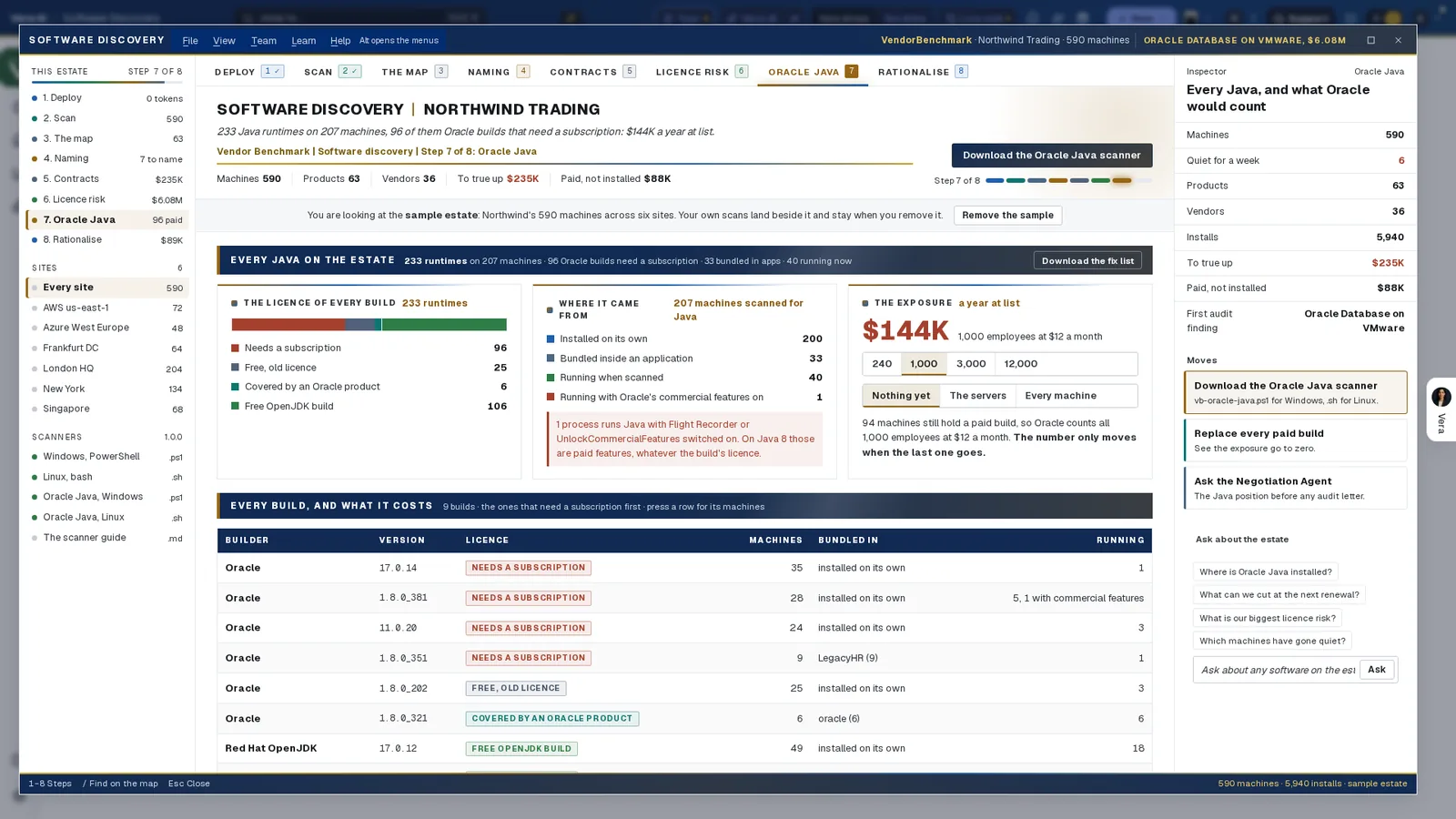
The same question inside Software Discovery. Its Oracle Java step on a separate sample of 590 machines: every runtime with its license; where each came from, whether installed on its own, bundled inside an application or running when scanned; and the exposure at list, which only moves when the last paid build goes.
From the count to zero
That is why the exit plan matters more than the count. Get to zero carries the figures in its head: to go, cleared a week net, the zero date at that pace, and a year at Oracle's list. It draws the installs that need a license by day, week or month with the projection to zero, splits the exit plan into waves from the safest first, and lists the moves, each with the Java it goes to.
Each install has a record, kept by machine and folder so it survives every new scan: Open, To uninstall, To delete, To replace, Waiting on the vendor, Migrated, Removed or Keep, with a note. Every change lands in a history with the person's name and the date, and nothing in it is edited or deleted. Emails drafts the update for the people who follow the program, a note to each application vendor whose Java the scan cannot clear by itself, and one to each system owner naming each machine and its move. You send them from your own mail.
One paid install puts every employee in scope. The number only moves when the last one goes.
When the position needs analysts behind it, Build the ELP hands the scan to the Same Day service: built by AI on the full scan, checked by the app, then by an analyst and a second analyst, and delivered within 24 hours with the exit plan and two Excel workbooks. It is a Same Day service on the Enterprise plan.
Where it sits in agentless discovery
Java Scanner is the Java specialist in the agentless discovery guide.
- Software Discovery reads every title on every machine, Java included, with the same read only design.
- The weekly position sends one report per publisher, so Oracle sits beside everything else you run.
- Same Day ELP is where the Java ELP and exit plan are checked by two analysts.
The Java Scanner page has the app itself, and the Same Day ELP guide covers the checked path for every vendor.
What to do first
- Search your applications. Open Applications and search the ones you run; the database answers with nothing scanned.
- Switch the sample on. 85 machines read four ways, with the ELP and exit plan delivered and every step filled.
- Scan one machine. On a paid plan, download the script for your system, run it on one machine and upload the file it writes. Nothing leaves the machine until you upload.
- Set the schedule and the employee count. Then roll the script out, or connect your asset tool, and press Build the ELP when the scan covers the estate.
Questions buyers ask
Does Java Scanner tell me which installs are licensed?
No. The scan does not read your Oracle contracts, so it never says an install is licensed. It says which installs need a license, which need one check, and which are fine as they are.
Why does one install matter so much?
Oracle prices Java SE per employee, so one install that needs a license puts the whole company in scope. A year at Oracle's list falls to nothing only when the last such install is gone.
Can it find Java without installing anything?
Yes. The agentless collector, installed on one Windows machine, reads every other Windows machine over the network with nothing installed on them, and Linux and Mac over SSH. It needs an account with administrator rights on the machines it reads.
What about Java bundled inside other software?
The scan reads where each Java came from. The application database says, for 1,443 applications, whether the product's own license covers its Java or the vendor must be asked, and drafts the question.
Who checks the license position?
Build the ELP hands the scan to the Same Day service: AI builds it, the app checks it, then an analyst and a second analyst, delivered within 24 hours. It is part of the Enterprise plan.