Built by hand, a license position is a project: export the installs, match them to the contracts, price the gaps, write it up. By the time it reaches the CFO, the estate has moved on.
In Vera AI by VendorBenchmark the position is not a project. The machines report on schedule, and Software Discovery and Software Discovery+ do what the operator did: name every title, build the position against what you pay for, rank the fixes and send the report. This article walks through what runs with nobody running it, what arrives, and the few places where a person still decides.
What runs with nobody running it
Five things happen between one report and the next, and none of them waits for a person.
- The machines report. Read only, every six hours, daily or weekly, or the collector reads every machine on its list once a day.
- Every title is named. By the catalog, a pattern or the component the scanner read. A name given once is kept as a rule, so the next scan of that title arrives named.
- The position is built. Paid against installed for every line, with the money a year: over, which is a true up, under, which is paid and unused, or matched.
- The fixes are ranked. Paid and unused, installed with no contract, the audit risks and the renewals to cut, in one queue, biggest money first.
- The summary is written. The AI summary of the estate in five cards: what you have, what you can save, compliance, renewals and usage, each opening its page.
The audit risks are ranked by what they would cost at list: Oracle Java SE, Oracle Database on VMware, SQL Server Enterprise cores against the agreement, Docker Desktop, remote access tools and WinRAR. Each comes with its reasons and a lever to try the fix, such as how Oracle counts the VMware cluster, or moving a small SQL Server Enterprise estate to Standard.
One report per publisher, on the day you choose
The page Under management lists every publisher found on your machines with its products, machines, spend a year, exposure, savings open and its position in one word: Exposed, Over licensed, In balance or Nothing paid for. A workspace owner selects the publishers to manage, sets Off, Weekly with the weekday, or Monthly with the day, and presses Save.
On that day, in the night, the platform reads the estate as the pages read it and writes one licensing report per publisher on the firm document. Each report covers four things.
- Where it stands. The position, and what changed since the last run.
- Owned against run. What you run, and what you own against what you run.
- The money. The savings and the risks, and the renewals ahead.
- The limits. What the scan cannot see, and what to do first.
The report goes to the members who asked, as a Word file. A publisher's first report brings its manual as a PDF: how the publisher is read, how its license is counted, what to supply beyond the scan, the report section by section, and the schedule.
Nobody is added by someone else. Each member presses Send me the reports for themselves, and Stop the reports ends them. Runs lists every run with its figures and how many people were sent the email; Run now, for owners, runs it today. Reports and manuals downloads any publisher's report, in Word or PDF, at any time, with what moved since the last run beside it.
Nobody runs the position. It arrives on the day you chose, with what changed since the last one.
What the scan cannot see, said out loud
A scan reads machines. Some of what a license position needs lives elsewhere, and the reports do not pretend otherwise. The Publishers page lists every publisher the scan covers, 179 of them, with the product families, the metric the license is sold on, and whether your estate holds it today. It also says how each title is recognized: by an installed title, a service, a process, a console export or a sign in.
For every major publisher it adds what a true position needs beyond the scan: infrastructure such as cores and clusters, entitlements such as the agreement and the license statement, identity such as named users, and the vendor's own consoles, each with where it comes from and why the position is wrong without it. For the publishers you manage, the same list sits under the reports.
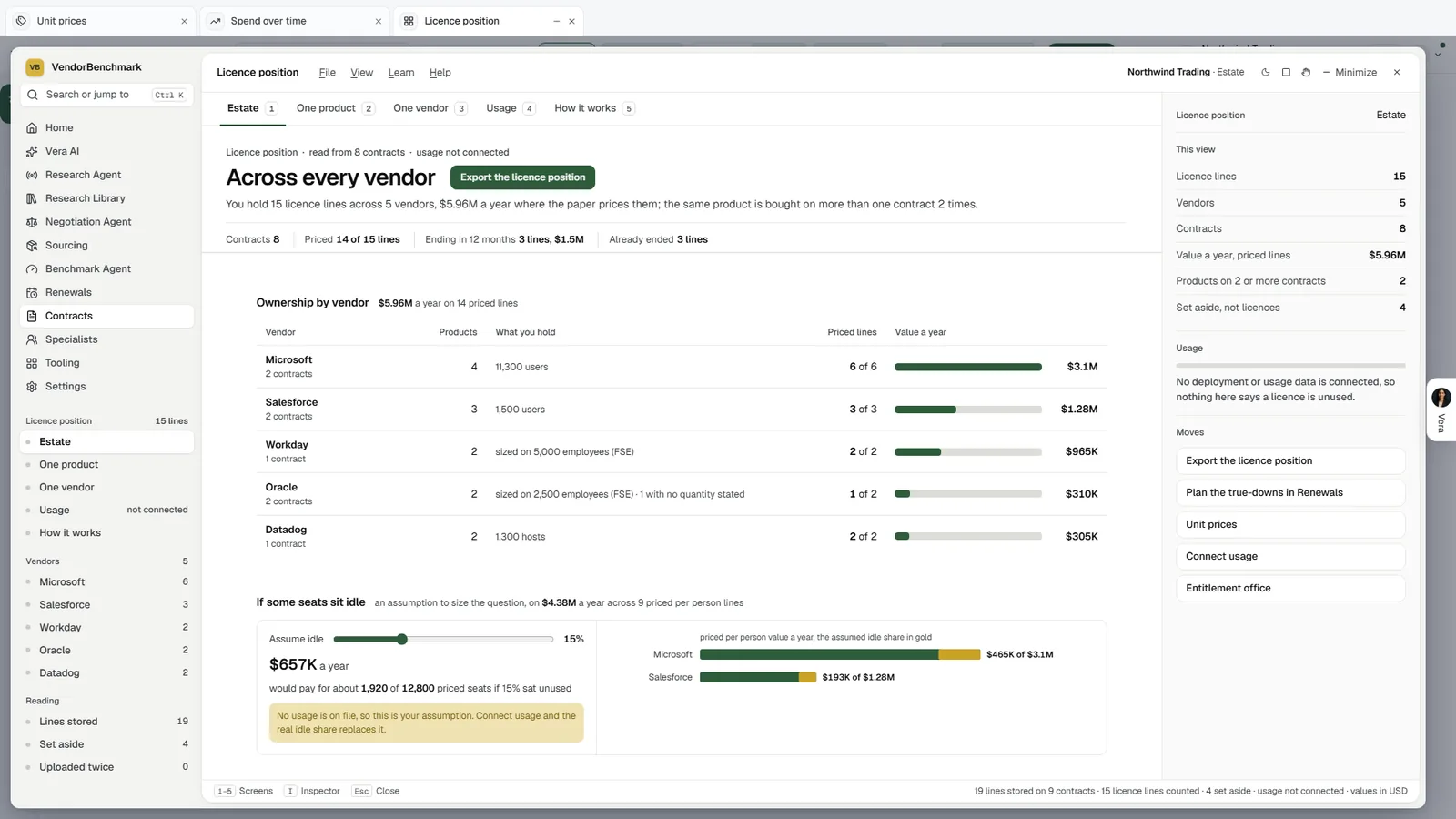
No guessing. License position reads what you hold from the contracts on file, each vendor with what you hold in its own metric and its value a year. With no deployment data connected, it says that nothing on the screen calls a license unused, and the idle share stays a lever labeled as your assumption.
Where a person still decides
No human operator means nobody has to run the position. It does not move a single decision away from the people who own it.
- A new title, once. A title nothing recognizes waits for one press of Name it; the rule keeps it named from then on.
- The lines you pay for. Added once with Add a line, with how a per person line counts, because the scanner counts machines and not people.
- What is managed, and who hears. An owner picks the publishers and the schedule; each person decides whether the reports come to them.
- Every removal and reclaim. The list downloads for the people who make the change. The scanners change nothing on a machine.
- Every renewal cut. Prepare opens the Deal Agent with the line, the price and the use, and the renewal is negotiated from there.
The boundary is deliberate. An agent that counts every week is useful because its count can be trusted; an agent that also uninstalled software or cut a contract line would need a different kind of trust, and we do not ask for it.
Where it sits in agentless discovery
The weekly position is where the agentless discovery guide lands: collection, reconciliation and reporting with nobody running them.
- The scanners and the collector do the collection, with nothing installed that changes a machine.
- Software Discovery+ does the reconciliation, each saving counted once.
- Java Scanner keeps a separate, scheduled position for Java, with the exit plan to zero.
The Software Discovery page shows the product end to end, and automated or human checked sets this path beside Same Day ELP.
What to do first
- Load the sample estate. See the position, the queue and the summary before your own machines report.
- Get the machines reporting. Roll the scanners out daily through the tool you already use, or install the collector on one machine.
- Choose the publishers. As a workspace owner, select the publishers to manage under management, set Weekly or Monthly and press Save.
- Ask for the reports. Press Send me the reports, and ask each person who should read them to do the same.
Questions buyers ask
Who builds the license position each week?
Nobody has to. The machines report on schedule, every title is named, and Software Discovery and Software Discovery+ build the position against the lines you pay for and rank the fixes.
How often do the reports arrive?
Weekly on the weekday you pick, or monthly on the day you pick, per publisher. A workspace owner sets it under management and can press Run now to run it today.
Who receives them?
The members who asked. Each person presses Send me the reports for themselves, nobody is added by another, and Stop the reports ends them.
Does the report claim more than the scan can see?
No. Each report has a section on what the scan cannot see, and for the major publishers the facts a true position needs beyond the scan are listed with where each comes from.
What if we need a position we can show a vendor?
Use Same Day ELP. AI drafts it from your paper and deployment data, an analyst reviews every line and a second analyst checks it, delivered within 24 hours of a complete submission.