AI Managed is the agent in Vera AI, the platform from VendorBenchmark, that negotiates software renewals by email: you hand it the contracts, it reads each one, benchmarks the price, asks the vendor for a better price inside the limits you set, and brings every offer back to you. It is for the buyer whose small renewals never get any attention, and for the quarter when every renewal moves at once.
This post is the reference for the product itself: what it takes in, the limits, what it hands back and where it stops. The product page is AI Managed. A longer walk through one email negotiation is in how AI agents negotiate for you.
PART ONE
What AI Managed does on every renewal
It does three jobs on each renewal you hand over. It reads the contract: the renewal date and the notice deadline, then the plan and the research on the vendor. It benchmarks the price against comparable customers before a word goes to the vendor. And it negotiates by email: under your threshold it asks the vendor for a better price and follows up until an offer arrives.
Over the threshold the route changes. A negotiator drafts a mandate for an owner to approve, so the larger renewals get a person's plan before any email is written.
PART TWO
The time it saves on the long tail
The saving is on the renewals nobody was going to negotiate. A large renewal gets a week of someone's time. The thirtieth largest gets an invoice. Here is that tail handled both ways. The hours are illustrative.
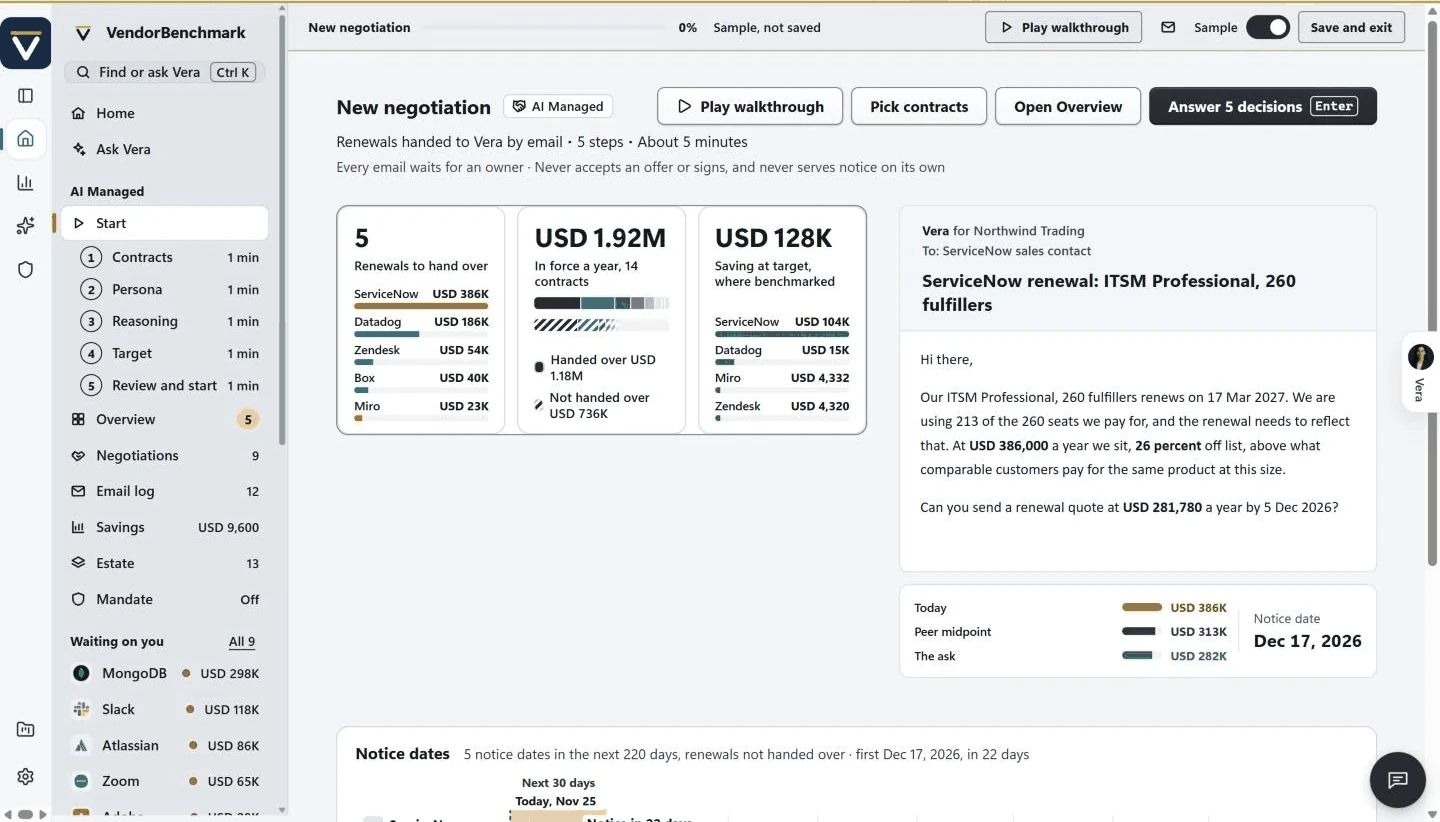
AI Managed on sample data: the renewals to hand over beside a drafted renewal email, with today's price, the peer midpoint and the ask.
THE SAME JOB, TWICE
TODAY, BY HAND
- Sort the quarter's small renewals by date and pick the few there is time for
- Write a first email for each one and remember when to chase it
- Keep each thread in a personal inbox and a spreadsheet of who has replied
- Let the rest renew at the vendor's price because the week ran out
Roughly 3 hours per small renewal, so most of a tail of 30 is never negotiated at all
WITH VERA
- Pick the renewals on Contracts and choose how the AI negotiates
- Read the first email for each contract on Review and start, then hand over
- Approve the first emails that wait for an owner under Waiting
- Accept, counter or hold each offer when the vendor replies
About 10 minutes of your attention per renewal, most of it on the offer
What changes: for example, 30 small renewals at roughly 3 hours each is 90 hours that rarely gets spent. At about 10 minutes each it is about 5 hours, and all 30 vendors are asked for a better price instead of a handful.
What the time depends on: how many renewals you hand over, whether each contract names a vendor contact, and how many emails your settings hold for an owner. A vendor can also simply not reply. The agent's answer to silence is a follow up, so the calendar time of a negotiation is still set by the vendor.
PART THREE
How to hand over a renewal, step by step
- Open AI Managed and start a new negotiation. It is five steps and takes about five minutes. Play walkthrough plays the whole job on the sample first: it sends nothing and saves nothing.
- Pick the contracts. Choose the renewals on file, or upload contracts. Each one shows its annual value, its renewal date and its notice period.
- Choose how the AI negotiates. The approach, the reasons it may give and the target. An owner confirms a reason before an email may name an alternative or state a budget.
- Review and start. Read the first email for each contract, then hand the contracts over.
- Answer what waits. Approve each first email, adding the vendor's contact where the contract names none.
- Decide each offer. When an offer lands, draft a counter at the figure you want, accept it, or hold it for seven days.
PART FOUR
The limits you set, and the checks on every email
The options are set once for the estate and can be changed any time. A run keeps the approach it started with.
- The approach. Collaborative, balanced or aggressive, with the opening ask and the follow up pace.
- The threshold. Under it the AI emails the vendor. Over it a negotiator drafts a mandate for an owner to approve.
- The justifications. You choose the arguments the AI may use, and it uses them only when they are true for that contract.
- Your yes first. Nothing goes to a vendor unless your settings allow it or you approve it. Approving an email is for organization owners.
Every email is then checked against the deal's mandate on the exact words that go, and only a clear result sends. An email the agent sends on its own is held if a recipient is not on the vendor's domain or the deal's list. It is held if it states a figure past the target or shows the walk away in any form. And it is held if it accepts terms or names a budget, a deadline or a decision already made. A held email shows its reason.
Two controls sit above all of it. An owner can list vendors whose renewals always come to a person first. And Stop all sending holds every live negotiation in one press: vendors are told nothing, replies still arrive, and only an owner can resume.
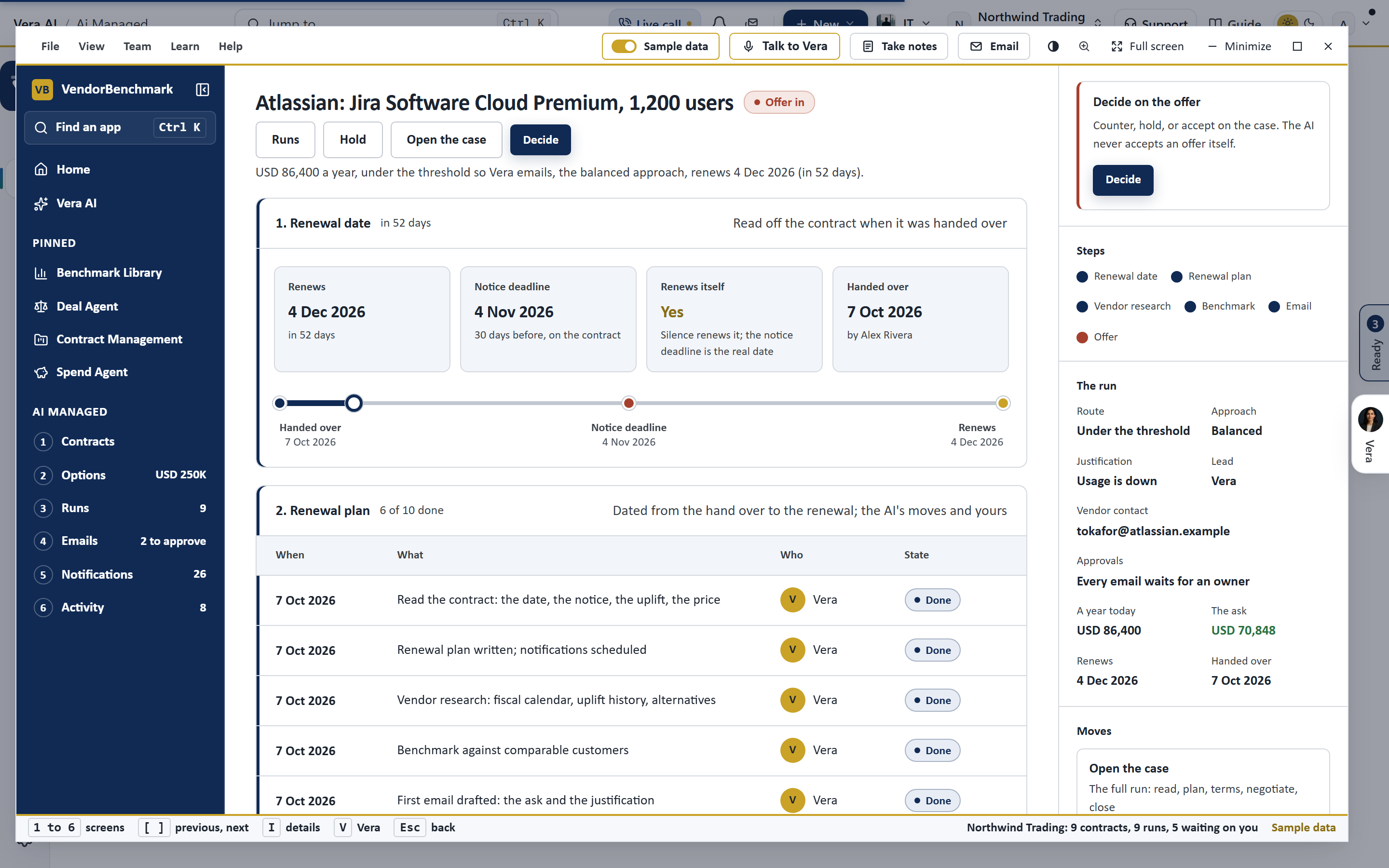
One AI Managed run on sample data: the renewal date and the notice deadline read off the contract, and the dated renewal plan with each step marked as done.
PART FIVE
What it hands back to you
- Waiting. Only the items that wait for your answer, one at a time: offers first, then first emails and plans.
- The negotiations by status. Four lanes: awaiting decision, in progress, awaiting vendor and closed, with the money in each.
- One renewal, every step. The renewal date, the notice deadline, the plan, the vendor research, the benchmark and every step the AI has taken.
- The email log. Every email between the AI and each vendor in full: drafted, scheduled, sent and received.
- Savings. What was saved, renewal by renewal, with a deck in PowerPoint, a report in Word and a workbook in Excel.
- A note in your procurement system. With Coupa or SAP Ariba connected, the outcome of each run is written back to the record. See how to integrate Vera AI with Coupa.
It asks, it follows up and it brings the offer back. The answer is yours.
PART SIX
How AI Managed uses AI, and what it never does
The AI reads each contract for the renewal date, the notice period and whether it renews itself. It researches the vendor and compares your price with what comparable customers pay. It drafts the plan, the first email and each counter. When a reply arrives it reads it and places the offer against today's price, your target and the walk away. Each step shows the evidence it rests on, and a step without evidence reads Pending, never Done.
- It never signs. Your approvers sign off in the order your policy sets, and signers sign in DocuSign or Acrobat Sign.
- It never accepts an offer. Every offer pauses the run and comes to you. You accept, counter or hold.
- It never serves notice of non renewal on its own. At the deadline, the notice is a decision it brings to an owner.
- It never agrees a price above your walk away. Accepting above it needs a person to confirm and give the reason, which goes on the audit log.
- It never hides what it is. The first email carries a fixed line saying the sender is an AI your organization authorized, and you are copied on everything.
- It never invents leverage. It does not claim a budget, a quote or an alternative that nobody confirmed.
These limits are the same ones we set out for every agent in what we will not let the AI do on your deals. One more honest limit: a renewal that no benchmark places carries no saving figure, and the screen says so.
PART SEVEN
Common questions
- What is AI Managed? The agent in Vera AI that negotiates software renewals by email inside limits you set, and brings every offer back to a person.
- Which renewals suit it? The long tail of small renewals that never get your time, and a busy quarter when every renewal is moving at once.
- Does the vendor know it is an AI? Yes. The first email says the sender is an AI your organization authorized, and you are copied on every message.
- What comes back to me? Every offer, every first email and every large renewal's plan, one at a time. Reject an offer with a steer and the AI counters again.
- Can I stop it? Yes. Hold or stop one negotiation, cancel a scheduled follow up, or press Stop all sending to hold every vendor at once.
- Can I try it without real vendors? Yes. The free trial needs no card, every app opens on a sample company, and the walkthrough sends nothing.
The short version: AI Managed does the asking and the chasing on renewals you would not have reached, and every offer is still your decision. For one renewal run in depth by a person, use the Deal Agent.
